TestFlow Alternatives 2026: 8 Options for Lab Instrument Automation
The eight tools engineers compare against TestFlow: NI LabVIEW, NI TestStand, Python with PyVISA and pytest, OpenTAP, Keysight PathWave and BenchVue, Tektronix KickStart, TofuPilot, and OpenHTF. What each one is, what it costs, and where it beats TestFlow.
The main TestFlow alternatives in 2026 are NI LabVIEW, NI TestStand, Python with PyVISA and pytest, OpenTAP, Keysight PathWave Test Automation and BenchVue, Tektronix KickStart, TofuPilot, and OpenHTF. Each one beats TestFlow (testflowinc.com) at something specific: LabVIEW at DAQ and FPGA work, TestStand as a full test executive, Python and OpenHTF at cost and platform freedom, OpenTAP at free multi-station deployment, the Keysight and Tektronix tools at native control of their own instruments, and TofuPilot at production test data across many stations.
TestFlow is an AI agent for electronics testing: you describe the test, the agent builds the automation, drives the lab instruments, and writes the report from the measured results. Three limits send most people looking for an alternative. Bench runs go through a Windows desktop app, its DAQ card coverage is limited to a few NI devices, and it is not a full test executive, with no operator and user management and no database connectivity yet.
This page is for test engineers and LabVIEW or TestStand teams deciding where the next bench test gets built. Vendor facts were checked on each vendor's own site or GitHub repository in November 2026. NI and Tektronix list prices are the October 2026 US figures already published on this site.
Which TestFlow is this page about?
This page is about TestFlow from TestFlow Technologies Inc., at testflowinc.com. At least four other things share the name or a close spelling, and search engines and AI assistants mix them up. If you came for one of them, this is where it lives.
| Name | Who makes it | What it is | Go here |
|---|---|---|---|
| TestFlow (this page) | TestFlow Technologies Inc. | AI agent that builds, runs, and reports bench tests on lab instruments | testflowinc.com |
| BenchVue Test Flow | Keysight Technologies | Free sequencing app that runs inside the Keysight BenchVue desktop | Keysight help file |
| Testflow | Maintained by JYTEK | Open-source C# test automation platform for test and measurement, GPL-3.0 | SeeSharpOpenSource/Testflow on GitHub |
| TestFlight | Apple | Beta testing service for apps across Apple platforms | developer.apple.com/testflight |
| testflow.io | An unrelated party | A domain with no connection to TestFlow Technologies Inc. | Not this product |
Keysight's help file describes BenchVue Test Flow as an embedded application that runs within the BenchVue desktop. It is the closest name clash, and BenchVue Test Flow vs TestFlow covers it in full. JYTEK's Testflow repository was created in 2018, is written in C#, and its last code push was in December 2022. Apple's TestFlight collects tester feedback on app betas and has nothing to do with electronics testing. As of November 2026, testflow.io shows a registrar's reserved-domain page.
The three limits that decide most switches
The right alternative depends on which TestFlow limit you hit, so it helps to be exact about what TestFlow covers first.
You connect the instruments on your bench over VISA (USB, LAN, GPIB, or serial), describe the test in a sentence, and the agent builds a reviewable workflow plus the Python, with the SCPI for your exact models. The web app builds and simulates. Runs on real hardware go through the desktop app, and the report is built from the run's own results as PDF, Word, Excel, Markdown, JSON, or CSV. Sequences are named, take declared parameters, and have immutable published revisions, and TestStand sequences import with their calls intact. A workflow exports as a standalone Python package you keep.
The three limits, stated plainly:
- 1
Windows only for bench runs. Real-instrument runs need the Windows 10 or 11 desktop app. There is no macOS or Linux bench support.
- 2
Narrow DAQ coverage. TestFlow drives SCPI instruments and a few NI DAQ devices through NI-DAQmx. A multifunction DAQ card such as an NI PXIe-6376 is out of scope today, and so are most instruments that do not speak SCPI.
- 3
Not a full test executive. No operator and user management, no database connectivity, and no equivalent of TestStand's Parallel and Batch process models.
If none of the three matters on your bench, TestFlow may already fit. If one does, the next table maps it to the tool that covers it.
Quick picks by requirement
Eight requirements cover most of the reasons engineers look past TestFlow. Start with the row that matches yours.
| If your requirement is | Look at first |
|---|---|
| NI DAQ cards, CompactDAQ, PXI, FPGA, or real-time | NI LabVIEW, or Python with NI's nidaqmx package |
| Operator interfaces, user privileges, database logging, parallel UUTs | NI TestStand |
| Bench runs on macOS or Linux at $0 license cost | Python with PyVISA and pytest |
| A free sequencer on many stations with no deployment licenses | OpenTAP |
| A Keysight-only bench | Keysight BenchVue Test Flow (free) or PathWave Test Automation |
| Keithley SMUs, I-V curves, or one Tektronix scope | Tektronix KickStart |
| Yield, traceability, and analytics across production stations | TofuPilot |
| Code-first production test in Python, free | OpenHTF |
The comparison hub lists every head-to-head page on this site if you already know which two tools you are weighing.
TestFlow alternatives compared side by side
The table puts all eight next to TestFlow on the questions that decide a purchase. Prices are public list prices only. TestFlow loses several rows here, and those rows matter.
| Option | Type | Public pricing | Bench platforms | Instrument reach | Strongest at |
|---|---|---|---|---|---|
| NI LabVIEW | Graphical programming | $605 to $2,805 per seat a year, US subscription | Windows; Linux for Full and up | NI hardware plus 10,000+ IDNet drivers | DAQ, FPGA, real-time, ecosystem |
| NI TestStand | Test executive | $2,428 per seat a year (Development System); $857 perpetual per Base Deployment Engine | Windows desktop and Windows Server | Whatever its code modules call | Process models, user privileges, database logging |
| Python, PyVISA, pytest | Libraries you script | Free, MIT licensed | Windows, macOS, Linux | Anything with a VISA or Python API, NI DAQ via nidaqmx | Cost, platform, total control |
| OpenTAP | Open-source sequencer | Free, MPL 2.0 | Cross-platform .NET; editors on Windows, Linux, macOS | Anything you write a plugin for | Free deployment, CLI, Git-friendly plans |
| Keysight PathWave TA and BenchVue | Vendor sequencer and instrument apps | BenchVue Test Flow free; PathWave TA by quote or online, free trial | Windows 10 and 11 (BenchVue) | Keysight apps; other vendors by typed SCPI or plugins | Native Keysight control and support |
| Tektronix KickStart | No-code vendor apps | $151 to $610 a year per app or suite; permanent from $506 | Windows 10 and 11 | Tektronix and Keithley, up to 8 instruments | I-V characterization, single-vendor price |
| TofuPilot | Test data and deployment platform | Free Lab; Pro $50 per paid seat and per station a month; Enterprise custom | Hosted service; self-hosting on Enterprise | Your test code, via its framework or OpenHTF, pytest, Robot | Multi-station analytics, operator UI, SSO |
| OpenHTF | Open-source Python framework | Free, Apache-2.0 | Wherever Python runs | Plugs you write or reuse | Free, code-first production test |
| TestFlow (reference) | AI agent | Free version; paid plans on pricing | Builds and simulates in the web app; bench runs on Windows 10 and 11 | SCPI instruments over VISA; a few NI DAQ devices | Test authoring from a description, per-run reports |
The rest of this page takes each alternative in turn: what it is, who it is best for, what it costs, where it beats TestFlow, and where TestFlow is still ahead.
1. NI LabVIEW: best for DAQ, FPGA, and NI hardware
What it is. LabVIEW is NI's graphical programming environment (NI is part of Emerson). You wire a block diagram, and a front panel becomes the user interface. Full adds advanced analysis and Linux support over Base, and Professional adds the Application Builder.
Best for. Hardware-timed acquisition through DAQmx, PXI, CompactDAQ, CompactRIO, FPGA logic, and real-time control loops.
Pricing. As of October 2026, NI's US subscription list is $605 (Base), $1,801 (Full), and $2,805 (Professional) per seat per year. The LabVIEW pricing breakdown covers perpetual licenses and add-on modules.
Where it beats TestFlow. Multifunction DAQ, FPGA, and determinism, which TestFlow does not cover. NI's Instrument Driver Network offers more than 10,000 free drivers for instruments from more than 350 vendors. LabVIEW Full and up runs on Linux, and Professional includes NI's Nigel AI assistant, so "has AI" is not a reason to leave by itself.
Where TestFlow is ahead. Mixed-vendor SCPI benches where nobody on the team writes G, and validation tests that change every week. Editing a sentence is cheaper than re-wiring a diagram. TestFlow vs LabVIEW runs one bench test both ways, and the 8 best LabVIEW alternatives covers the field from LabVIEW's side.
2. NI TestStand: best when you need a real test executive
What it is. TestStand is NI's test management software. Engineers build sequences in the Sequence Editor, and each step calls a code module through an adapter for LabVIEW, C/C++, .NET, or Python. A process model wraps the sequence with UUT identification, result logging, and the report, in Sequential, Parallel, or Batch form.
Best for. Production lines and validation stations where operators run the test, privileges matter, and every result lands in a database.
Pricing. As of October 2026, NI lists the TestStand Development System at $2,428 a year per seat on subscription or $8,497 perpetual. Each deployed station needs a Base Deployment Engine ($857 perpetual) or a Debug Deployment Environment ($3,252 perpetual). See TestStand pricing and NI software licensing costs for how that adds up across a fleet.
Where it beats TestFlow. Exactly where TestFlow is incomplete: a built-in user manager with privileges enforced at run time, database logging, Parallel and Batch process models for several UUTs at once, example operator interfaces, and deployment packages for many testers.
Where TestFlow is ahead. Authoring. TestFlow imports TestStand sequences and keeps the sequences and the calls between them, then builds new bench steps from a description instead of a code module per step. It does not run LabVIEW VIs. TestFlow vs NI TestStand and the wider NI TestStand alternatives cover the boundary.
3. Python with PyVISA and pytest: best for free, total control
What it is. PyVISA is the MIT-licensed Python binding to VISA, and pytest is the MIT-licensed general-purpose Python test runner. Together they give you instrument sessions as fixtures and limits as assertions. PyVISA 1.16.2 shipped in February 2026 and requires Python 3.10 or later.
Best for. Teams that already write Python, need bench runs on macOS or Linux, or want the test inside a CI pipeline they already run.
Pricing. $0 for the libraries. The VISA backend is either Keysight IO Libraries Suite, a no-cost download, or the pure-Python pyvisa-py backend, also MIT licensed.
Where it beats TestFlow. Cost, platform, and reach. It runs on all three desktop operating systems, and it can drive NI DAQ hardware through NI's nidaqmx package, which TestFlow covers for only a few devices. Nothing sits between you and the instrument.
Where TestFlow is ahead. You write every SCPI command, error check, limit, and report yourself. A minimal pytest check on a Keysight 34461A looks like this:
# test_rail.py, run with: pytest -q
import pyvisa
import pytest

@pytest.fixture(scope="module")
def dmm():
    rm = pyvisa.ResourceManager()
    inst = rm.open_resource("TCPIP0::192.168.1.51::inst0::INSTR")  # Keysight 34461A
    inst.timeout = 5000
    inst.write("*RST")
    yield inst
    inst.close()

def test_3v3_rail(dmm):
    v = float(dmm.query("MEAS:VOLT:DC? 10"))
    assert 3.25 <= v <= 3.35, f"3V3 rail at {v:.4f} V"
That covers one reading on one instrument, with no supply control, no report, and no record of the run. The PyVISA tutorial, Python instrument control libraries compared, and data acquisition with Python cover the rest, and Python hardware test frameworks compares the runners. TestFlow vs Python and PyVISA runs a full 104-line regulator script against one sentence.
4. OpenTAP: best free sequencer for many stations
What it is. OpenTAP describes itself as an open source, cross-platform test sequencer for hardware and software test automation. It is licensed under MPL 2.0, built on .NET, and originally developed by Keysight. GUI test plan editors exist for Windows, Linux, and macOS, and the base package ships a tap command-line runner.
Best for. Teams with C# skills that want one sequencer on many stations without paying per station.
Pricing. Free, with no development or deployment licenses.
Where it beats TestFlow. Free deployment on any number of stations, test plans stored as XML that diff in a pull request, a first-class CLI for CI, and cross-platform operation. It is also the engine under Keysight's commercial PathWave Test Automation, so a plan can grow into a supported product.
Where TestFlow is ahead. Every instrument and custom step in OpenTAP is a plugin, a .NET class usually written in C#. That is the main barrier for teams who work in Python or LabVIEW. Operator interfaces are also thinner than TestStand's and usually mean building something. OpenTAP vs TestStand and the test sequencer comparison go deeper.
5. Keysight PathWave Test Automation and BenchVue: best for a Keysight bench
What it is. Two Keysight tools. BenchVue is a Windows desktop with an app per instrument family, and its Test Flow app chains blocks from those apps into a sequence without code. PathWave Test Automation is Keysight's commercial sequencer built on the OpenTAP engine, sold as the KS8400B Developers System, the KS8000B Deployment System, and the KS8500B Cloud.
Best for. Benches where most instruments are Keysight, from a single engineer (BenchVue) to a deployed fleet (PathWave).
Pricing. BenchVue Test Flow is free, with no licensed version, and the BenchVue Basic instrument apps are free. PathWave Test Automation is sold online or by quote, with a free trial per model; Keysight's page shows no list price.
Where it beats TestFlow. Native Keysight panels and support, a dedicated BenchVue Data Acquisition app (BV0006B) for Keysight data acquisition, and a deployment system plus a cloud tier for scaling a test across sites.
Where TestFlow is ahead. Non-Keysight instruments mean typed SCPI in a Test Flow block or plugin work in PathWave. Test Flow limits are conditions that stop the sequence, not a PASS/FAIL per reading in a report. See Keysight PathWave alternatives, Keysight BenchVue alternatives, and automating Keysight instruments without coding.
6. Tektronix KickStart: best for Keithley SMUs and one-vendor benches
What it is. Keithley KickStart is Windows software that sets up tests, collects data, and plots it across up to eight Tektronix and Keithley instruments without programming. Version 2.11.5 was released on May 20, 2026.
Best for. Keithley SMU work such as I-V curves, and benches built only from Tektronix and Keithley hardware.
Pricing. As of October 2026 on tek.com, the suite costs $610 a year as a floating subscription or $2,310 as a permanent node-locked license. The core apps run from $151 a year (AFG) to $256 a year (I-V Characterizer), and specialist apps such as Battery Simulator cost more. A 30-day trial is included, and controlling an instrument needs a license.
Where it beats TestFlow. Purpose-built I-V characterization on Keithley SMUs, a lower price for one instrument class, and test setup on simulated instruments before the hardware arrives.
Where TestFlow is ahead. Benches that add another vendor's supply, load, or scope, and runs that need a verdict per reading and a report someone can sign. KickStart exports .csv and .xlsx and has pass/fail limits per channel in its Data Logger app. Also note that when a KickStart subscription expires, all features stop working. The full breakdown is in automating Tektronix instruments without coding.
7. TofuPilot: best for production test data across stations
What it is. TofuPilot is a platform for building, deploying, and tracing test results across test stations, built around an MIT-licensed open-source test framework. It lists OpenHTF, pytest, and Robot Framework as supported test runners, imports CSV, Excel, and TestStand XML reports, and publishes client libraries for Python, C#, Rust, and C++.
Best for. Hardware teams running the same test on several stations who need traceability, yield analytics, and versioned deployments.
Pricing. As of November 2026: a free Lab plan with one station, one paid seat, free unlimited viewers and operators, and 100 test runs a month; Pro at $50 per paid seat and per station a month, with 1,000 runs included and then $0.01 per run; Enterprise at custom pricing with SSO, SCIM, and self-hosting.
Where it beats TestFlow. The production layer TestFlow does not have: an operator UI, roles for owners, admins, developers, operators, and viewers, Git deployments to stations, and analytics across all of them. AI investigations of yield and drift alerts are on Pro.
Where TestFlow is ahead. TofuPilot records, deploys, and analyzes tests that you write. TestFlow builds the test from a description, writes the SCPI, and runs it. They answer different questions. AI tools for test engineers places both in the wider tool map, and automated test report generation covers what a defensible per-run report needs.
8. OpenHTF: best open-source Python framework for production test
What it is. OpenHTF is a Python library that calls itself the open-source hardware testing framework. It lives in Google's GitHub organization under Apache-2.0, with a note that it is not an official Google product. A test is a Python program built from phases, measurements with pass/fail specs, and plugs that talk to hardware. Version 1.6.3 was released on October 8, 2026.
Best for. Python teams writing repeatable tests for the lab bench or the manufacturing floor who want DUT IDs, measurement specs, and a test record without building that scaffolding.
Pricing. Free. Install with pip install openhtf.
Where it beats TestFlow. Free, code-first, runs wherever Python runs, and structured for production: every run has a DUT ID, measurements out of spec fail the run, and a web frontend lists stations. It is also a supported runner in TofuPilot.
Where TestFlow is ahead. You still write the plugs and the SCPI. The same rail check as an OpenHTF phase:
import openhtf as htf
import pyvisa

@htf.measures(htf.Measurement("rail_3v3").with_units("V").in_range(3.25, 3.35))
def measure_rail(test):
    rm = pyvisa.ResourceManager()
    dmm = rm.open_resource("TCPIP0::192.168.1.51::inst0::INSTR")  # Keysight 34461A
    test.measurements.rail_3v3 = float(dmm.query("MEAS:VOLT:DC? 10"))
    dmm.close()

if __name__ == "__main__":
    htf.Test(measure_rail).execute(test_start=lambda: "DUT-0001")
OpenHTF manages setup, execution, teardown, and the pass/fail result. The instrument code is still yours. The SCPI command cheat sheet helps with the commands.
When TestFlow is still the right pick
TestFlow is the better choice in six situations, and it is the wrong one whenever a limit from the list above is a hard requirement.
- •The bench mixes vendors. One workflow can drive a Keysight supply, a Tektronix scope, a Keithley SMU, and a Chroma load, because the agent writes the SCPI for each model. For a SCPI instrument missing from the catalog, the agent reads the vendor's programming manual and drafts the command set. Check your models on the supported instruments page.
- •Writing the test is the bottleneck. The input is a sentence naming the instruments, set points, and limits, not a block diagram, a C# plugin, or a pytest file.
- •Every run needs a report you can defend. The agent writes limits, never measurements. It cannot claim a PASS without a run, and it will not widen a limit to make a test pass. The trust model explains how verdicts are decided.
- •The team runs LabVIEW or TestStand today. TestFlow works next to both rather than demanding a rewrite. TestStand sequences import with their calls, and LabVIEW keeps the DAQ and real-time work.
- •You want to keep the code. A workflow exports as a standalone Python package with one entry point, or as a standalone EXE an operator can run.
- •The hardware has not arrived. The web app simulates a workflow, so the sequence can be reviewed before the bench exists.
If your bench is DAQ-heavy, has to run on macOS or Linux, or needs operator logins and database logging on a production line, pick from the eight above. The AI test automation hub and AI test automation for lab instruments cover how agent-built tests compare with scripted ones.
How to run a fair trial in 5 steps
A comparison table cannot settle which tool fits your bench. One real test, built twice, can.
- 1
Pick one test with known-good results from the tool you use today, such as a supply and DMM check or a load regulation sweep.
- 2
Build it in the alternative and in TestFlow's free version with the same set points and limits.
- 3
Run both on the same device and compare readings within the instruments' stated uncertainty. A mismatch usually means a settling delay or a range setting differs.
- 4
Time two things: hours to the first passing run, and minutes to make one change, such as a new limit.
- 5
Check the exit. List what you own afterwards: code, sequence files, reports, and results data.
For a wider shortlist before the trial, the best test automation software ranking, no-code test automation for electronics, and free instrument control software each cover tools that did not make this list.
Related reading
- •Compare TestFlow with other tools, every head-to-head in one place
- •NI TestStand alternatives, the executive layer in detail
- •LabVIEW vs Python, when the alternative is code you write
- •Data acquisition software compared, for the DAQ work TestFlow does not cover
- •LabVIEW to Python migration, if leaving NI entirely is the goal
- •Keysight BenchVue vs LabVIEW, the two incumbents side by side
- •Download the desktop app, for bench runs on Windows
Where TestFlow fits
Every tool on this list wins somewhere TestFlow does not. TestFlow's case is narrower: a mixed-vendor SCPI bench where writing and reporting the test is the bottleneck, not acquiring the data or running a production line.
- 1
Connect your instruments. Pick the manufacturer and model, paste the VISA address (USB, LAN, GPIB, or serial), and the agent knows what is on your bench. No bench yet? Use a placeholder address, build the full automation, and swap in the real address when you are in the lab.
- 2
Tell the agent what to test. For example, "run a VI sweep from 1 to 10 V in 1 V steps at 0.5 A load current," or "suggest the tests for a power-management device."
- 3
The agent builds the complete workflow in seconds. Instrument-aware automation appears on the canvas, with the generated scripts visible in a code panel you can inspect and edit.
- 4
Run it in your lab. Click Run in the TestFlow desktop app for Windows and the status panel streams results step by step, with measured values inline (VOUT = 3.301 V, asserted 3.2 to 3.4 V, PASS). One click exports a structured PDF report, or the raw results as CSV.
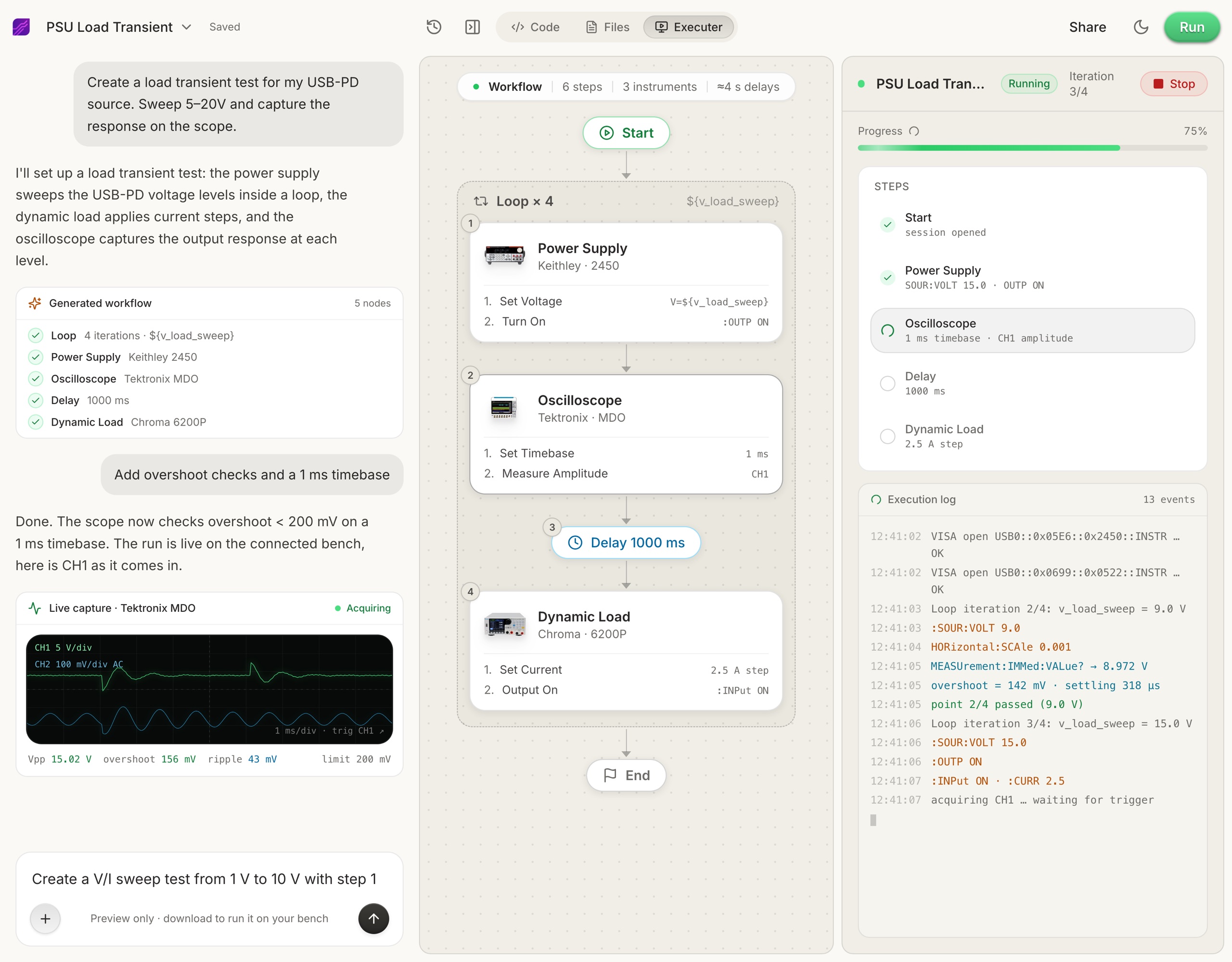
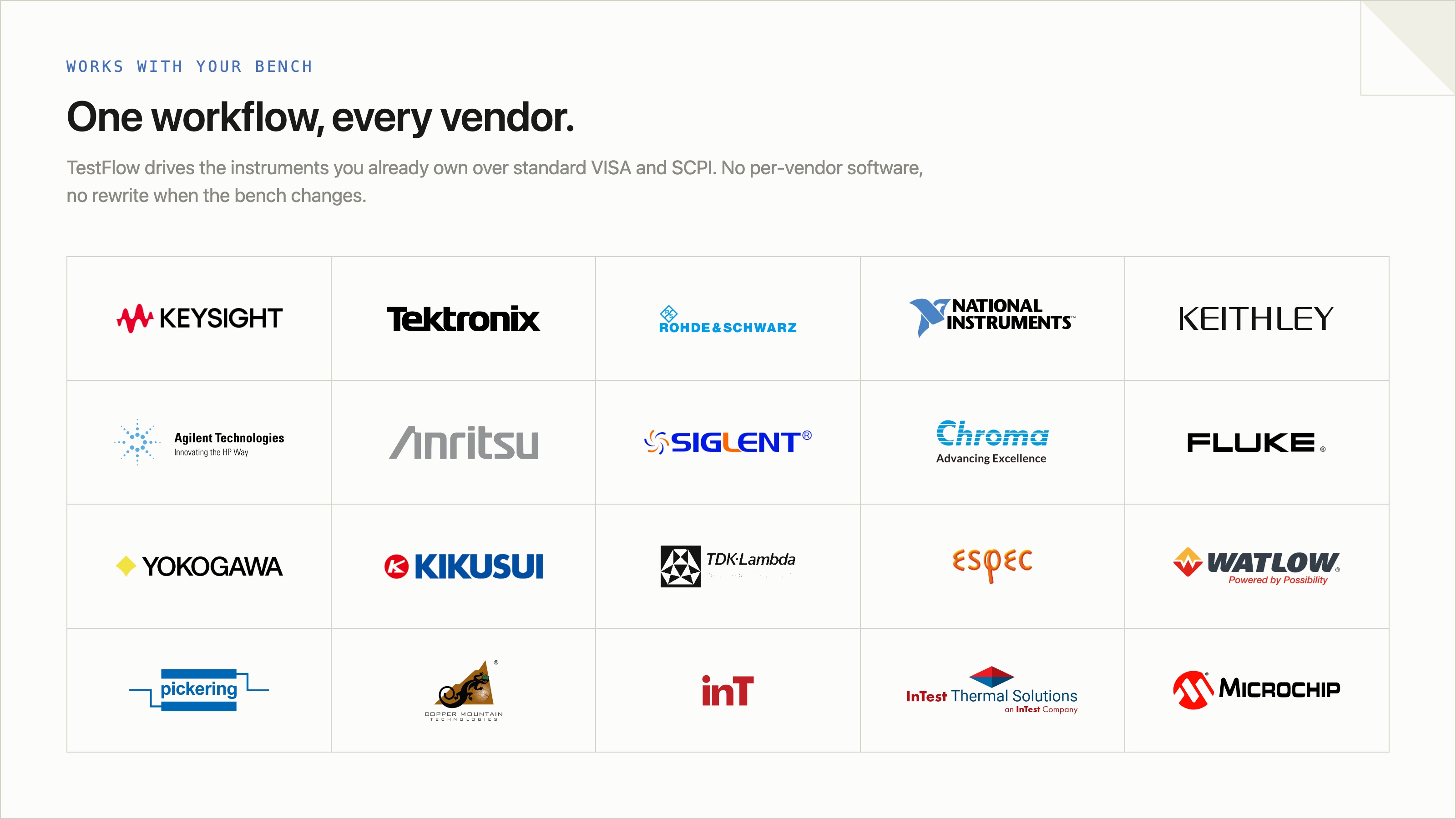
- Vendor-neutral by design. One workflow drives Keysight, Tektronix, Rohde & Schwarz, Rigol, Keithley, Anritsu, and any other SCPI instrument over standard VISA.
- Built in the browser, run on the bench. Workflows live in your workspace, so a sequence built in one lab runs the same way in another. Bench runs use the Windows desktop app.
- Free version to start. Sign in at app.testflowinc.com and build your first workflow today; teams can book a demo to scope a Bench Pilot.
The step-by-step walkthrough, VISA address formats, and Test Planner prompts are all in the TestFlow product guide.
Frequently asked questions
What are the best TestFlow alternatives?
NI LabVIEW for DAQ, FPGA, and NI hardware; NI TestStand for a full test executive; Python with PyVISA and pytest for free code on any operating system; OpenTAP for a free open-source sequencer; Keysight PathWave Test Automation and BenchVue for Keysight benches; Tektronix KickStart for Keithley and Tektronix instruments; TofuPilot for production test data across stations; and OpenHTF for open-source Python production tests.
Is TestFlow the same as Keysight BenchVue Test Flow?
No. BenchVue Test Flow is a free sequencing app that runs inside Keysight's BenchVue desktop. TestFlow (testflowinc.com) is a separate AI agent from TestFlow Technologies Inc. that builds, runs, and reports bench tests across instrument vendors. It is also unrelated to JYTEK's open-source Testflow project, Apple TestFlight, and the testflow.io domain.
Is there a free alternative to TestFlow?
Yes. Python with PyVISA and pytest (both MIT licensed), OpenTAP (MPL 2.0), and OpenHTF (Apache-2.0) are free and open source, and Keysight BenchVue Test Flow is free for Keysight-first benches. TofuPilot has a free Lab plan. TestFlow itself also has a free version.
Can TestFlow drive DAQ cards?
Only a few. TestFlow drives SCPI instruments over VISA and a small set of NI devices through NI-DAQmx (USB-6001, USB-6501, PCI-6515), but not multifunction cards such as an NI PXIe-6376 or CompactDAQ. For DAQ work, use NI LabVIEW or Python with NI's nidaqmx package.
Does TestFlow replace NI TestStand?
Not on a production line. TestFlow has no operator and user management, no database connectivity, and no equivalent of TestStand's Parallel and Batch process models. It imports TestStand sequences with their calls and fits as the authoring and bench execution tool next to TestStand.
Does TestFlow run on Mac or Linux?
The web app builds and simulates workflows, but bench runs on real instruments need the Windows 10 or 11 desktop app. For bench runs on macOS or Linux, use Python with PyVISA and pytest, OpenHTF, or OpenTAP.
Automate every instrument in the lab,
Create test workflows in minutes
- 01Describe the testIn a sentence, the way you would tell a colleague.
- 02The agent builds itWorkflow and script for your instruments, any vendor.
- 03Run it, get the reportOn your bench, with the measured values.
Tags

Article by
Ali Kamaly
Ali Kamaly is the Co-Founder and CEO of TestFlow, an AI-native platform for electronics test automation. He writes about test automation, lab validation, and the infrastructure behind modern hardware engineering.
Keep reading
All 13 articles in the AI test automation guide- TestFlow vs Python and PyVISA in 2026 (When to Write the Script)The same Keysight E36313A and 34465A regulator test, written by hand in PyVISA and built by an AI agent from one sentence. Cost, time to first run, upkeep, reports, and when the script is still the right call.
- TestFlow vs NI TestStand in 2026 (What Each Is Actually For)TestStand is a test executive that runs sequences engineers build. TestFlow is an AI agent that builds and runs bench tests from a description. What each does, what TestFlow still lacks, real 2026 prices, and who should
- We Used Claude Agent to Train an Open LLM!At TestFlow, we're literally using AI agents for everything — marketing, product, sales, and even fine-tuning the models themselves. Here's how we gave Claude the ability to train open-source LLMs and why we believe agen
- Largest AI Conference in EMEA: Redefining Hardware Validation with TestFlowAt the largest AI and deep-tech gathering in the EMEA region, Ali Kamaly, Co-Founder and CEO of TestFlow, addressed the critical challenge facing every semiconductor company: How do we validate increasingly complex chips
- AI Test Automation for Lab Instruments in 2026 (6 Options Compared)Six ways to put a language model in charge of a bench in 2026, checked against each vendor's own documentation: what each one automates, what it costs, and what stops it from sending a bad command or inventing a number.
Your next test, automated today
Describe the test. TestFlow builds the workflow, runs it on your instruments, and writes the report. See it on a bench like yours.