 Ali Kamaly
TestFlow vs NI TestStand in 2026 (What Each Is Actually For)
TestStand is a test executive that runs sequences engineers build. TestFlow is an AI agent that builds and runs bench tests from a description. What each does, what TestFlow still lacks, real 2026 prices, and who should stay on TestStand.

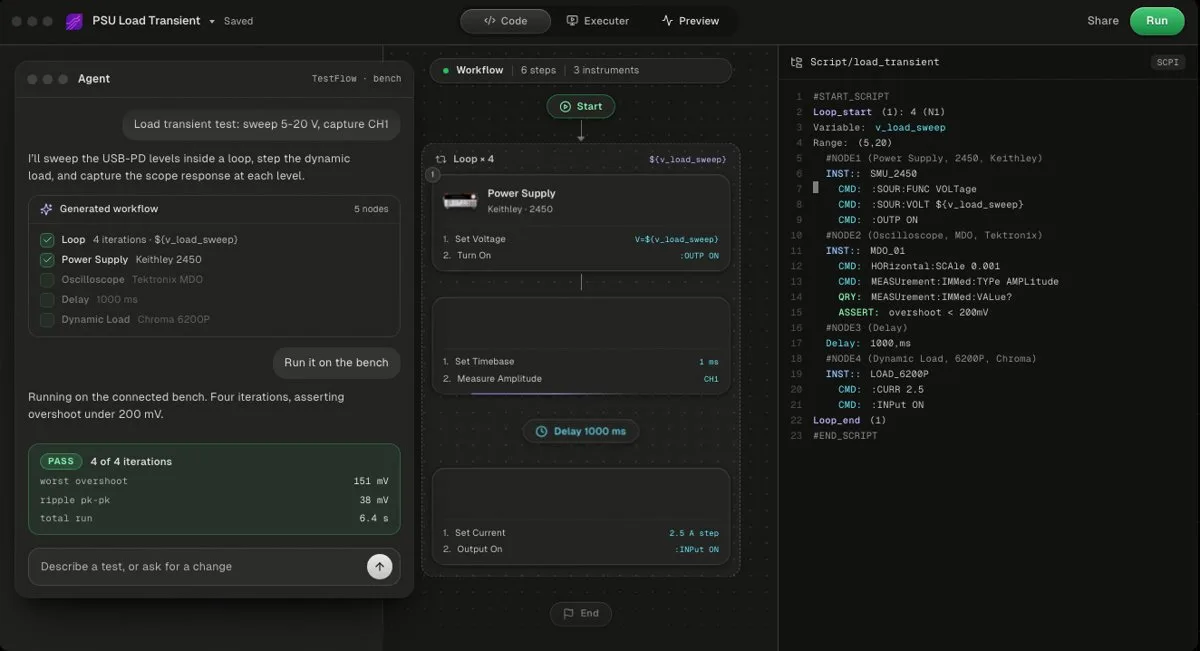
NI TestStand is a test executive, and TestFlow (testflowinc.com) is an AI agent that builds and runs bench tests, so they overlap less than the comparison suggests. TestStand runs sequences that engineers build, with Sequential, Parallel, and Batch process models, user privileges, database logging, and per-station deployment licences. TestFlow builds the workflow from a description of the test, drives SCPI instruments through its Windows desktop app, and writes the report from the measured results.
As of October 2026, TestFlow has a real sequencing layer (named sequences with declared parameters, immutable published revisions, and TestStand sequence import), but it has no operator or user management and no database connectivity. That makes it a test authoring and bench execution tool that sits next to TestStand, not a replacement for it on a production line. NI lists the TestStand Development System at $2,428 a year per seat (US subscription list, NI's licence page). TestFlow is free to start, then $39 or $149 a month per seat.
This page is for test engineers, test system integrators, and validation leads deciding where TestStand earns its licence and where an AI-built workflow does the job. It covers what each tool is for, a feature table, what TestStand does that TestFlow does not, real 2026 prices, sequence import, and an honest list of who should stay on TestStand.
Disclosure: this guide is written by the team behind TestFlow, which appears as one of the options. We list its tradeoffs the same way as everyone else's.
What each one is actually for
TestStand and TestFlow answer different questions. TestStand answers "how do we run, log, and control a test across many stations and operators?" TestFlow answers "how do we get a working bench test from a description of what to measure?"
1. NI TestStand (test executive, Windows)
NI describes TestStand as off-the-shelf test management software for validation and production test, built so teams do not maintain an in-house sequencer. Engineers build sequences in the Sequence Editor, and each step calls a code module through an adapter for LabVIEW, C/C++, .NET, or Python. A process model wraps the sequence with what every unit needs: UUT identification, pass/fail display, result logging, and the report. Reports come out as HTML, XML, ATML, or ASCII text, and results can be logged to a database.
On top of that sit a built-in user management tool with privileges enforced at run time, example operator interfaces, sequence diff and merge, deployment packages for a fleet of testers, and NI's Nigel AI, which NI says can generate sequences from a prompt inside TestStand. NI's own TestStand page cites deployments at Texas Instruments, GN Audio, and Lockheed Martin.

2. TestFlow
TestFlow is an AI agent for electronics testing. It is free to start, then $39 or $149 a month per seat. It builds workflows in the browser and runs them on SCPI instruments through a Windows 10/11 desktop app. It is not yet a full test executive: there is no user management and no database connectivity.
You connect the instruments on the bench over VISA (USB, LAN, GPIB, or serial), describe the test in a sentence, and the agent builds a reviewable workflow of steps plus the Python, with the SCPI commands for your exact models. The desktop app runs it, measured values stream against limits, and the report is built from the run's results. See how TestFlow works and running a test on the bench.
- Best for
- Teams that want automation without writing VIs or drivers
- Cost
- Free to start. Engineer $39 a month, Lab $149 a month
- Tradeoff
- Runs on your bench through the Windows desktop app
TestFlow vs TestStand, feature by feature
The table compares the two on what a test system actually needs. Prices are US list as of October 2026. TestStand wins most of the rows that matter on a production floor.
| NI TestStand | TestFlow | |
|---|---|---|
| What it is | Test executive (test management software) | AI agent that builds and runs bench tests |
| How a test gets built | An engineer builds sequences in the Sequence Editor | You describe the test; the agent builds steps, limits, and Python |
| Code modules | LabVIEW, C/C++, .NET, and Python adapters | Generated Python you own; does not run VIs |
| Reusable sequences | Sequences, subsequences, sequence files | Named sequences with declared parameters, immutable published revisions, version pinning, diff and rollback, .tfseq files |
| Multi-UUT testing | Sequential, Parallel, and Batch process models | No equivalent of Parallel or Batch |
| Operator UI | Example user interfaces you customise | Operator panel exported as an EXE: barcode entry, group verdicts, live charts, end-of-test PDF |
| User management | Built-in user manager, privileges enforced | None |
| Database logging | Built in, with shipped schemas you can edit | None; results export as files |
| Reports | HTML, XML, ATML, ASCII text | PDF, Word, Excel, Markdown, JSON, CSV; binning and lot reports |
| Instrument layer | Whatever your code modules call | SCPI over VISA; catalog plus most SCPI instruments; no DAQ |
| Platforms | Windows desktop and Windows Server | Browser to build and simulate; Windows 10/11 app for bench runs |
| AI | Nigel AI, with an active subscription or service agreement | The agent is the builder |
| Price | $2,428/yr or $8,497 perpetual per developer; $857 per station to deploy | Free version; $39/month; $149/month; Enterprise by quote |
What TestStand does that TestFlow does not
TestStand does six things that TestFlow does not do as of October 2026, and for a production line most of them are requirements, not features:
- 1
Process models for many UUTs. TestStand ships Sequential, Parallel, and Batch models. NI's process model overview describes Parallel for independent fixtures and Batch for several units in one fixture, with Test UUTs and Single Pass entry points. The process model is itself a sequence file you can edit, and callbacks let one product use a barcode scanner instead of typed serial numbers. TestFlow has no Parallel or Batch equivalent.
- 2
Resource scheduling. TestStand starts steps as shared equipment becomes free, which is how a multi-socket station keeps its instruments busy.
- 3
User management. Operators log in, and privileges decide who can run, edit, or debug. Entry points can be restricted so an operator only runs Test UUTs. TestFlow has no operator or user management at all.
- 4
Database logging. TestStand ships database schemas and logs UUT and step results through Configure, Result Processing, Database. NI documents building a schema from scratch for custom tables. TestFlow has no database connectivity; you export files and load them yourself.
- 5
Code modules in any language. Years of LabVIEW, CVI, C, and .NET test code plug in through adapters, and debug licences can step into LabVIEW and CVI modules. TestFlow generates Python and does not run VIs.
- 6
ATML and fleet deployment. ATML output and deployment packages for an entire fleet of testers are mature in TestStand. TestFlow can export a standalone EXE and a Python package, which is not the same thing as fleet management.
What TestFlow added in September 2026, and what is still missing
TestFlow shipped a sequencing layer in September 2026 that TestStand users will recognise:
- •Named, reusable sequences with a declared parameter contract, so a block of steps is called with inputs rather than copied.
- •Published revisions that are immutable and version-pinned, with diff and rollback, so a workflow keeps calling the exact revision it was validated against.
- •`.tfseq` export and import, so a sequence moves between workflows as a file.
- •NI TestStand sequence import that keeps the sequences and the calls between them.
- •An operator panel with barcode entry, group verdicts, live charts, and an end-of-test PDF, plus binning and lot reports.
Two things a production test executive needs are still missing: operator and user management, and database connectivity. There is also no DAQ support, and no real-time or deterministic timing. If your line depends on any of those, TestStand stays. The test sequencer comparison puts both next to OpenTAP, pytest, and Robot Framework on the same criteria.
What each one costs in 2026
TestStand pricing is public on NI's licence page. As of October 2026, the US list is:
| Licence | Price | What it is for |
|---|---|---|
| TestStand Development System | $2,428 a year, or $8,497 perpetual | Building and editing sequences |
| LabVIEW+ Suite | $4,239 a year, or $15,271 perpetual | TestStand plus LabVIEW Professional, InstrumentStudio, FlexLogger, DIAdem |
| TestStand Base Deployment Engine | $857 perpetual, per station | Running sequences on a deployed tester |
| TestStand Debug Deployment Environment | $3,252 perpetual, per station | Running plus debugging into code modules |
A development licence is required to build sequences, and every deployed system needs a deployment or debug deployment licence. One developer and five stations on Base Deployment Engines is $2,428 + 5 × $857 = $6,713 in the first year, then $2,428 a year, before the LabVIEW or other environment your code modules need. See NI software licensing costs for the whole stack and LabVIEW pricing for the code-module side.
TestFlow, per its pricing page, is free to start, then Engineer at $39 a month (50 runs on real instruments a month) or Lab at $149 a month (unlimited runs), per seat. Deployment on systems you build, for a test team or an integrator, is the Enterprise plan, by quote, with a paid Bench Pilot on your own bench first. So the per-seat numbers are not a like-for-like station comparison, and nobody should present them as one.
Importing TestStand sequences into TestFlow
TestFlow imports NI TestStand sequences and keeps the sequences and the calls between them, so the structure of an existing test survives the move. Treat the import as a way to carry structure and naming across, then review every step before it touches hardware.
Three limits apply:
- •VIs do not run in TestFlow. TestFlow does not import or execute LabVIEW VIs. A step whose instrument work lives inside a VI needs that work described again against an SCPI instrument TestFlow drives. The TestFlow vs LabVIEW comparison covers that boundary in detail.
- •DAQ and NI PXI steps have no target. Steps that call DAQmx or NI instrument drivers cannot be driven, because TestFlow has no DAQ support and only a handful of NI catalog entries.
- •Executive features have nowhere to land. User privileges, database schemas, and Parallel or Batch process model behaviour have no TestFlow equivalent yet.
Before importing, check that the instruments the sequence drives are in the supported instruments list or speak SCPI. The VISA resource string guide covers addressing.
Running TestFlow and TestStand together
The most useful pattern for many teams is both: TestFlow to get a measurement working fast on the bench, TestStand to run it in production. TestStand's Python adapter calls a function in a Python module and hands the return value to the step, so a Numeric Limit Test step can judge it. This is a complete module for a Keithley 2450 SMU (set to its SCPI command set) that such a step can call:
# leakage.py: called by a TestStand Numeric Limit Test step through the Python adapter
import pyvisa


def measure_leakage(resource: str = "TCPIP0::192.168.1.60::inst0::INSTR",
                    bias_v: float = 5.0,
                    i_limit: float = 0.01) -> float:
    """Source bias_v volts on a Keithley 2450 and return the measured current in amps."""
    rm = pyvisa.ResourceManager()
    smu = rm.open_resource(resource)
    smu.timeout = 10000
    try:
        smu.write("*RST")
        smu.write(":SOUR:FUNC VOLT")
        smu.write(f":SOUR:VOLT {bias_v}")
        smu.write(f":SOUR:VOLT:ILIM {i_limit}")
        smu.write(':SENS:FUNC "CURR"')
        smu.write(":SENS:CURR:RANG:AUTO ON")
        smu.write(":OUTP ON")
        return float(smu.query(":READ?"))
    finally:
        smu.write(":OUTP OFF")
        smu.close()
TestFlow's export is ordinary Python too: a standalone package with the sequence, a VISA runtime, the instrument drivers, requirements, and one entry point (see the code panel guide). Wrap that entry point in a function that returns the values your limits check, and TestStand can call it the same way. Keep one rule: only one program owns an instrument at a time, because SCPI state lives in the instrument.
A second pattern splits by phase: validation and characterisation in TestFlow, where tests change weekly and the report is built from measured results, then a hardened sequence in TestStand once the product moves to the line. A real Keithley SMU run in TestFlow shows what the bench side looks like.
Who should stay on TestStand
Stay on TestStand, and do not let anyone talk you out of it, if any of these is true:
- •You test several units at once with Parallel or Batch process models. TestFlow has no equivalent.
- •Operators log in and privileges are audited. TestFlow has no user management.
- •Results feed a SQL database, an MES, or a yield dashboard. TestFlow has no database connectivity.
- •Your IP is years of LabVIEW, CVI, C, or .NET code modules. TestFlow does not run them, and rewriting working, qualified code rarely pays.
- •The station is NI PXI or DAQ hardware. TestFlow does not drive it.
- •A customer requires ATML reports, or the line is already licensed and deployed across a fleet.
For the open-source side of that decision, OpenTAP vs TestStand and the NI TestStand alternatives list cover the other options.
Where TestFlow fits instead of, or next to, TestStand
TestFlow fits when the bottleneck is writing the test rather than running it at volume:
- •Validation and characterisation labs where tests change every week and one engineer runs one unit at a time.
- •Test system integrators who need a working measurement on a customer's SCPI bench before committing hours to a TestStand architecture.
- •Teams without a TestStand budget, such as a hardware startup, where $2,428 a year per developer plus a code-module environment is hard to justify for bench validation.
- •Mixed-vendor benches, because the agent writes the SCPI for each model rather than relying on one vendor's drivers.
- •Reports someone else will check. The agent writes limits, never measurements, cannot claim a PASS without a run, and will not widen a limit to make a test pass. The trust model explains how verdicts are decided, and test plans can be drafted before any sequence exists.
Related reading
- •TestFlow vs LabVIEW, the code-module half of the NI stack
- •LabWindows/CVI alternatives, if your code modules are C
- •Automated test report generation, what a defensible report contains
- •The Windows desktop app, how TestFlow reaches the bench
- •Measurement limits, how a reading becomes PASS or FAIL
- •Video tutorials, real runs on real instruments
Where TestFlow fits
TestStand stays the executive on production lines that need process models, user privileges, and database logging. TestFlow covers the step before that: getting a working, reviewable bench test out of a description of what to measure.
- 1
Connect your instruments. Pick the manufacturer and model, paste the VISA address (USB, LAN, GPIB, or serial), and the agent knows what is on your bench. No bench yet? Use a placeholder address, build the full automation, and swap in the real address when you are in the lab.
- 2
Tell the agent what to test. For example, "run a VI sweep from 1 to 10 V in 1 V steps at 0.5 A load current," or "suggest the tests for a power-management device."
- 3
The agent builds the complete workflow in seconds. Instrument-aware automation appears on the canvas, with the generated scripts visible in a code panel you can inspect and edit.
- 4
Run it in your lab. Click Run in the TestFlow desktop app for Windows and the status panel streams results step by step, with measured values inline (VOUT = 3.301 V, asserted 3.2 to 3.4 V, PASS). One click exports a structured PDF report, or the raw results as CSV.

- Vendor-neutral by design. One workflow drives Keysight, Tektronix, Rohde & Schwarz, Rigol, Keithley, Anritsu, and any other SCPI instrument over standard VISA.
- Built in the browser, run on the bench. Workflows live in your workspace, so a sequence built in one lab runs the same way in another. Bench runs use the Windows desktop app.
- Free version to start. Sign in at app.testflowinc.com and build your first workflow today; plans and quotes are on the pricing page.

The step-by-step walkthrough, VISA address formats, and Test Planner prompts are all in the TestFlow product guide.
Frequently asked questions
Is TestFlow a replacement for NI TestStand?
Not on a production line in 2026. TestFlow has a sequencing layer, but it has no operator or user management, no database connectivity, and no equivalent of TestStand's Parallel and Batch process models. It fits validation benches and test authoring next to TestStand.
How much does NI TestStand cost in 2026?
As of October 2026, NI lists the TestStand Development System at $2,428 a year per seat on subscription or $8,497 perpetual, US list. Each deployed station needs a Base Deployment Engine ($857 perpetual) or a Debug Deployment Environment ($3,252 perpetual).
Can TestFlow import TestStand sequences?
Yes. TestFlow imports NI TestStand sequences and keeps the sequences and the calls between them. It does not run LabVIEW VIs, so instrument actions that live inside VIs need to be described again against the SCPI instruments TestFlow drives.
Does TestFlow have user management or database logging?
No, not as of October 2026. TestFlow has no operator or user management and no database connectivity. Results export as PDF, Word, Excel, Markdown, JSON, or CSV files.
What are TestStand process models?
Process models wrap a test sequence with the operations every unit under test needs, such as identifying the UUT, logging results, and generating the report. TestStand ships Sequential (one UUT at a time), Parallel, and Batch (several UUTs at once) models, and you can modify or replace them.
Can TestFlow build a test sequence from a description?
Yes. You describe the test in a sentence, and the agent builds a reviewable workflow of steps with limits and the Python for your instrument models, then runs it on the bench through the Windows desktop app and writes the report from the measured results.
Automate every instrument in the lab,
Create test workflows in minutes
- 01Describe the testIn a sentence, the way you would tell a colleague.
- 02The agent builds itWorkflow and script for your instruments, any vendor.
- 03Run it, get the reportOn your bench, with the measured values.
Tags
Your next test, automated today
Describe the test. TestFlow builds the workflow, runs it on your instruments, and writes the report. Free to start, no card needed.