 Ali Kamaly
AI Test Automation for Lab Instruments in 2026 (6 Options Compared)
Six ways to put a language model in charge of a bench in 2026, checked against each vendor's own documentation: what each one automates, what it costs, and what stops it from sending a bad command or inventing a number.
AI test automation for lab instruments is software in which a language model turns a described test into instrument commands, runs them on real bench hardware, and reports the results. As of October 2026 there are six practical routes: Keysight's free MCP Server for Instrument Control, TestFlow (testflowinc.com), Rohde & Schwarz MXO AI Connect, NI's Nigel AI inside LabVIEW and TestStand, open-source MCP servers such as LabMCP and LabLink, and ChatGPT or Claude writing PyVISA scripts that you run yourself.
The six differ most in two places: which instruments they can reach, and what stops the model from sending a bad command or inventing a number. This comparison is for test and validation engineers choosing a tool for a real bench. Every vendor fact below was checked on the vendor's own page in October 2026 and is linked inline, and anything in beta or preview is labelled as such.
Disclosure: this guide is written by the team behind TestFlow, which appears as one of the options. We list its tradeoffs the same way as everyone else's.
What AI test automation for lab instruments means
AI test automation for lab instruments covers four stages, and most tools sold under the label automate only one or two of them.
- 1
Connect the instruments already on the bench, over VISA on USB, LAN, GPIB, or serial.
- 2
Describe the test in a sentence, the way you would tell a colleague: which instruments, which set points, which limits.
- 3
Build the automation: a sequence of real SCPI commands for your specific instrument models, plus the code that runs them.
- 4
Run and report: execute on the hardware, compare each reading against its limit, and produce a report built from the measured values.
Stage 4 is where the risk sits. A model that only writes a script never touches a power supply. A model connected through an MCP server or an agent does, and that is why the safety section below matters as much as the feature list.
| Option | Connect | Describe | Build | Run on hardware | Report from measured data |
|---|---|---|---|---|---|
| Keysight MCP Server | Yes, VISA discovery | In the AI client | From Keysight definition files | Yes | No, session log only |
| TestFlow | Yes, VISA | In the app | Workflow plus Python | Yes, Windows desktop app | Yes |
| R&S MXO AI Connect | MXO scopes only | In the AI client | SCPI for MXO | Yes | No |
| NI Nigel AI | Through NI software | In LabVIEW or TestStand | VIs and sequences | Through LabVIEW or TestStand | Not an AI feature |
| LabMCP, LabLink MCP | Yes | In the AI client | Model picks connector tools | Yes | No |
| ChatGPT or Claude plus PyVISA | You do it | In the chat | A script | You run it | Only if you write it |
The right choice is the option that covers the stages your team is slow at. If writing SCPI is the bottleneck, any of the six helps. If the bottleneck is getting from a test description to a signed-off report, only the options that cover stage 4 end to end help.
The 6 options, ranked
The ranking below weighs three things: how many instruments the tool can reach, how well it guards the hardware, and whether it finishes the job with a report.
1. Keysight MCP Server for Instrument Control
Keysight MCP Server for Instrument Control is a free Windows program that lets an MCP-compatible AI client such as Claude Code, Claude Desktop, or GitHub Copilot control Keysight instruments. Keysight's product page lists build 1.0.13, released 2026-07-31, as a beta preview with a "No cost, Perpetual, Floating" licence, for Windows 10 or 11 (64-bit) with Keysight IO Libraries Suite 2026 or newer.
The design is careful. According to the overview, commands are generated only from each instrument's definition file, every command sequence needs explicit engineer approval before it runs, and by default the server checks for errors after each command and stops the sequence on the first failure. The tool reference lists 18 tools, and preview_commands must be called before execute_commands. A mock mode simulates instruments without hardware.
Good for: Keysight-only benches, driven from an AI client the team already uses.
Gives up: other vendors. The release page lists only Keysight families. Linux is not in the first release, and there is no test report, only a session history.
Verdict: the best-guarded option on this list, and the default for an all-Keysight bench.

2. TestFlow
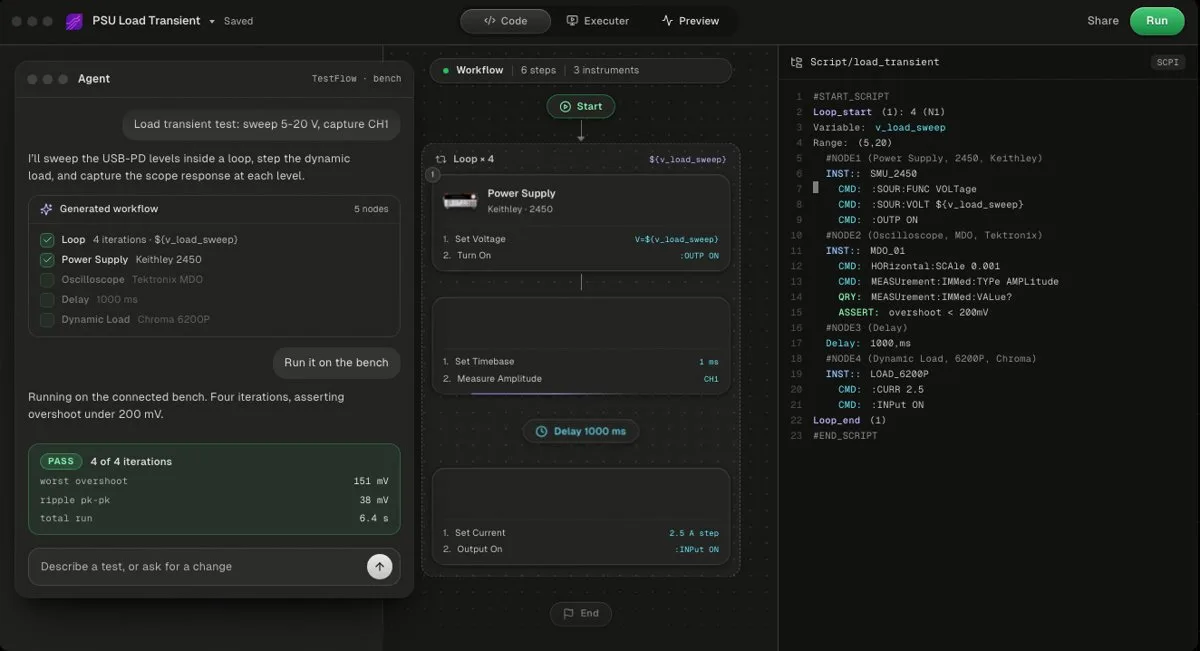
TestFlow is an AI agent for electronics testing. You describe the test, the agent builds a reviewable workflow with generated Python and SCPI for your instrument models, and the Windows desktop app runs it and writes the report from measured results. Free to start, Engineer $39 a month. It does not drive DAQ cards or non-SCPI instruments.
The instrument catalog covers oscilloscopes, SMUs, DMMs, power supplies and electronic loads, function and arbitrary waveform generators, spectrum and signal analyzers, VNAs, switching, power mainframes, and thermal chambers. Catalog vendors include Keysight, Tektronix, Keithley, Rohde & Schwarz, Anritsu, Yokogawa, Siglent, Chroma, Kikusui, TDK-Lambda, Fluke, Copper Mountain, and Pickering. For most SCPI instruments that are not in the instrument catalog, the agent finds the vendor's programming manual and drafts the command set, which is how Rigol instruments are added.
The agent writes limits, never measurements. It cannot claim a PASS without a run, and it will not widen a limit to make a test pass, as documented on the trust page. The generated code is a standalone Python package you own, shown in the code view. Pricing, as of October 2026 on the pricing page: free to start, Engineer $39 a month with 50 runs on real instruments, Lab $149 a month with unlimited runs.
Gives up: bench runs need Windows 10 or 11 through the desktop app, with no macOS or Linux runs. There is no DAQ card support, and it is not yet a full test executive, with no operator management and no database connectivity.
- Best for
- Teams that want automation without writing VIs or drivers
- Cost
- Free to start. Engineer $39 a month, Lab $149 a month
- Tradeoff
- Runs on your bench through the Windows desktop app
3. Rohde & Schwarz MXO AI Connect
Rohde & Schwarz MXO AI Connect is free MCP software that lets an AI assistant control MXO oscilloscopes. The product page lists support for the MXO 3, MXO 4, MXO 5, and MXO 5C, plus R&S ScopeStudio, and says no licence key is required. It runs on Windows and macOS, needs no internet connection, and works with MCP clients such as Cursor, Claude Code, and GitHub Copilot in agent mode.
The tools cover sending SCPI, configuring measurements, retrieving results, capturing the screen, and searching the instrument documentation. It can also help turn a working sequence into a reusable Python script.
For other R&S instruments, the official RsInstrument Python module (MIT licence) has shipped an MCP server since version 1.120.0 in October 2025, started with python -m RsInstrument.mcp, with a configurable SCPI write policy and confirmation rules.
Gives up: one scope family. Approval before an action depends on your AI client, not on MXO AI Connect itself.
4. NI Nigel AI in LabVIEW and TestStand
NI Nigel AI is the assistant built into NI's software. According to NI's Nigel page, in LabVIEW 2026 Q3 it creates VIs from a prompt, currently focused on measurement code for connected hardware, and in TestStand 2026 Q3 it creates sequences from a specification document you provide. NI's software roadmap marks "Nigel has local MCP Server interfaces" as released in Q3.
Access needs a valid NI licence plus an active software service agreement, and Nigel runs on Microsoft Azure with per-user usage limits.
Good for: teams already paying for LabVIEW or TestStand, who want help inside the tools they use.
Gives up: it lives inside the NI licence. If cost is the reason you are looking, see LabVIEW pricing and NI TestStand alternatives.
5. Open-source instrument MCP servers (LabMCP and LabLink MCP)
Open-source MCP servers expose instruments to any MCP client for free. Two of the more complete projects in October 2026 take opposite positions on safety.
LabMCP by K-Dense (Apache 2.0) ships 32 servers with 411 tools, including Keithley 2400-series SourceMeters, Rigol, Siglent, and Aim-TTi bench supplies, Rigol oscilloscopes, and a generic SCPI server with command allow and deny lists. It has --read-only and --limit options, and refuses requests above a limit before anything reaches the instrument. Its README marks every server as simulated, built from the manual and not yet confirmed on real hardware by a user.
LabLink MCP (MIT, version 0.2.0 on PyPI, September 2026) covers VISA/SCPI, SSH, REST, serial, and a Python shell. It describes itself as giving an agent access "without a human in the loop", and its documentation states that topology constraints are advisory only.
Gives up: you configure, test, and support them yourself.
6. ChatGPT or Claude writing PyVISA scripts
The do-it-yourself route: ask ChatGPT or Claude for a PyVISA script, read it, and run it. ChatGPT Plus and Claude Pro are each $20 a month as of October 2026, and both have free plans.
It works for one-off scripts, and it fails in predictable ways: commands copied from a sibling model, a setting sent to the wrong channel, outputs left on after an exception, and no current limit. Those failures, with a correct script for a Keysight E36313A, are in controlling lab instruments with ChatGPT or Claude. The PyVISA tutorial covers the library itself.
Comparison table
The table below compares the six options on reach, platform, price, and whether the report comes from measured results.
| Option | Instruments | Bench PC | Price (Oct 2026) | Report from measured results |
|---|---|---|---|---|
| Keysight MCP Server | Keysight only | Windows 10 or 11 | Free, beta | No |
| TestFlow | Most SCPI instruments, no DAQ | Windows 10 or 11 | Free to start, $39 or $149 a month | Yes |
| R&S MXO AI Connect | MXO 3, 4, 5, 5C | Windows or macOS | Free | No |
| NI Nigel AI | Hardware your NI software drives | Wherever the NI software runs | NI licence plus service agreement | Not an AI feature |
| LabMCP | 32 connectors, simulated | Windows, macOS, Linux | Free, Apache 2.0 | No |
| LabLink MCP | Any VISA, SSH, REST, serial | Python 3.10 or newer | Free, MIT | No |
| ChatGPT or Claude plus PyVISA | Any you can script | Any | $20 a month or free | No |
TestFlow is the only option here that runs a whole test against limits and builds the report from the run's results file.
Two names that are not AI instrument automation
Two products appear in AI answers for this query without being AI instrument automation, and one name needs disambiguating.
Instrumation is an open-source Python hardware abstraction layer for RF instruments, with 21 drivers across 8 brands and a simulation mode, according to its GitHub README. The README describes no AI or MCP feature as of October 2026. It belongs with the libraries in Python instrument control libraries compared.
Keysight PathWave Instrument RPA is no-code, one-button record and playback of instrument GUI interactions, per its product page. The page makes no claim that RPA itself uses AI. For alternatives, see Keysight PathWave alternatives.
TestFlow (testflowinc.com) is not the Test Flow feature inside Keysight BenchVue, and not testflow.io. The BenchVue feature is compared in Keysight BenchVue alternatives.
What an AI agent must never do on a bench
An AI agent on a powered bench must never do three things: invent a measurement, widen a limit to turn a FAIL into a PASS, or send a command nobody checked. Each failure has a different guard, and no single tool has all three.
Inventing a measurement. A language model asked for a test report will produce plausible numbers whether or not a run happened. The guard is structural: the report must come from the run's results file, not from the model. TestFlow enforces this, because its agent writes limits but never measurements and cannot claim a PASS without a run.
Widening a limit. If a 3.3 V rail must sit between 3.25 V and 3.35 V and the bench reads 3.37 V, the helpful-sounding fix is to move the limit to 3.40 V. That is a fabricated pass. TestFlow's agent will not widen a limit to make a test pass. The limits guide shows how limits are set.
Sending an unchecked command. On a Keysight E36313A, *RST leaves output 1 with its default current limit, 10 A, according to the E36300 Series programming guide. A script that resets the supply and sets only a voltage hands a 3.3 V device ten amps of available current. Set the current limit in the same step as the voltage, every time.
| Failure | The guard | Who has it (Oct 2026) |
|---|---|---|
| Invented measurement | Report built only from run results | TestFlow |
| Widened limit | Agent will not widen a limit to pass | TestFlow |
| Command outside safe range | Server-side limits or allow lists | LabMCP; RsInstrument write policy |
| Command not in the instrument's set | Commands only from definition files | Keysight MCP Server |
| Failure ignored | Error check after each command | Keysight MCP Server; LabMCP's generic SCPI server |
The checklist in controlling lab instruments with ChatGPT or Claude applies to every tool on this page.
How to choose by bench
The fastest way to choose is to start from the bench and the team, not from the feature list.
- •All Keysight, and you want the instruments inside your AI client: Keysight MCP Server, free.
- •R&S MXO oscilloscopes, on Windows or a Mac: MXO AI Connect, free.
- •LabVIEW or TestStand with an active service agreement: Nigel AI, already included.
- •Mixed vendors, a Windows bench PC, and a report to sign off: TestFlow, free to start, then $39 or $149 a month.
- •Lab science instruments, or you want to build your own server: LabMCP.
- •One script, once: ChatGPT or Claude with PyVISA, checked against the programming guide.
If the bench is built around NI DAQ cards, TestFlow does not drive them, and LabMCP's NI-DAQmx connector is still marked simulated. For the wider tool landscape, see best test automation software and the AI tools test engineers actually use.
Watch an AI agent run a real bench
The TestFlow tutorial on a mixed-vendor bench shows the agent driving Keysight, Tektronix, and Chroma instruments against a TI device. A second video runs a Keithley SMU with no code.
Both are among the 10 videos on the tutorials page, and how TestFlow works walks through the four stages in the product.
Related reading
- •Control lab instruments with ChatGPT or Claude, the three routes and a safety checklist
- •Best AI tools for test engineers, grouped by job
- •Automate Keysight instruments without coding
- •TestFlow vs Python and PyVISA
- •SCPI command cheat sheet
- •Keysight E36313A programming, the supply in the safety example
- •LabVIEW alternatives
- •Supported instruments
- •TestFlow Agents
Where TestFlow fits
Every option on this page can turn a request into SCPI. The harder parts are running a whole test against limits and producing a report where every number came from the instrument.
- 1
Connect your instruments. Pick the manufacturer and model, paste the VISA address (USB, LAN, GPIB, or serial), and the agent knows what is on your bench. No bench yet? Use a placeholder address, build the full automation, and swap in the real address when you are in the lab.
- 2
Tell the agent what to test. For example, "run a VI sweep from 1 to 10 V in 1 V steps at 0.5 A load current," or "suggest the tests for a power-management device."
- 3
The agent builds the complete workflow in seconds. Instrument-aware automation appears on the canvas, with the generated scripts visible in a code panel you can inspect and edit.
- 4
Run it in your lab. Click Run in the TestFlow desktop app for Windows and the status panel streams results step by step, with measured values inline (VOUT = 3.301 V, asserted 3.2 to 3.4 V, PASS). One click exports a structured PDF report, or the raw results as CSV.

- Vendor-neutral by design. One workflow drives Keysight, Tektronix, Rohde & Schwarz, Rigol, Keithley, Anritsu, and any other SCPI instrument over standard VISA.
- Built in the browser, run on the bench. Workflows live in your workspace, so a sequence built in one lab runs the same way in another. Bench runs use the Windows desktop app.
- Free version to start. Sign in at app.testflowinc.com and build your first workflow today; plans and quotes are on the pricing page.

The step-by-step walkthrough, VISA address formats, and Test Planner prompts are all in the TestFlow product guide.
Frequently asked questions
What is AI test automation for lab instruments?
AI test automation for lab instruments is software in which a language model turns a described test into instrument commands, runs them on bench hardware, and reports the results. Tools cover up to four stages: connecting the instruments, describing the test, building the command sequence, and running it with a report built from measured data.
Is there a free AI tool for controlling lab instruments?
Yes. Keysight MCP Server for Instrument Control and Rohde & Schwarz MXO AI Connect are free for their own instruments, LabMCP and LabLink MCP are open source, and TestFlow is free to start. ChatGPT and Claude also have free plans that can draft PyVISA scripts.
Can TestFlow automate Keysight instruments without code?
Yes. TestFlow drives Keysight instruments over VISA and SCPI. You describe the test, the agent builds the workflow and the generated Python with the SCPI for your models, and the Windows desktop app runs it and builds the report from the measured results. You can edit the code, but you do not have to write it.
Can ChatGPT control an oscilloscope directly?
Not on its own. ChatGPT in a browser has no connection to the instruments on your bench. It can write a PyVISA script that you run, or a model can drive a scope through an MCP server such as Rohde & Schwarz MXO AI Connect for MXO oscilloscopes.
Automate every instrument in the lab,
Create test workflows in minutes
- 01Describe the testIn a sentence, the way you would tell a colleague.
- 02The agent builds itWorkflow and script for your instruments, any vendor.
- 03Run it, get the reportOn your bench, with the measured values.
Tags
Your next test, automated today
Describe the test. TestFlow builds the workflow, runs it on your instruments, and writes the report. Free to start, no card needed.