 Ali Kamaly
TestFlow vs LabVIEW in 2026 (Cost, Speed, and Where LabVIEW Wins)
LabVIEW owns NI DAQ, FPGA, and real-time work. TestFlow builds and runs SCPI bench tests from a description of the test. Real 2026 prices, a side-by-side table, and an honest migration scope.
TestFlow (testflowinc.com) and NI LabVIEW automate different parts of a lab, and an honest comparison starts there. LabVIEW is NI's graphical programming environment, and it is the stronger tool for NI DAQ hardware, PXI, FPGA, real-time targets, and deterministic control. TestFlow is an AI agent for electronics testing: you describe the test, the agent builds the automation, drives the SCPI instruments on your bench, and writes the report from the measured results.
On price, NI lists LabVIEW at $605, $1,801, and $2,805 per seat per year for Base, Full, and Professional (US subscription list prices, as of October 2026, on NI's edition page). TestFlow is free to start, then $39 or $149 a month per seat. TestFlow has no DAQ card support and no FPGA or real-time path, so for many LabVIEW labs it is a complement rather than a replacement.
This page is for test and validation engineers who run LabVIEW today and are deciding where the next bench test gets built. It covers what each tool is, a side-by-side table, real 2026 costs, where LabVIEW clearly wins, how to run both, and what a migration can and cannot move.
Disclosure: this guide is written by the team behind TestFlow, which appears as one of the options. We list its tradeoffs the same way as everyone else's.
Which one to use, by situation
The choice between TestFlow and LabVIEW is usually made by the hardware on the bench, not by taste. Five situations cover most labs:
- •NI DAQ cards, CompactDAQ, or PXI modules that use NI drivers (DAQmx, NI-DCPower, NI-SCOPE): LabVIEW, or Python with NI's own packages. TestFlow cannot drive a DAQ card such as a PXIe-6376.
- •FPGA logic or real-time control loops: LabVIEW with the FPGA or Real-Time Module. TestFlow has no FPGA, real-time, or deterministic timing support.
- •A bench of SCPI instruments from several vendors (a Keysight supply, a Tektronix scope, a Keithley SMU, a Chroma load): TestFlow is built for exactly this. LabVIEW does it too, through VISA and instrument drivers, one VI at a time.
- •Nobody on the team writes G, and the test is due this month: TestFlow, because the input is a description of the test rather than a block diagram.
- •Thousands of working VIs and a trained LabVIEW team: keep LabVIEW for what works and trial TestFlow on the next new SCPI test, not on a rewrite of old ones.
If you are still surveying the whole field, the 8 best LabVIEW alternatives compares Python, MATLAB, OpenTAP, and the rest on the same terms.
What each one is
1. LabVIEW (NI graphical programming, Windows and Linux)
LabVIEW is NI's graphical programming environment (NI is part of Emerson). You build virtual instruments (VIs) by wiring a block diagram, with a front panel as the user interface. As of October 2026, NI sells three editions plus a suite:
- •Base covers acquisition from NI and third-party hardware, standard maths, interactive UIs, file I/O to CSV and TDMS, and calling Python, C/C++, .NET, and MATLAB code.
- •Full adds advanced analysis, signal processing, and PID control. It is the first edition NI lists for Linux, and the first that can take the Real-Time and FPGA Modules as add-ons.
- •Professional adds the Application Builder for royalty-free executables, graphical merge, code analysis, a unit test framework, the Report Generation and Database Connectivity Toolkits, and NI's Nigel AI assistant, which NI says can generate code and sequences from a prompt.
- •LabVIEW+ Suite adds TestStand, InstrumentStudio, FlexLogger, and DIAdem on top of Professional.
For third-party instruments, LabVIEW uses NI-VISA and instrument drivers. NI's Instrument Driver Network offers more than 10,000 free drivers for instruments from more than 350 vendors, which is an ecosystem nobody else in this space matches.

2. TestFlow
TestFlow is an AI agent for electronics testing. It is free to start, then $39 or $149 a month per seat. Workflows are built and simulated in the browser and run on real instruments through a Windows 10/11 desktop app. It drives SCPI instruments over VISA, and it does not support DAQ cards, FPGA, or real-time targets.
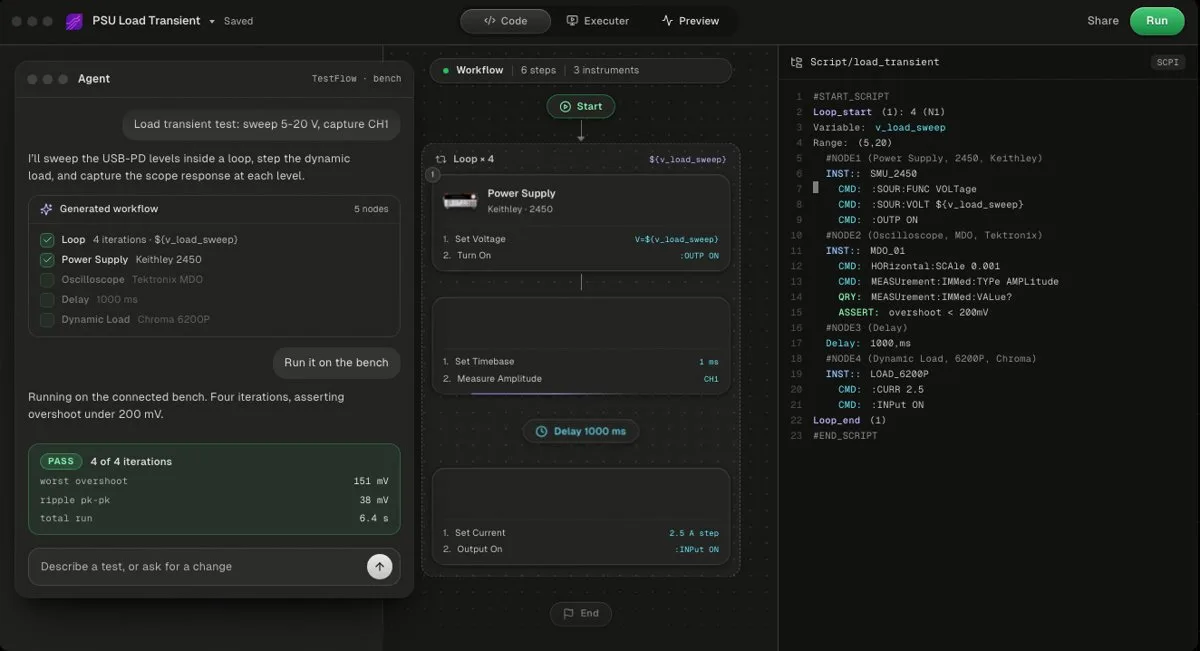
You connect the instruments already on the bench (USB, LAN, GPIB, or serial), describe the test in a sentence, and the agent builds a reviewable workflow of steps plus the Python, with the SCPI commands for your exact models. The catalog covers Keysight, Tektronix, Keithley, Rohde & Schwarz, Anritsu, Yokogawa, Siglent, Chroma, Kikusui, TDK-Lambda, Fluke, Copper Mountain, and Pickering, and the agent can add most other SCPI instruments by reading the vendor's programming manual. See how TestFlow works and the instrument catalog.
- Best for
- Teams that want automation without writing VIs or drivers
- Cost
- Free to start. Engineer $39 a month, Lab $149 a month
- Tradeoff
- Runs on your bench through the Windows desktop app
TestFlow vs LabVIEW, side by side
The table below compares the two on the questions that decide a purchase. Prices are US list as of October 2026. TestFlow loses several rows, and those rows matter.
| LabVIEW | TestFlow | |
|---|---|---|
| Licence cost per seat | $605/yr Base, $1,801/yr Full, $2,805/yr Professional (subscription); $2,116 to $10,107 perpetual | Free version; $39/month Engineer, $149/month Lab; Enterprise by quote |
| Platforms | Windows (all editions), Linux (Full and up), macOS only as the free Community Edition | Builds and simulates in a browser; bench runs need the Windows 10/11 desktop app |
| NI DAQ and NI hardware | Native: DAQmx, PXI, CompactDAQ, CompactRIO | Not supported |
| FPGA and real-time | Yes, with the FPGA and Real-Time Modules (Full and up) | Not supported |
| Deterministic timing | Yes, on real-time targets | No |
| SCPI bench instruments | Yes, through NI-VISA and IDNet drivers | Yes, the core use case: catalog models plus most SCPI instruments added from the manual |
| Input | A block diagram you wire in G | A description of the test, in a sentence |
| Time to a first automated test | Depends on G fluency and on whether a driver exists for the model | TestFlow's claim is minutes for a catalog instrument; check it on the free version |
| Who maintains it | Your LabVIEW developers | Your engineers review; the agent edits on request, scoped to selected steps |
| Code ownership | Your VIs; building an EXE needs Professional, the runtime engine is free | A standalone Python package you own, or a standalone EXE |
| Reports | Report Generation Toolkit (Professional) or your own VIs | Built from the run's measured results: PDF, Word, Excel, Markdown, JSON, CSV |
| AI assistance | Nigel AI in Professional, with an active subscription or service agreement | The agent is the builder |
| Ecosystem | Decades of VIs, IDNet, NI training, a large community | Young: a product guide and 10 video tutorials |
What each one costs in 2026
LabVIEW list prices are public on NI's edition page. As of October 2026, the US list is:
| Edition | Subscription, per seat per year | Perpetual, per seat |
|---|---|---|
| Base | $605 | $2,116 |
| Full | $1,801 | $6,300 |
| Professional | $2,805 | $10,107 |
| LabVIEW+ Suite | $4,239 | $15,271 |
Perpetual licences include the first year of NI's software service, which then renews annually. Volume licences start at 5 seats. The Real-Time, FPGA, and Vision modules are separate add-ons. Running a built LabVIEW executable only needs the free LabVIEW Runtime Engine, but building one needs the Application Builder, which is in Professional. The LabVIEW pricing breakdown covers the tiers in more depth, and NI software licensing costs adds up the rest of the NI stack.
TestFlow's pricing page lists a free version, Engineer at $39 a month (50 runs on real instruments a month), Lab at $149 a month (unlimited runs), and Enterprise by quote. Yearly billing is 20% off.
For a 5-engineer lab, LabVIEW Full is 5 × $1,801 = $9,005 a year and Professional is $14,025. TestFlow Engineer is 5 × $39 × 12 = $2,340 a year, and Lab is $8,940. Note the honest part: per seat, TestFlow Lab ($1,788 a year) costs about the same as LabVIEW Full. On a SCPI bench, the larger cost is usually the engineering hours spent building and maintaining the test, which neither price list shows.
Where LabVIEW clearly wins
LabVIEW wins outright in six areas, and in four of them TestFlow does not compete at all:
- 1
DAQ. Hardware-timed, multi-channel analog and digital acquisition through DAQmx is LabVIEW's home ground. TestFlow has no DAQ card support. If your rig is a CompactDAQ chassis full of modules, read data acquisition with Python or stay on LabVIEW.
- 2
NI hardware. PXI instruments, CompactDAQ, and CompactRIO ship with LabVIEW drivers. TestFlow's catalog has only a handful of NI entries and is not a route to driving an NI chassis.
- 3
FPGA and real-time. The FPGA Module compiles G to NI reconfigurable I/O hardware, and the Real-Time Module runs compiled code deterministically on embedded targets. Neither exists in TestFlow. See LabVIEW FPGA and real-time.
- 4
Determinism. Hard real-time loops and hardware-in-the-loop need timing guarantees. TestFlow runs over VISA from a Windows PC and makes no timing guarantee.
- 5
Ecosystem. More than 10,000 IDNet drivers, decades of shared VIs, NI's training and certification, and a large forum. A new TestFlow user has a product guide and video tutorials, not decades of answered forum threads.
- 6
Platform breadth. LabVIEW Full and up run on Linux. TestFlow bench runs are Windows only, and there is no macOS or Linux bench support.
LabVIEW also has its own AI now. Nigel lives inside Professional and TestStand, so "has an AI assistant" is not a reason to switch by itself. The real differences are vendor neutrality and who builds and runs the test.
Where TestFlow is the better fit
TestFlow is the better fit when the bench is SCPI instruments and the bottleneck is writing the test, not acquiring the data:
- •Mixed-vendor benches. One workflow can drive a Keysight supply, a Tektronix scope, and a Keithley SMU without hunting for three drivers, because the agent writes the SCPI for each model.
- •Teams without G skills. The input is a description of the test. Engineers who can read Python can review everything the agent produced in the code panel.
- •Tests that change every week. Validation and characterisation work gets re-scoped constantly. Editing a sentence and re-running is cheaper than re-wiring a diagram.
- •Reports you can defend. The agent writes limits, never measurements. It cannot claim a PASS without a run, and it will not widen a limit to make a test pass. The trust model and measurement limits pages explain how verdicts are decided.
- •Code in text. The export is a standalone Python package (sequence, VISA runtime, instrument drivers, requirements, one entry point), so it diffs in Git like any other code. LabVIEW ships a graphical diff in every edition and a graphical merge in Professional, which works, but only inside LabVIEW.
- •Before the hardware arrives. The web app simulates a workflow in the browser, so the sequence can be reviewed before the bench exists. See the two run modes.
The same bench test in each
Here is one ordinary bench test: set channel 1 of a Keysight E36313A supply to 3.3 V with a 0.5 A limit, measure the load voltage on a Keysight 34461A DMM, read the supply current, and pass if the voltage is between 3.25 V and 3.35 V.
In LabVIEW you either drop the IDNet driver VIs for each instrument (Initialize, Configure, Read, Close) or wire VISA Open, VISA Write, and VISA Read with the SCPI strings, add an In Range and Coerce for the limit, and build a report VI. This is the same logic as text, in PyVISA, which is what those VISA VIs send:
import time
import pyvisa

rm = pyvisa.ResourceManager()
psu = rm.open_resource("TCPIP0::192.168.1.50::inst0::INSTR")  # Keysight E36313A
dmm = rm.open_resource("TCPIP0::192.168.1.51::inst0::INSTR")  # Keysight 34461A
psu.timeout = dmm.timeout = 5000

try:
    psu.write("*RST")
    dmm.write("*RST")
    psu.write("VOLT 3.3,(@1)")
    psu.write("CURR 0.5,(@1)")
    psu.write("OUTP ON,(@1)")
    time.sleep(0.5)  # let the output settle

    v_load = float(dmm.query("MEAS:VOLT:DC? 10"))
    i_supply = float(psu.query("MEAS:CURR? (@1)"))
finally:
    psu.write("OUTP OFF,(@1)")

verdict = "PASS" if 3.25 <= v_load <= 3.35 else "FAIL"
print(f"V_load = {v_load:.4f} V, I = {i_supply * 1000:.1f} mA, {verdict}")
In TestFlow, the same test starts as one sentence: "Set channel 1 of the E36313A to 3.3 V with a 0.5 A limit, wait 500 ms, measure DC volts on the 34461A and the supply current, and pass if the voltage is between 3.25 and 3.35 V." The agent turns that into steps, a limit on the voltage column, and the Python, and the run produces the report. The E36313A programming guide and the SCPI command cheat sheet cover the commands if you want to check them by hand, and automating Keysight instruments without coding walks through the same flow on more models.
Running LabVIEW and TestFlow side by side
Running LabVIEW and TestFlow on the same bench works well when you follow four rules:
- 1
Split by instrument, not by test. Give each VISA resource one owner at a time. SCPI state lives in the instrument, so two programs writing to the same supply will overwrite each other's settings mid-test.
- 2
Keep DAQ, FPGA, and real-time in LabVIEW. Those were never candidates. TestFlow takes the supplies, meters, scopes, SMUs, and loads.
- 3
Join results on a key. TestFlow exports CSV and JSON, and LabVIEW writes CSV or TDMS natively. Record the DUT serial number and a timestamp in both and merge downstream.
- 4
Call across when you need to. LabVIEW's Python Node (LabVIEW 2018 and later) calls a function in a Python module. Because TestFlow's export is ordinary Python, a LabVIEW application can call it like any other module: wrap the entry point in a function that returns the values you need. NI notes the Python Node does not run on real-time or FPGA targets, so make the call from the Windows host.
Both tools can share one Windows PC. The desktop app guide covers how TestFlow reaches the VISA hardware, and VISA and SCPI instrument control explains the layer both of them sit on.
Migrating from LabVIEW to TestFlow, scoped honestly
TestFlow does not import LabVIEW VIs. There is no converter and no G parser. A migration means re-describing your SCPI instrument tests and proving the new runs match the old ones, which is five steps:
- 1
Inventory VIs by the hardware they touch. Anything that calls DAQmx, FPGA, or Real-Time VIs stays in LabVIEW. Anything built on VISA or IDNet driver VIs for SCPI instruments is a candidate.
- 2
Pick one SCPI test with known-good LabVIEW results. A supply-and-DMM check or a load regulation sweep is ideal.
- 3
Describe it in TestFlow with the same set points and limits, simulate it in the browser, and review the steps and the generated SCPI before it touches hardware.
- 4
Run both on the same device and compare the readings within the instruments' stated uncertainty. Disagreement often means a settling delay or range setting differs.
- 5
Move the rest in batches and time any seat reduction to your NI renewal date, keeping the LabVIEW seats that DAQ and real-time work still need.
Four things do not move. Front panels and custom operator UIs stay where they are. Custom analysis built on Full's signal processing library stays, or moves to Python by hand. Database Connectivity Toolkit logging has no TestFlow equivalent, because TestFlow has no database connectivity. And TestStand sequences that call VIs bring their structure through TestFlow's sequence import but not the VIs themselves; TestFlow vs NI TestStand covers that boundary. If the goal is to leave LabVIEW entirely and own hand-written code, the LabVIEW to Python migration plan is the better guide.
Related reading
- •TestFlow as a LabVIEW alternative, the product view of this decision
- •8 best LabVIEW alternatives, the full field
- •LabVIEW vs Python, if the alternative is code you write yourself
- •LabVIEW on Mac and Linux, the platform question in detail
- •Supported instruments, to check your bench before you start
- •NI TestStand alternatives, the sequencing layer above LabVIEW
- •PyVISA tutorial, the library behind the code above
Where TestFlow fits
LabVIEW stays the right tool for DAQ, FPGA, and real-time targets. For the SCPI bench instruments around them, TestFlow replaces hand-wired VIs with a workflow the agent builds from a description of the test.
- 1
Connect your instruments. Pick the manufacturer and model, paste the VISA address (USB, LAN, GPIB, or serial), and the agent knows what is on your bench. No bench yet? Use a placeholder address, build the full automation, and swap in the real address when you are in the lab.
- 2
Tell the agent what to test. For example, "run a VI sweep from 1 to 10 V in 1 V steps at 0.5 A load current," or "suggest the tests for a power-management device."
- 3
The agent builds the complete workflow in seconds. Instrument-aware automation appears on the canvas, with the generated scripts visible in a code panel you can inspect and edit.
- 4
Run it in your lab. Click Run in the TestFlow desktop app for Windows and the status panel streams results step by step, with measured values inline (VOUT = 3.301 V, asserted 3.2 to 3.4 V, PASS). One click exports a structured PDF report, or the raw results as CSV.

- Vendor-neutral by design. One workflow drives Keysight, Tektronix, Rohde & Schwarz, Rigol, Keithley, Anritsu, and any other SCPI instrument over standard VISA.
- Built in the browser, run on the bench. Workflows live in your workspace, so a sequence built in one lab runs the same way in another. Bench runs use the Windows desktop app.
- Free version to start. Sign in at app.testflowinc.com and build your first workflow today; plans and quotes are on the pricing page.

The step-by-step walkthrough, VISA address formats, and Test Planner prompts are all in the TestFlow product guide.
Frequently asked questions
Is TestFlow a replacement for LabVIEW?
For SCPI bench instrument automation, it can be. For NI DAQ cards, PXI modules that use NI drivers, FPGA, and real-time targets, it is not: TestFlow has no DAQ card support and no FPGA, real-time, or deterministic timing path. Many labs run both.
How much does LabVIEW cost compared with TestFlow in 2026?
As of October 2026, NI lists LabVIEW at $605 (Base), $1,801 (Full), and $2,805 (Professional) per seat per year on a US subscription. TestFlow is free to start, then $39 a month (Engineer) or $149 a month (Lab) per seat, with Enterprise by quote.
Can TestFlow import LabVIEW VIs?
No. TestFlow does not import or run LabVIEW VIs. Moving a test means describing it again in a sentence, letting the agent rebuild it against your SCPI instruments, and comparing the results with the LabVIEW run on the same device.
Can TestFlow automate Keysight or Tektronix instruments without writing code?
Yes, over SCPI. You connect the instruments over VISA, describe the test in a sentence, and the agent builds the workflow and the Python, runs it through the Windows desktop app, and writes the report from the measured results.
Does LabVIEW run on Mac or Linux in 2026?
Commercial LabVIEW runs on Windows, and on Linux for the Full, Professional, and LabVIEW+ Suite editions. On macOS, NI ships only the Community Edition, starting with LabVIEW 2025 Q3. The last LabVIEW Professional for macOS was 2023 Q3.
Can LabVIEW and TestFlow run on the same bench?
Yes, as long as they do not drive the same instrument at the same time. A common split is LabVIEW for NI DAQ and real-time hardware and TestFlow for the SCPI supplies, meters, scopes, and loads, with results joined on a serial number or timestamp.
Automate every instrument in the lab,
Create test workflows in minutes
- 01Describe the testIn a sentence, the way you would tell a colleague.
- 02The agent builds itWorkflow and script for your instruments, any vendor.
- 03Run it, get the reportOn your bench, with the measured values.
Tags
Your next test, automated today
Describe the test. TestFlow builds the workflow, runs it on your instruments, and writes the report. Free to start, no card needed.