 Ali Kamaly
TestFlow vs Python and PyVISA in 2026 (When to Write the Script)
The same Keysight E36313A and 34465A regulator test, written by hand in PyVISA and built by an AI agent from one sentence. Cost, time to first run, upkeep, reports, and when the script is still the right call.
TestFlow vs Python and PyVISA comes down to who writes and maintains the test: with Python and PyVISA you write every SCPI command, error check, limit, and report yourself, at no licence cost; with TestFlow (testflowinc.com) you describe the test in a sentence and an AI agent builds the workflow, generates the Python, runs it on your bench, and writes the report from the measured results. Both paths end in Python sending SCPI over VISA. TestFlow even exports that Python as a package you keep.
This page runs one real test both ways: a 3.3 V regulator check on a Keysight E36313A power supply and a Keysight 34465A digital multimeter. You get the full PyVISA script, the one sentence that replaces it, a side-by-side table, and a straight answer on when writing the script yourself is still the better call.
Disclosure: this guide is written by the team behind TestFlow, which appears as one of the options. We list its tradeoffs the same way as everyone else's.
The short verdict
Python plus PyVISA is the right tool when you are a capable Python programmer, the test is yours to maintain, and you need control the tool does not give you. It costs nothing, runs on Windows, macOS, and Linux, and reaches anything with a VISA address.
TestFlow is the right tool when the time cost of writing, debugging, and reporting is the real cost. That is most recurring bench work: the same test across many units, run by people who did not write it, on a bench where instruments change. TestFlow starts free, the Engineer plan is $39 a month as of October 2026, and bench runs need its Windows desktop app.
The rest of this page shows why, with one test you can run on real hardware today.
The test: a 3.3 V LDO line-regulation check
A line-regulation check sweeps a regulator's input voltage and confirms its output stays inside a band. It is a test every power-board team runs, and it needs exactly two instruments.
Load regulation is the more famous test, but it needs a load that steps current, and the E36313A only sources current. With a supply and a DMM, the honest two-instrument test is line regulation. The device under test is a 3.3 V LDO board with a fixed resistive load on its output.
| Parameter | Value |
|---|---|
| Supply | Keysight E36313A, channel 1 (6 V, 10 A output) drives VIN |
| Meter | Keysight 34465A, DC volts at the regulator output pins |
| VIN sweep | 4.0, 4.5, 5.0, 5.5, 6.0 V |
| Current limit | 300 mA, overcurrent protection on |
| Settling | 200 ms after each VIN change |
| VOUT limit | 3.3 V ±2 %, so 3.234 V to 3.366 V at every step |
| Input current limit | 150 mA or less at every step |
| Line regulation limit | VOUT spread across the sweep of 10 mV or less |
Both instruments sit on LAN here. USB or GPIB changes only the VISA address string, as covered in GPIB vs USB vs LAN instrument control.
The PyVISA version, written by hand
The PyVISA version of this test is 104 lines of Python, and every SCPI string in it comes from the two Keysight programming guides. You need Python 3.10 or later, pip install pyvisa, and a VISA backend.
PyVISA is MIT licensed, and version 1.16.2 shipped on February 27, 2026. For the backend, Keysight's IO Libraries Suite is listed as "No cost" and runs on Windows 10, Windows 11, and Linux. The alternative is PyVISA-py, a pure-Python VISA implementation, also MIT licensed. The PyVISA tutorial and the Keysight IO Libraries guide cover installation.
The supply commands follow Keysight's E36300 Series Programming Guide, which uses the (@1) channel-list form. The meter commands follow the Truevolt Series Operating and Service Guide.
"""LDO line-regulation check.

Keysight E36313A channel 1 (6 V / 10 A output) drives the regulator's VIN.
Keysight 34465A measures VOUT at the regulator's output pins.
Needs: pip install pyvisa, plus a VISA backend (Keysight IO Libraries or pyvisa-py).
"""
import csv
import time
from datetime import datetime, timezone

import pyvisa

PSU_ADDR = "TCPIP0::192.168.1.20::inst0::INSTR"  # E36313A
DMM_ADDR = "TCPIP0::192.168.1.21::inst0::INSTR"  # 34465A

VIN_STEPS = [4.0, 4.5, 5.0, 5.5, 6.0]  # V, inside channel 1's 6 V range
CURRENT_LIMIT = 0.300                  # A, with overcurrent protection on
SETTLE_S = 0.2                         # s after each VIN change

VOUT_MIN, VOUT_MAX = 3.234, 3.366      # V, 3.3 V +/- 2 %
IIN_MAX = 0.150                        # A, at every step
LINE_REG_MAX = 0.010                   # V, VOUT spread across the sweep


def drain_errors(inst, name):
    """Read SYST:ERR? until +0,"No error"; raise if anything was queued."""
    errors = []
    for _ in range(20):
        reply = inst.query("SYST:ERR?").strip()
        if int(reply.split(",", 1)[0]) == 0:
            break
        errors.append(reply)
    if errors:
        raise RuntimeError(f"{name}: {errors}")


def connect(rm, addr):
    inst = rm.open_resource(addr)
    inst.read_termination = "\n"
    inst.write_termination = "\n"
    inst.timeout = 10_000  # ms: five readings at 10 PLC with autozero need headroom
    inst.write("*RST")
    inst.write("*CLS")
    inst.query("*OPC?")
    return inst


def main():
    rm = pyvisa.ResourceManager()
    psu, dmm = connect(rm, PSU_ADDR), connect(rm, DMM_ADDR)
    ids = [psu.query("*IDN?").strip(), dmm.query("*IDN?").strip()]

    # 34465A: DC volts, fixed 10 V range, 10 PLC, five readings per READ?.
    # IMP:AUTO ON gives >10 GOhm input on the 10 V range. It must come after
    # CONF, because CONF resets it to OFF (10 MOhm).
    dmm.write("CONF:VOLT:DC 10")
    dmm.write("VOLT:DC:NPLC 10")
    dmm.write("VOLT:DC:IMP:AUTO ON")
    dmm.write("SAMP:COUN 5")
    drain_errors(dmm, "34465A")

    # E36313A channel 1: first set point, current limit, overcurrent protection.
    psu.write(f"VOLT {VIN_STEPS[0]}, (@1)")
    psu.write(f"CURR {CURRENT_LIMIT}, (@1)")
    psu.write("CURR:PROT:STAT ON, (@1)")
    drain_errors(psu, "E36313A")

    rows = []
    try:
        psu.write("OUTP ON, (@1)")
        for vin in VIN_STEPS:
            psu.write(f"VOLT {vin}, (@1)")
            time.sleep(SETTLE_S)
            samples = [float(v) for v in dmm.query("READ?").split(",")]
            vout = sum(samples) / len(samples)
            iin = float(psu.query("MEAS:CURR? (@1)"))
            drain_errors(psu, "E36313A")
            drain_errors(dmm, "34465A")
            ok = VOUT_MIN <= vout <= VOUT_MAX and iin <= IIN_MAX
            rows.append({"vin_v": vin, "vout_v": round(vout, 6),
                         "iin_a": round(iin, 6), "result": "PASS" if ok else "FAIL"})
            print(rows[-1])
    finally:
        psu.write("OUTP OFF, (@1)")
        psu.close()
        dmm.close()

    vouts = [r["vout_v"] for r in rows]
    line_reg = max(vouts) - min(vouts)
    passed = all(r["result"] == "PASS" for r in rows) and line_reg <= LINE_REG_MAX

    stamp = datetime.now(timezone.utc).strftime("%Y%m%dT%H%M%SZ")
    with open(f"line_reg_{stamp}.csv", "w", newline="") as f:
        f.write("".join(f"# {i}\n" for i in ids))
        writer = csv.DictWriter(f, fieldnames=list(rows[0]))
        writer.writeheader()
        writer.writerows(rows)
    print(f"line regulation {line_reg * 1000:.2f} mV, limit {LINE_REG_MAX * 1000:.0f} mV")
    print("VERDICT:", "PASS" if passed else "FAIL")
    return 0 if passed else 1


if __name__ == "__main__":
    raise SystemExit(main())
What the script gets right, and what it leaves out
A correct instrument script spends most of its lines on things other than the measurement. Four details in the script above are the ones engineers usually learn the hard way.
- •The error queue is drained after every block. SCPI instruments do not raise exceptions. A mistyped command sets an entry in the queue and the script carries on, so
drain_errorsreadsSYST:ERR?until the instrument answers+0,"No error". - •`VOLT:DC:IMP:AUTO ON` comes after `CONF`. The Truevolt guide states that
CONFigureresets the input impedance to 10 MΩ. Send it first and the 34465A loads the regulator output with 10 MΩ instead of more than 10 GΩ, silently. - •The output turns off in `finally`. A crash mid-sweep otherwise leaves the board powered at whatever VIN was last set.
- •Overcurrent protection is on. With
CURR:PROT:STAT ON, (@1)a shorted board trips the E36313A instead of sitting at 300 mA.
Here is what 104 lines do not give you:
- •No report. The output is a CSV with a comment header. A chart, a PDF, and a sign-off page are more code, as covered in automated test report generation.
- •No unit traceability. No serial number, operator, or lot is recorded. Adding an input prompt and a results schema is more code.
- •No reuse across models. Twelve lines carry SCPI strings written for these two exact models. Below the common layer of
*RST,*IDN?, andSYST:ERR?, command syntax is vendor-specific, as the SCPI command cheat sheet shows. Swap the meter for another vendor's and those lines change. - •No one else can safely edit it unless they know Python, PyVISA, and both programming guides.
The TestFlow version: one sentence
In TestFlow, the same test starts as one sentence typed into the agent chat. This is the whole input:
> Power the 3.3 V LDO board from channel 1 of the E36313A at a 300 mA current limit with overcurrent protection on, step VIN from 4.0 V to 6.0 V in 0.5 V steps with 200 ms settling, and at each step average five 10 PLC high-impedance readings of VOUT on the 34465A and read the input current from the supply, passing if VOUT stays within 3.3 V ±2 %, the input current stays under 150 mA, and VOUT varies by less than 10 mV across the sweep.
The agent returns a reviewable workflow of steps plus the generated Python, with SCPI for those two exact models. For this sentence the workflow has this shape:
| # | Step | Instrument | Limit |
|---|---|---|---|
| 1 | Configure DC volts, 10 V range, 10 PLC, high impedance, 5 samples | 34465A | none |
| 2 | Channel 1 to 4.0 V, 300 mA limit, overcurrent protection on | E36313A | none |
| 3 | Output on | E36313A | none |
| 4 | Loop VIN over 4.0, 4.5, 5.0, 5.5, 6.0 V | ||
| 4a | Set VIN, wait 200 ms | E36313A | none |
| 4b | Measure VOUT, average of 5 | 34465A | 3.3 V ±2 % |
| 4c | Measure input current | E36313A | 150 mA maximum |
| 5 | Compute the VOUT spread across the sweep | 10 mV maximum | |
| 6 | Output off | E36313A | none |
The derived figure in step 5 is a Python computation step, a step type documented in the step types guide. Each limit sits on the measurement it governs, as described in limits and pass/fail.
Then you run it. The Windows desktop app drives the real instruments, values stream against their limits as they arrive, and the report is built from the run's measured results: charts, PASS/FAIL per reading, and a verdict, exported as PDF, Word, Excel, Markdown, JSON, or CSV. Before the hardware is even on the bench, the web app can simulate the workflow in the browser.
Two rules from the trust guide matter more than speed here. The agent writes limits, never measurements, so it cannot report a PASS without a run. And it will not widen a limit to make a test pass.
Side by side: cost, time, upkeep, ownership
Python and PyVISA win on cost, platform reach, and raw flexibility; TestFlow wins on time to a reported run and on who can maintain the test. Prices are as of October 2026.
| Python + PyVISA | TestFlow | |
|---|---|---|
| Licence cost | Free. Python and PyVISA (MIT) cost nothing; Keysight IO Libraries Suite is no cost | Free version, no card. Engineer $39 a month (50 real-instrument runs). Lab $149 a month (unlimited runs). Enterprise by quote |
| Time to first run | Writing and debugging 104 lines against two programming guides | One sentence, a workflow review, an optional browser simulation |
| Who can maintain it | Someone fluent in Python, PyVISA, and both instruments' SCPI | Anyone who can describe the test; Python is optional |
| Limits and verdicts | Hand-written comparisons | Limits attached to each measurement, PASS/FAIL per reading, run verdict |
| Reports | CSV unless you build more | Charts, per-reading PASS/FAIL, verdict; PDF, Word, Excel, Markdown, JSON, CSV |
| Version control | Git on .py files, the best diff tooling there is | Named sequences with immutable published revisions, diff, rollback, .tfseq export; the exported package also goes in Git |
| Code ownership | 100 % yours | Yours: a standalone Python package (sequence, VISA runtime, drivers, requirements, one entry point) or a standalone EXE |
| Where bench runs happen | Windows, macOS, Linux | Windows 10 or 11 desktop app only |
| Instrument reach | Anything with a VISA address or a Python driver, DAQ cards included | SCPI instruments over VISA; no DAQ cards; non-SCPI instruments unsupported |
Note the last two rows. They are the reasons engineers keep writing Python, and they are real.
Four ways to automate this test in 2026
There are four realistic ways to automate a two-instrument bench test in 2026, and the right one depends on who maintains it. They are ordered by how often engineers reach for them first.
1. Python and PyVISA (free, you write it)
The script above. Free, portable, unlimited in what it can express, and entirely dependent on the person who wrote it. The Python instrument control libraries comparison covers the layers above PyVISA, such as instrument-class libraries, if you want less raw SCPI.

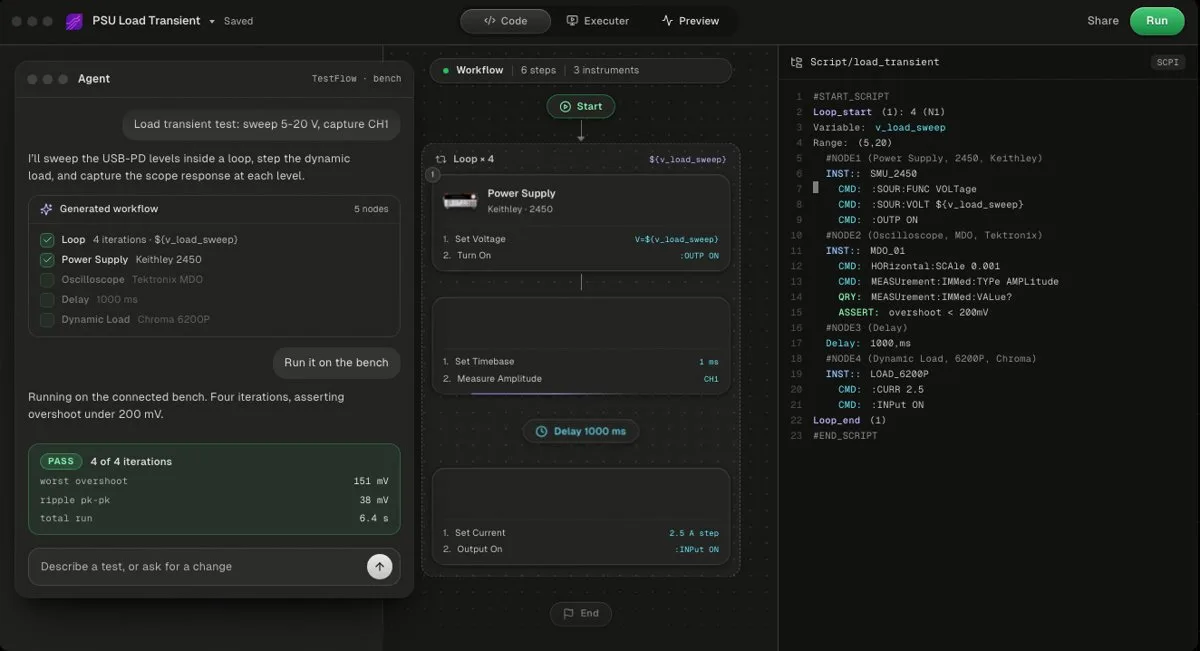
2. TestFlow
TestFlow is an AI agent for electronics testing: describe the test, and it builds the workflow, drives the instruments, and writes the report from measured results. Free to start; Engineer is $39 a month as of October 2026. Bench runs need the Windows desktop app. It does not support DAQ cards or instruments that do not speak SCPI.
The catalog covers Keysight, Tektronix, Keithley, Rohde & Schwarz, Siglent, Chroma, and others on the supported instruments page, and the agent can add most SCPI instruments that are missing by drafting the command set from the vendor's programming manual. See how it works.
- Best for
- Teams that want automation without writing VIs or drivers
- Cost
- Free to start. Engineer $39 a month, Lab $149 a month
- Tradeoff
- Runs on your bench through the Windows desktop app
3. Keysight BenchVue Test Flow (free, Keysight-first)
A drag-and-drop sequencing app inside Keysight's PathWave BenchVue, free with no licensed version according to Keysight's licensing article. It is a different product from a different company, despite the name. The full comparison is in BenchVue Test Flow vs TestFlow.
4. LabVIEW or TestStand (the incumbents)
NI's graphical programming environment and its test executive, both commercial products. Teams already invested in them should read TestFlow vs LabVIEW and TestFlow vs TestStand rather than this page.
Maintenance is where the real cost lives
The first version of an instrument script is the cheap part; the cost arrives when the bench, the spec, or the author changes. Three events account for most of it.
- 1
An instrument is replaced. The 34465A goes out for calibration and a different meter takes its place. In the script, the configure block and the read call change. In TestFlow, you ask the agent to move those steps to the new meter, scope the edit to the selected steps, and review the result before the next run.
- 2
The spec changes. A new regulator variant needs a 2.5 V limit and a 3.0 V to 5.5 V sweep. In Python, that is an edit to constants plus a retest. In TestFlow, it is a sentence, and the edit can be scoped to the selected steps so nothing else moves.
- 3
The author leaves. This is the one that hurts. The script is readable, but only to someone who knows PyVISA and both programming guides. The TestFlow workflow reads as named steps with visible limits, and published sequence revisions are immutable and version-pinned, so a technician runs the same test the author ran.
None of this makes the Python wrong. It makes it a codebase, and a codebase needs an owner. If you are moving a lab off hand-maintained scripts or LabVIEW VIs, the LabVIEW to Python migration guide and the LabVIEW alternative page cover the wider decision.
When to just write Python
Write the PyVISA script yourself when control, portability, or reach matters more than time. Specifically, choose Python when any of these is true:
- •The test runs once. A quick characterisation sweep you will never repeat does not need a workflow, a report, or an owner. Twenty lines of PyVISA in a notebook is the right answer.
- •It lives inside a Python system you already run. If results feed a pytest suite, a CI job, or a data pipeline built on NumPy and pandas, keep it in Python and in Git with the rest.
- •The hardware is a DAQ card or does not speak SCPI. TestFlow drives bench instruments over VISA and SCPI. An NI DAQmx board needs NI's own driver, covered in DAQ with Python.
- •Bench runs must happen on macOS or Linux. TestFlow runs benches from a Windows 10 or 11 desktop app only. Python and Keysight's IO Libraries Suite run on Linux.
- •You need behaviour the tool does not expose. Custom triggering across instruments, tight polling loops, or a protocol only one vendor DLL speaks are jobs for code you control. Neither Python on a desktop OS nor TestFlow offers deterministic, real-time timing, so hard real-time work belongs on dedicated hardware.
- •Your team is software engineers. If everyone reads Python fluently, the maintenance argument above is weaker.
When TestFlow is the better call
TestFlow earns its $39 a month when a test repeats, outlives its author, or must produce a report someone else signs. The clearest cases:
- •Recurring tests on many units, where per-reading PASS/FAIL and a verdict per run matter more than flexibility.
- •Mixed-vendor benches, where a Keysight supply, a Tektronix scope, and a Chroma load have to work together without three sets of driver code.
- •Engineers who are test experts, not programmers. They describe the test in the terms they already use: instruments, set points, limits.
- •Teams moving off LabVIEW or TestStand, where TestStand sequence import keeps the existing sequences and calls.
- •Anyone who wants the Python anyway. The exported package is yours, so TestFlow can be the fastest way to get a correct first script, then you take it from there.
The tutorials include a Keithley SMU real run with no code and a Keysight, Tektronix, and Chroma bench against a TI device, which show the run and the report on real hardware. Pricing details are on the pricing page.
Related reading
- •PyVISA tutorial, the library this page compares against
- •Keysight E36313A programming, the supply used here
- •Keysight 34465A SCPI commands, the meter used here
- •Automate a Keysight power supply with Python
- •Automate power supply testing, without a script
- •Instrument control with VISA and SCPI, the layer both paths share
- •Control lab instruments with ChatGPT, and where a general chatbot stops
- •BenchVue Test Flow vs TestFlow, Keysight's own no-code option
- •Code and the generated package, what you own when you export
Where TestFlow fits
Python and PyVISA give you total control over a test, and total responsibility for it. TestFlow keeps the Python and takes on the writing, the limits, and the report.
- 1
Connect your instruments. Pick the manufacturer and model, paste the VISA address (USB, LAN, GPIB, or serial), and the agent knows what is on your bench. No bench yet? Use a placeholder address, build the full automation, and swap in the real address when you are in the lab.
- 2
Tell the agent what to test. For example, "run a VI sweep from 1 to 10 V in 1 V steps at 0.5 A load current," or "suggest the tests for a power-management device."
- 3
The agent builds the complete workflow in seconds. Instrument-aware automation appears on the canvas, with the generated scripts visible in a code panel you can inspect and edit.
- 4
Run it in your lab. Click Run in the TestFlow desktop app for Windows and the status panel streams results step by step, with measured values inline (VOUT = 3.301 V, asserted 3.2 to 3.4 V, PASS). One click exports a structured PDF report, or the raw results as CSV.

- Vendor-neutral by design. One workflow drives Keysight, Tektronix, Rohde & Schwarz, Rigol, Keithley, Anritsu, and any other SCPI instrument over standard VISA.
- Built in the browser, run on the bench. Workflows live in your workspace, so a sequence built in one lab runs the same way in another. Bench runs use the Windows desktop app.
- Free version to start. Sign in at app.testflowinc.com and build your first workflow today; plans and quotes are on the pricing page.

The step-by-step walkthrough, VISA address formats, and Test Planner prompts are all in the TestFlow product guide.
Frequently asked questions
Is TestFlow a replacement for PyVISA?
No. TestFlow generates Python that talks to instruments over VISA, and it exports a standalone Python package with the sequence, the VISA runtime, the instrument drivers, the requirements, and one entry point. It replaces writing and maintaining the script by hand, not the VISA layer underneath it.
Is PyVISA free?
Yes. PyVISA is open source under the MIT licence, and version 1.16.2 (February 2026) requires Python 3.10 or later. It needs a VISA backend: Keysight IO Libraries Suite is a no-cost download, and the pure-Python PyVISA-py backend is also MIT licensed.
Can TestFlow automate Keysight instruments without writing Python?
Yes. Describe the test in a sentence, naming the instruments, set points, and limits, and the TestFlow agent builds a reviewable workflow and the SCPI for your models, such as a Keysight E36313A and 34465A. Bench runs need the Windows desktop app. The free version needs no card, and Engineer is $39 a month as of October 2026.
When should I write the PyVISA script myself?
When the test is a one-off, when the script must live inside a Python system you already maintain, when the instruments are DAQ cards or do not speak SCPI, or when bench runs must happen on macOS or Linux.
Do I own the code TestFlow generates?
Yes. A TestFlow workflow exports as a standalone Python package with one entry point that runs without TestFlow, and it can also export as a standalone EXE an operator can run.
Automate every instrument in the lab,
Create test workflows in minutes
- 01Describe the testIn a sentence, the way you would tell a colleague.
- 02The agent builds itWorkflow and script for your instruments, any vendor.
- 03Run it, get the reportOn your bench, with the measured values.
Tags
Your next test, automated today
Describe the test. TestFlow builds the workflow, runs it on your instruments, and writes the report. Free to start, no card needed.