 Ali Kamaly
Automate Keysight Instruments Without Coding in 2026 (6 Options)
BenchVue Test Flow, PathWave Test Automation, the Keysight MCP server, Command Expert, Instrument RPA, and TestFlow, checked on keysight.com in October 2026, with a worked E36313A, 34465A, and InfiniiVision 3000T example.
To automate Keysight instruments without coding in 2026, start with BenchVue Test Flow, Keysight's free drag-and-drop sequencer, and use TestFlow (testflowinc.com) when the bench mixes vendors or every run needs limits and a report. Keysight also offers PathWave Test Automation, a graphical OpenTAP editor with a free Community licence, a free beta MCP server that turns natural-language requests into SCPI, Command Expert for command sequences inside Excel, and PathWave Instrument RPA for record-and-playback on instrument front panels.
This page ranks all six for a test engineer choosing a tool this week. Every Keysight fact was checked on keysight.com in October 2026 and is linked inline. The worked example at the end takes one sentence describing a regulator test on an E36313A supply, a 34465A DMM, and an InfiniiVision 3000T scope, and shows the workflow and the exact SCPI from Keysight's programming guides.
Disclosure: this guide is written by the team behind TestFlow, which appears as one of the options. We list its tradeoffs the same way as everyone else's.
How the six options were ranked
The ranking weighs how much of a complete bench test each tool covers without code: setup, sequence, measurement, limits, and a report. Licence cost and vendor scope break ties. A tool that only sends commands faster ranks below one that finishes the test.
Four of the six cost nothing from Keysight as of October 2026, and on an all-Keysight bench that often settles the question. One naming note: TestFlow (testflowinc.com) is a separate company and product from the Test Flow app inside BenchVue. The BenchVue Test Flow vs TestFlow page covers the difference in detail.
The 6 options, ranked
1. Keysight BenchVue Test Flow (free, Keysight-first)
BenchVue Test Flow is a free sequencing app inside Keysight's PathWave BenchVue software that builds a test by dragging instrument controls and measurements into a sequence. Keysight's BenchVue page describes it as drag-and-drop, and the Test Flow application note says it builds sequences "all without having to write a computer program."
The app note lists loops, delays, operator prompts, simple if-then conditions, math on results, instrument commands not built into BenchVue, and automatic export of data and images to Excel, MATLAB, CSV, or Word.
Licence, as of October 2026: Keysight's licensing page says BenchVue Platform Software does not require a licence, while most BenchVue apps do. Keysight's knowledge base lists Test Flow among three apps that are free with no licensed version. The old paid app, BV1001A, is marked obsolete.
The instrument apps Test Flow pulls blocks from come two ways. BenchVue Basic versions are free, one version behind, and without technical support. Licensed versions are perpetual or 3, 6, 12, 24, or 36 month subscriptions, with a 7-day trial. Keysight publishes no list price. BenchVue runs on Windows 10 and 11, 64-bit, per the 2025 release notes.
Good for: an all-Keysight bench. The BenchVue page cites dedicated apps for twelve Keysight instrument families, "supporting several hundred instruments."
Gives up: other vendors get a typed-SCPI path only. The power supply app page says third-party supplies "can also be controlled using SCPI commands through LAN or GPIB." The app note does not describe per-reading limits or a verdict report, so PASS/FAIL usually ends up in Excel.
Verdict: the default first step on a Keysight bench: free, native, and backed by the vendor whose instruments you own. More in Keysight BenchVue alternatives and BenchVue vs LabVIEW.

2. TestFlow
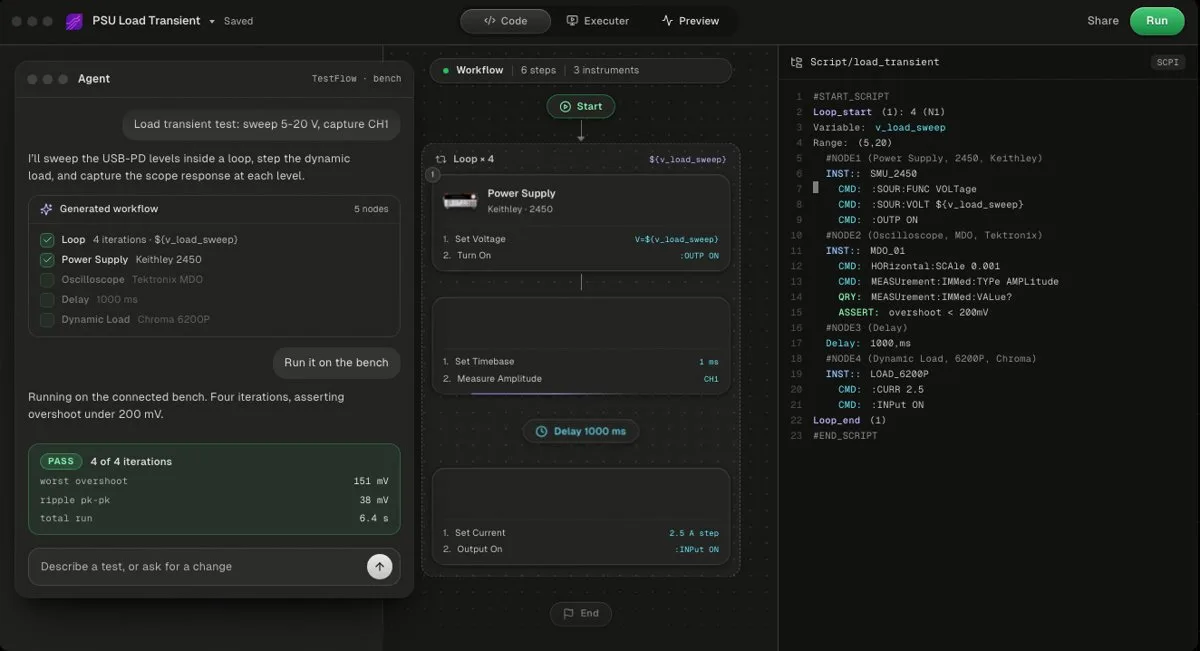
TestFlow (testflowinc.com) is an AI agent for electronics testing: describe the test in a sentence, and it builds a reviewable workflow with generated Python and the SCPI for your instrument models, runs it from a Windows desktop app, and writes the report from measured results. Free to start; Engineer is $39 a month. It does not drive DAQ cards.
Keysight sits in the instrument catalog next to Tektronix, Keithley, Rohde & Schwarz, Anritsu, Yokogawa, Siglent, Chroma, Kikusui, TDK-Lambda, Fluke, Copper Mountain, and Pickering. For most SCPI instruments outside the catalog, the agent finds the vendor's programming manual and drafts the command set. That is the difference from every Keysight option on this page: one workflow drives a Keysight supply, a Tektronix scope, and a Chroma load, as in this Keysight, Tektronix, and Chroma bench run.
The agent writes limits, never measurements, and it will not widen a limit to make a test pass, as the trust page documents. The report (charts, PASS/FAIL per reading, verdict) is built from the run's measured results and exports as PDF, Word, Excel, Markdown, JSON, or CSV. The generated code is a standalone Python package you own, shown in the code view, and a workflow can also export as a standalone EXE an operator runs.
Pricing, as of October 2026 on the pricing page: free to start with no card, Engineer $39 a month with 50 runs on real instruments, Lab $149 a month with unlimited runs.
Good for: mixed-vendor benches, and tests that need limits, a verdict, and a report on every run.
Gives up: bench runs need Windows 10 or 11 through the desktop app, with no macOS or Linux runs. No DAQ cards and no instruments that do not speak SCPI. Not yet a full test executive: no operator or user management and no database connectivity. Past the free version it costs money, where four Keysight options cost nothing.
Verdict: the pick when the bench is not all Keysight, or when the deliverable is a report rather than a CSV.
- Best for
- Teams that want automation without writing VIs or drivers
- Cost
- Free to start. Engineer $39 a month, Lab $149 a month
- Tradeoff
- Runs on your bench through the Windows desktop app
3. Keysight PathWave Test Automation (graphical OpenTAP editor)
PathWave Test Automation (KS8400B) is Keysight's graphical editor for building test plans on OpenTAP, the open-source test sequencer. The product page calls it a "graphical editor for creating test plans." OpenTAP itself is on GitHub under the Mozilla Public License 2.0.
Licence, as of October 2026: since version 9.29, the release notes offer a Community License, "fully featured and at no-cost," without Keysight support or warranty. It requires an OpenTAP forum account, an internet connection, and opting in to telemetry. Commercial licences have no public price, and a full-featured trial is available.
Platform: Windows and Linux, plus macOS on Apple Silicon, officially supported from version 9.34, dated July 1, 2026. No other option here runs on three desktop operating systems.
Code: a test plan built from existing test steps is assembled in the editor. Support for a new instrument means writing a plugin with the Python or .NET SDK, and Keysight does not market the product as no-code.
Good for: teams that want a real sequencer with an open core, on any desktop OS.
Gives up: the no-code property ends where the plugin library ends. Someone writes C# or Python for each new instrument. See OpenTAP vs TestStand and Keysight PathWave alternatives.
Verdict: Keysight's strongest free sequencer, if your team can write the occasional plugin.
4. Keysight MCP Server for Instrument Control (free beta)
Keysight MCP Server for Instrument Control is a free beta that lets an AI client turn a natural-language request into SCPI for Keysight instruments. The download page lists build 1.0.13, dated July 31, 2026, as a preview release with a no-cost, perpetual, floating licence. It runs on Windows 10 or 11, 64-bit, with IO Libraries Suite 2026 or newer.
The overview says it lets you describe what you want "instead of writing SCPI commands or scripts." Commands come from Keysight instrument definition files. The release notes list 18 tools, a mock mode, and reusable command sequences, and they put Linux under "Not in This Release." You bring the MCP client, for example Claude Code, Claude Desktop, or GitHub Copilot.
Coverage is the catch. The supported instruments page lists Infiniium scopes, X-Series signal analyzers and signal generators, PNA and ENA network analyzers, N6700, N6900, and N7900 power systems, B2900-family SMUs, Trueform generators, and the 34980A. As of October 2026 it does not list the E36300 supplies, the 34465A, or InfiniiVision 3000T scopes, and the DM34460A and DM34461A sit under "Coming Soon."
Good for: conversational control of high-end Keysight instruments from an AI client your team already uses.
Gives up: beta status, Windows only, and Keysight-validated models only. The release notes describe procedures and command sequences, not limits or a test report.
Verdict: worth installing if your instruments are on the list. See control lab instruments with ChatGPT and AI test automation for lab instruments for the wider field.
5. Keysight Command Expert (free, low-code)
Keysight Command Expert is free software that browses an instrument's command set, builds command sequences, and runs them from Excel, MATLAB, LabVIEW, Python, and other environments. The download page lists Command Expert 2025, build 1.13.10, released June 2, 2026, under a no-cost, perpetual, floating licence with no activation. It runs on Windows 10 and 11 and needs the Keysight IO Libraries Suite.
It is low-code rather than no-code. You write no program, and you still pick every SCPI command yourself. Keysight's command set list includes a "Generic SCPI-99 Instrument" entry, so non-Keysight SCPI instruments connect, with documentation only where Keysight ships a definition.
Good for: turning a known command list into an Excel-driven sequence in an afternoon.
Gives up: you need to know the commands, and nothing produces a verdict or a report.
Verdict: install it next to BenchVue regardless. See Keysight Command Expert alternatives.
6. PathWave Instrument RPA (record and playback, check status first)
PathWave Instrument RPA records and replays user-interface interactions on instruments that have a built-in screen. The product page says it automates "all user interface interactions via no-code, one-button record, and playback operation." The technical overview says it connects over Remote Desktop or VNC. It needs a licence, offers a 7-day trial, and runs on Windows 10, 64-bit.
Check status before buying. The latest download is version 1.33P, dated May 10, 2024. As of October 2026 the BV7001A Standard and BV7002A Advanced licences are marked discontinued, with "No replacement found for this product."
Good for: automating a Windows-based instrument's own GUI, where a measurement exists only as a front-panel workflow.
Gives up: screen recordings break when the GUI changes, and there has been no release since May 2024.
Verdict: a niche tool for front-panel-only features, not a test framework.
Comparison table: Keysight no-code test automation in 2026
The table below compares the six options on cost, vendor scope, code, reports, and platform, as of October 2026. No option wins every column.
| Option | Cost (as of October 2026) | Vendor scope | Needs code? | Reports | Runs on |
|---|---|---|---|---|---|
| BenchVue Test Flow | Free; instrument apps free Basic or licensed | Keysight apps; others by typed SCPI | No | Export to Excel, MATLAB, CSV, Word | Windows 10/11 |
| TestFlow | Free to start; Engineer $39/mo; Lab $149/mo | 13 catalog vendors, plus most SCPI instruments added from the manual | No | PASS/FAIL per reading, verdict; PDF, Word, Excel, Markdown, JSON, CSV | Windows desktop app for bench runs; web app builds and simulates |
| PathWave Test Automation | Free Community licence; commercial by quote | Any instrument with an OpenTAP plugin | Only for new plugins (C#, Python) | Results Viewer | Windows, Linux, macOS (Apple Silicon) |
| Keysight MCP Server | Free beta | Keysight validated models only | No, but needs an MCP client | Operation tracking, no test report | Windows 10/11 |
| Command Expert | Free | Keysight command sets; generic SCPI connects | You choose every SCPI command | None built in | Windows 10/11 |
| PathWave Instrument RPA | Licensed, no public price; 7-day trial | Instruments with a built-in GUI | No | None | Windows 10 |
Keysight VEE Pro is left off the list because it is graphical programming, not no-code. The VEE Pro page lists version 9.33, released September 8, 2023, licence required, with a 30-day evaluation.
Where Keysight's own tools win
Keysight's tools win on an all-Keysight bench, on price, and on native instrument knowledge. Pretending otherwise would waste your time.
- •Price. BenchVue Test Flow, Command Expert, the MCP server, and PathWave Test Automation under the Community licence cost nothing as of October 2026. TestFlow is free to start and $39 a month for 50 real-instrument runs.
- •Native drivers and definitions. Command Expert documents SCPI, IVI-C, IVI-COM, and IVI.NET commands for Keysight models. BenchVue's apps know each instrument's front panel. The MCP server builds commands from Keysight definition files.
- •Platform. PathWave Test Automation runs on Linux and macOS. TestFlow bench runs need Windows.
- •Vendor support. Licensed BenchVue apps include KeysightCare support. That matters in a regulated lab.
TestFlow wins elsewhere: a bench where the supply, scope, and load come from different vendors, a test described in a sentence instead of assembled block by block, and a report with a verdict per reading on every run. The no-code test automation guide compares the same trade-off across vendors, and the Tektronix version of this page covers KickStart and TSP Toolkit.
Worked example: one sentence, three Keysight instruments
A regulator check on three Keysight instruments shows what "without coding" has to produce: a configured supply, DMM, and scope, a measured result, and a limit verdict. The bench:
| Instrument | Role | Setting used |
|---|---|---|
| Keysight E36313A triple-output supply | Powers the DUT from CH1 | CH1 is 0 to 6 V and 0 to 10 A; CH2 and CH3 are 0 to 25 V and 0 to 2 A; 160 W total |
| Keysight 34465A 6½-digit DMM | Measures the 3.3 V output | 10 V range, 10 NPLC, 10 samples |
| Keysight DSOX3034T (InfiniiVision 3000T) | Measures output ripple | Channel 1, 10:1 probe, AC-coupled, 20 mV/div, 2 µs/div |
The DUT is a 5 V to 3.3 V buck regulator board. The whole test, as you would tell a colleague:
> Power the board from CH1 of the E36313A at 5 V with a 0.5 A limit, wait 200 ms, average ten 10-NPLC readings of the 3.3 V output on the 34465A, measure peak-to-peak ripple on scope channel 1 AC-coupled, and fail if the output is outside 3.25 to 3.35 V or the ripple is above 50 mV.
The workflow TestFlow builds from that sentence
A workflow for this sentence breaks into reviewable steps like these, each mapped to commands for the exact model:
| # | Step | Instrument | Commands |
|---|---|---|---|
| 1 | Identify and reset | All three | *IDN?, *RST, *CLS |
| 2 | Configure CH1 | E36313A | VOLT 5,(@1), CURR 0.5,(@1), CURR:PROT:STAT ON,(@1) |
| 3 | Configure DC volts | 34465A | CONF:VOLT:DC 10, VOLT:DC:NPLC 10, SAMP:COUN 10, CALC:AVER:STAT ON |
| 4 | Configure ripple capture | 3000T | :CHANnel1:PROBe 10, :CHANnel1:COUPling AC, :CHANnel1:SCALe 0.02, :TIMebase:SCALe 2E-6 |
| 5 | Output on, settle 200 ms | E36313A | OUTP ON,(@1) |
| 6 | Measure output | 34465A | INIT, *WAI, CALC:AVER:AVER? |
| 7 | Measure ripple | 3000T | :DIGitize CHANnel1, :MEASure:VPP? CHANnel1 |
| 8 | Log input power | E36313A | MEAS:VOLT? (@1), MEAS:CURR? (@1) |
| 9 | Output off, check errors | All three | OUTP OFF,(@1), SYST:ERR? |
| 10 | Verdict and report | TestFlow | 3.25 V to 3.35 V and 50 mV limits from the sentence |
The SCPI, checked against Keysight's programming guides
Every command below was checked against the E36300 Series Programming Guide (Edition 12, June 2025), the Truevolt Series Operating and Service Guide (Edition 13), and the InfiniiVision 3000T X-Series Programmer's Guide (version 07.66). For more per-model detail, see E36313A programming and 34465A SCPI commands.
E36313A, channel 1:
*RST
*CLS
VOLT 5,(@1)
CURR 0.5,(@1)
CURR:PROT:STAT ON,(@1)
OUTP ON,(@1)
MEAS:VOLT? (@1)
MEAS:CURR? (@1)
OUTP OFF,(@1)
SYST:ERR?
34465A, ten averaged readings on the 10 V range:
*RST
CONF:VOLT:DC 10
VOLT:DC:NPLC 10
SAMP:COUN 10
CALC:AVER:STAT ON
INIT
*WAI
CALC:AVER:AVER?
CALC:AVER:PTP?
SYST:ERR?
DSOX3034T, AC-coupled ripple on channel 1:
*RST
:CHANnel1:PROBe 10
:CHANnel1:COUPling AC
:CHANnel1:SCALe 0.02
:TIMebase:SCALe 2E-6
:TRIGger:MODE EDGE
:TRIGger:EDGE:SOURce CHANnel1
:TRIGger:EDGE:LEVel 0
:DIGitize CHANnel1
:MEASure:VPP? CHANnel1
:SYSTem:ERRor?
Six details the guides warn about
- 1
E36313A over-current protection has no separate threshold. The
CURRsetpoint is the trip level: protection trips when CH1 stays in constant current longer than the protection delay, 50 ms after*RST, and the output turns off. - 2
Put a space before a channel list in a query.
MEAS:VOLT?(@1)raises error -103.MEAS:VOLT? (@1)works. - 3
`CONF` resets trigger and sample settings on the 34465A. Send
VOLT:DC:NPLCandSAMP:COUNafterCONF, never before. Ten readings at 10 NPLC take seconds, so raise the VISA timeout above PyVISA's 2 second default. - 4
Set the scope's probe factor before the scale. Changing
PROBeafterwards rescales the channel. - 5
A failed scope measurement returns 9.9E+37. It means the waveform part the measurement needs is not on screen. Treat it as an error, never as a reading.
- 6
Read every query response before sending the next command. Otherwise the 3000T reports a Query INTERRUPTED error.
The same test as a PyVISA script
Written by hand, the same test is about 55 lines of PyVISA. It runs as-is once the three VISA addresses match your bench:
import time
import pyvisa

rm = pyvisa.ResourceManager()
psu = rm.open_resource("TCPIP0::192.168.1.10::inst0::INSTR")    # E36313A
dmm = rm.open_resource("TCPIP0::192.168.1.11::inst0::INSTR")    # 34465A
scope = rm.open_resource("TCPIP0::192.168.1.12::inst0::INSTR")  # DSOX3034T
dmm.timeout = 20000
scope.timeout = 10000

for inst in (psu, dmm, scope):
    print(inst.query("*IDN?").strip())
    inst.write("*RST")
    inst.write("*CLS")

psu.write("VOLT 5,(@1)")
psu.write("CURR 0.5,(@1)")
psu.write("CURR:PROT:STAT ON,(@1)")

dmm.write("CONF:VOLT:DC 10")
dmm.write("VOLT:DC:NPLC 10")
dmm.write("SAMP:COUN 10")
dmm.write("CALC:AVER:STAT ON")

scope.write(":CHANnel1:PROBe 10")
scope.write(":CHANnel1:COUPling AC")
scope.write(":CHANnel1:SCALe 0.02")
scope.write(":TIMebase:SCALe 2E-6")
scope.write(":TRIGger:MODE EDGE")
scope.write(":TRIGger:EDGE:SOURce CHANnel1")
scope.write(":TRIGger:EDGE:LEVel 0")

psu.write("OUTP ON,(@1)")
try:
    time.sleep(0.2)
    dmm.write("INIT")
    dmm.write("*WAI")
    vout = float(dmm.query("CALC:AVER:AVER?"))
    spread = float(dmm.query("CALC:AVER:PTP?"))
    scope.write(":DIGitize CHANnel1")
    ripple = float(scope.query(":MEASure:VPP? CHANnel1"))
    vin = float(psu.query("MEAS:VOLT? (@1)"))
    iin = float(psu.query("MEAS:CURR? (@1)"))
finally:
    psu.write("OUTP OFF,(@1)")

errors = [psu.query("SYST:ERR?"), dmm.query("SYST:ERR?"), scope.query(":SYSTem:ERRor?")]
if ripple > 9e37:
    raise RuntimeError("Scope could not measure ripple: check scale and timebase")

vout_ok = 3.25 <= vout <= 3.35
ripple_ok = ripple <= 0.050
print(f"Input   {vin:.3f} V  {iin * 1000:.1f} mA")
print(f"Output  {vout:.4f} V (spread {spread * 1000:.2f} mV)  {'PASS' if vout_ok else 'FAIL'}")
print(f"Ripple  {ripple * 1000:.1f} mV pk-pk  {'PASS' if ripple_ok else 'FAIL'}")
print("Errors ", [e.strip() for e in errors])
The script is the easy part to write and the hard part to own. Every new board needs edits, every engineer formats the output differently, and the report still lives in someone's spreadsheet. That gap is what the automated test report generation guide covers, and it is why the ranked list above weighs reports so heavily. The SCPI command cheat sheet collects these patterns for other instrument classes.
How to choose in one afternoon
Pick by the bench you have today, not the bench you might have next year.
| Your bench | Start with |
|---|---|
| All Keysight, simple sequences, Excel output is fine | BenchVue Test Flow |
| All Keysight, real sequencing, team can write a plugin | PathWave Test Automation (Community licence) |
| High-end Keysight instruments on the MCP list, interactive work | Keysight MCP Server |
| A known command list you want to run from a spreadsheet | Command Expert |
| A feature that only exists on an instrument's own GUI | PathWave Instrument RPA, if a licence is still available |
| Mixed vendors, or a report and verdict on every run | TestFlow |
If a test sits on the line, run it both ways. The 10 video tutorials show TestFlow on real benches, and the supported instruments page lists catalog models. Teams leaving NI tools for the same reasons should also read NI TestStand alternatives.
Related reading
- •BenchVue Test Flow vs TestFlow, two products with similar names
- •Keysight BenchVue alternatives, when BenchVue stops fitting
- •Keysight PathWave alternatives, the sequencer decision
- •Keysight Command Expert alternatives, SCPI discovery tools
- •Automate a Keysight power supply with Python, the code route
- •Automate power supply testing, the same job across vendors
- •Automate oscilloscope measurements, ripple, rise time, and frequency
- •Automate Tektronix instruments without coding, KickStart and TSP Toolkit
- •Setting limits in TestFlow, how limits become a verdict
- •How TestFlow works, the four stages
Where TestFlow fits
Every Keysight option on this page is free or cheap on Keysight hardware. TestFlow is for the bench where the supply, the scope, and the SMU come from different vendors and every run needs a verdict.
- 1
Connect your instruments. Pick the manufacturer and model, paste the VISA address (USB, LAN, GPIB, or serial), and the agent knows what is on your bench. No bench yet? Use a placeholder address, build the full automation, and swap in the real address when you are in the lab.
- 2
Tell the agent what to test. For example, "run a VI sweep from 1 to 10 V in 1 V steps at 0.5 A load current," or "suggest the tests for a power-management device."
- 3
The agent builds the complete workflow in seconds. Instrument-aware automation appears on the canvas, with the generated scripts visible in a code panel you can inspect and edit.
- 4
Run it in your lab. Click Run in the TestFlow desktop app for Windows and the status panel streams results step by step, with measured values inline (VOUT = 3.301 V, asserted 3.2 to 3.4 V, PASS). One click exports a structured PDF report, or the raw results as CSV.

- Vendor-neutral by design. One workflow drives Keysight, Tektronix, Rohde & Schwarz, Rigol, Keithley, Anritsu, and any other SCPI instrument over standard VISA.
- Built in the browser, run on the bench. Workflows live in your workspace, so a sequence built in one lab runs the same way in another. Bench runs use the Windows desktop app.
- Free version to start. Sign in at app.testflowinc.com and build your first workflow today; plans and quotes are on the pricing page.

The step-by-step walkthrough, VISA address formats, and Test Planner prompts are all in the TestFlow product guide.
Frequently asked questions
Can you automate Keysight instruments without coding?
Yes. Keysight's free BenchVue Test Flow app builds drag-and-drop sequences with loops, delays, prompts, and simple if-then conditions, and exports to Excel, MATLAB, CSV, or Word. PathWave Test Automation, the Keysight MCP server, Command Expert, and TestFlow cover longer tests, natural-language control, and mixed-vendor benches.
Is BenchVue Test Flow free?
Yes, as of October 2026. Keysight lists Test Flow among the BenchVue apps that are free with no licensed version, and the BenchVue platform itself needs no licence. The instrument apps come as free Basic versions or as licensed versions, perpetual or on 3 to 36 month subscriptions.
Can TestFlow automate Keysight instruments without code?
Yes. Keysight is in the TestFlow instrument catalog. Describe the test in a sentence, for example a 5 V rail on an E36313A checked by a 34465A and a 3000T scope, and the agent builds the workflow and the SCPI, runs it from the Windows desktop app, and writes the report from the measured results.
What is the Keysight MCP server?
Keysight MCP Server for Instrument Control is a free beta that lets an MCP client such as Claude Code, Claude Desktop, or GitHub Copilot turn natural-language requests into SCPI for validated Keysight instruments. It runs on Windows 10 or 11, and as of October 2026 its list does not include the E36300 supplies, the 34465A, or InfiniiVision 3000T scopes.
What is the best BenchVue Test Flow alternative?
For a Keysight-only bench that needs a real sequencer, PathWave Test Automation, which is free under its Community licence. For a mixed-vendor bench, or when every run needs limits, PASS/FAIL per reading, and a report, TestFlow.
Automate every instrument in the lab,
Create test workflows in minutes
- 01Describe the testIn a sentence, the way you would tell a colleague.
- 02The agent builds itWorkflow and script for your instruments, any vendor.
- 03Run it, get the reportOn your bench, with the measured values.
Tags
Your next test, automated today
Describe the test. TestFlow builds the workflow, runs it on your instruments, and writes the report. Free to start, no card needed.