 Ali Kamaly
Best AI Tools for Test Engineers in 2026 (Hardware and Lab)
Eight AI tools a hardware test engineer can use today, verified against each vendor's own page, ranked, priced, and grouped by the four jobs of the work: writing test code, driving instruments, analysing results, and writing reports.
The best AI tools for test engineers in 2026 are Claude and ChatGPT for reading manuals and drafting code, TestFlow (testflowinc.com) for running a described test on a real bench and reporting it, GitHub Copilot for test code in the editor, NI Nigel AI inside LabVIEW and TestStand, vendor MCP servers from Keysight and Rohde & Schwarz, the open-source LabMCP servers, and TofuPilot for production test data. No single tool covers every job, so this guide ranks them and then groups them by the four jobs of the work.
The four jobs are writing test code, driving instruments, analysing results, and writing reports. Every product fact below was checked on the vendor's own page in October 2026 and is linked inline. Prices are as of October 2026.
Disclosure: this guide is written by the team behind TestFlow, which appears as one of the options. We list its tradeoffs the same way as everyone else's.
The 8 best AI tools for test engineers, ranked
The ranking weighs how much of a hardware test engineer's week each tool covers, then how safely it handles the bench, then price.
1. Claude and ChatGPT
Claude and ChatGPT are general-purpose language models, and they are the AI tools most test engineers already use. They read a programming guide faster than anyone, including the 195 pages of Keysight's E36300 Series guide, explain an error code, draft PyVISA and SCPI, and turn a datasheet table into a test plan outline. ChatGPT Plus and Claude Pro are each $20 a month, both have free plans, and Claude Pro includes Claude Code.
Gives up: neither touches the bench on its own, and both invent plausible commands and numbers. The failure modes and a correct script are in controlling lab instruments with ChatGPT or Claude.

2. TestFlow
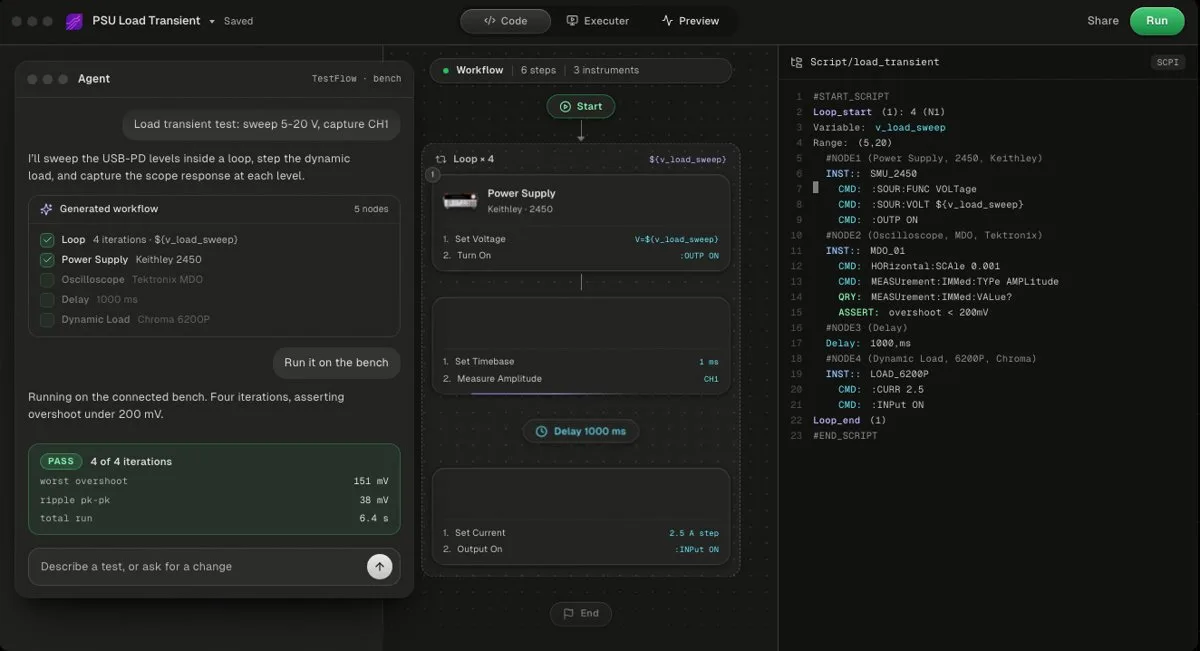
TestFlow is an AI agent for electronics testing that covers the four jobs on one bench: you describe the test, the agent builds the workflow and Python, the Windows desktop app runs it on your instruments, and the report comes from measured results. Free to start, Engineer $39 a month. No DAQ cards, and not a full test executive.
It is vendor-neutral over VISA and SCPI, with a catalog of Keysight, Tektronix, Keithley, Rohde & Schwarz, Anritsu, Yokogawa, Siglent, Chroma, Kikusui, TDK-Lambda, Fluke, Copper Mountain, and Pickering instruments, and the agent adds most other SCPI instruments from the vendor's programming manual. The agent writes limits, never measurements, and will not widen a limit to make a test pass, per the trust page. Lab is $149 a month with unlimited runs, per the pricing page.
Gives up: bench runs are Windows only, with no operator or user management and no database connectivity yet.
- Best for
- Teams that want automation without writing VIs or drivers
- Cost
- Free to start. Engineer $39 a month, Lab $149 a month
- Tradeoff
- Runs on your bench through the Windows desktop app
3. GitHub Copilot
GitHub Copilot is an AI coding assistant inside the editor, and it is the fastest way to write the Python around the instrument calls: fixtures, parsers, retry logic, and tests of the test. The plans page lists Free at $0, Pro at $10 a month, and Pro+ at $39 a month. Keysight's MCP server documentation also names GitHub Copilot as a client it was tested with.
Gives up: it knows Python well and your instrument's command tree poorly.
4. NI Nigel AI
NI Nigel AI is the assistant inside NI's software. Per NI's Nigel page, in LabVIEW 2026 Q3 it creates VIs from a prompt, focused on measurement code for connected hardware, and in TestStand 2026 Q3 it creates sequences from a specification document. It needs a valid NI licence and an active service agreement, runs on Microsoft Azure, and has per-user usage limits.
Gives up: it is only useful inside an NI licence. If that licence is the problem, see LabVIEW alternatives.
5. Keysight MCP Server for Instrument Control
Keysight MCP Server for Instrument Control lets an AI client drive Keysight instruments, with engineer approval of every command sequence. The product page lists it as free, beta build 1.0.13 from 2026-07-31, for Windows 10 or 11.
Gives up: Keysight instruments only, and no test report.
6. Rohde & Schwarz MXO AI Connect
Rohde & Schwarz MXO AI Connect is free MCP software for MXO 3, 4, 5, and 5C oscilloscopes, on Windows or macOS, per its product page. The RsInstrument Python module adds an MCP server for other R&S instruments under an MIT licence.
Gives up: one scope family, and approval before an action depends on your AI client.
7. LabMCP by K-Dense
LabMCP is an open-source set of 32 MCP servers with 411 tools under Apache 2.0, including a Keithley 2400-series SMU, Rigol, Siglent, and Aim-TTi supplies, Rigol oscilloscopes, and a generic SCPI server with allow and deny lists, read-only mode, and limits.
Gives up: every connector is marked simulated in the README, not yet confirmed on real hardware by a user.
8. TofuPilot
TofuPilot is a test data platform for hardware production, and its AI feature investigates yield and drift alerts with hypotheses, evidence, and a next check. The homepage says AI features are in preview. The pricing page lists a free Lab plan, Pro at $50 per user or station a month, and custom Enterprise pricing.
Gives up: it analyses results from tests you already run. It does not write or run the test.
The tools by job
Grouping the eight tools by job shows where each one fits and where two of them overlap.
| Tool | Writing test code | Driving instruments | Analysing results | Writing reports | Price (Oct 2026) |
|---|---|---|---|---|---|
| Claude, ChatGPT | Yes | No, not directly | Writes analysis code | Drafts text, not numbers | Free, or $20 a month |
| TestFlow | Generated Python | Yes, any SCPI vendor, Windows | Limits and PASS/FAIL per reading | Yes, from measured results | Free to start, $39 or $149 a month |
| GitHub Copilot | Yes | MCP client only | Writes analysis code | No | Free, $10 or $39 a month |
| NI Nigel AI | VIs and sequences | Through NI software | Not a stated feature | Not a stated feature | Needs NI licence and service |
| Keysight MCP Server | No | Keysight only | No | No | Free, beta |
| R&S MXO AI Connect | Helps turn a session into Python | MXO scopes | No | No | Free |
| LabMCP | No | 32 connectors, simulated | No | No | Free, Apache 2.0 |
| TofuPilot | No | No | Yes, AI investigations in preview | Not a stated feature | Free Lab, Pro $50 per user or station |
TestFlow is the only row with a yes in all four job columns, and it is not the best tool in every column. TofuPilot goes further on production data across many stations, and Copilot is better for the hand-written code around a test.
Job 1: writing test code
Writing test code is where AI tools save the most time today, because drafting PyVISA, SCPI, and LabVIEW from a programming guide is exactly what language models do well. The engineer's job shifts from typing commands to checking them.
Three habits make AI-drafted test code safe to run:
- •Give the model the exact model number and the manual pages. A command tree differs between a Keysight E36311A and an E36313A, and between any two vendors.
- •Ask for the error queue. Every configuration block should end with a
SYST:ERR?loop, because SCPI instruments queue errors silently instead of raising them. - •Ask for a `finally` block that turns outputs off. The most expensive bug in bench automation is a supply left on after an exception.
The same applies to on-instrument scripting. Tektronix published a technical brief on using AI agents with its TSP Toolkit for VS Code to generate multichannel scripts for a Keithley DAQ6510. For the Python libraries the code is built on, see Python instrument control libraries compared and the PyVISA tutorial.
Job 2: driving instruments
Driving instruments is the job where AI tools carry real risk, because a wrong command reaches a powered device. The tools split into MCP servers, where the model sends each command during a conversation, and agents, where the model builds a workflow that a runtime then executes.
| Guard | Keysight MCP | MXO AI Connect | LabMCP | TestFlow |
|---|---|---|---|---|
| Commands checked before sending | Only from definition files, previewed | Not described | Against your configured limits | Reviewable workflow, agent cannot widen a test limit |
| Record of what happened | Full session history | Not described | Log of every command | Report built only from run results |
| Instruments | Keysight | MXO scopes | 32 connectors | Most SCPI instruments |
TestFlow's edge is what happens after the commands: a test with limits that runs again the same way, and a report whose numbers come from the run. The full comparison is in AI test automation for lab instruments, and the SCPI safety checklist is in controlling lab instruments with ChatGPT or Claude.
Job 3: analysing results
Analysing results with AI works best when the AI writes the analysis code and the code computes the numbers. A language model asked for a standard deviation of 400 readings pasted into a chat can return a plausible wrong value. Code that computes it is checkable and gives the same answer every time.
A Cpk and pass-rate summary that any of the coding assistants above will draft, and that you can check line by line:
import pandas as pd

# One row per reading: serial, test, value, low, high
runs = pd.read_csv("rail_3v3_results.csv")
runs["passed"] = runs["value"].between(runs["low"], runs["high"])

summary = runs.groupby("test").agg(
    n=("value", "size"),
    mean=("value", "mean"),
    std=("value", "std"),
    low=("low", "first"),
    high=("high", "first"),
    pass_rate=("passed", "mean"),
)
margin = pd.concat(
    [summary["high"] - summary["mean"], summary["mean"] - summary["low"]], axis=1
).min(axis=1)
summary["cpk"] = margin / (3 * summary["std"])
print(summary.round(4))
Cpk is the distance from the mean to the nearer limit, divided by three standard deviations, so a Cpk of 1.33 means the nearer limit sits four standard deviations away. For production data across many stations, TofuPilot's AI investigations, in preview as of October 2026, look for the cause of a yield or drift alert. On a single bench, TestFlow compares each reading against its limit as the values stream and marks PASS or FAIL per reading in the run results.
Job 4: writing reports
Writing reports is the job where a general language model is most dangerous, because a report is the one document where an invented number gets signed. The rule that makes AI-written reports safe is provenance: every measured value, bound, and verdict must come from the run's results file, never from the model.
General LLMs are useful for the words around the numbers: the purpose, the setup description, the deviation notes. They should never be the source of a measurement. The safe pattern is a template filled by code from the results file, covered in automated test report generation.
TestFlow builds the report from the run's measured results, with charts, PASS or FAIL per reading, and a verdict, and exports PDF, Word, Excel, Markdown, JSON, or CSV. Before the test exists, it can also draft a structured validation plan with a coverage matrix and one page per test, exported to Word, shown in the test planner guide.
What AI tools still cannot do for test engineers
AI tools for test engineers still leave four areas to people and to conventional tools as of October 2026.
- •DAQ cards. TestFlow has no DAQ card support, and LabMCP's NI-DAQmx connector is marked simulated like the other 31. For DAQ work, see data acquisition with Python.
- •Hard real-time and HIL. None of the eight AI tools adds deterministic timing, so real-time work stays on dedicated platforms. See HIL testing software compared.
- •Production test executives. User management, operator roles, and results databases still belong to TestStand and its peers. See test sequencer comparison and NI TestStand alternatives.
- •Setting the limits. An AI can carry a limit from a datasheet into a test. Deciding what the limit should be is the spec owner's call.
Which AI tool to start with
The right first AI tool depends on what the team already pays for and which job is slowest.
- •One engineer, Python, any bench: Claude Pro or ChatGPT Plus at $20 a month, plus the checklist above.
- •An NI shop with a service agreement: Nigel AI, which is already included.
- •An all-Keysight bench: Keysight MCP Server, free.
- •A mixed-vendor bench where the report is the deliverable: TestFlow, free to start, then $39 a month.
- •Production lines with yield questions: TofuPilot, free Lab plan, then $50 per user or station a month.
To see an agent on a real bench first, the video tutorials include a Keithley SMU run with no code and a Keysight, Tektronix, and Chroma bench testing a TI device. The supported instruments list shows what TestFlow drives today.
Related reading
Where TestFlow fits
The tools on this page each speed up a slice of test work. The slowest part for most teams is the handoff between slices, from the code to the run to the report.
- 1
Connect your instruments. Pick the manufacturer and model, paste the VISA address (USB, LAN, GPIB, or serial), and the agent knows what is on your bench. No bench yet? Use a placeholder address, build the full automation, and swap in the real address when you are in the lab.
- 2
Tell the agent what to test. For example, "run a VI sweep from 1 to 10 V in 1 V steps at 0.5 A load current," or "suggest the tests for a power-management device."
- 3
The agent builds the complete workflow in seconds. Instrument-aware automation appears on the canvas, with the generated scripts visible in a code panel you can inspect and edit.
- 4
Run it in your lab. Click Run in the TestFlow desktop app for Windows and the status panel streams results step by step, with measured values inline (VOUT = 3.301 V, asserted 3.2 to 3.4 V, PASS). One click exports a structured PDF report, or the raw results as CSV.

- Vendor-neutral by design. One workflow drives Keysight, Tektronix, Rohde & Schwarz, Rigol, Keithley, Anritsu, and any other SCPI instrument over standard VISA.
- Built in the browser, run on the bench. Workflows live in your workspace, so a sequence built in one lab runs the same way in another. Bench runs use the Windows desktop app.
- Free version to start. Sign in at app.testflowinc.com and build your first workflow today; plans and quotes are on the pricing page.

The step-by-step walkthrough, VISA address formats, and Test Planner prompts are all in the TestFlow product guide.
Frequently asked questions
What are the best AI tools for test engineers?
By job: Claude or ChatGPT for reading manuals and drafting code, GitHub Copilot for test code in the editor, NI Nigel AI inside LabVIEW and TestStand, Keysight and R&S MCP servers for driving their instruments, TofuPilot for production test data, and TestFlow to build, run, and report a test on a mixed-vendor bench.
Can AI write test code for hardware?
Yes, with checking. ChatGPT, Claude, and GitHub Copilot draft PyVISA and SCPI quickly, but they borrow commands from other models and vendors. Read every command against the instrument's programming guide and drain SYST:ERR? after each configuration block.
Does TestFlow write test reports from real measurements?
Yes. TestFlow builds the report, with charts, PASS or FAIL per reading, and a verdict, from the run's measured results, and exports it as PDF, Word, Excel, Markdown, JSON, or CSV. The agent writes limits, never measurements, and cannot claim a PASS without a run.
Should I let ChatGPT analyse my test data?
Let it write the analysis code, then run that code on the data yourself. A language model asked for a mean or a Cpk directly can return a plausible wrong number, while code that computes it is checkable and repeatable.
Are there free AI tools for electronics testing?
Yes. Keysight MCP Server for Instrument Control and R&S MXO AI Connect are free for their own instruments, LabMCP is open source, GitHub Copilot and Claude have free plans, TofuPilot has a free Lab plan, and TestFlow is free to start.
Automate every instrument in the lab,
Create test workflows in minutes
- 01Describe the testIn a sentence, the way you would tell a colleague.
- 02The agent builds itWorkflow and script for your instruments, any vendor.
- 03Run it, get the reportOn your bench, with the measured values.
Tags
Your next test, automated today
Describe the test. TestFlow builds the workflow, runs it on your instruments, and writes the report. Free to start, no card needed.