 Ali Kamaly
Automate Tektronix Instruments Without Coding in 2026 (6 Options)
Keithley KickStart, TSP Toolkit, TekScope PC, OpenChoice Desktop, TekDrive, and TestFlow, checked on tek.com in October 2026, with real prices and a worked Keithley 2450 I-V sweep plus a Tektronix MSO measurement.
To automate Tektronix and Keithley instruments without coding in 2026, start with Keithley KickStart, the no-code app suite Tektronix sells for its own SMUs, DMMs, power supplies, AFGs, and oscilloscopes, and use TestFlow (testflowinc.com) when the bench mixes vendors or each run needs limits and a report. Keithley is part of Tektronix, so one software list covers both brands. TSP Toolkit, TekScope PC, OpenChoice Desktop, and TekDrive fill narrower jobs: scripting, waveform analysis, screen and waveform capture, and file transfer.
This page ranks all six for an engineer choosing a tool this week. Every Tektronix fact was checked on tek.com or Tektronix's own GitHub in October 2026 and is linked inline, prices included. The worked example at the end turns one sentence into a Keithley 2450 I-V sweep plus a Tektronix MSO oscillator check, with SCPI and TSP taken from the instrument manuals.
Disclosure: this guide is written by the team behind TestFlow, which appears as one of the options. We list its tradeoffs the same way as everyone else's.
How the six options were ranked
The ranking weighs how much of a complete bench test each tool covers without code: setup, sequence, measurement, limits, and a report. Licence cost and vendor scope break ties.
KickStart is the one product Tektronix markets as no-code bench automation. Tek's test automation page says "With KickStart's no-code automation, you can easily control supported oscilloscopes, AFGs, power supplies," and the rest of the list is scripting, analysis, capture, or storage. Those still matter, because they are what engineers reach for when KickStart runs out.
The 6 options, ranked
1. Keithley KickStart (no-code apps, Tektronix and Keithley only)
Keithley KickStart is Windows software that sets up tests, collects data, and plots it across up to eight Tektronix and Keithley instruments without programming. The KickStart product page describes "fast test setup, automated data collection, and intuitive visualization," and the download page lists version 2.11.5, released May 20, 2026.
KickStart is sold per app. Prices on tek.com, as of October 2026:
| KickStart app | Annual floating subscription | Permanent node-locked |
|---|---|---|
| Suite (AFG, I-V Characterizer, Scope, Data Logger, DMM, Power Supply) | $610 | $2,310 |
| I-V Characterizer | $256 | $846 |
| Scope | $173 | $568 |
| DMM | $212 | $650 |
| Data Logger | $212 | $650 |
| Power Supply | $212 | $643 |
| AFG | $151 | $506 |
| Battery Simulator | $457 | $1,520 |
| High Resistivity | $421 | $1,560 |
The separate I-V Tracer app is sold permanent only, from $2,430 to $8,090. The product page offers a 30-day trial with no payment method. The KickStart datasheet adds three details worth knowing before you buy:
- •Without a licence, KickStart can still create tests and view, manipulate, and export data. Controlling an instrument needs a licence.
- •When a subscription expires, all features stop working.
- •Tests can be configured on simulated instruments and moved to real ones when they arrive.
The datasheet lists automatic export to .csv and .xlsx, pass/fail limits per channel in the Data Logger app, and a Scope app for TBS1000 and TBS2000, the 2 Series MSO, 3 Series MDO, 4 and 5 Series MSO, 6 Series B MSO, MDO, MSO, and DPO 3000 and 4000, and TDS1000 and TDS2000 scopes. It connects over USB, GPIB, and LAN, and the 2.11.5 release notes say RS-232 is not supported.
Good for: a Keithley SMU or DMM that needs an I-V curve or a data log this afternoon, with no script.
Gives up: other vendors. Every supported model listed is Tektronix or Keithley, so a Keysight supply or a Rigol scope on the same bench falls outside it. Each instrument class is a paid app, and output is data files rather than a report with a verdict per reading.
Verdict: the default for an all-Tektronix and Keithley bench. The I-V Characterizer alone is $256 a year, which is hard to beat for one instrument.

2. TestFlow
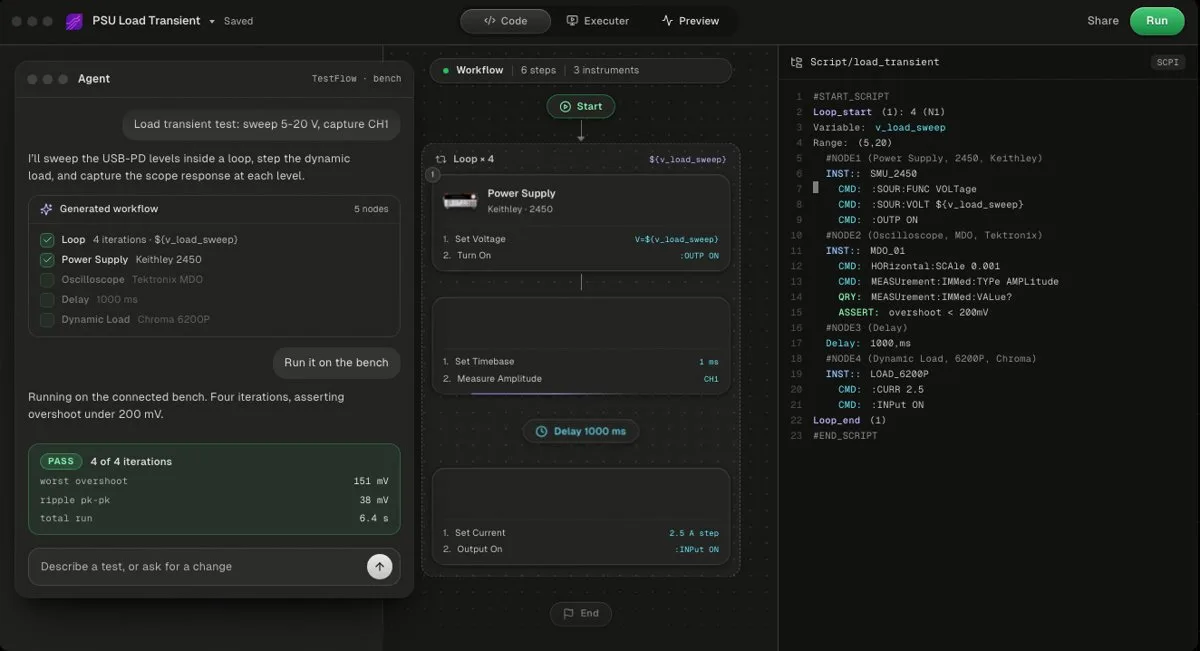
TestFlow (testflowinc.com) is an AI agent for electronics testing: describe the test in a sentence, and it builds a reviewable workflow with generated Python and SCPI for your Tektronix and Keithley models, runs it from a Windows desktop app, and writes the report from measured results. Free to start; Engineer is $39 a month. It does not drive DAQ cards.
Tektronix and Keithley sit in the instrument catalog with Keysight, Rohde & Schwarz, Anritsu, Yokogawa, Siglent, Chroma, Kikusui, TDK-Lambda, Fluke, Copper Mountain, and Pickering. For most SCPI instruments outside the catalog, the agent finds the vendor's programming manual and drafts the command set, which is how Rigol and other SCPI instruments get added. Watch a real Keithley SMU run with no code to see the flow end to end.
The agent writes limits, never measurements, and it will not widen a limit to make a test pass, as the trust page documents. The report (charts, PASS/FAIL per reading, verdict) is built from the run's measured results and exports as PDF, Word, Excel, Markdown, JSON, or CSV. The generated code is a standalone Python package you own, shown in the code view.
Pricing, as of October 2026 on the pricing page: free to start with no card, Engineer $39 a month with 50 runs on real instruments, Lab $149 a month with unlimited runs.
Good for: benches that mix Tektronix and Keithley with other vendors, and tests that need limits, a verdict, and a report on every run.
Gives up: bench runs need Windows 10 or 11 through the desktop app, with no macOS or Linux runs. No DAQ cards and no instruments that do not speak SCPI. Not yet a full test executive: no operator or user management and no database connectivity. For a single Keithley SMU, KickStart's $256 a year undercuts the $39 monthly Engineer plan.
Verdict: the pick when the bench is not all Tektronix, or when the deliverable is a report rather than a spreadsheet.
- Best for
- Teams that want automation without writing VIs or drivers
- Cost
- Free to start. Engineer $39 a month, Lab $149 a month
- Tradeoff
- Runs on your bench through the Windows desktop app
3. Keithley TSP Toolkit for VS Code (free, code-first)
TSP Toolkit is a free, open-source Visual Studio Code extension from Tektronix for writing, running, and debugging TSP scripts on Keithley instruments. The TSP Toolkit page lists "real-time error checking, intelligent autocompletion, inline help, an on-instrument debugger." The source is on GitHub under Apache-2.0, and version 1.5.2 shipped on September 23, 2026. Install it from the VS Code Marketplace.
It replaces Keithley's old editor. The Test Script Builder page reads "End of production: Test Script Builder has been replaced with the TSP Toolkit extension."
TSP is Keithley's Lua-based instrument language, and scripts run on the instrument itself. The supported list covers the 2400 Graphical Series SMUs such as the 2450, the 2600B and 2650 Series, the DMM6500, DMM7510, DAQ6510, 3700A, and the MP5000 modular system.
The no-code part is narrow. Automated TSP Script Generation, in beta, lets you enter test parameters in a form and generate a TSP script in one click, and Tek states it "is compatible with the MP5000 Series Modular Precision Test System SMUs and PSUs." On a 2450, you write the script.
Tek's own May 2026 technical brief on AI agents shows general-purpose coding agents writing TSP inside VS Code, and reports that the first script an agent generated for a DAQ6510 produced an error when it ran. AI-written scripts still need someone who reads TSP.
Good for: engineers who will write TSP, scripts that run on the instrument without a PC, and multi-instrument TSP-Link setups.
Gives up: it is a code editor. Outside the MP5000 generator, every test is a script.
Verdict: the best free tool for Keithley scripting, and the honest answer for anyone willing to learn TSP.
4. TekScope PC Analysis Software (free Basic, analysis-first)
TekScope PC is Tektronix's waveform viewing and analysis software, with a free Basic licence that can connect to one remote oscilloscope. The TekScope page lists the Basic licence with waveform viewing and analysis, cursors, zoom, "Remote connection to single scope," and a "Programmable interface for automation."
Paid tiers, as of October 2026: Starter at $424 for one year, $1,030 for three years, or $666 permanent; the Pro bundles at about $850 a year or $1,330 permanent; Ultimate at $1,070 a year, $2,670 for three years, or $1,720 permanent, which adds multi-scope analysis. Every paid tier has a 30-day trial with no payment method.
Good for: measurements and serial decode on saved or live Tektronix waveforms without touching the scope. The TekScope datasheet lists imports from .bin and .trc files as well as Tektronix formats.
Gives up: it analyses waveforms. It does not sequence a power supply, an SMU, and a scope into a test.
Verdict: worth the free Basic licence for any Tektronix scope owner. See TekScope alternatives.
5. OpenChoice Desktop and TekVISA (free capture utility)
OpenChoice Desktop is a free Windows utility that captures oscilloscope screen images, waveform data, and settings to a PC. The OpenChoice Desktop page lists version 2.8, released December 14, 2020, and it needs TekVISA, Tektronix's VISA implementation. TekVISA 5.11.1 is dated April 16, 2024.
Its supported-model list is built around older TDS, TPS, TBS, DPO, MSO, and MDO families, and there has been no OpenChoice Desktop release since 2020.
Good for: pulling a screenshot or a waveform file off an older Tektronix scope with no script.
Gives up: no sequencing, no measurement logic, and no instruments other than scopes.
Verdict: a capture tool, not automation. See OpenChoice alternatives.
6. TekDrive (free 100 MB, file plumbing)
TekDrive is Tektronix's cloud workspace for test and measurement files, which 4, 5, and 6 Series MSO scopes can mount and save to directly. The TekDrive page lists a free Basic plan with 100 MB of storage and paid plans at $440 (Starter), $1,770 (Pro), and $5,290 (Ultimate) as of October 2026. It has a REST API and an open-source Python SDK.
Good for: getting waveform files off a 4, 5, or 6 Series scope and shared without a USB stick.
Gives up: it moves files. It does not control instruments or run tests.
Verdict: useful plumbing next to any of the options above.
Also on tek.com, not ranked
Two more Tektronix products come up in this search, and neither is no-code bench automation.
- •tm_devices is Tektronix's free Python driver package, Apache-2.0 on GitHub, for Tektronix and Keithley devices. It is good code, but it is code. See Python instrument control libraries compared.
- •Keithley ACS is parametric characterization software for semiconductor device and wafer-level test, listed from $560. It targets probe stations, not a general bench.
Comparison table: Tektronix no-code automation in 2026
The table compares the six options on cost, vendor scope, code, reports, and platform, as of October 2026. No option wins every column.
| Option | Cost (as of October 2026) | Vendor scope | Needs code? | Reports | Runs on |
|---|---|---|---|---|---|
| Keithley KickStart | $151 to $610 a year per app or suite; permanent from $506; 30-day trial | Tektronix and Keithley only | No | .csv and .xlsx export; Data Logger pass/fail limits | Windows 10/11 |
| TestFlow | Free to start; Engineer $39/mo; Lab $149/mo | 13 catalog vendors, plus most SCPI instruments added from the manual | No | PASS/FAIL per reading, verdict; PDF, Word, Excel, Markdown, JSON, CSV | Windows desktop app for bench runs; web app builds and simulates |
| TSP Toolkit | Free, Apache-2.0 | TSP-enabled Keithley instruments | Yes, except the MP5000 generator (beta) | None built in | VS Code |
| TekScope PC | Free Basic; paid from $424 a year | Tektronix scopes; imports .bin and .trc files | No for analysis | Measurements and analysis | Windows PC |
| OpenChoice Desktop | Free | Older Tektronix scopes | No | Screenshots, waveform and settings files | Windows 10 |
| TekDrive | Free 100 MB; paid $440 to $5,290 | Files from any device; mounts on 4, 5, 6 Series MSO | No; REST API optional | None, it stores files | Browser and 4, 5, 6 Series scopes |
Where Tektronix's own tools win
Tektronix's tools win on a single-vendor bench, on native instrument knowledge, and on price for one instrument class.
- •Price per instrument class. One KickStart app costs $151 to $256 a year. TestFlow Engineer is $39 a month.
- •Free tools. TSP Toolkit, the TekScope Basic licence, OpenChoice Desktop, the TekDrive Basic plan, and tm_devices cost nothing.
- •On-instrument execution. TSP scripts run inside the SMU, and TSP-Link groups instruments under one script. That is Keithley's design, and TSP Toolkit is the native way to write for it.
- •Simulation before hardware. KickStart builds tests on simulated instruments. TestFlow's web app also simulates a workflow before hardware arrives.
- •Platform. TSP Toolkit runs wherever VS Code runs. TestFlow bench runs need Windows.
TestFlow wins on a mixed bench, on a test described in a sentence instead of configured app by app, and on a report with a verdict per reading. The Keysight version of this page runs the same comparison for BenchVue, and the no-code test automation guide covers the general case.
Worked example: a Keithley 2450 I-V sweep and a Tektronix MSO check
A small board test on a Keithley 2450 and a Tektronix MSO44 shows what "without coding" has to produce. The bench:
| Instrument | Role | Setting used |
|---|---|---|
| Keithley 2450 SourceMeter | Powers the board, measures its current, sweeps its supply | SCPI command set, 20 V source range, 100 mA current limit |
| Tektronix MSO44 (4 Series MSO) | Checks the board's 8 MHz oscillator | Channel 1, DC-coupled, 1 V/div, 100 ns/div |
The DUT is a 3.3 V sensor board with an 8 MHz crystal oscillator. The whole test, as you would tell a colleague:
> Power the board from the 2450 at 3.3 V with a 100 mA limit and log the supply current, check that the 8 MHz oscillator on MSO channel 1 reads 7.99 to 8.01 MHz and at least 2.5 V peak-to-peak, then sweep the supply from 0 to 3.6 V in 37 points and plot current against voltage.
The workflow TestFlow builds from that sentence
| # | Step | Instrument | Commands |
|---|---|---|---|
| 1 | Identify and reset | Both | *IDN?, *RST, then HEADer OFF on the scope |
| 2 | Configure source and measure | 2450 | :SOUR:FUNC VOLT, :SOUR:VOLT:RANG 20, :SOUR:VOLT:ILIM 0.1, :SENS:FUNC "CURR" |
| 3 | Configure capture and measurements | MSO44 | CH1:SCAle 1, HORizontal:SCAle 100E-9, MEASUrement:ADDNew "MEAS1" |
| 4 | Power at 3.3 V, read current | 2450 | :SOUR:VOLT 3.3, :OUTP ON, :READ? |
| 5 | Single acquisition | MSO44 | ACQuire:STOPAfter SEQuence, ACQuire:STATE RUN, *OPC? |
| 6 | Read frequency and amplitude | MSO44 | MEASUrement:MEAS1:RESUlts:CURRentacq:MEAN? |
| 7 | Output off | 2450 | :OUTP OFF |
| 8 | I-V sweep | 2450 | :SOUR:SWE:VOLT:LIN 0, 3.6, 37, 0.05, :INIT, *WAI |
| 9 | Read sweep data | 2450 | :TRAC:DATA? 1, 37, "defbuffer1", SOUR, READ |
| 10 | Verdict, plot, report | TestFlow | Frequency and amplitude limits from the sentence |
The commands, checked against the manuals
Every command below was checked against the 2450 Reference Manual (2450-901-01 Rev. E) and the 4/5/6 Series MSO Programmer Manual (077-1305-16, which covers the MSO44 and MSO46). The 2450 sweep follows the manual's own linear-sweep example.
Keithley 2450, SCPI command set:
*RST
:SOUR:FUNC VOLT
:SOUR:VOLT:RANG 20
:SOUR:VOLT:ILIM 0.1
:SENS:FUNC "CURR"
:SENS:CURR:RANG:AUTO ON
:SOUR:VOLT 3.3
:OUTP ON
:READ?
:OUTP OFF
:TRAC:CLE "defbuffer1"
:SOUR:SWE:VOLT:LIN 0, 3.6, 37, 0.05
:INIT
*WAI
:TRAC:DATA? 1, 37, "defbuffer1", SOUR, READ
:SYST:ERR?
The same sweep in TSP, for a 2450 switched to the TSP command set:
reset()
defbuffer1.clear()
smu.measure.func = smu.FUNC_DC_CURRENT
smu.measure.autorange = smu.ON
smu.source.func = smu.FUNC_DC_VOLTAGE
smu.source.range = 20
smu.source.ilimit.level = 0.1
smu.source.sweeplinear("IV", 0, 3.6, 37, 0.05)
trigger.model.initiate()
waitcomplete()
printbuffer(1, defbuffer1.n, defbuffer1.sourcevalues, defbuffer1.readings)
Tektronix MSO44, frequency and peak-to-peak on channel 1:
*RST
HEADer OFF
CH1:COUPling DC
CH1:SCAle 1
HORizontal:SCAle 100E-9
TRIGger:A:EDGE:SOUrce CH1
TRIGger:A:LEVel:CH1 1.65
MEASUrement:ADDNew "MEAS1"
MEASUrement:MEAS1:TYPe FREQUENCY
MEASUrement:MEAS1:SOUrce1 CH1
MEASUrement:ADDNew "MEAS2"
MEASUrement:MEAS2:TYPe PK2Pk
MEASUrement:MEAS2:SOUrce1 CH1
ACQuire:STOPAfter SEQuence
ACQuire:STATE RUN
*OPC?
MEASUrement:MEAS1:RESUlts:CURRentacq:MEAN?
MEASUrement:MEAS2:RESUlts:CURRentacq:MEAN?
Six details the manuals warn about
- 1
The 2450 runs one command set at a time. SCPI and TSP cannot be mixed. Switch with
*LANG SCPIor*LANG TSP, or MENU, System, Settings, Command Set, then reboot. The factory default is SCPI. - 2
Set source settings before the sweep command. The sweep command builds a new trigger model and source configuration list, and the output turns on and off automatically as part of the sweep.
- 3
Quote the measure function.
:SENS:FUNC "CURR"needs the quotes. In TSP,sweeplineartakes the buffer objectdefbuffer1, not a quoted name. - 4
`MEASUrement:IMMed` does not exist on the 4, 5, and 6 Series MSO. Use a numbered measurement and its
RESUltsqueries. Older MSO and DPO 2000, 3000, and 4000B scopes do useMEASUrement:IMMed, and call rise timeRISeinstead ofRISETIME. - 5
Turn headers off. With
HEADer OFF, a query returns only the number, which is what a script can parse. - 6
**
*OPC?waits for an acquisition only in single-sequence mode.** SetACQuire:STOPAfter SEQuencefirst, and give the VISA session a timeout longer than the acquisition.
The same test as a PyVISA script
Written by hand in PyVISA, the test looks like this. It runs as-is once the two VISA addresses match your bench and the 2450 is in its SCPI command set:
import pyvisa

rm = pyvisa.ResourceManager()
smu = rm.open_resource("TCPIP0::192.168.1.30::inst0::INSTR")    # Keithley 2450
scope = rm.open_resource("TCPIP0::192.168.1.31::inst0::INSTR")  # Tektronix MSO44
smu.timeout = 30000
scope.timeout = 20000

print(smu.query("*IDN?").strip())
print(scope.query("*IDN?").strip())
smu.write("*RST")
scope.write("*RST")
scope.query("*OPC?")
scope.write("HEADer OFF")

smu.write(":SOUR:FUNC VOLT")
smu.write(":SOUR:VOLT:RANG 20")
smu.write(":SOUR:VOLT:ILIM 0.1")
smu.write(':SENS:FUNC "CURR"')
smu.write(":SENS:CURR:RANG:AUTO ON")
smu.write(":SOUR:VOLT 3.3")

scope.write("CH1:COUPling DC")
scope.write("CH1:SCAle 1")
scope.write("HORizontal:SCAle 100E-9")
scope.write("TRIGger:A:EDGE:SOUrce CH1")
scope.write("TRIGger:A:LEVel:CH1 1.65")
scope.write('MEASUrement:ADDNew "MEAS1"')
scope.write("MEASUrement:MEAS1:TYPe FREQUENCY")
scope.write("MEASUrement:MEAS1:SOUrce1 CH1")
scope.write('MEASUrement:ADDNew "MEAS2"')
scope.write("MEASUrement:MEAS2:TYPe PK2Pk")
scope.write("MEASUrement:MEAS2:SOUrce1 CH1")
scope.write("ACQuire:STOPAfter SEQuence")

smu.write(":OUTP ON")
try:
    idd = float(smu.query(":READ?"))
    scope.write("ACQuire:STATE RUN")
    scope.query("*OPC?")
    freq = float(scope.query("MEASUrement:MEAS1:RESUlts:CURRentacq:MEAN?"))
    vpp = float(scope.query("MEASUrement:MEAS2:RESUlts:CURRentacq:MEAN?"))
finally:
    smu.write(":OUTP OFF")

smu.write(':TRAC:CLE "defbuffer1"')
smu.write(":SOUR:SWE:VOLT:LIN 0, 3.6, 37, 0.05")
smu.write(":INIT")
smu.write("*WAI")
raw = [float(x) for x in smu.query(':TRAC:DATA? 1, 37, "defbuffer1", SOUR, READ').split(",")]
sweep = list(zip(raw[0::2], raw[1::2]))

freq_ok = 7.99e6 <= freq <= 8.01e6
vpp_ok = vpp >= 2.5
print(f"Supply current at 3.3 V: {idd * 1000:.2f} mA")
print(f"Oscillator {freq / 1e6:.4f} MHz  {'PASS' if freq_ok else 'FAIL'}")
print(f"Amplitude  {vpp:.2f} V pk-pk  {'PASS' if vpp_ok else 'FAIL'}")
for volts, amps in sweep:
    print(f"{volts:5.2f} V  {amps * 1000:8.3f} mA")
print(smu.query(":SYST:ERR?").strip())
The script prints numbers. Turning those into a plotted I-V curve, a verdict per reading, and a report someone else can read is the rest of the work, covered in automated test report generation. For more scope-side detail, see automate a Tektronix oscilloscope with Python, and for sweep design, the V-I curve sweep guide.
How to choose in one afternoon
Pick by the instruments on the bench today.
| Your bench | Start with |
|---|---|
| Keithley SMU or DMM, one instrument class, data files are enough | KickStart, one app |
| Several Tektronix and Keithley instruments, no other vendors | KickStart Suite |
| You will write scripts, or need tests that run inside the SMU | TSP Toolkit |
| Waveform analysis on a Tektronix scope | TekScope PC, free Basic licence |
| Screenshots off an older Tektronix scope | OpenChoice Desktop |
| Mixed vendors, or a report and verdict on every run | TestFlow |
The 10 video tutorials show TestFlow on real benches, the supported instruments page lists catalog models, and setting limits explains how a sentence's limits become a verdict. For the oscilloscope side across vendors, see automate oscilloscope measurements and Keysight vs Tektronix oscilloscopes.
Related reading
- •Tektronix OpenChoice alternatives, beyond screenshots
- •Tektronix TekScope alternatives, waveform analysis options
- •Automate a Tektronix function generator with Python, the AFG31000 in code
- •Automate Keysight instruments without coding, BenchVue and its alternatives
- •AI test automation for lab instruments, the agent landscape
- •Battery test automation, the same approach for battery work
- •TestFlow vs Python and PyVISA, when to keep the script
- •LabVIEW alternatives, the wider tool choice
- •How TestFlow works, the four stages
Where TestFlow fits
KickStart and TSP Toolkit are built by the company that makes your SMU and your scope. TestFlow is for the bench where those instruments share the desk with other vendors and every run needs a verdict.
- 1
Connect your instruments. Pick the manufacturer and model, paste the VISA address (USB, LAN, GPIB, or serial), and the agent knows what is on your bench. No bench yet? Use a placeholder address, build the full automation, and swap in the real address when you are in the lab.
- 2
Tell the agent what to test. For example, "run a VI sweep from 1 to 10 V in 1 V steps at 0.5 A load current," or "suggest the tests for a power-management device."
- 3
The agent builds the complete workflow in seconds. Instrument-aware automation appears on the canvas, with the generated scripts visible in a code panel you can inspect and edit.
- 4
Run it in your lab. Click Run in the TestFlow desktop app for Windows and the status panel streams results step by step, with measured values inline (VOUT = 3.301 V, asserted 3.2 to 3.4 V, PASS). One click exports a structured PDF report, or the raw results as CSV.

- Vendor-neutral by design. One workflow drives Keysight, Tektronix, Rohde & Schwarz, Rigol, Keithley, Anritsu, and any other SCPI instrument over standard VISA.
- Built in the browser, run on the bench. Workflows live in your workspace, so a sequence built in one lab runs the same way in another. Bench runs use the Windows desktop app.
- Free version to start. Sign in at app.testflowinc.com and build your first workflow today; plans and quotes are on the pricing page.

The step-by-step walkthrough, VISA address formats, and Test Planner prompts are all in the TestFlow product guide.
Frequently asked questions
Can you automate Tektronix and Keithley instruments without coding?
Yes. Keithley KickStart is the no-code app suite Tektronix sells for its own SMUs, DMMs, power supplies, AFGs, data loggers, and oscilloscopes, from $151 a year per app or $610 a year for the suite as of October 2026. TestFlow covers mixed-vendor benches and writes a report with a verdict per reading.
Is Keithley KickStart free?
No. KickStart installs with a one-time 30-day trial of all apps. Without a licence you can build tests and view and export data, but controlling an instrument needs a licence. As of October 2026 the suite costs $610 a year as a floating subscription or $2,310 as a permanent node-locked licence.
What is the best Keithley KickStart alternative?
For TSP scripting on Keithley instruments, the free TSP Toolkit extension for VS Code. For no-code automation on a bench that mixes Tektronix, Keithley, and other vendors, with limits and a report on every run, TestFlow.
Can TestFlow automate a Keithley 2450 without code?
Yes. Tektronix and Keithley are in the TestFlow instrument catalog. Describe the test in a sentence, such as an I-V sweep from 0 to 3.6 V with a 100 mA limit, and the agent builds the workflow and the SCPI, runs it from the Windows desktop app, and writes the report from the measured results.
Does TSP Toolkit need coding?
Mostly, yes. TSP Toolkit is a free VS Code extension for writing and debugging TSP scripts on Keithley instruments. Its automated script generation feature, in beta, builds TSP from a parameter form without code, but Tektronix lists it as compatible with MP5000 Series SMUs and PSUs only.
Automate every instrument in the lab,
Create test workflows in minutes
- 01Describe the testIn a sentence, the way you would tell a colleague.
- 02The agent builds itWorkflow and script for your instruments, any vendor.
- 03Run it, get the reportOn your bench, with the measured values.
Tags
Your next test, automated today
Describe the test. TestFlow builds the workflow, runs it on your instruments, and writes the report. Free to start, no card needed.