NI TestStand Pricing 2026: License Cost per Seat ($2,428/yr)
Every NI TestStand license type with its US list price on ni.com as of November 2026, the subscription versus perpetual break-even, and a worked five-year cost for a six-station test fleet.
NI TestStand pricing, as of November 2026 on ni.com (US list), is $2,428 a year per development seat on subscription or $8,497 for a perpetual seat, plus a one-time deployment license for every test station: $857 for the Base Deployment Engine or $3,252 for the Debug Deployment Environment. The LabVIEW+ Suite, which bundles TestStand with LabVIEW Professional and DIAdem, lists at $4,239 a year. The recurring line is the development seat. The station licenses are perpetual and, in NI's own words, do not require annual renewal.
This page is for test engineers, test system integrators, and engineering managers who need a TestStand budget they can defend. It covers each TestStand license type and what it allows, subscription versus perpetual, what actually drives the cost of a fleet, a worked five-year example built only from ni.com prices, how to get a quote, and the cheaper options when TestStand is more than the job needs. For the wider picture, start at the NI TestStand hub.
TestStand license types and prices on ni.com
NI sells four TestStand licenses on its TestStand license page. The prices below are the US list prices in NI's online store at ni.com, as of November 2026, for a single seat delivered by download.
| License | Part number | Term | US list price | Needed for |
|---|---|---|---|---|
| TestStand Development System | 788372-35 | Subscription, 1 year | $2,428 a year | Building and editing sequences |
| TestStand Development System | 777777-35 | Perpetual | $8,497 | Same features, owned outright |
| LabVIEW+ Suite | 788509-35 | Subscription, 1 year | $4,239 a year | TestStand plus LabVIEW Professional, InstrumentStudio, FlexLogger, DIAdem |
| LabVIEW+ Suite | 790058-35 | Perpetual | $15,271 | Same bundle, owned outright |
| TestStand Base Deployment Engine | 777774-35 | Perpetual only | $857 per station | Running sequences on a deployed tester |
| TestStand Debug Deployment Environment | 779851-35 | Perpetual only | $3,252 per station | Running plus debugging into code modules |
Three caveats matter before you put these numbers in a budget.
- •These are US list prices. In countries where NI does not sell online, the same store pages show "Price unavailable" and send you to a distributor, who quotes in local terms.
- •Renewals are not locked. NI's product page says subscriptions and software service renew "at then-current prices".
- •Volume changes the math. NI offers volume licenses for 5 or more seats, and its deployment license page notes multi-unit options for the Base Deployment Engine. Neither discount is published.
What each TestStand license is for
The rule NI states on the license page is simple: a development license is required to build test sequences, and a deployment or debug deployment license is required for each system where a sequence runs.
TestStand Development System ($2,428 a year or $8,497 perpetual)
This is the engineer's seat. It includes the TestStand Sequence Editor, the built-in type management and user management tools, sequence diff and merge, example operator interfaces, and the ability to build deployable installers. Steps call code modules written in LabVIEW, Python, C#, C++, or C. NI's Nigel AI assistant is included only while you hold an active subscription or software service agreement.
LabVIEW+ Suite ($4,239 a year or $15,271 perpetual)
The Suite is the TestStand Development System plus LabVIEW Professional, InstrumentStudio, FlexLogger, and DIAdem. If your code modules are written in LabVIEW, compare it against buying the two products separately. LabVIEW Professional lists at $2,805 a year on ni.com as of November 2026, so TestStand plus LabVIEW Professional is $5,233 a year per engineer, and the Suite saves $994 a year per seat. The LabVIEW pricing guide covers the LabVIEW editions on their own.
TestStand Base Deployment Engine ($857 per station)
This is the license for a production or validation station that runs sequences built elsewhere. NI lists three capabilities: deploy TestStand to the station, execute sequences with simple debugging, and upgrade deployed systems to the latest TestStand version for free. It is perpetual only, one per target computer.
TestStand Debug Deployment Environment ($3,252 per station)
This adds advanced debugging on the deployed station: stepping into code modules written in LabVIEW, LabWindows/CVI, or Measurement Studio. NI's deployment license page says it activates the TestStand, LabVIEW, LabWindows/CVI, and Measurement Studio development systems for that purpose, so one debug license covers a station whose code modules mix those environments. NI's footnote draws the line: minor fixes are debugging, but changes that add functionality are development and need a development license.
TestStand Semiconductor Module licenses
Teams on the TestStand Semiconductor Module buy separate deployment licenses. As of November 2026, ni.com lists the Semiconductor Base Deployment License (784608-35) at $2,191 and the Semiconductor Module Debug Deployment License (779991-35) at $5,710, both US list.
Subscription vs perpetual: the 3.5-year break-even
NI states that subscription and perpetual TestStand licenses have no functional or feature differences. The difference is how you pay, and what lapses when you stop paying.
| Subscription | Perpetual | |
|---|---|---|
| Development System price (ni.com, November 2026) | $2,428 a year | $8,497 once |
| Software service (upgrades, support, older versions) | Included while active | Included for year 1, then renewed annually |
| If you stop paying | The software stops | The installed version keeps working |
| Nigel AI | Included while active | Only with an active service agreement |
| Deployment licenses | Perpetual either way | Perpetual either way |
The break-even is $8,497 divided by $2,428, or 3.5 years. That figure assumes you never renew software service on the perpetual seat, which also means no new versions, no technical support, and no downloads of older versions, since NI ties those downloads to an active subscription or service agreement. NI does not publish the service renewal price for TestStand, so get it quoted before you decide.
NI's own licensing guide is candid about the result: it says that in many cases a perpetual license costs more over the long term than a subscription. Perpetual makes sense when a contract requires owned tools, or when a station configuration will be frozen for a decade. For most teams, subscription seats plus perpetual station licenses is the cheaper shape.
What drives TestStand cost across a station fleet
The license table hides the real shape of the bill. Five items decide what a fleet costs.
1. Development seats, the only recurring line
Every engineer who builds or changes sequences needs a development seat. On subscription that is $2,428 a year each (ni.com, as of November 2026), and it is the line that grows with headcount and renews every year.
2. One deployment license per station, paid once
NI's rule is one deployment license for each target computer. At $857 per Base Deployment Engine, a 10-station line is $8,570 and a 25-station line is $21,425, both one-time. Pick the Debug Deployment Environment at $3,252 only for stations where someone will step into code: the rework bench, the pilot line, or the first station of a new product.
3. LabVIEW Run-Time and toolkit runtime licenses
For built LabVIEW applications, NI's licensing guide says the runtime engine license is included in the cost of the LabVIEW development license, even on subscription, and a deployed executable keeps running if that subscription is not renewed. Some NI products need their own deployment license on every station, and NI's deployment list includes the Vision Development Module Runtime License, NI Switch Executive, the LabVIEW Sound and Vibration Analysis Library, and the LabVIEW OPC UA Toolkit. If your sequences call any of those, count them per station too.
4. Software service on perpetual and debug licenses
Perpetual development seats and Debug Deployment Environments include software service for the first year only. Renewal is annual and quoted. Budget a line for it, or accept a frozen version.
5. The code-module environment
TestStand calls code, it does not replace it. Python and C# code modules need no NI license. LabVIEW code modules need LabVIEW seats for the engineers who write them, which is where the Suite comparison above comes in, and where LabVIEW alternatives and LabVIEW to Python migration change the number.
Worked example: two developers, six stations, five years
A realistic integrator or production test team: two TestStand developers, six stations, five on the Base Deployment Engine and one on the Debug Deployment Environment for the rework bench. All figures are US list prices on ni.com as of November 2026, with renewals held flat, which NI does not promise.
| Line | Quantity | Year 1 | Years 2 to 5 | Five-year total |
|---|---|---|---|---|
| TestStand Development System, subscription | 2 seats | $4,856 | $4,856 a year | $24,280 |
| Base Deployment Engine | 5 stations | $4,285 | $0 | $4,285 |
| Debug Deployment Environment | 1 station | $3,252 | Service renewal, quoted | $3,252 plus service |
| Total, Python or C# code modules | $12,393 | $4,856 a year | $31,817 |
If the code modules are LabVIEW, swap the two development seats for the LabVIEW+ Suite at $4,239 a year each.
| Option | Annual seat cost | Five-year total with the same 6 stations |
|---|---|---|
| TestStand only, Python or C# modules | $4,856 | $31,817 |
| LabVIEW+ Suite, 2 seats | $8,478 | $49,927 |
| TestStand plus LabVIEW Professional bought separately, 2 seats | $10,466 | $59,867 |
| Perpetual TestStand, 2 seats | $16,994 in year 1, then service | $24,531 plus 4 years of service |
Two things stand out. First, the six stations cost $7,537 once, while the two seats cost $24,280 over five years, so headcount drives a TestStand budget more than station count. Second, the language of your code modules moves the total by up to $28,050 over five years, which is a bigger lever than any discount you will negotiate.
How to get a TestStand quote
The online store gives US list prices. Everyone else, and anyone buying volume, needs a quote. Use NI's "Order by Part Number or Request a Quote" page, or "Find a Distributor" if your country has no online purchasing.
- 1
Quote by part number. Use the six part numbers in the table above, so the quote cannot drift to a different edition.
- 2
Ask for subscription and perpetual side by side, with the annual software service price for the perpetual option written in.
- 3
Ask for the Base Deployment Engine multi-unit price if you run more than a handful of stations.
- 4
Price the LabVIEW+ Suite against separate licenses if your code modules are LabVIEW.
- 5
Ask what renewal has cost on your account for the last three cycles, since NI renews at then-current prices.
- 6
Count toolkit runtime licenses per station before the purchase order, not after.
NI's deployment and debug license list is the reference for which products need a per-station license.
When TestStand is worth $2,428 a seat
TestStand is a full test executive, and on the right line it is cheap for what it does. It is worth the price when several of these are true:
- •You test several units at once with TestStand's Parallel or Batch process models.
- •Operators log in and privileges are enforced, which the Development System's user management tool covers.
- •Results feed a database through TestStand's built-in database logging, or a customer requires ATML reports.
- •Your IP is years of LabVIEW, LabWindows/CVI, or .NET code modules that already work and are qualified.
- •The line runs NI PXI hardware and the rest of the NI stack is already licensed.
It is harder to justify for a single validation bench, one engineer running one unit at a time, a team whose code is all Python, or a hardware startup where $2,428 a year per developer (ni.com US list, as of November 2026) buys sequencing nobody needs yet. The NI TestStand alternatives list covers those cases in detail.
Cheaper alternatives to TestStand in 2026
Each of these replaces part of what TestStand does. None replaces all of it, so match the option to the job.
1. OpenTAP (free, open source)
OpenTAP is a free, open-source sequencer originally from Keysight, and it has no deployment licenses at all, so a 25-station line costs $0 in licenses instead of $21,425 in Base Deployment Engines at ni.com's November 2026 list price. Plugins are C# classes, which is the main barrier for Python or LabVIEW teams. It also underpins Keysight's commercial PathWave Test Automation, covered in Keysight PathWave alternatives. The full comparison is in OpenTAP vs TestStand.

2. TestFlow
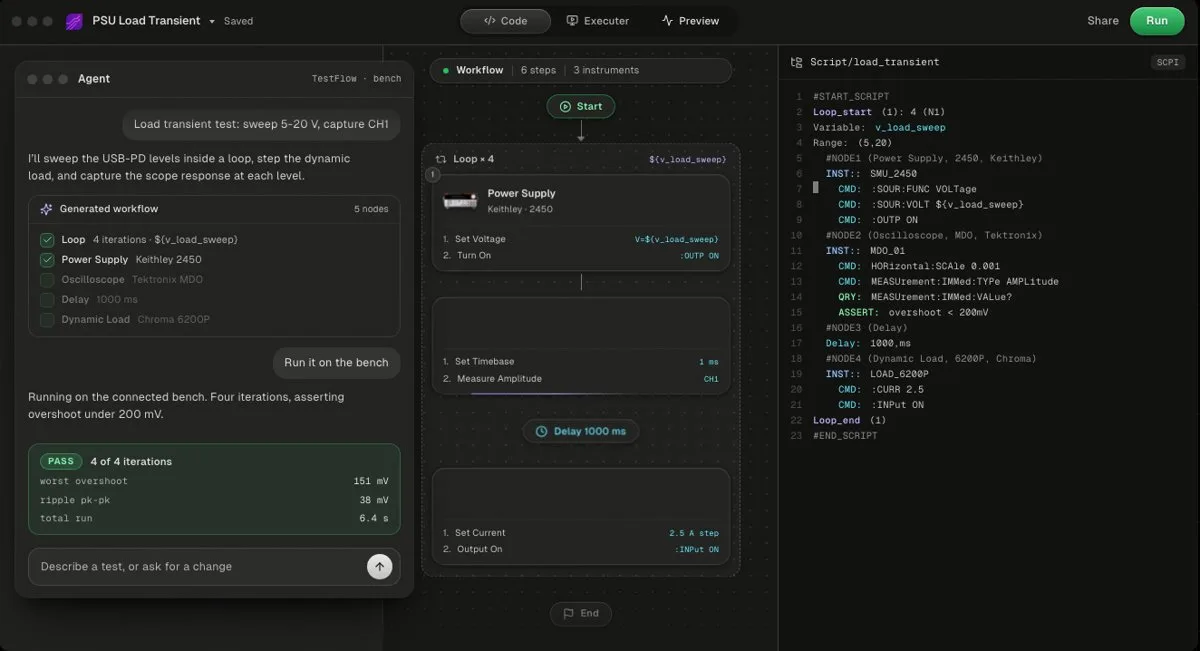
TestFlow builds the test instead of running a sequence you wrote. You connect the instruments on your bench, describe the test, and the agent builds the workflow, drives the instruments through the Windows desktop app, and writes the report from the run's own results. It is vendor-agnostic across instrument makers, and the web app can build and simulate before you touch hardware. It is honest to say what it is not: TestFlow is not a full test executive, with no operator and user management and no database connectivity yet, and it does not drive DAQ cards. It has a free version, see TestFlow pricing, and the TestFlow vs TestStand comparison covers the boundary in detail.
- Best for
- Teams that want automation without writing VIs or drivers
- Cost
- A paid Bench Pilot on your bench first, then a team licence
- Tradeoff
- Runs on your bench through the Windows desktop app
3. pytest or a Python sequencer (free)
For teams who live in Python, pytest fixtures handle instrument setup and teardown, parameterization covers test matrices, and JUnit XML output feeds CI. There is no operator interface, so it suits validation benches rather than production lines. The PyVISA tutorial and the Python instrument control libraries comparison cover the instrument layer underneath.
4. Robot Framework (free)
Robot Framework gives keyword-driven, table-style test cases that mixed-skill teams can read, with strong reporting built in. You still write the instrument keywords in Python. The test sequencer comparison puts all four next to TestStand on licensing, operator interface, and results handling.
| Option | Development license | Per-station license | Best fit |
|---|---|---|---|
| NI TestStand | $2,428 a year (ni.com, November 2026) | $857 or $3,252, once | Production lines, multi-UUT, regulated |
| OpenTAP | Free | Free | Replacing TestStand sequencing with open source |
| TestFlow | Free version to start | See TestFlow plans | Building and running bench tests from a description |
| pytest | Free | Free | Python teams on validation benches |
| Robot Framework | Free | Free | Readable test cases, mixed-skill teams |
How TestFlow works alongside TestStand
Most teams that own TestStand should keep it on the line. The useful pattern is to split by phase: TestFlow on the validation bench, where tests change every week, and TestStand in production once the test is stable. TestFlow imports NI TestStand sequences and keeps the sequences and the calls between them, though it does not run LabVIEW VIs.
The handoff can also go the other way. TestStand's Python adapter calls a function in a Python module and passes the return value to the step, so a Numeric Limit Test step can judge it. This complete module reads a DC voltage from a Keysight 34465A over LAN with standard SCPI:
# rail_check.py: called by a TestStand Numeric Limit Test step through the Python adapter
import pyvisa


def measure_rail(resource: str = "TCPIP0::192.168.1.50::inst0::INSTR") -> float:
    """Return the DC voltage measured by a Keysight 34465A, in volts."""
    rm = pyvisa.ResourceManager()
    dmm = rm.open_resource(resource)
    dmm.timeout = 10000
    try:
        dmm.write("*RST")
        dmm.write("CONF:VOLT:DC 10")
        dmm.write("VOLT:DC:NPLC 10")
        return float(dmm.query("READ?"))
    finally:
        dmm.close()
Keep one rule when both tools share a bench: only one program owns an instrument at a time, because SCPI state lives in the instrument. The SCPI command cheat sheet covers the commands above, and the supported instruments list shows what TestFlow drives today. For reports someone else will check, see automated test report generation.
Common mistakes when budgeting TestStand
Prices in this section are the ni.com US list prices as of November 2026.
- •Treating deployment licenses as annual. They are perpetual. A budget that renews $857 per station every year overstates a 10-station line by $34,280 over five years.
- •Forgetting the code-module environment. TestStand at $2,428 a year is not the whole seat if your steps are LabVIEW. Price the Suite.
- •Buying Debug Deployment for every station. At $3,252 against $857, it belongs on the stations where someone actually debugs.
- •Choosing perpetual to save money. At 3.5 years to break even before service renewals, it rarely does.
- •Missing toolkit runtime licenses. Vision, Switch Executive, and Sound and Vibration need their own per-station licenses.
- •Budgeting one product at a time. TestStand usually sits next to LabVIEW, DIAdem, and sometimes VeriStand. See NI software licensing costs for the rest of the stack, NI DIAdem alternatives for the reporting line, and NI VeriStand alternatives for the real-time line.
Related reading
- •NI TestStand hub, everything on the site about TestStand in one place
- •TestFlow vs TestStand, what each tool is actually for
- •NI TestStand alternatives, the full list of options
- •OpenTAP vs TestStand, the free sequencer evaluated properly
- •Test sequencer comparison, TestStand, OpenTAP, pytest, and Robot Framework side by side
- •LabVIEW pricing, the code-module half of the bill
- •TestFlow vs LabVIEW, when the code modules are the problem
- •LabWindows/CVI alternatives, if your code modules are C
- •LabVIEW FPGA and real-time, the NI licenses worth keeping
- •HIL testing software compared, when the station is a HIL rig
- •NI FlexLogger alternatives, the data-logging piece of the Suite
- •Free instrument control software, what the zero-license stack covers
- •Download the TestFlow desktop app, to run bench tests on Windows
Where TestFlow fits
TestStand earns its price on production lines that need process models, operator privileges, and database logging. TestFlow covers the authoring step before that, on the validation bench, and works alongside TestStand rather than replacing it.
- 1
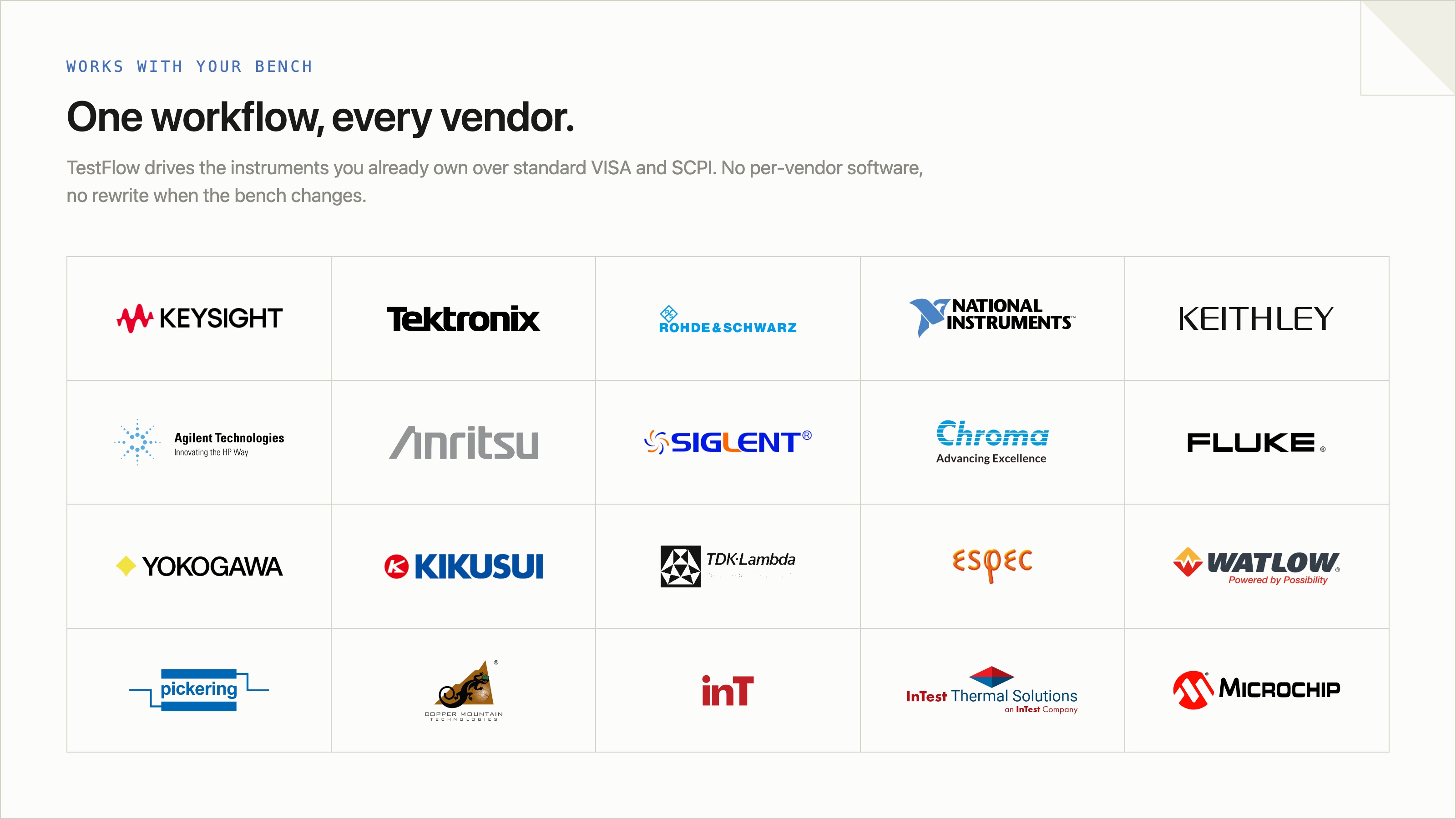
Connect your instruments. Pick the manufacturer and model, paste the VISA address (USB, LAN, GPIB, or serial), and the agent knows what is on your bench. No bench yet? Use a placeholder address, build the full automation, and swap in the real address when you are in the lab.
- 2
Tell the agent what to test. For example, "run a VI sweep from 1 to 10 V in 1 V steps at 0.5 A load current," or "suggest the tests for a power-management device."
- 3
The agent builds the complete workflow in seconds. Instrument-aware automation appears on the canvas, with the generated scripts visible in a code panel you can inspect and edit.
- 4
Run it in your lab. Click Run in the TestFlow desktop app for Windows and the status panel streams results step by step, with measured values inline (VOUT = 3.301 V, asserted 3.2 to 3.4 V, PASS). One click exports a structured PDF report, or the raw results as CSV.
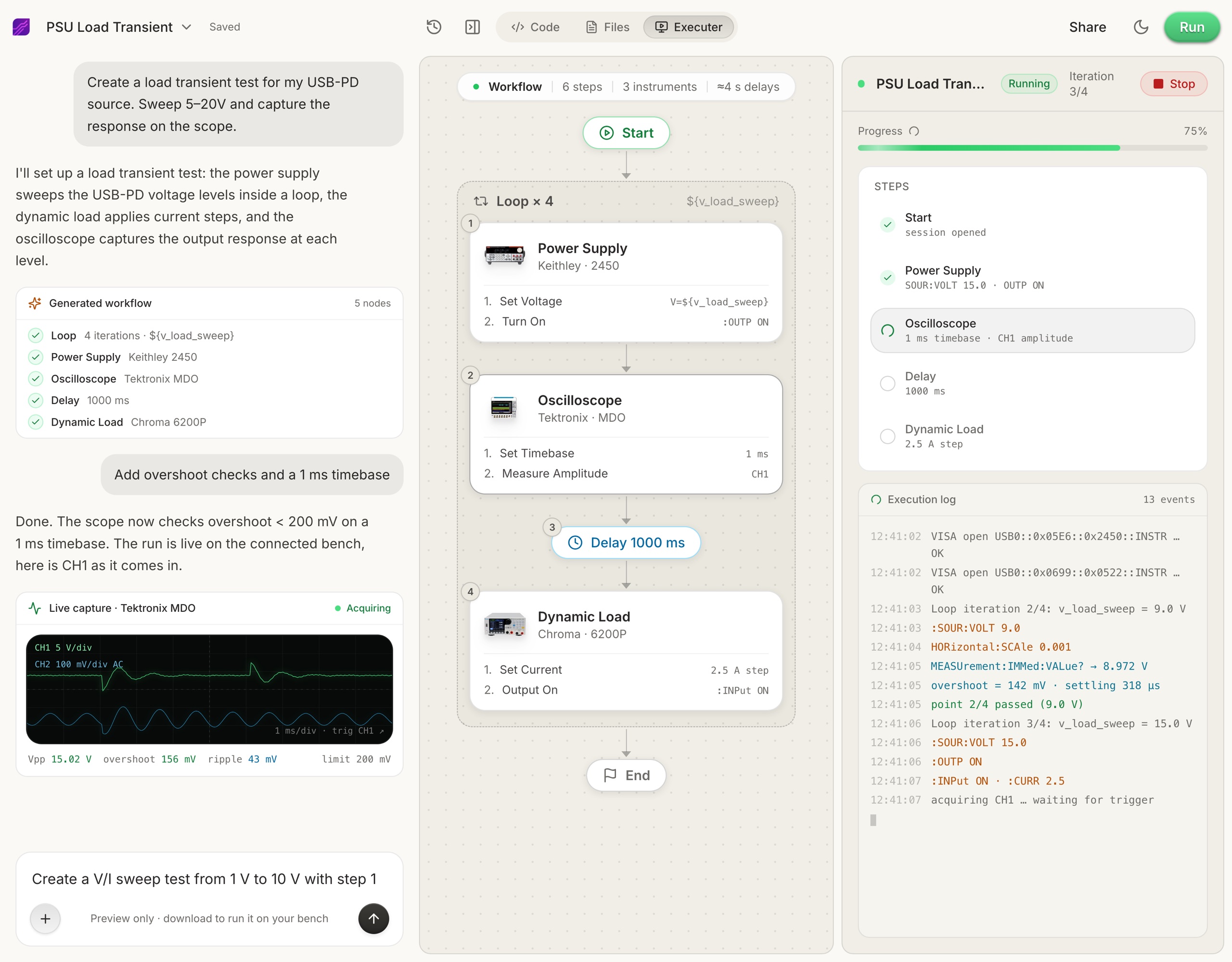
- Vendor-neutral by design. One workflow drives Keysight, Tektronix, Rohde & Schwarz, Rigol, Keithley, Anritsu, and any other SCPI instrument over standard VISA.
- Built in the browser, run on the bench. Workflows live in your workspace, so a sequence built in one lab runs the same way in another. Bench runs use the Windows desktop app.
- Free version to start. Sign in at app.testflowinc.com and build your first workflow today; teams can book a demo to scope a Bench Pilot.
The step-by-step walkthrough, VISA address formats, and Test Planner prompts are all in the TestFlow product guide.
Frequently asked questions
How much does NI TestStand cost in 2026?
As of November 2026, ni.com lists the TestStand Development System at $2,428 a year per seat on subscription or $8,497 perpetual, US list. Every deployed station also needs a Base Deployment Engine at $857 or a Debug Deployment Environment at $3,252, both one-time perpetual licenses.
What is the difference between the TestStand Base Deployment Engine and the Debug Deployment Environment?
The Base Deployment Engine runs test sequences on a deployed station and allows simple debugging. The Debug Deployment Environment adds advanced debugging that steps into LabVIEW, LabWindows/CVI, and Measurement Studio code modules on that station. NI counts any change that adds functionality as development, which needs a development license.
Is NI TestStand a subscription or a perpetual license?
Both, for development. The TestStand Development System and the LabVIEW+ Suite are sold on annual subscription or as perpetual licenses with the same features. All TestStand deployment licenses are perpetual only.
Do TestStand deployment licenses renew every year?
No. NI states that deployment licenses are perpetual and do not require annual renewal. The recurring cost in a TestStand fleet is the development seats on subscription, or the software service renewal on perpetual seats, which NI quotes rather than lists.
Does TestStand include LabVIEW?
The TestStand Development System does not. The LabVIEW+ Suite does: as of November 2026 it lists at $4,239 a year on ni.com and bundles the TestStand Development System with LabVIEW Professional, InstrumentStudio, FlexLogger, and DIAdem.
Is there a free version of NI TestStand?
No. NI offers a free trial of the TestStand Development System from ni.com, but commercial use needs a paid license. OpenTAP, pytest, and Robot Framework are free test sequencers, and TestFlow has a free version for building and running bench tests.
Automate every instrument in the lab,
Create test workflows in minutes
- 01Describe the testIn a sentence, the way you would tell a colleague.
- 02The agent builds itWorkflow and script for your instruments, any vendor.
- 03Run it, get the reportOn your bench, with the measured values.
Tags

Article by
Ali Kamaly
Ali Kamaly is the Co-Founder and CEO of TestFlow, an AI-native platform for electronics test automation. He writes about test automation, lab validation, and the infrastructure behind modern hardware engineering.
- NI TestStand Alternatives 2026: Free, Open-Source & AI OptionsThe best NI TestStand alternatives in 2026: OpenTAP, pytest, Robot Framework, and AI-native TestFlow. Plus what TestStand does, how it works with LabVIEW, and what it costs.
- LabWindows/CVI Alternatives in 2026 (Free & Modern C Options)LabWindows/CVI is in maintenance mode with a four-figure seat price. Here are the realistic replacements for ANSI C test applications, and how to migrate without rewriting a decade of code at once.
- OpenTAP vs NI TestStand in 2026 (Free Open Source vs the Incumbent)A direct comparison of the free open-source sequencer and the production incumbent, on cost, capability, and the migration effort in each direction.
- Test Sequencing Software Compared 2026 (TestStand, OpenTAP, pytest)What a test sequencer actually does, the five real options in 2026, and the four questions that decide which one fits, including the results question most teams ask too late.
- 8 Best LabVIEW Alternatives in 2026 (Free, Open Source, and AI-Native)Compare the 8 best LabVIEW alternatives in 2026: Python, MATLAB, OpenTAP, TestStand, BenchVue, and AI-native TestFlow. Costs, lock-in, learning curve, and a migration checklist.
Your next test, automated today
Describe the test. TestFlow builds the workflow, runs it on your instruments, and writes the report. See it on a bench like yours.