 Ali Kamaly
BenchVue Test Flow vs TestFlow in 2026 (Two Different Products)
Keysight's free BenchVue Test Flow app and TestFlow, the AI agent from testflowinc.com, share a name and nothing else. What each one is, what it costs, which instruments it drives, and which one fits a Keysight-only or a mixed-vendor bench.
BenchVue Test Flow and TestFlow are two different products from two different companies: Test Flow is a free drag-and-drop sequencing app inside Keysight's PathWave BenchVue software, and TestFlow (testflowinc.com) is an AI agent from TestFlow Technologies Inc. that builds, runs, and reports bench tests across instrument vendors. The companies are unrelated and the products share only a name.
Choose BenchVue Test Flow for a Keysight-only bench where free and native matter most. Choose TestFlow for a mixed-vendor bench, or when every run needs limits, PASS/FAIL per reading, and a report. This page checks every Keysight fact against keysight.com as of October 2026, then compares the two on licence, product status, instrument scope, and the work each one leaves to you.
Disclosure: this guide is written by the team behind TestFlow, which appears as one of the options. We list its tradeoffs the same way as everyone else's.
Two products, two companies, one similar name
Keysight Technologies makes BenchVue Test Flow; TestFlow Technologies Inc. makes TestFlow. Search engines and AI assistants merge the two because the names differ by one space, so here is the plain mapping.
| Name | Company | What it is | Where it lives |
|---|---|---|---|
| BenchVue Test Flow (also "PathWave BenchVue Test Flow") | Keysight Technologies | Free sequencing app embedded in the BenchVue desktop | keysight.com |
| TestFlow | TestFlow Technologies Inc., a Delaware C corporation | AI agent for electronics testing, vendor-neutral | testflowinc.com |
Keysight has documented Test Flow for a long time: the "BenchVue Test Flow Overview" product tour on its BenchVue software page is dated August 3, 2016. TestFlow is a separate product with no connection to Keysight.
TestFlow (testflowinc.com) is also not testflow.io, not TestFlows.com (a software testing framework), not JYTEK Testflow, and not Apple TestFlight.
What BenchVue Test Flow does
BenchVue Test Flow builds automated test sequences by dragging instrument controls and measurements from BenchVue's instrument apps into a sequence, with no programming. Keysight's help file describes it as an app embedded in the BenchVue desktop, and says the main BenchVue application must be installed first (Keysight help).
Keysight's application note Create Test Sequences without Programming Using BenchVue Test Flow (5992-1690EN, published September 15, 2021) is the most detailed description. It covers:
- •Blocks from instrument apps. Anything outlined in orange in a BenchVue app can be dragged into the sequence as a Set, Get, List, or Sweep operation, depending on the control.
- •Flow control. Delay, If-Then-Stop, and Wait Until blocks, plus five loop types: Count, Duration, While, Until, and Forever.
- •Variables and math. Set and Output variables, nested math functions, and unit conversions such as dBm from watts.
- •A SCPI block for commands the apps do not expose, with a Validate button that sends the command followed by
SYST:ERR?. - •Command Expert sequences imported as blocks, for multi-command setups.
- •Results in a table, a line chart, and an X-Y chart, with screen and trace captures, exported to Excel, Word, CSV, or MATLAB by hand or by an Export block.
The note's own SCPI block example triggers a Keysight 33500A or 33600A waveform generator, which the Function Generator app cannot do from its panel:
*TRG
SYST:ERR?
The first line is what you type into the block. The second is the error check Test Flow sends after it.
Limits work through conditions. The note checks a reading against 4.75 V to 5.25 V and a frequency against 90 kHz to 110 kHz with an If-Then-Stop block that halts the sequence when either is out of range. It does not describe a per-reading PASS/FAIL column or a generated test report.
Licence, price, and product status as of October 2026
BenchVue Test Flow costs nothing and has no paid edition. Keysight's support article Do I Need a BenchVue License? (April 15, 2025) lists three apps that "are totally free and have no licensed versions": Serial Control, Power Analyzer, and Test Flow.
The instrument apps Test Flow pulls blocks from are licensed differently. The table below covers what Keysight states today.
| Item | Status as of October 2026 | Source |
|---|---|---|
| Test Flow app | Free, no licensed version | Keysight support |
| BenchVue Basic instrument apps (DMM, power supply, scope, function generator, DAQ, power meter, counter, e-load, USB modular) | Free, no licence or registration; one revision behind the licensed release; no KeysightCare support | BenchVue Basic |
| BenchVue Included licence | Replaced by BenchVue Basic from platform version 2022.1 | BenchVue Basic |
| Signal generator, network analyzer, spectrum analyzer apps | Require the BV9001B Complete Control Collection licence | Keysight support |
| BV9001B Complete Control Collection | Sold by quote or online, free trial; 2026 release dated January 31, 2026; Windows 10 and 11 | BV9001B, download |
| BV9200B and BV9201B Advanced Power Control | Discontinued April 1, 2025; replaced by PW9252A | BV9201B |
Licensed apps come as node-locked, transportable, USB-portable, or floating licences, on perpetual or subscription terms, according to the same support article. This page does not quote prices for the licensed apps; check keysight.com for current pricing.
So BenchVue is not discontinued. It is actively shipped in 2026. What changed is the licensing model in 2022 and a handful of individual products in 2025. The most recent Test Flow application note on keysight.com is dated September 2021.
Instrument scope: Keysight first, SCPI by hand for the rest
BenchVue Test Flow's drag-and-drop blocks only exist for instruments that a BenchVue app supports, and those are Keysight instruments. The BV9001B page lists dedicated apps for 12 Keysight instrument families, covering several hundred instruments. Keysight publishes the BenchVue Basic supported models list for the free apps.
For anything else, the application note says the SCPI block can address any discovered instrument, including unsupported and non-Keysight ones, provided they use SCPI. The catch is that you type every command, and the instrument must answer SYST:ERR?, or you turn off the error check.
That is the practical line between the two products:
- •On a Keysight bench, Test Flow gives you real panels to drag from.
- •On a mixed bench, the non-Keysight half becomes hand-typed SCPI in Test Flow, which is the SCPI work a no-code tool is supposed to remove.
Under either tool, a supply step on a Keysight E36313A ends up as SCPI like this, per the E36300 Series Programming Guide:
VOLT 5.0, (@1)
CURR 0.3, (@1)
CURR:PROT:STAT ON, (@1)
OUTP ON, (@1)
MEAS:CURR? (@1)
The difference is who writes it. In Test Flow, the power supply app writes it for a Keysight supply and you write it for anything else. In TestFlow, the agent writes it for whichever vendor's model is on the bench.
What TestFlow is
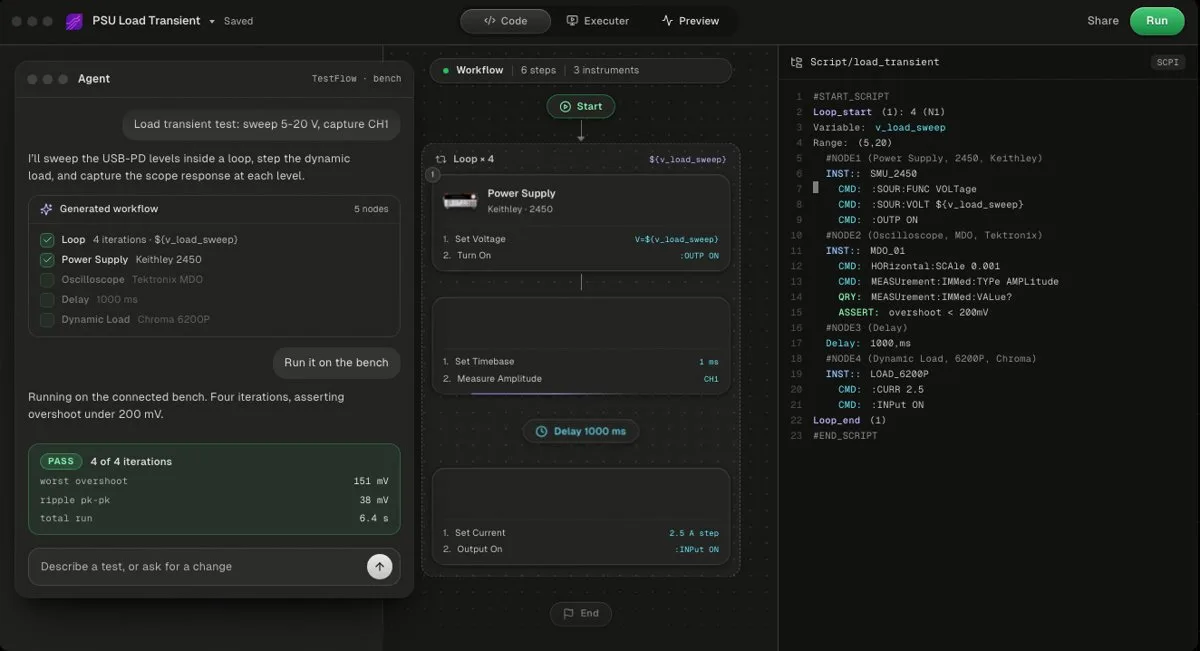
TestFlow is an AI agent for electronics testing: you describe the test, the agent builds the automation, drives the lab instruments on your bench, and writes the report from the measured results. It works in four stages.
- 1
Connect the instruments already on the bench, over VISA on USB, LAN, GPIB, or serial.
- 2
Describe the test in a sentence, the way you would tell a colleague: instruments, set points, limits.
- 3
The agent builds it: a reviewable workflow of steps plus the generated Python, with the SCPI commands for your specific instrument models.
- 4
Run and report: the Windows desktop app runs the workflow on the real instruments, values stream against limits, and the report (charts, PASS/FAIL per reading, verdict) is built from the run's measured results. Exports are PDF, Word, Excel, Markdown, JSON, and CSV.
The instrument catalog covers Keysight, Tektronix, Keithley, Rohde & Schwarz, Anritsu, Yokogawa, Siglent, Chroma, Kikusui, TDK-Lambda, Fluke, Copper Mountain, and Pickering, as of October 2026. For a SCPI instrument that is missing, the agent finds the vendor's programming manual and drafts the command set, which covers most SCPI instruments, Rigol included. The supported instruments page lists the models.
The agent writes limits, never measurements, so it cannot claim a PASS without a run, and it will not widen a limit to make a test pass (trust guide). A workflow exports as a standalone Python package you own, or as a standalone EXE an operator can run (code guide).
What TestFlow does not do, stated plainly: no DAQ card support, no instruments that do not speak SCPI, bench runs only from the Windows 10 or 11 desktop app, and it is not yet a full test executive, with no operator or user management and no database connectivity.
BenchVue Test Flow vs TestFlow, side by side
BenchVue Test Flow wins on price and on native Keysight control; TestFlow wins on vendor reach, verdicts, reports, and code you can take away. Prices are as of October 2026.
| BenchVue Test Flow | TestFlow | |
|---|---|---|
| Maker | Keysight Technologies | TestFlow Technologies Inc. |
| How you build a test | Drag blocks from Keysight instrument apps into a sequence | Describe the test in a sentence; the agent builds the workflow |
| Price | Free, no licensed version; instrument apps free (Basic) or licensed | Free version, no card; Engineer $39 a month; Lab $149 a month; Enterprise by quote |
| Runs on | Windows 10 and 11, inside the BenchVue platform | Web app builds and simulates; bench runs from the Windows 10 or 11 desktop app |
| Keysight instruments | Native panels across 12 instrument families | In the catalog, with SCPI generated per model |
| Other vendors | Hand-typed SCPI block, needs SYST:ERR? support | Catalog of 13 vendors, most other SCPI instruments added automatically |
| Logic | 5 loop types, If-Then-Stop, Wait Until, variables, math | Loops, conditions, limits on each measurement, reusable named sequences |
| Pass/fail | Range conditions that halt the sequence | PASS/FAIL per reading and a run verdict |
| Output | Results table and charts; export to Excel, Word, CSV, MATLAB | Report with charts and verdict; PDF, Word, Excel, Markdown, JSON, CSV |
| Code you keep | None described in Keysight's Test Flow docs | Standalone Python package or EXE |
| Interactive front-panel control | Yes, it is the point of BenchVue | Not the focus; it builds and runs tests |
| Support | Basic apps: none beyond install help; licensed apps: KeysightCare | Lab plan: priority email support |
Two rows favour BenchVue clearly: price and interactive control. If you live in the instrument panels all day, BenchVue is the better tool for that part of the job.
Ways to automate a Keysight bench in 2026
Four tools cover most Keysight bench automation in 2026, and only one of them is free with no strings: Keysight's own Test Flow. They are ordered by how close they are to Keysight's own stack.
1. Keysight BenchVue Test Flow (free, Keysight-first)
Free, no licence, already a step away if BenchVue is installed. Best for chained measurements and sweeps on supported Keysight instruments. Keysight's Test Flow technical summary demo builds a simple sweep in 10 seconds. Limits are conditions that stop the run, and non-Keysight instruments mean typing SCPI.

2. TestFlow
TestFlow is an AI agent that builds, runs, and reports bench tests from a described test, across Keysight, Tektronix, Keithley, Rohde & Schwarz, and other SCPI vendors. Free to start; Engineer is $39 a month as of October 2026. Bench runs need the Windows desktop app. No DAQ cards, no non-SCPI instruments, no user management.
The Keysight automation guide walks through a Keysight-only build, and pricing lists what each plan includes.
- Best for
- Teams that want automation without writing VIs or drivers
- Cost
- Free to start. Engineer $39 a month, Lab $149 a month
- Tradeoff
- Runs on your bench through the Windows desktop app
3. Keysight PathWave Instrument RPA (record and playback)
Keysight positions PathWave Instrument RPA as no-code automation for R&D engineers, built on one-button record and playback of user-interface interactions. It replays what you do on an instrument's screen or PC interface rather than building a SCPI sequence. Keysight offers a free trial.
4. Python and PyVISA (free, you write it)
Free and unlimited, and every command, limit, and report is yours to write. The TestFlow vs Python and PyVISA comparison runs one E36313A and 34465A test both ways, and the PyVISA tutorial covers the basics.
Verdict by use case
The bench decides the tool: an all-Keysight bench points to Test Flow, and a mixed-vendor bench points to TestFlow. The specific cases:
- •Keysight-only bench, one engineer, exploratory work. Use BenchVue Test Flow. It costs $0, the panels are native, and a sweep with an Excel export takes a handful of blocks. Nothing on this page beats free and already installed.
- •Mixed-vendor bench. Use TestFlow. A Keysight supply, a Tektronix scope, and a Chroma load in one Test Flow sequence means typing SCPI for two of the three. TestFlow treats all three the same way.
- •Keysight-only bench, but the test runs on every unit. Use TestFlow, or both. Test Flow halts on out-of-range conditions; TestFlow records PASS/FAIL per reading, gives a verdict per run, and writes a report someone can sign. See automated test report generation for why that matters.
- •The test must outlive the person who built it. TestFlow, because sequences have immutable published revisions with version pinning, and the generated Python package can be handed to anyone.
- •Bench built around Keysight data acquisition. BenchVue has a dedicated Data Acquisition app (BV0006B). TestFlow does not support DAQ cards.
- •Bench runs on macOS or Linux. Neither. BenchVue lists Windows 10 and 11, and TestFlow bench runs need its Windows desktop app. Use Python and PyVISA.
Running both on one bench
BenchVue and TestFlow can share a bench, as long as only one of them controls an instrument at a time. Two programs sending SCPI to the same instrument interleave their commands, and the results of either are then meaningless.
A pattern that works on a Keysight-heavy bench:
- 1
Use the BenchVue apps for interactive work: front-panel control, screen captures, quick logging.
- 2
Close BenchVue's connection to an instrument before a TestFlow run uses it.
- 3
Use TestFlow for the repeatable test that needs limits, a verdict, and a report, and for the instruments BenchVue does not cover.
The same split applies to Keysight's Command Expert, which the Test Flow application note uses to build multi-command sequences: a good tool for finding commands, a separate step from running the test. For the wider Keysight software picture, see Keysight BenchVue alternatives, Keysight PathWave alternatives, and Keysight BenchVue vs LabVIEW.
Related reading
- •Keysight E36313A programming, the supply in the SCPI example
- •Keysight 34465A SCPI commands
- •Keysight IO Libraries, the VISA layer under both tools
- •No-code test automation for electronics
- •Automate Rigol and Siglent instruments without coding, the non-Keysight half of many benches
- •TestFlow vs TestStand, when the question is a test executive
- •Tutorials, real runs on Keysight, Tektronix, Keithley, and Chroma hardware
- •Limits and pass/fail, how TestFlow turns readings into a verdict
Where TestFlow fits
BenchVue Test Flow is the right free tool for a Keysight bench. TestFlow is for the bench where the instruments come from several vendors and every run needs a verdict and a report.
- 1
Connect your instruments. Pick the manufacturer and model, paste the VISA address (USB, LAN, GPIB, or serial), and the agent knows what is on your bench. No bench yet? Use a placeholder address, build the full automation, and swap in the real address when you are in the lab.
- 2
Tell the agent what to test. For example, "run a VI sweep from 1 to 10 V in 1 V steps at 0.5 A load current," or "suggest the tests for a power-management device."
- 3
The agent builds the complete workflow in seconds. Instrument-aware automation appears on the canvas, with the generated scripts visible in a code panel you can inspect and edit.
- 4
Run it in your lab. Click Run in the TestFlow desktop app for Windows and the status panel streams results step by step, with measured values inline (VOUT = 3.301 V, asserted 3.2 to 3.4 V, PASS). One click exports a structured PDF report, or the raw results as CSV.

- Vendor-neutral by design. One workflow drives Keysight, Tektronix, Rohde & Schwarz, Rigol, Keithley, Anritsu, and any other SCPI instrument over standard VISA.
- Built in the browser, run on the bench. Workflows live in your workspace, so a sequence built in one lab runs the same way in another. Bench runs use the Windows desktop app.
- Free version to start. Sign in at app.testflowinc.com and build your first workflow today; plans and quotes are on the pricing page.

The step-by-step walkthrough, VISA address formats, and Test Planner prompts are all in the TestFlow product guide.
Frequently asked questions
Is BenchVue Test Flow the same as TestFlow?
No. BenchVue Test Flow is a free sequencing app inside Keysight's PathWave BenchVue software. TestFlow (testflowinc.com) is a separate product from TestFlow Technologies Inc., an AI agent that builds, runs, and reports bench tests across instrument vendors. The two companies and products are unrelated.
Is BenchVue Test Flow free?
Yes. Keysight lists Test Flow as one of three BenchVue apps that are totally free and have no licensed version. The instrument apps it takes blocks from come as free Basic versions, one revision behind the licensed release and without KeysightCare support, or as licensed versions.
Does BenchVue Test Flow work with non-Keysight instruments?
Partly. Drag-and-drop blocks come from BenchVue's Keysight instrument apps. For other instruments, Test Flow's SCPI block sends commands you type to any discovered instrument that speaks SCPI, provided it supports the SYST:ERR? query Test Flow uses to check for errors.
Can TestFlow automate Keysight instruments without code?
Yes. Keysight is in TestFlow's instrument catalog. Describe the test in a sentence, for example a supply sweep on an E36313A measured by a 34465A, and the agent builds the workflow and the SCPI, runs it from the Windows desktop app, and writes the report from the measured results.
Which should I use on a Keysight-only bench?
Start with BenchVue Test Flow. It is free, it uses Keysight's own instrument controls, and it covers loops, conditions, math, and Excel export. Move to TestFlow when the bench mixes vendors, when each run needs a report with PASS/FAIL per reading, or when someone else must run the test the same way.
Is Keysight BenchVue discontinued?
No. As of October 2026 Keysight still ships PathWave BenchVue, with a 2026 Complete Control Collection release dated January 31, 2026. Parts of the line have changed: free BenchVue Basic replaced BenchVue Included from platform 2022.1, and the BV9200B and BV9201B power apps were discontinued on April 1, 2025, replaced by PW9252A.
Automate every instrument in the lab,
Create test workflows in minutes
- 01Describe the testIn a sentence, the way you would tell a colleague.
- 02The agent builds itWorkflow and script for your instruments, any vendor.
- 03Run it, get the reportOn your bench, with the measured values.
Tags
Your next test, automated today
Describe the test. TestFlow builds the workflow, runs it on your instruments, and writes the report. Free to start, no card needed.