 Ali Kamaly
8 Best LabVIEW Alternatives in 2026 (Free & Open Source Options)
The realistic LabVIEW alternatives in 2026, what each is good at, where each falls short, what they cost, and how to actually migrate, so you can pick the right tool for your lab instead of defaulting to what you know.
The best LabVIEW alternatives in 2026 are Python with pyVISA (free and code-first), TestFlow (AI-native and vendor-neutral), MATLAB (math-heavy work), and OpenTAP (open-source test sequencing). Which one is right depends on whether your pain is the subscription cost, the NI hardware lock-in, or the G programming learning curve.
Most engineers searching for a LabVIEW alternative are pushed by one of those three things, and the pressure has grown since Emerson acquired NI in 2023 and LabVIEW shifted to an annual subscription model. This guide compares the eight realistic options, with costs, tradeoffs, and a migration checklist.
Why engineers look for a LabVIEW alternative
- Cost. LabVIEW is now subscription-based and priced per seat, roughly $500 to $5,000 per engineer per year depending on edition. For a small team, the annual bill adds up fast. See our breakdown of what a LabVIEW license actually costs.
- Hardware lock-in. LabVIEW is built to sell NI (now Emerson) hardware. Drivers, DAQ cards, and the ecosystem assume you stay inside it.
- The G language. LabVIEW's graphical dataflow is powerful but hard to diff, version-control, and code-review. Onboarding a new engineer takes weeks. If you are new to the ecosystem, start with what LabVIEW actually is.
- Hiring. There are far more Python engineers than LabVIEW engineers, so maintaining LabVIEW code is a staffing risk.
- Platform trust. NI discontinued LabVIEW NXG in 2022 after years of pushing teams to adopt it, and official Mac and Linux support has narrowed. Betting a lab on one vendor's roadmap feels riskier than it used to.
What to compare when you evaluate a LabVIEW alternative
Before you switch, score each option on the things that actually cost you time later:
- •Instrument support (VISA, SCPI, GPIB, serial, and vendor coverage)
- •Total cost (license, hardware lock-in, maintenance)
- •Learning curve and code review
- •Collaboration and version control
- •Deployment (local app, browser, on-prem)
- •AI assistance (does it help you build tests, or do you write every line?)
The 8 best LabVIEW alternatives in 2026
1. Python (pyVISA, PyMeasure, nidaqmx)
Free, open source, and the default for new test automation projects. With pyVISA you talk to almost any instrument over VISA and SCPI, PyMeasure adds ready-made instrument drivers and live plotting, and NI ships an official nidaqmx Python package for its DAQ hardware. Your tests live in Git, diff cleanly, and run anywhere.
Weak spots: you build the GUI, the sequencing, the operator view, and the reporting yourself, and unmanaged scripts get fragile as the bench grows. Best for teams with software discipline. Read the full LabVIEW vs Python comparison or our guide to data acquisition with Python.
2. TestFlow (AI-native, vendor-neutral)
TestFlow removes the parts of LabVIEW engineers dislike. You connect your instruments, tell an AI agent what you want to test in plain English, and it generates the complete automation scripts and workflow in seconds. It speaks SCPI to instruments from any vendor through its ATOMS scripting layer, so a Keysight DMM, a Tektronix scope, and a third-party supply live in the same workflow with no NI hardware requirement.
Weak spots: it is a young platform compared to 35 years of LabVIEW, and if your lab is built on NI FPGA or Real-Time targets those stay in the NI stack. Best for validation teams that want automation running this week, not next quarter. There is a free version, and the full TestFlow vs LabVIEW comparison covers the details. Check supported instruments for your bench.
3. MATLAB + Instrument Control Toolbox
Strong if your work is math-heavy: filtering, fitting, RF analysis, control design. The Instrument Control Toolbox handles VISA, GPIB, and serial instruments, and Simulink covers modeling and HIL workflows.
Weak spots: MATLAB is also proprietary and expensive once you add toolboxes, so you trade one license bill for another. Scripted automation is solid; building operator-facing test stations is not its strength. Best for R&D analysis that occasionally touches instruments.
4. OpenTAP (open-source test sequencer)
OpenTAP is a free, open-source test automation framework originally created at Keysight. It gives you the sequencing discipline of a commercial sequencer: test plans, steps, result listeners, and a plugin model, in C# with Python support.
Weak spots: it is a framework, not a finished application. You still write the instrument steps, and the GUI editor is part of Keysight's commercial PathWave Test Automation layer on top. Best for teams replacing TestStand-style sequencing with open source. See TestStand and its modern alternatives.
5. NI TestStand
A sequencing and test-management layer that sits on top of LabVIEW, C#, or Python. It solves test orchestration, parallel UUTs, reporting, and operator interfaces, and it is the incumbent on many production lines.
Weak spots: it keeps you inside the NI ecosystem and adds its own per-seat and deployment license cost on top of LabVIEW. If you are leaving LabVIEW to escape NI lock-in, TestStand is not the exit. Best for teams already committed to NI for years to come.
6. Keysight BenchVue / PathWave
Keysight's desktop software gives you a point-and-click front panel, logging, and simple sequencing for supported Keysight bench instruments. For a single-vendor Keysight bench it removes real front-panel drudgery with no code at all.
Weak spots: it is Keysight-first, the productive features sit behind paid per-app licenses, and it breaks down the moment your bench mixes vendors. Best as a free utility, not a lab automation strategy. Full breakdown: Keysight BenchVue, costs, and alternatives.
7. LabWindows/CVI
NI's own ANSI C environment for test and measurement. You get real text-based code with NI's instrument libraries and UI tools, which solves the version-control and code-review problems of G.
Weak spots: it is still a paid NI product with the same ecosystem gravity, C is a slower development language than Python, and the community is small. Best for teams with existing CVI code bases. More in our LabWindows/CVI guide.
8. Dewesoft X
Measurement and DAQ software known for fast setup, strong visualization, and license-free software included with Dewesoft hardware. Popular in automotive, aerospace, and structural testing.
Weak spots: the software is tied to Dewesoft data acquisition hardware, so it trades NI lock-in for Dewesoft lock-in. Best for dedicated high-channel-count DAQ rigs rather than general bench automation. For the broader category, see our data acquisition system guide.
LabVIEW alternatives compared
| Tool | Cost | Hardware lock-in | Learning curve | AI-native | Best for |
|---|---|---|---|---|---|
| LabVIEW | $500 to $5,000/seat/yr | High (NI/Emerson) | Steep (G) | No | Existing NI labs |
| Python (pyVISA) | Free | None | Medium | Add-on only | Code-first teams |
| TestFlow | Free version to start | None | Low | Yes | Fast vendor-neutral automation |
| MATLAB | Expensive + toolboxes | Medium | Medium | Add-on only | Math-heavy R&D |
| OpenTAP | Free (open source) | None | Medium | No | Open-source sequencing |
| NI TestStand | Adds NI licenses | High | Medium | No | NI production lines |
| BenchVue | Free + paid apps | High (Keysight) | Low | No | All-Keysight benches |
| LabWindows/CVI | Paid (NI) | High | Steep (C) | No | Legacy C test code |
| Dewesoft X | Included with hardware | High (Dewesoft) | Low | No | High-channel DAQ rigs |
How to choose
- •You live in code and want full control: Python with pyVISA, and add PyMeasure for drivers.
- •You want to escape NI lock-in and move fast without writing every script: TestFlow.
- •Your work is modeling and heavy math: MATLAB and Simulink.
- •You need TestStand-style sequencing without the license: OpenTAP.
- •Your bench is 100% Keysight and stays that way: BenchVue is a fine free utility.
- •You are staying on NI hardware for years: keeping LabVIEW, or LabWindows/CVI for text-based code, may beat migrating.
The cost math for a 5-engineer lab
Concrete numbers make the decision easier. Take a typical validation team of five engineers on LabVIEW Full:
- •LabVIEW Full, 5 seats: roughly $10,000 to $12,000 per year, before add-on toolkits like FPGA or Real-Time, each of which can match the base license. Full breakdown in LabVIEW pricing in 2026.
- •Python: $0 in licenses, but budget real engineering time to build and maintain sequencing, reporting, and operator UIs.
- •TestFlow: free version to start, paid plans on the pricing page, and no NI hardware requirement, which is where the largest savings usually hide.
The license is rarely the biggest number. The hardware ecosystem the license drags in, and the engineer-hours spent maintaining test code, dominate the real total.
How to migrate off LabVIEW without breaking the lab
Teams rarely fail at picking a tool. They fail at the migration. The pattern that works:
- 1
Inventory your VIs. List what each one does: instrument I/O, sequencing logic, analysis, or UI. Most labs find 20% of VIs carry 80% of the daily work.
- 2
Separate instrument I/O from logic. The instrument layer is the easiest to port because it is just VISA and SCPI commands underneath. The UI layer is usually not worth porting at all.
- 3
Pick one real test, not a toy. Re-implement a test your team runs weekly in the new tool. In TestFlow that means connecting the instruments and describing the test in plain English; in Python it means writing the pyVISA script.
- 4
Run old and new in parallel on that one test until the results match and the team trusts the output.
- 5
Stop renewing seats you no longer need. Migration pays for itself at the next renewal date, which is why the best time to evaluate alternatives is a quarter before yours.
Where TestFlow fits
If the reasons you are leaving LabVIEW are cost, lock-in, and speed, TestFlow is the most direct replacement. Instead of building tests by hand in G, you drive your bench with an AI agent:
- 1
Connect your instruments. Pick the manufacturer and model, paste the VISA address (USB, LAN, GPIB, or serial), and the agent knows what is on your bench. No bench yet? Use a placeholder address, build the full automation, and swap in the real address when you are in the lab.
- 2
Tell the agent what to test, in plain English. For example, "run a VI sweep from 1 to 10 V in 1 V steps at 0.5 A load current," or "suggest the tests for a power-management device."
- 3
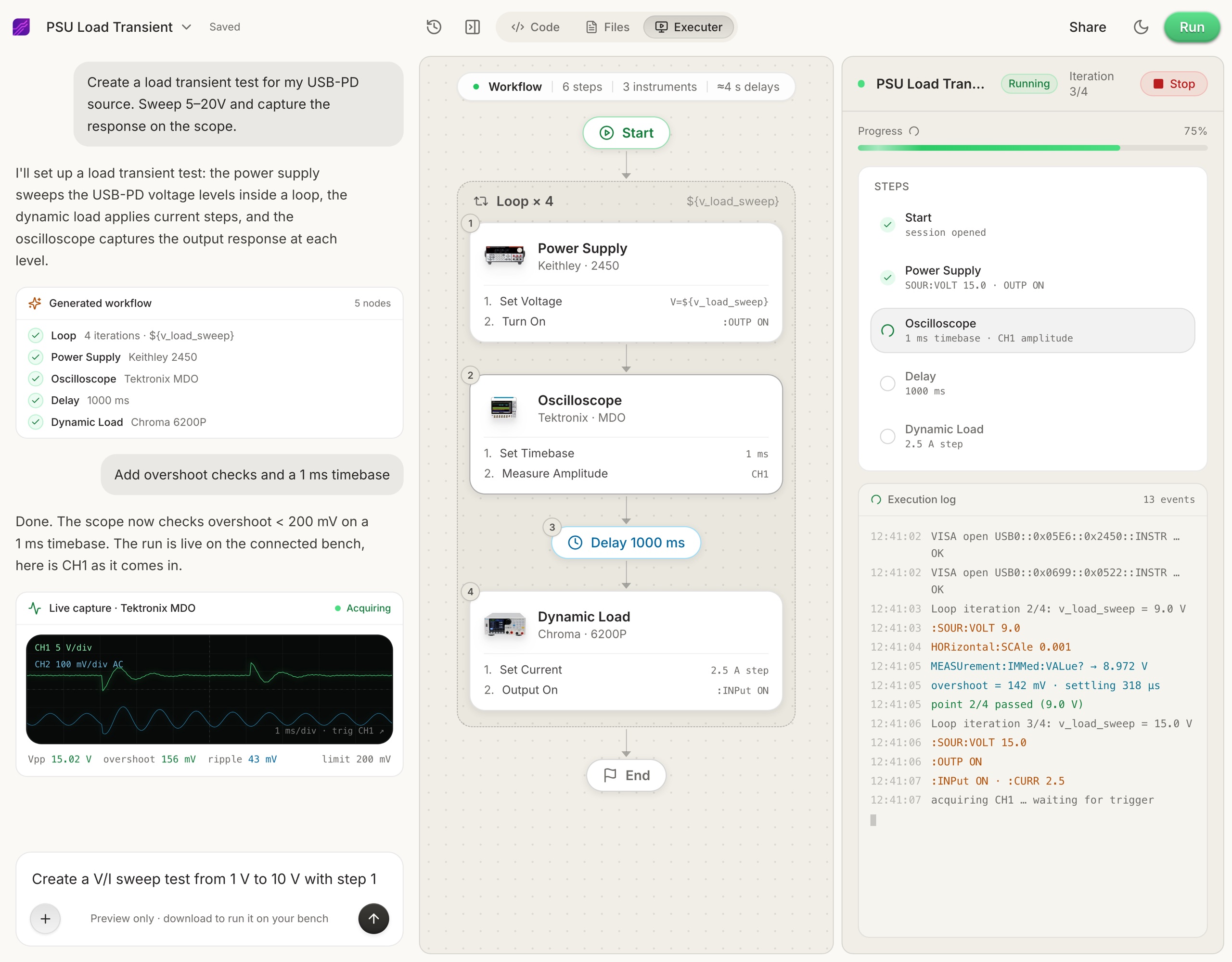
The agent builds the complete workflow in seconds. Instrument-aware automation appears on the canvas, with the generated scripts visible in a code panel you can inspect and edit.
- 4
Run it in your lab. Click Run and the status panel streams results step by step, with measured values inline (VOUT = 3.301 V, asserted 3.2 to 3.4 V, PASS). One click exports a structured PDF report, or the raw results as CSV.
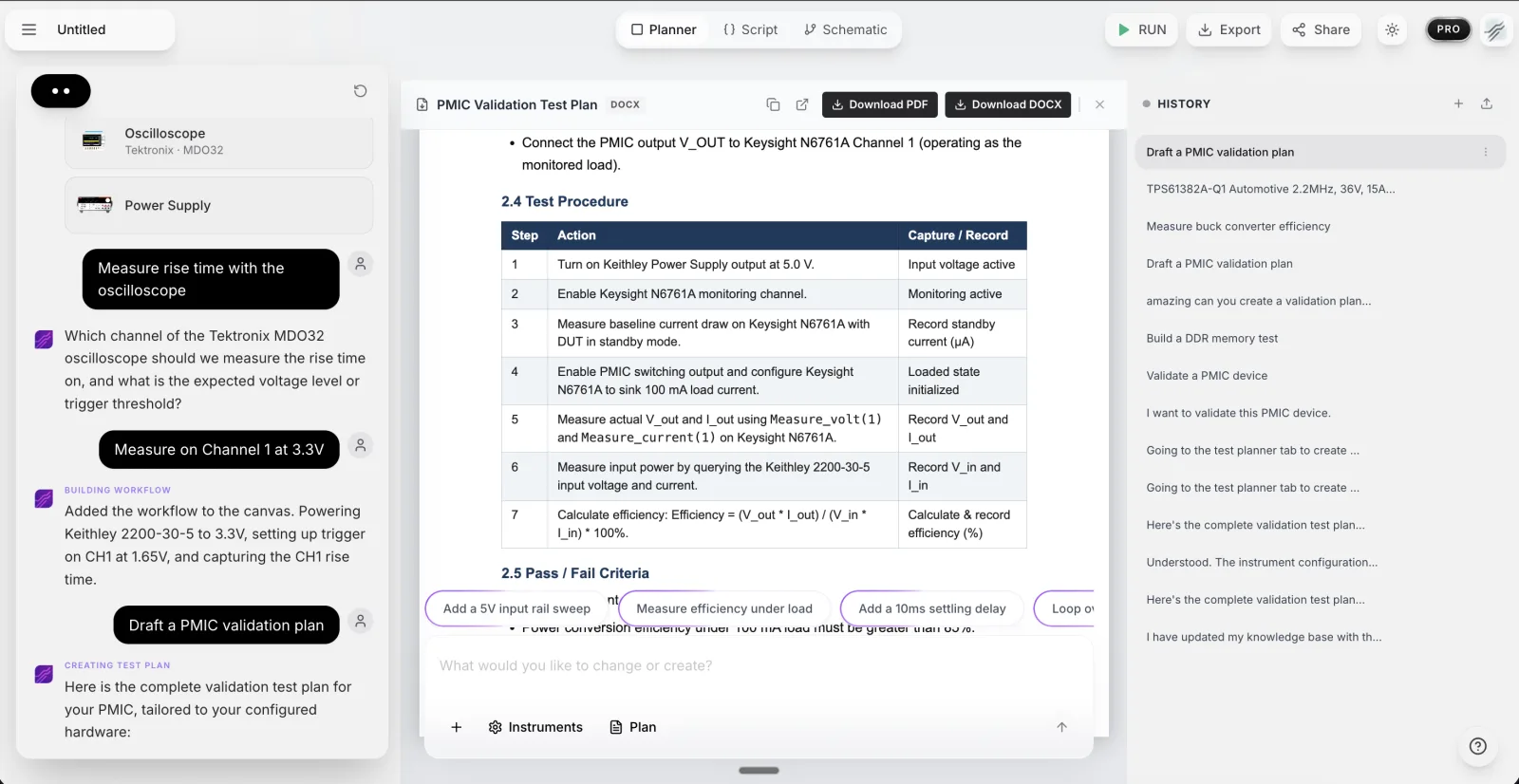
For bigger jobs there is the Test Planner: describe the device and conditions, and it drafts a structured validation plan, numbered test cases with purpose and setup, a measurement matrix with units and thresholds, and explicit pass/fail criteria. You review it, export it as PDF or DOCX, then tell the agent to build the workflow from the approved plan.
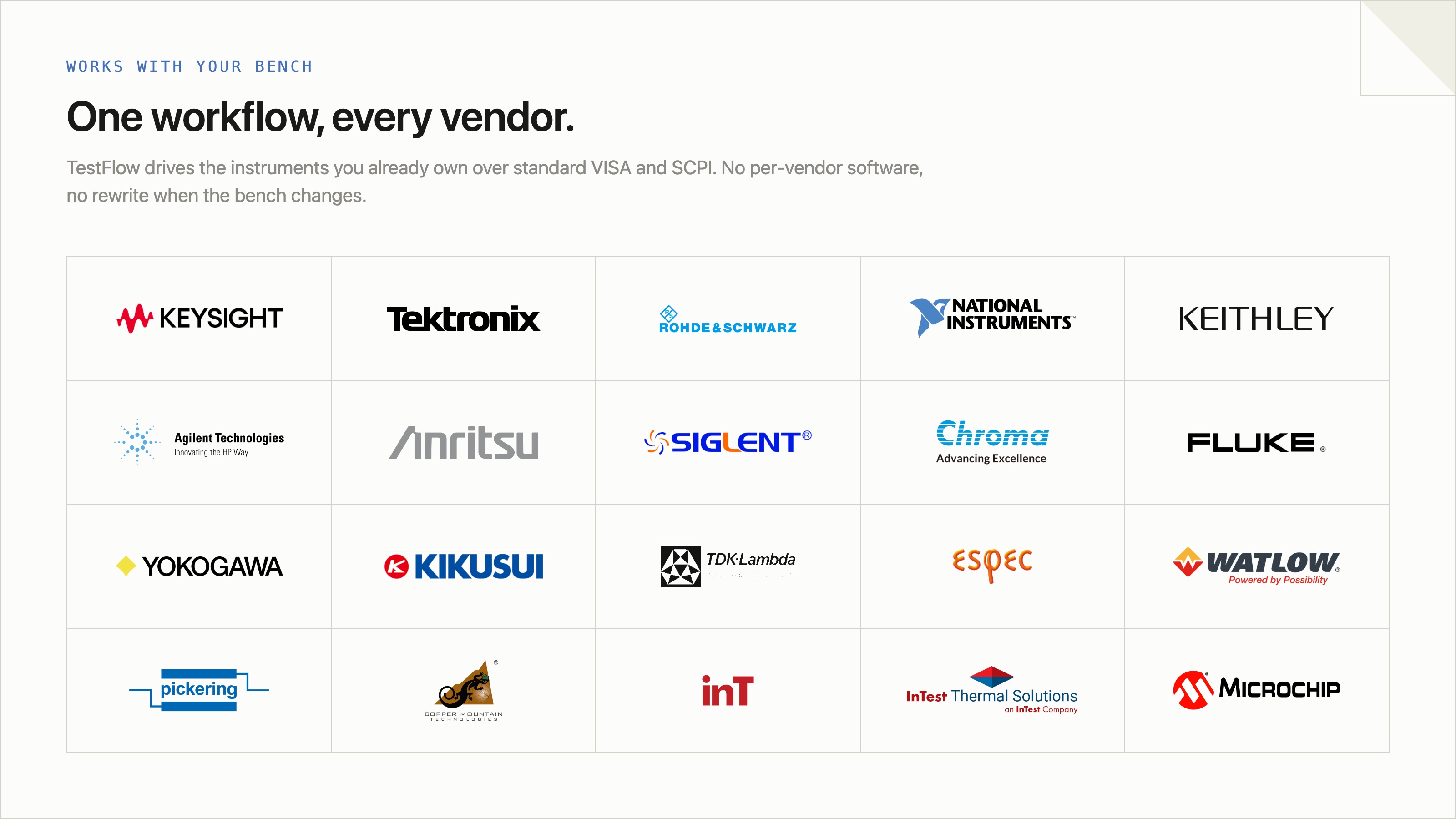
- Vendor-neutral by design. One workflow drives Keysight, Tektronix, Rohde & Schwarz, NI, Rigol, Keithley, Anritsu, and more over standard VISA and SCPI.
- Browser-based and shareable. Workflows live in your workspace, so a sequence built in one lab runs the same way in another.
- Free version to start. Sign in at app.testflowinc.com and build your first workflow today; plans and quotes are on the pricing page.
The step-by-step walkthrough, VISA address formats, and Test Planner prompts are all in the TestFlow product guide.
That is the wedge: automate electronic testing and lab instruments in minutes, with a free version to start. See the TestFlow LabVIEW alternative page for a full side-by-side.
Frequently asked questions
Is there a free LabVIEW alternative?
Yes. Python with pyVISA is free and open source, OpenTAP is a free open-source test sequencer, and TestFlow has a free version you can start with in the browser. LabVIEW itself has a free Community Edition, but it is not licensed for commercial work; see how to download LabVIEW.
What is the best LabVIEW alternative for test automation?
For pure code-level flexibility, Python with pyVISA. For escaping NI hardware lock-in with an AI agent that builds and runs the tests for you, TestFlow. For math-heavy work, MATLAB.
Can I replace LabVIEW with Python?
For most data acquisition and instrument-control tasks, yes. pyVISA talks SCPI to almost any instrument and nidaqmx covers NI DAQ hardware. The tradeoff is that you build the sequencing, UI, and reporting yourself. See LabVIEW vs Python.
What replaced LabVIEW NXG?
Nothing directly. NI discontinued LabVIEW NXG in 2022 and folded development back into classic LabVIEW, which pushed many teams to re-evaluate the ecosystem and consider alternatives.
Does LabVIEW run on Mac or Linux?
Official platform support has narrowed over the years and is Windows-first. Cross-platform teams usually pick Python or a browser-based platform like TestFlow instead. Details in LabVIEW on Mac and Linux.
Is LabVIEW worth learning in 2026?
If your employer runs an NI stack, yes, it still pays. If you are starting fresh, Python plus SCPI fundamentals transfers across more jobs, and AI-native tools generate the automation code for you. Our take: learning LabVIEW in 2026.
Ready to move past LabVIEW?
Connect your instruments, describe a test in plain English, and TestFlow builds and runs it in minutes. No NI hardware required.
Tags
Put it on your bench this week
A new way for testing, from specs to automated sequences, capture clean data, and accelerate your validation cycle.