 Ali Kamaly
No-Code Test Automation for Electronics in 2026 (8 Tools Compared)
Eight ways to automate lab instruments without writing a program, each checked against the vendor's own pages: what it costs, which instruments it drives, how far its sequencing goes, and where you end up writing code anyway.
No-code test automation for electronics is software that sets up lab instruments, runs a sequence of measurements, and records the results without you writing a program. In 2026 the credible options are Keysight BenchVue Test Flow for Keysight benches, TestFlow (testflowinc.com) for mixed-vendor SCPI benches, NI FlexLogger for NI DAQ logging, and Keithley KickStart for Keithley and Tektronix instruments. Keysight PathWave Test Automation and EEZ Studio are low-code, and NI LabVIEW is graphical programming, which is still programming.
Every vendor fact below was checked on the vendor's own site in October 2026, with the source linked inline. This page is for test and validation engineers choosing how to automate a bench without hiring a developer. It ranks eight tools, compares them in one table, and ends with an honest section on where each one stops and code starts.
Disclosure: this guide is written by the team behind TestFlow, which appears as one of the options. We list its tradeoffs the same way as everyone else's.
What counts as no-code test automation
No-code test automation means the engineer defines the test and the tool generates every instrument command. Four interaction styles exist in 2026, and each one breaks in a different place.
| Style | How you build the test | Examples | Where it breaks |
|---|---|---|---|
| Configure in dialogs | Pick an instrument app, fill in set points and limits | FlexLogger, KickStart | Anything the dialog did not anticipate |
| Drag blocks into a flow | Arrange steps, loops, and conditions on a canvas | BenchVue Test Flow, EEZ Flow, PathWave Test Automation | Logic past simple branching, instruments with no block |
| Describe the test | State instruments, set points, and limits in a sentence | TestFlow | Instruments that do not speak SCPI, DAQ cards |
| Record and replay | Record clicks on an instrument GUI, replay them | PathWave Instrument RPA | Screen layout changes, firmware updates |
Graphical programming, the LabVIEW model, is a fifth style that people often file under no-code. It is covered at position 8 with an explanation of why it does not belong there.
The second filter is vendor scope, and it usually decides the question. Most no-code tools come from an instrument vendor and drive that vendor's hardware first. If your bench has a Keysight supply, a Tektronix scope, and a Chroma load, the vendor scope column in the comparison table below matters more than any feature list.
The 8 tools, ranked
The eight no-code test automation tools below are ranked on three things: how much of a real bench test you can build without code, how many vendors' instruments the tool drives, and what you hold at the end, a report or only a data file.
1. Keysight BenchVue Test Flow (Keysight benches)
Keysight BenchVue Test Flow is the sequencing app inside PathWave BenchVue, Keysight's Windows instrument-control software. Keysight's Test Flow page says it lets you create sequences of setups and measurements "all without having to write a computer program". You drag instrument settings and measurements into a sequence, add loops, delays, prompts, simple if-then conditions, and math, and export data and images to Excel, MATLAB, CSV, or Word.
- •Instruments: Keysight's BenchVue page describes the Complete Control Collection (BV9001B) as dedicated apps for twelve Keysight instrument families. Test Flow can also send instrument commands that BenchVue does not have built in, which is how equipment outside the supported list gets in.
- •Cost, as of October 2026: BenchVue Basic apps are free and run one version behind the current release. Current apps and BV9001B are paid and quoted. The product page does not say which tier includes Test Flow, so confirm it in the BenchVue Apps tab first.
- •Runs on: Windows 11 or Windows 10 (64-bit, version 1809 or later) with 8 GB of RAM, per Keysight's BenchVue system requirements.
Good for: a bench that is mostly Keysight. It is the most mature drag-and-drop sequencer on this list, and the export to Word covers a basic report.
Gives up: vendor neutrality and depth. Simple if-then is the ceiling on logic, and a Tektronix or Rigol instrument turns into raw command work. TestFlow (testflowinc.com) is a separate product and company from the Test Flow app inside BenchVue; BenchVue Test Flow vs TestFlow compares the two directly, and Keysight BenchVue alternatives covers the wider field.
2. TestFlow
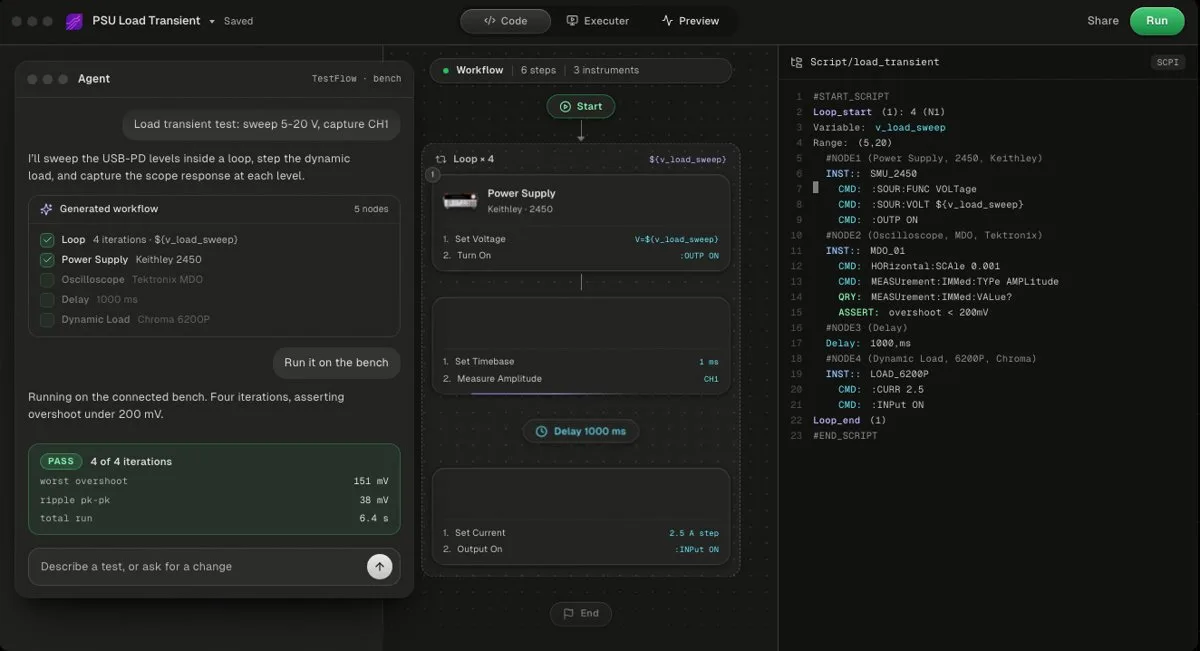
TestFlow is an AI agent for electronics testing: you describe the test, the agent builds a reviewable workflow plus Python, runs it on SCPI instruments across vendors, and writes the report from measured results. Free to start, then $39 or $149 a month per seat. Bench runs need the Windows desktop app, and it has no DAQ card support.
The workflow has four stages. You connect the instruments already on the bench over VISA (USB, LAN, GPIB, or serial). You describe the test the way you would tell a colleague, with instruments, set points, and limits. The agent builds the steps and the generated Python, with the SCPI commands for your specific models. The Windows desktop app runs it on the real instruments, values stream against limits, and the report (charts, PASS or FAIL per reading, a verdict) is built from the run's measured results, with export to PDF, Word, Excel, Markdown, JSON, or CSV.
- •Instruments: the catalog, as of October 2026, covers Keysight, Tektronix, Keithley, Rohde & Schwarz, Anritsu, Yokogawa, Siglent, Chroma, Kikusui, TDK-Lambda, Fluke, Copper Mountain, and Pickering. The agent can add most SCPI instruments that are not listed by finding the vendor's programming manual. Check yours on the supported instruments page.
- •Sequencing: named reusable sequences with declared parameters, published revisions that are immutable and version-pinned, diff and rollback, and NI TestStand sequence import.
- •Code: a standalone Python package you own, or a standalone EXE an operator can run. See the code view.
- •Trust: the agent writes limits, never measurements, and it will not widen a limit to make a test pass (how that is enforced).
Good for: mixed-vendor SCPI benches where the bottleneck is the time to write the test, and teams replacing hand-built LabVIEW or Python bench scripts.
Gives up: NI DAQ cards and instruments that do not speak SCPI, bench runs on macOS or Linux, and the production test-executive layer: there is no operator and user management and no database connectivity yet. Prices are on the pricing page.
- Best for
- Teams that want automation without writing VIs or drivers
- Cost
- Free to start. Engineer $39 a month, Lab $149 a month
- Tradeoff
- Runs on your bench through the Windows desktop app
3. NI FlexLogger (NI DAQ logging)
NI FlexLogger is "application software for quick sensor configuration and data logging of mixed signals to verify electromechanical systems, all without programming", per NI's FlexLogger page. It works with NI data acquisition hardware, with sensor-specific setup for analog sensors, digital signals, and vehicle communication buses, plus signal generation to drive actuators.
- •Cost, as of October 2026: NI's US store lists FlexLogger from $841, with perpetual or subscription licences and one to three years of service.
- •Instruments: NI DAQ hardware. It is not designed to drive SCPI bench supplies, meters, or scopes.
Good for: thermocouple, strain, and bridge channels on NI cDAQ, where configuring scaling and excitation in a dialog removes real work.
Gives up: the bench instruments around the DAQ, and step-by-step test sequencing with limits. Logging is the job. See NI FlexLogger alternatives and, for the code route, DAQ with Python.
4. Keithley KickStart (Keithley and Tektronix)
Keithley KickStart is Tektronix's PC software for test setup and data collection across up to eight instruments, sold as apps, per Tektronix's KickStart page. The suite covers I-V Characterizer, Data Logger, DMM, Power Supply, Scope, and AFG apps, with Battery Simulator and High Resistivity as specialty apps. Data auto-exports to .csv and .xlsx.
- •Instruments: Keithley 2400, 2600, and 2650 Series SMUs, DAQ6510, DMM6500, DMM7510, Keithley power supplies, the AFG31000, and Tektronix TBS, MDO, MSO, and DPO scope families. The I-V Characterizer drives up to four SMUs.
- •Cost, as of October 2026: the suite bundle is US $610 a year (subscription) or $2,310 permanent node-locked. Single apps start at $151 a year (AFG). A 30-day free trial needs no payment method.
Good for: SMU I-V curves and multi-channel logging on Keithley hardware, with a fast path from unboxing to a plotted result.
Gives up: other vendors, and general sequencing. Each app does one job, so a test that combines a supply sweep, a scope capture, and a limit check across apps is not what KickStart is shaped for.
5. Keysight PathWave Test Automation (low-code sequencer)
Keysight PathWave Test Automation (KS8400B) is a test-plan editor and sequencer built on OpenTAP, the open-source test sequencer, per Keysight's KS8400B page. It has a graphical editor for Windows and Linux and a Python and .NET SDK. Pricing is by quote, and Keysight offers a full-featured free trial.
PathWave Test Automation is low-code, not no-code. Composing a plan from existing test steps needs no programming, but new instruments and custom steps are plugins someone writes against the SDK. That split is the strength for a production team with a developer, and the wall for a lab without one.
Good for: production-style test plans and teams that want an open-source runtime underneath. See OpenTAP vs TestStand.
Gives up: no-code for anything new. The first unsupported instrument means C# or Python. Keysight PathWave alternatives covers the options.
6. Keysight PathWave Instrument RPA (GUI record and playback)
Keysight PathWave Instrument RPA "enables no-code automation of bench set-ups, instruments and circuits or devices under test", per Keysight's RPA page. It records and replays mouse and keyboard operations on an instrument's interface, reached through Windows Remote Desktop, VNC, a built-in web interface, or apps such as BenchVue, according to the technical overview. A Visual Script Editor lets you parameterize recordings and rearrange blocks.
- •Runs on: Windows 10 64-bit, Intel Core i5, 8 GB of RAM.
- •Cost, as of October 2026: licensed, with a 7-day trial that starts on install. The newest release on Keysight's download page is 1.33P, from May 2024.
Good for: instruments whose setup lives in a Windows front panel or vendor GUI where the SCPI coverage is incomplete, and legacy software nobody wants to rewrite.
Gives up: robustness and data. A recorded click depends on the screen layout, so a firmware update or a moved dialog breaks the flow, and measured values come back as whatever the GUI shows.
7. EEZ Studio (free, open source, low-code)
EEZ Studio, from Envox, is a free, open-source (GPL-3.0) tool for Windows, macOS, and Linux that controls SCPI instruments and includes EEZ Flow, described as "flowchart based low-code programming", per the EEZ Studio repository. It connects over serial (USB), Ethernet, and VISA, keeps a searchable history of every session, exports graphs to CSV, and ships an instrument extension catalog that includes Rigol, Siglent, and Keysight models. Version 0.29.0 was released in August 2026.
Good for: budget benches, macOS and Linux users, and Rigol or Siglent instruments, which the vendor tools cover thinly. See automating Rigol and Siglent without coding.
Gives up: a report generator, and staying no-code. Shortcuts and task automation beyond the flowchart are JavaScript, and support is best effort unless you buy one of Envox's support plans.
8. NI LabVIEW (graphical, but still programming)
NI describes LabVIEW as "a graphical programming environment", and its language is G, per NI's LabVIEW page. LabVIEW lands on no-code lists because it has no text syntax, and that is the only sense in which it qualifies. You still design data flow, loops, state machines, error handling, and timing, and a large block diagram is as hard to review and maintain as a large script.
- •Editions: Base, Full, Professional, and LabVIEW+ Suite, each as subscription or perpetual, per NI's edition page. The Community Edition is free for non-commercial use only.
- •Cost: see the LabVIEW pricing breakdown.
Good for: NI DAQ, PXI, FPGA, real-time targets, and deterministic control. Nothing else on this page does that work.
Gives up: the no-code promise. Read what LabVIEW is for the model, LabVIEW alternatives for the field, and TestFlow vs LabVIEW for the head-to-head.
Comparison table
The comparison table lists each tool's cost as of October 2026, taken from the vendor's own page, next to vendor scope, sequencing depth, reports, and code export.
| Tool | Cost | Vendor scope | Sequencing | Reports | Export of code |
|---|---|---|---|---|---|
| BenchVue Test Flow | Basic apps free, current apps quoted | Keysight first, others by raw command | Loops, delays, prompts, simple if-then | Excel, MATLAB, CSV, Word export | Not listed by Keysight |
| TestFlow | Free to start, $39 or $149 a month | SCPI instruments across vendors, no DAQ | Workflows, versioned named sequences | PDF, Word, Excel, Markdown, JSON, CSV from measured results | Yes, Python package or EXE |
| FlexLogger | From $841 (NI US store) | NI DAQ hardware | Logging, not step sequences | Data logs | No |
| KickStart | Suite $610 a year or $2,310 permanent | Keithley and Tektronix, up to 8 instruments | Per-app setups | .csv and .xlsx export | No |
| PathWave Test Automation | Quote, free trial | Instruments with an OpenTAP plugin | Full test plans | Results Viewer | Plans run on OpenTAP |
| PathWave Instrument RPA | Licensed, 7-day trial | Instruments reachable through a remote GUI | Recorded workflows | Not a report tool | No |
| EEZ Studio | Free, GPL-3.0 | SCPI over serial, Ethernet, VISA | Flowcharts, JavaScript | Session history, CSV graphs | Not for tests |
| LabVIEW | By edition, subscription or perpetual | Broadest, NI DAQ native | Anything you program | Anything you program | It is code |
Read the table by your bench, not by the row count. TestFlow is not the cheapest (EEZ Studio is free) and not the broadest (LabVIEW drives NI DAQ and FPGA, and TestFlow does neither). Its column is vendor scope plus a report built from measured results without code.
What no-code tools cannot do
No-code tools stop where their designers stopped anticipating, and every bench eventually crosses that line. Six limits come up on almost every project, whichever tool you pick.
- 1
Instruments outside the supported list. BenchVue, KickStart, and FlexLogger are built around one vendor's hardware. A raw-command step is still code, typed into a smaller window.
- 2
Logic past simple branching. Retries on a failed reading, a binary search for a threshold, a state machine that reacts to the device under test. Flow canvases get unreadable around the third nested condition.
- 3
Custom analysis. Efficiency curves, jitter decomposition, a compliance mask from a standard. If it is not in the math menu, it is a script.
- 4
Integration. A results database, an MES, a CI pipeline, lot traceability. None of the no-code tools here ships a full answer, and TestFlow has no database connectivity today either.
- 5
Hard timing. Deterministic, hardware-timed loops and HIL need LabVIEW Real-Time or FPGA, or a dedicated HIL platform. VISA and SCPI round trips are milliseconds, not microseconds.
- 6
Review and version control. Proprietary project files diff badly. A sequence you cannot review is a sequence nobody trusts after its author leaves.
Where you will end up writing code anyway
Most teams that adopt a no-code tool still keep a little Python next to it. Two pieces show up in almost every lab.
The first is an error-queue check. SCPI instruments do not raise errors, they queue them and carry on, so a setting that silently failed is only visible in SYSTem:ERRor?. This helper works on any SCPI-compliant instrument, including Keysight's +0,"No error" format and Siglent's 0 No Error format:
import pyvisa

def drain_errors(inst, limit=20):
    """Read the SCPI error queue until it reports error 0."""
    errors = []
    for _ in range(limit):
        reply = inst.query("SYSTem:ERRor?").strip()
        code = int(reply.split(",")[0].split()[0])
        if code == 0:
            break
        errors.append(reply)
    return errors

rm = pyvisa.ResourceManager()
inst = rm.open_resource("TCPIP0::192.168.1.20::INSTR")   # any LXI instrument
print(inst.query("*IDN?").strip())
print(drain_errors(inst) or "no errors")
The second is a limit check on an export. Most no-code tools export CSV, and the pass or fail decision you need for a report is often not in the tool:
import pandas as pd

LIMITS = {"VOUT": (3.234, 3.366)}       # 3.3 V rail, plus or minus 2 percent
data = pd.read_csv("export.csv")         # the CSV your tool exported

for column, (low, high) in LIMITS.items():
    values = data[column]
    outside = values[(values < low) | (values > high)]
    print(f"{column}: min {values.min():.4f} V, max {values.max():.4f} V, "
          f"{len(outside)} of {len(values)} readings outside {low} to {high} V")
Rename VOUT to the column header your export uses. If these snippets are the whole of your custom code, a no-code tool is working. If they grow past a few hundred lines, look at the PyVISA tutorial, the SCPI command cheat sheet, and automated test report generation, because you are now maintaining a framework.
How to choose by bench
The fastest way to choose a no-code test automation tool is to start from the instruments you already own. This table maps the eight tools to the benches they fit.
| Your bench | Start with | Why |
|---|---|---|
| Mostly Keysight supplies, DMMs, and scopes | BenchVue Test Flow | Native apps, drag-and-drop sequences |
| Keithley SMUs and I-V curves | KickStart | I-V Characterizer drives up to 4 SMUs |
| NI cDAQ modules and physical sensors | FlexLogger | Sensor scaling without code |
| Mixed vendors over SCPI, and you need a report | TestFlow | One description, one run, one report |
| A production test plan and a developer on the team | PathWave Test Automation | OpenTAP runtime, full plans |
| An instrument you can only drive through its GUI | PathWave Instrument RPA | Records the clicks you already make |
| Rigol and Siglent on a budget, or macOS and Linux | EEZ Studio | Free, open source, cross-platform |
| DAQ, FPGA, or real-time control | LabVIEW | The only tool here built for it |
Two of those rows usually apply at once. A common split is FlexLogger or LabVIEW on the NI DAQ side and an SCPI tool for the bench instruments around it, with results joined on a timestamp or serial number. For vendor-specific walk-throughs, see automating Keysight instruments without coding and automating Tektronix instruments without coding.
Related reading
- •AI test automation for lab instruments, the agent-based approach in depth
- •Free instrument control software, the zero-licence stack
- •Best test automation software, the wider field including coded tools
- •Test sequencer comparison, when the job is the sequencing layer
- •NI TestStand alternatives, the production test executive question
- •TestFlow as a LabVIEW alternative, the product view
- •Supported instruments, to check your bench before you start
- •TestFlow tutorials, including a Keithley SMU run with no code
- •How TestFlow works, the four stages in detail
Where TestFlow fits
Every tool on this page removes some programming. What matters is whether it removes it for the instruments you actually own, and whether the result is a report you can hand to someone else.
- 1
Connect your instruments. Pick the manufacturer and model, paste the VISA address (USB, LAN, GPIB, or serial), and the agent knows what is on your bench. No bench yet? Use a placeholder address, build the full automation, and swap in the real address when you are in the lab.
- 2
Tell the agent what to test. For example, "run a VI sweep from 1 to 10 V in 1 V steps at 0.5 A load current," or "suggest the tests for a power-management device."
- 3
The agent builds the complete workflow in seconds. Instrument-aware automation appears on the canvas, with the generated scripts visible in a code panel you can inspect and edit.
- 4
Run it in your lab. Click Run in the TestFlow desktop app for Windows and the status panel streams results step by step, with measured values inline (VOUT = 3.301 V, asserted 3.2 to 3.4 V, PASS). One click exports a structured PDF report, or the raw results as CSV.

- Vendor-neutral by design. One workflow drives Keysight, Tektronix, Rohde & Schwarz, Rigol, Keithley, Anritsu, and any other SCPI instrument over standard VISA.
- Built in the browser, run on the bench. Workflows live in your workspace, so a sequence built in one lab runs the same way in another. Bench runs use the Windows desktop app.
- Free version to start. Sign in at app.testflowinc.com and build your first workflow today; plans and quotes are on the pricing page.

The step-by-step walkthrough, VISA address formats, and Test Planner prompts are all in the TestFlow product guide.
Frequently asked questions
What is no-code test automation for electronics?
Software that sets up lab instruments such as supplies, meters, scopes, loads, and DAQ hardware, runs a sequence of measurements, and records the results without you writing a program. You fill in dialogs, drag blocks into a flow, or describe the test, and the tool sends the instrument commands.
Can TestFlow automate lab instruments without code?
Yes, for SCPI instruments over VISA. You connect the instruments, describe the test in a sentence, and the agent builds a reviewable workflow plus the Python, runs it through the Windows desktop app, and writes the report from the measured results. It does not drive DAQ cards.
Is LabVIEW a no-code tool?
No. NI describes LabVIEW as a graphical programming environment, and its language, G, is still programming. You design data flow, loops, state, and error handling with wires instead of text. It removes the syntax barrier, not the engineering one.
Is Keysight BenchVue Test Flow free?
Keysight offers free BenchVue Basic apps that run one version behind the current release. Current BenchVue apps and the Complete Control Collection (BV9001B) are paid and quoted, and Keysight's product page does not say which tier includes Test Flow, so confirm it before you plan around it.
Which no-code tools work with instruments from several vendors?
TestFlow and EEZ Studio both drive SCPI instruments across vendors, and PathWave Instrument RPA automates instruments through their remote GUIs. BenchVue, KickStart, and FlexLogger are built around Keysight, Keithley and Tektronix, and NI DAQ hardware respectively.
When do you still need to write code?
When the test needs something the tool does not offer: custom analysis, logic beyond simple branching, a results database or MES link, error recovery, or an instrument outside its supported list. Most teams keep a small Python layer next to whichever tool they choose.
Automate every instrument in the lab,
Create test workflows in minutes
- 01Describe the testIn a sentence, the way you would tell a colleague.
- 02The agent builds itWorkflow and script for your instruments, any vendor.
- 03Run it, get the reportOn your bench, with the measured values.
Tags
Your next test, automated today
Describe the test. TestFlow builds the workflow, runs it on your instruments, and writes the report. Free to start, no card needed.