The builder
Preview: the canvas
The workflow itself. Every step in execution order, with the instrument that runs it, the actions it sends, and the limits its measurements must meet.
Preview is the source of truth for what will run. The Code pane is generated from it, the Executor runs it, and the Report is written against the columns it produces. If Preview is right, everything downstream is right.

Reading a step
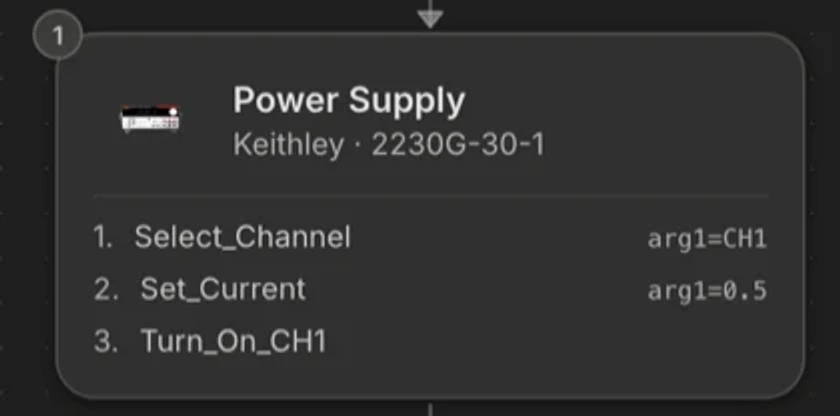 1234
1234- 1Position in the sequence. Steps execute in this order, top to bottom.
- 2The instrument. Its type, and the exact manufacturer and model the actions were resolved against.
- 3The actions, in the order they are sent. All of one instrument’s consecutive actions live in a single step.
- 4The parameters for each action. A value here can be a literal or a loop variable.
An instrument step shows its type, its manufacturer and model, and the actions it performs in order. One instrument's consecutive actions live in a single step, so “set voltage, set current limit, enable output” is one card with three actions, not three cards. The instrument reappears as a new step only when it comes back later in the flow.
Click a step to open its detail panel: the full action list with parameters, any limits attached to its measurements, and the option to scope an edit to it.
Canvas controls
| Control | What it does | Why it is there |
|---|---|---|
| Locked (default) | The canvas is fixed at a readable size and scrolls vertically. | A procedure is read top to bottom. Locked mode makes the mouse wheel do the obvious thing. |
| Unlocked | Free pan and zoom. | For a long workflow you want to see all of at once. |
| Fit | Frames the whole workflow. | The fast way back after zooming into a detail. |
| Click a step | Opens the detail panel. | Where parameters and limits live. |
| Scope to this | Adds the step to the edit scope. | See edit scope. |
Editing by hand
Everything the agent can set, you can set. Change a set-point, a settle time, a loop range, or a limit directly in the step. Hand edits and agent edits go into the same structure, so the agent sees your change on its next turn and patches around it rather than over it.
What Preview does not show
- The raw SCPI. Actions are named operations. The commands behind them are in the Code pane.
- Measured values. Preview is intent. Values live in the Report.
- The wiring. That is Schematic.