The builder
The agent chat
The left pane. You describe tests here, and every artifact in the project is written from here.
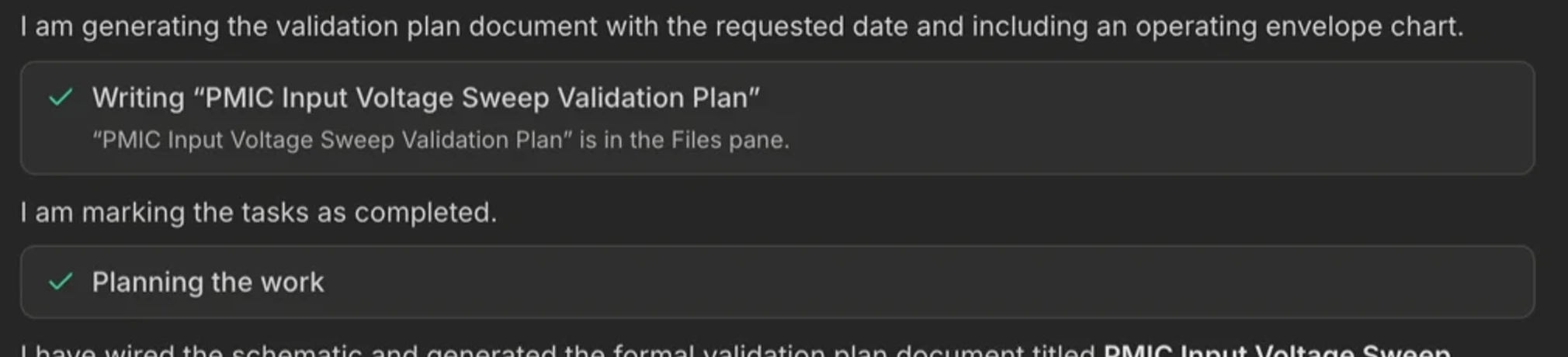
The chat is not a help desk bolted onto a GUI. It is the primary way work gets done in TestFlow: the agent has direct write access to the workflow, the documents, the schematic, the report, and the run button, and everything it does appears as a card you can click.
The composer

| Control | What it is for | Notes |
|---|---|---|
| Attach | PDFs, images, and text files. | A datasheet is the single highest-value attachment. Limits, pin names, and operating ranges come from its tables instead of being guessed. |
| Target chip | Which artifact this turn is allowed to write. | Build, Plan, or Report. See targets and edit scope. |
| Scope chip | Appears when you have selected steps. | The turn can only change those steps. Clear it with the ×. |
| Voice | Dictation into the composer. | Where the browser supports it. Useful with a probe in one hand. |
| Enter | Send. | Shift+Enter for a newline. |
What a turn looks like


- 1
One line of intent
The agent says what it is about to do, in a sentence. It does not narrate its reasoning at you. - 2
A checklist, on longer work
For multi-part requests it posts up to eight tasks and ticks them off as it goes, so you can see where it is. - 3
Cards for things that changed
One card per write: the workflow, the document, the schematic, the report, a bench proposal, a run. Click a card to open the pane it wrote. - 4
Lookups, folded
Read-only work such as checking an instrument’s available actions or reading a run log collapses into a single summary row. Expand it if you want the detail. - 5
A verdict line
A short line under the turn stating what actually happened. The product writes that line, not the model.
What the agent will not do
- Invent an instrument. It builds only with what is on your bench. If a test needs a scope and you have none, it says so instead of pretending.
- Invent a command. Action titles are validated against your exact models' catalogs. A miss is rejected and corrected in the same turn.
- Claim a pass it does not have. Saying a test passed requires a passing outcome from a run of the current workflow.
- Describe your screen. It cannot see the UI, so it does not give click-by-click directions. It tells you what it produced, and the card is the way in.
- Write PyVISA in chat as the deliverable. The workflow is the deliverable.

Two documents, one pane
The Plans pane holds one document. Asking for a second replaces the first, and the agent will say so before it does. If you need both, remix the project.
Interrupting
You can stop a turn mid-stream. Cards that were in flight settle to an error state rather than hanging, and anything already applied to a pane stays applied. To undo an entire turn, use revert, which restores the pre-turn snapshot of the canvas.