 Ali Kamaly
Automate Rigol & Siglent Without Coding in 2026 (6 Tools Compared)
Rigol and Siglent ship free PC software, and their newer scopes run in a browser, yet none of it sequences a test. Six options compared on rigol.com and siglent.com facts, plus a worked DHO800 and SPD3303X example with verified SCPI.
You can automate Rigol and Siglent instruments without coding, but not with the vendors' own software alone. Rigol UltraSigma and Siglent's EasyPower and SigScopeLab connect to the vendor's own instruments and send commands or pull data, and Rigol DHO800 and Siglent SDS800X HD scopes can be driven from a web browser, yet none of them sequences a multi-instrument test or writes a report. For that you need a layer above them: EEZ Studio (free, low-code flowcharts), TestFlow (testflowinc.com), an AI agent that builds and runs the test, or PyVISA if you are willing to write Python.
This page ranks six options using facts from rigol.com and siglent.com, checked in October 2026, and works one real example end to end: a Rigol DHO800 or DS1000Z scope and a Siglent SPD3303X supply checking a 3.3 V regulator at power-up, with every SCPI command checked against the vendors' programming guides.
Disclosure: this guide is written by the team behind TestFlow, which appears as one of the options. We list its tradeoffs the same way as everyone else's.
Why Rigol and Siglent instruments are easy to automate
Rigol and Siglent instruments are easy to automate because both vendors implement SCPI over USB and LAN, the same command standard Keysight and Tektronix use. Rigol's DHO800 user guide lists three remote paths: SCPI programming, PC software (Rigol recommends UltraSigma), and Web Control, and it states that the scope conforms to LXI Core 2011. Siglent's SPD3303X quick start guide documents USB and LAN control and prints the full SCPI command list.
The hardware is also cheap enough that the software budget matters. As of October 2026, Rigol North America lists the DHO800 series at $329 (DHO802) to $549 (DHO814), and Siglent lists the SPD3303X at $631 and the SPD3303X-E at $459. A DHO804 and an SPD3303X-E come to $918 at list. Automation software that costs more than the bench is the wrong answer, which is why every option below has a free way to start.
What the vendor software does not do is run a test. It gives each instrument a remote front panel. A test needs the supply and the scope driven in order, a measurement compared with a limit, and a record of what happened, and that layer has to come from somewhere else.
The 6 options, ranked
The six options for automating Rigol and Siglent instruments are ranked by how much of a real two-instrument test each one builds without code, then by cost, then by how well it covers both brands.
1. Rigol UltraSigma and Ultra Scope (Rigol's own PC software)
Rigol UltraSigma is Rigol's free PC software for finding instruments and sending SCPI commands. Rigol lists UltraSigma V00.01.06.01 on both the DHO800 and DS1000Z product pages, and the DS1000Z page also lists the Ultra Scope (PC) installer, version 00.01.02.13. Per the DHO800 user guide, UltraSigma finds the scope over USB-TMC or LAN, and you right-click the resource and choose "SCPI Panel Control" to send commands and read data. It also opens the instrument's LXI web page.
Good for: confirming that a scope answers, trying a command from the programming guide before you build anything, and pulling a single reading by hand.
Gives up: sequencing, limits, and reports. UltraSigma is a command console built around Rigol instruments, not an automation tool. That gap is why people search for a Rigol UltraSigma alternative as soon as a test has more than three steps.

2. TestFlow
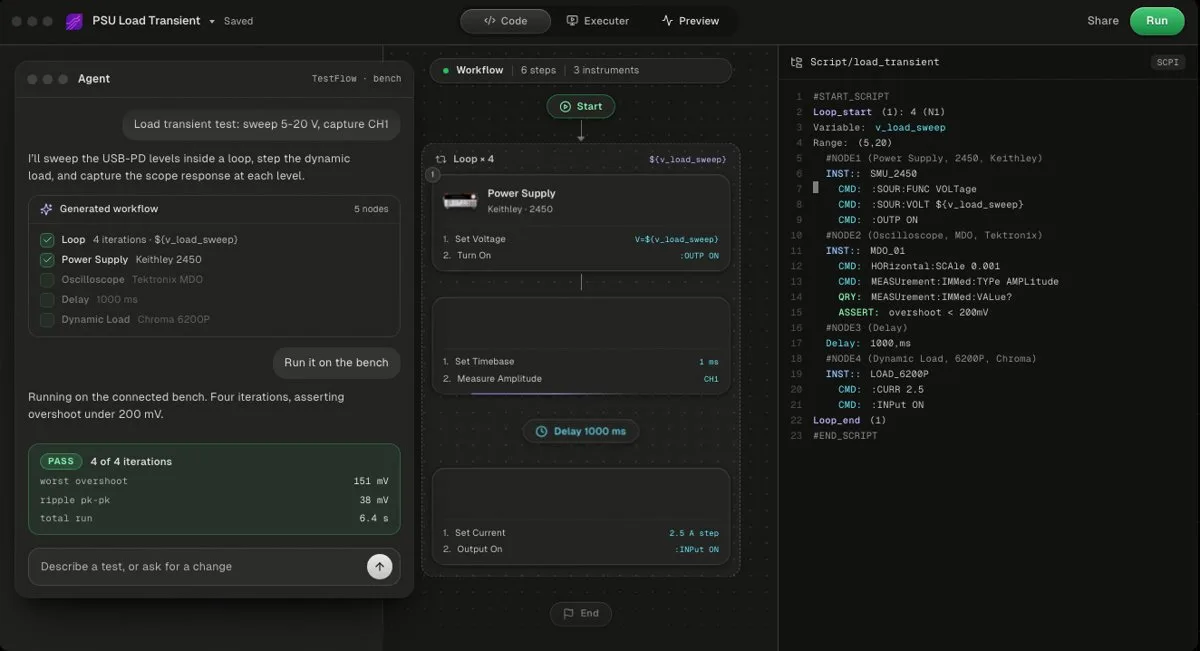
TestFlow is an AI agent for electronics testing: you describe the test, the agent builds the workflow and Python, runs it, and writes the report from measured results. Free to start, then $39 or $149 a month per seat. Bench runs need the Windows desktop app. Rigol is not in its catalog, and Siglent has one entry, the SDS6000A.
That last point decides how TestFlow handles a budget bench. Rigol and Siglent instruments speak SCPI over USB and LAN, so for a DHO804 or an SPD3303X the agent can add the instrument by finding the vendor's programming manual and drafting the command set, the same way it adds any SCPI instrument that is not in the catalog. Treat that as a capability, not a promise for every model: check your exact model in the app before you plan a project around it, and compare the generated commands with the programming guide on the first run. The supported instruments page and the instrument catalog guide explain what is listed.
A run looks like this. You connect both instruments over VISA, then describe the test in a sentence: "Set SPD3303X CH1 to 5 V with a 0.5 A limit, capture the 3.3 V rail on DHO804 channel 1 at power-up, and fail if the settled value is outside 3.234 to 3.366 V." The agent builds a reviewable workflow plus the generated Python, the Windows desktop app runs it, and the report shows each reading against its limit with a verdict. The web app can simulate the workflow before the hardware arrives.
Good for: two or more instruments in one test, results that need to be a report, and engineers who do not want to maintain a script. The agent writes limits, never measurements, and will not widen a limit to make a test pass (details).
Gives up: bench runs on macOS and Linux, which matters if your bench PC runs Linux, plus DAQ cards and non-SCPI instruments. Prices are on the pricing page.
- Best for
- Teams that want automation without writing VIs or drivers
- Cost
- Free to start. Engineer $39 a month, Lab $149 a month
- Tradeoff
- Runs on your bench through the Windows desktop app
3. Siglent SigScopeLab, EasyPower, EasyPowerX, and EasyWaveX
Siglent splits its PC software by instrument family, and none of it is a multi-instrument sequencer. Siglent North America's PC software page lists SigScopeLab as free Windows software for oscilloscope control and waveform analysis, with no test sequencer among the products.
- •SigScopeLab (scopes): per Siglent's SigScopeLab page, it acquires waveforms online or analyzes saved files offline. The free version connects 2 oscilloscopes with 16 channels, 2 Mpts per channel, and 5 measurements; Advanced raises that to 8 scopes and 64 channels. Remote control covers the SDS800X HD, SDS1000X HD, SDS2000X Plus, SDS2000X HD, SDS3000X HD, SDS5000X, SDS6000A, SDS6000L, and SDS7000A.
- •EasyScopeX (older scopes): Siglent lists it under discontinued products, for the SHS1000X, SHS800X, SDS1000X-E, and SDS2000X-E.
- •EasyPower (SPD3303X): the SPD3303X product page lists "Free PC software: Easypower", and the quick start guide uses it for firmware upgrades over USB-TMC or LAN.
- •EasyPowerX (newer supplies): EasyPowerX V1.0.3R1 covers the SPS6000X, SPS5000X, SPD4000X, SPD3303C, and SPD1000X series.
- •EasyWaveX (generators): EasyWaveX V1.1.0.25 edits arbitrary waveforms for the SDG800 through SDG8000A series.
Good for: controlling one Siglent instrument from a PC, editing generator waveforms, and analyzing captures on a big screen.
Gives up: cross-instrument sequencing. The scope tool and the supply tool are separate programs, and neither talks to a Rigol.
4. The instrument's built-in web control
Built-in web control is the zero-install option: type the instrument's IP address into a browser and operate it remotely. Coverage differs by model, so check before you rely on it.
- •Rigol DHO800: the user guide documents Web Control showing the live screen and moving control to a PC, phone, or tablet. The DHO800 datasheet lists 10/100 Base-T LAN with LXI-C. The default login is user "admin" and password "rigol", so change it on any shared network.
- •Siglent SDS800X HD: Siglent's product page states that a built-in web server supports remote control over LAN from a browser, alongside USBTMC and LAN (VXI-11, Telnet, and socket) interfaces. List prices run from $356 (SDS802X HD) to $839 (SDS824X HD), as of October 2026.
- •Siglent SPD3303X: its quick start guide documents no web control. Its LAN port carries SCPI over VXI-11 and EasyPower.
Good for: remote viewing, demos, and adjusting a setup from your desk.
Gives up: automation entirely. It is a remote front panel, so every step is still a click.
5. EEZ Studio (free, open source, low-code)
EEZ Studio, from Envox, is a free, open-source (GPL-3.0) SCPI controller for Windows, macOS, and Linux with a flowchart automation feature called EEZ Flow, per the EEZ Studio repository. Its instrument extension catalog lists Rigol and Siglent models, it connects over serial (USB), Ethernet, and VISA through the free R&S VISA, and it keeps a searchable history of every session. Version 0.29.0 was released in August 2026.
Good for: the closest free answer to "automate a Rigol without coding" on any operating system, including a Linux bench PC.
Gives up: a report generator, and staying no-code as the test grows. Shortcuts and task automation beyond the flowchart are JavaScript.
6. PyVISA (when you do want code)
PyVISA is the free, MIT-licensed Python library most Rigol and Siglent scripts are built on; version 1.16.2 requires Python 3.10 or newer. It is not no-code, and it belongs here because it is what every other option on this list is measured against: full control, any operating system, version control, and CI.
Good for: engineers who will maintain a script, and anything the tools above cannot express. Start with the Rigol oscilloscope PyVISA guide and the PyVISA tutorial.
Gives up: the no-code property, and the report, which you build yourself.
Comparison table
The table compares the six options for automating Rigol and Siglent instruments on cost, brand coverage, and whether they run a test or only control an instrument.
| Option | Cost (as of Oct 2026) | Rigol | Siglent | Multi-instrument test | Report |
|---|---|---|---|---|---|
| Rigol UltraSigma, Ultra Scope | Free | Yes | Not documented | No | No |
| TestFlow | Free to start, $39 or $149 a month | Added from the manual, not in catalog | SDS6000A in catalog, others added | Yes | Yes, from measured results |
| Siglent SigScopeLab, EasyPower, EasyPowerX, EasyWaveX | Free, SigScopeLab Advanced paid | No | Yes, per instrument family | No | No |
| Built-in web control | Free | DHO800 Web Control | SDS800X HD web server | No | No |
| EEZ Studio | Free, GPL-3.0 | Yes, IEXT catalog | Yes, IEXT catalog | Yes, flowcharts | No |
| PyVISA | Free, MIT | Yes | Yes | Yes, you write it | You build it |
The TestFlow row does not win everything. It costs money past the free version, its bench runs are Windows-only where EEZ Studio and PyVISA run on Linux and macOS, and Rigol support depends on the agent adding your model rather than on a catalog entry.
Worked example: a 3.3 V regulator power-up check
The worked example is a 3.3 V regulator power-up check that fits in one sentence: set SPD3303X CH1 to 5.0 V with a 0.5 A limit, arm a single capture on the scope at 2.5 V rising, switch the output on, and record the 3.3 V rail's rise time, peak, and settled value along with the input current. CH1 of the supply feeds the regulator input, and scope channel 1, on a 10x probe, sits on the 3.3 V output.
Every command below was checked against Rigol's DHO800/DHO900 programming guide, Rigol's DS1000Z programming guide, and the command chapter of Siglent's SPD3303X quick start guide. Whichever option you pick, this is the sequence it has to send.
Scope commands (Rigol DHO800 and DS1000Z)
*IDN?
:CHANnel1:DISPlay ON
:CHANnel1:PROBe 10
:CHANnel1:COUPling DC
:CHANnel1:SCALe 1
:TIMebase:MAIN:SCALe 0.0002
:TRIGger:MODE EDGE
:TRIGger:EDGE:SOURce CHANnel1
:TRIGger:EDGE:SLOPe POSitive
:TRIGger:EDGE:LEVel 2.5
:SINGle
:TRIGger:STATus?
:MEASure:ITEM? RTIMe,CHANnel1
:MEASure:ITEM? VMAX,CHANnel1
:MEASure:ITEM? VTOP,CHANnel1
:SYSTem:ERRor?
:TRIGger:STATus? returns TD, WAIT, RUN, AUTO, or STOP on both families. Poll it until WAIT before you switch the supply on, then until STOP before you read measurements.
Supply commands (Siglent SPD3303X)
*IDN?
CH1:VOLTage 5.0
CH1:CURRent 0.5
OUTPut CH1,ON
MEASure:VOLTage? CH1
MEASure:CURRent? CH1
SYSTem:STATus?
OUTPut CH1,OFF
SYSTem:ERRor?
SYSTem:STATus? returns a hex word such as 0x0224. Bit 0 is 1 when CH1 is in constant-current mode, which here means the 0.5 A limit is holding the input and the test should fail.
The same test in Python
This is the PyVISA version of the sequence, for anyone who wants to see exactly what a no-code tool has to do on their behalf. Every command in it is documented for both Rigol scope families and for the SPD3303X and SPD3303X-E.
import time
import pyvisa

SCOPE = "TCPIP0::192.168.1.50::INSTR"   # Rigol DHO804 or DS1054Z on LAN (LXI)
PSU = "TCPIP0::192.168.1.60::INSTR"     # Siglent SPD3303X on LAN (VXI-11)
VOUT_LIMITS = (3.234, 3.366)            # settled 3.3 V rail, plus or minus 2 percent

rm = pyvisa.ResourceManager()
scope = rm.open_resource(SCOPE)
psu = rm.open_resource(PSU)
scope.timeout = 10000
psu.timeout = 5000

def psu_write(cmd):
    psu.write(cmd)
    time.sleep(0.1)    # the SPD3303X command list has no *OPC?, so pace the writes

def wait_for(state, timeout_s=5.0):
    deadline = time.time() + timeout_s
    while time.time() < deadline:
        if scope.query(":TRIGger:STATus?").strip() == state:
            return True
        time.sleep(0.05)
    return False

print(scope.query("*IDN?").strip())
print(psu.query("*IDN?").strip())

psu_write("OUTPut CH1,OFF")
psu_write("CH1:VOLTage 5.0")
psu_write("CH1:CURRent 0.5")

for cmd in (":CHANnel1:DISPlay ON", ":CHANnel1:PROBe 10", ":CHANnel1:COUPling DC",
            ":CHANnel1:SCALe 1", ":TIMebase:MAIN:SCALe 0.0002",
            ":TRIGger:MODE EDGE", ":TRIGger:EDGE:SOURce CHANnel1",
            ":TRIGger:EDGE:SLOPe POSitive", ":TRIGger:EDGE:LEVel 2.5", ":SINGle"):
    scope.write(cmd)

if not wait_for("WAIT"):
    raise RuntimeError("scope did not arm")
psu_write("OUTPut CH1,ON")                     # the power-up edge is the trigger
if not wait_for("STOP"):
    psu_write("OUTPut CH1,OFF")
    raise RuntimeError("no trigger: check the probe and the 2.5 V level")

rise = float(scope.query(":MEASure:ITEM? RTIMe,CHANnel1"))
vmax = float(scope.query(":MEASure:ITEM? VMAX,CHANnel1"))
vtop = float(scope.query(":MEASure:ITEM? VTOP,CHANnel1"))

time.sleep(0.5)                                # let the input current settle
vin = float(psu.query("MEASure:VOLTage? CH1"))
iin = float(psu.query("MEASure:CURRent? CH1"))
in_cc = bool(int(psu.query("SYSTem:STATus?").strip(), 16) & 0x1)
psu_write("OUTPut CH1,OFF")

passed = VOUT_LIMITS[0] <= vtop <= VOUT_LIMITS[1] and not in_cc
print(f"rise {rise * 1e6:.1f} us, peak {vmax:.3f} V, settled {vtop:.3f} V, "
      f"input {vin:.3f} V at {iin * 1000:.1f} mA, CC mode {in_cc}: "
      f"{'PASS' if passed else 'FAIL'}")
print("scope errors:", scope.query(":SYSTem:ERRor?").strip())
print("psu errors:", psu.query("SYSTem:ERRor?").strip())
To keep the captured waveform as well as the numbers, read it while the scope is stopped. Both Rigol guides give the same conversion, voltage equals (raw minus YORigin minus YREFerence) times YINCrement, using values from :WAVeform:PREamble?:
scope.write(":WAVeform:SOURce CHANnel1")
scope.write(":WAVeform:MODE NORMal")
scope.write(":WAVeform:FORMat BYTE")
pre = [float(x) for x in scope.query(":WAVeform:PREamble?").split(",")]
xinc, xorg, xref, yinc, yorg, yref = pre[4], pre[5], pre[6], pre[7], pre[8], pre[9]
raw = scope.query_binary_values(":WAVeform:DATA?", datatype="B", container=bytes)

with open("powerup.csv", "w") as f:
    f.write("t_s,v\n")
    for i, b in enumerate(raw):
        f.write(f"{(i - xref) * xinc + xorg:.9e},{(b - yorg - yref) * yinc:.4f}\n")
Model quirks that cost an afternoon
Rigol and Siglent model differences are small, and each one breaks a script written for the other model. These are the ones the programming guides confirm.
| Item | Rigol DS1000Z | Rigol DHO800 | Siglent SPD3303X |
|---|---|---|---|
| Autoscale | :AUToscale | :AUToset | Not applicable |
| Error query reply | -113,"Undefined header..." | Same format | 0 No Error, no comma |
| Wait for completion | *OPC? available | *OPC? available | No *OPC?, pace writes |
| Reset | *RST | *RST | No *RST in the command list |
| Waveform formats | WORD, BYTE, ASCii | WORD, BYTE, ASCii (12-bit ADC) | Not applicable |
| LAN resource | LXI Core 2011, TCPIP0::ip::INSTR | LXI Core 2011, TCPIP0::ip::INSTR | VXI-11; Siglent's socket example uses port 5025 |
| Browser access | LXI web page (instrument info) | Web Control, admin / rigol | None documented |
A few more details matter on the SPD3303X. CH3 is fixed at 2.5, 3.3, or 5 V by a hardware switch, so SCPI can only turn it on and off with OUTPut CH3,ON. The SPD3303X-E has 10 mV and 10 mA resolution against 1 mV and 1 mA on the SPD3303X, per Siglent's product page, so when input current is a pass or fail criterion, the X is the better choice. Siglent's own LAN programming example sends OUTPUT CH1,ON over a raw socket on port 5025 and notes the SPD uses VXI-11 for LAN.
On the scopes, avoid autoscale inside an automated test anyway: it changes the vertical scale, the time base, and the trigger, so two runs stop being comparable. On the DHO800, :WAVeform:FORMat WORD returns 16 bits per point and keeps the 12-bit resolution; BYTE is used above because it works on both families. In NORMal mode the DHO800 returns up to 1,000 screen points, and RAW reads full memory only while the scope is stopped.
The full step-by-step script, from finding the scope to capturing the waveform and troubleshooting, is in automate a Rigol oscilloscope with Python. For the supply side in general, see programmable DC power supply, and for the commands other vendors use for the same jobs, the SCPI command cheat sheet.
Which option for which bench
The right way to automate a Rigol or Siglent bench depends on how many instruments the test touches and whether the result has to be a report.
| Situation | Start with |
|---|---|
| One scope, check a setting or grab a reading | Web Control (DHO800, SDS800X HD) or UltraSigma |
| Analyze Siglent captures on a PC | SigScopeLab, free version |
| Edit an arbitrary waveform for an SDG generator | EasyWaveX |
| Supply plus scope in one repeatable test, no code, Linux or macOS | EEZ Studio |
| Supply plus scope in one test with limits and a report, Windows bench | TestFlow |
| You will maintain a script and want it in version control | PyVISA |
If the bench mixes brands, the choice gets simpler, because only the vendor-neutral options survive. A Rigol scope next to a Keysight DMM and a Siglent supply rules out every vendor tool on this page. See no-code test automation for electronics for the wider field, free instrument control software for the zero-licence stack, and Tektronix vs Rigol oscilloscopes if the scope purchase is still open.
Related reading
- •Automate Keysight instruments without coding, the same question for Keysight benches
- •Automate Tektronix instruments without coding, and for Tektronix
- •Automate oscilloscope measurements, the measurement side in depth
- •Automate power supply testing, sweeps, limits, and load steps
- •Instrument control with VISA and SCPI, the protocol underneath every option here
- •GPIB vs USB vs LAN, choosing the connection
- •Keysight Command Expert alternatives, finding the right SCPI command fast
- •Python instrument control libraries compared, if you outgrow raw PyVISA
- •TestFlow tutorials, real bench runs with no code
- •The generated code, what TestFlow hands you to keep
Where TestFlow fits
A budget bench is still a bench. The scope and the supply cost less, and the test you need to run on them is the same one a Keysight bench runs.
- 1
Connect your instruments. Pick the manufacturer and model, paste the VISA address (USB, LAN, GPIB, or serial), and the agent knows what is on your bench. No bench yet? Use a placeholder address, build the full automation, and swap in the real address when you are in the lab.
- 2
Tell the agent what to test. For example, "run a VI sweep from 1 to 10 V in 1 V steps at 0.5 A load current," or "suggest the tests for a power-management device."
- 3
The agent builds the complete workflow in seconds. Instrument-aware automation appears on the canvas, with the generated scripts visible in a code panel you can inspect and edit.
- 4
Run it in your lab. Click Run in the TestFlow desktop app for Windows and the status panel streams results step by step, with measured values inline (VOUT = 3.301 V, asserted 3.2 to 3.4 V, PASS). One click exports a structured PDF report, or the raw results as CSV.

- Vendor-neutral by design. One workflow drives Keysight, Tektronix, Rohde & Schwarz, Rigol, Keithley, Anritsu, and any other SCPI instrument over standard VISA.
- Built in the browser, run on the bench. Workflows live in your workspace, so a sequence built in one lab runs the same way in another. Bench runs use the Windows desktop app.
- Free version to start. Sign in at app.testflowinc.com and build your first workflow today; plans and quotes are on the pricing page.

The step-by-step walkthrough, VISA address formats, and Test Planner prompts are all in the TestFlow product guide.
Frequently asked questions
Can you automate a Rigol oscilloscope without coding?
Yes, within limits. Rigol's UltraSigma sends SCPI commands from a panel, and DHO800 scopes have browser-based Web Control, but neither sequences a test or writes a report. For a repeatable test without code you need a tool above them, such as EEZ Studio flowcharts or TestFlow.
What is Rigol UltraSigma?
UltraSigma is Rigol's free PC software for finding instruments over USB and LAN and sending SCPI commands through its SCPI Panel Control. Rigol lists version 00.01.06.01 on the DHO800 and DS1000Z product pages, and the DS1000Z page also lists the Ultra Scope installer.
Does TestFlow support Rigol and Siglent instruments?
Rigol is not in the TestFlow catalog, and Siglent has one catalog entry, the SDS6000A oscilloscope. Both vendors' instruments speak SCPI, so the agent adds most models from the vendor's programming manual. Check your exact model in the app before you plan a project around it.
What is the best Rigol UltraSigma alternative?
It depends on the job. EEZ Studio is a free, open-source SCPI controller with flowchart automation, PyVISA is the free route if you will write Python, and TestFlow builds and runs a full multi-instrument test from a description. For interactive use, a DHO800's own Web Control needs no install.
What software does Siglent provide for its power supplies?
Siglent's SPD3303X product page lists EasyPower as free PC software. The newer EasyPowerX covers the SPS6000X, SPS5000X, SPD4000X, SPD3303C, and SPD1000X series. Both control and monitor one supply rather than sequencing a test across instruments.
What SCPI commands control a Siglent SPD3303X?
CH1:VOLTage and CH1:CURRent set the output, OUTPut CH1,ON switches it, and MEASure:VOLTage? CH1 and MEASure:CURRent? CH1 read it back. SYSTem:STATus? returns a hex word whose bit 0 shows whether CH1 is in constant-current mode. The command list has no *OPC? and no *RST.
Automate every instrument in the lab,
Create test workflows in minutes
- 01Describe the testIn a sentence, the way you would tell a colleague.
- 02The agent builds itWorkflow and script for your instruments, any vendor.
- 03Run it, get the reportOn your bench, with the measured values.
Tags
Your next test, automated today
Describe the test. TestFlow builds the workflow, runs it on your instruments, and writes the report. Free to start, no card needed.