 Ali Kamaly
Automate Power Supply Testing in 2026 (Efficiency, Load, Transient)
The five DC-DC converter tests every power bench runs, the instruments and wiring each one needs, example limits, a complete PyVISA efficiency sweep for a Keysight E36313A, EL34143A, and two 34465As, and the same test described to an AI agent in one sentence.
Automating power supply testing means scripting a programmable supply, an electronic load, one or more DMMs, and an oscilloscope to run line regulation, load regulation, efficiency versus load, load transient response, and ripple and noise as one repeatable sequence with limits. The core loop never changes: set an input condition, set a load, let it settle, measure input and output at the converter pins, compute, and compare to a limit. You can write that loop in Python with PyVISA, or describe the test in a sentence to an AI agent such as TestFlow (testflowinc.com), which builds the same sequence, runs it on your bench, and writes the report.
This guide is for engineers validating DC-DC converters, regulators, and point-of-load modules. You get the five tests with the instruments and example limits for each, the wiring that decides your accuracy, a complete PyVISA efficiency sweep for a Keysight E36313A, a Keysight EL34143A, and two Keysight 34465A DMMs, the Chroma 63600 equivalents, and the same test as a one-sentence TestFlow description.
The five power supply tests and the bench they need
Power supply testing on a bench comes down to five measurements, and each one needs a different combination of instruments. The table uses a hypothetical 12 V to 3.3 V, 2 A buck converter as the device under test.
| Test | What it proves | Instruments | Example spec limit |
|---|---|---|---|
| Line regulation | Vout holds as Vin moves from 9 to 16 V at full load | Supply, load, DMM on Vout | within ±0.5% of 3.3 V |
| Load regulation | Vout holds from 10% to 100% load at 12 V in | Supply, load, DMM on Vout | within ±1% |
| Efficiency vs load | Pout / Pin across the load range | Supply, load, two DMMs | 85% or better from 0.5 A to 2 A |
| Load transient | Deviation and recovery when the load steps 0.5 A to 1.5 A | Load in transient mode, scope | ±165 mV (5%) peak, back within 33 mV in 100 µs |
| Ripple and noise | Switching residue on Vout | Scope, 20 MHz bandwidth limit | 33 mVpp (1%) or less |
Every number in the last column is an example spec limit for a hypothetical part, not a measured result. Your limits come from the converter's datasheet or your requirement document. The structure of the test is what transfers.
The bench used in the rest of this guide, with list prices from keysight.com as of October 2026:
| Role | Model | Rating | List price |
|---|---|---|---|
| Input supply | Keysight E36313A | 6 V / 10 A plus two 25 V / 2 A outputs, 160 W | US$2,609 |
| Electronic load | Keysight EL34143A | 150 V / 60 A / 350 W | US$3,128 |
| Meters (x2) | Keysight 34465A | 6½ digits, 30 ppm basic 1-year DCV | US$2,075 each |
Any SCPI supply, load, and DMM works. The programmable DC power supply guide covers choosing the supply, and the E36313A programming guide covers its command set in depth.
Wiring decides accuracy before any code runs
Kelvin connections at the converter pins matter more than any line of Python. A 20 mΩ lead carrying 2 A drops 40 mV, which is 1.2% of a 3.3 V output, already larger than the ±1% load regulation limit above. Measure every voltage at the device pins, never at the instrument terminals.
Four connections make the measurement honest:
- 1
Supply remote sense at the DUT input. The E36313A switches to 4-wire sensing with
VOLT:SENS:SOUR EXT, (@2). Its data sheet lists about 1 V of maximum load-lead drop for remote sense, so a short lead and a series ammeter stay inside the loop. - 2
Load remote sense at the DUT output. The EL34143A uses the same command form,
VOLT:SENS:SOUR EXT, (@1), so its voltage readback is taken at the output pins. - 3
A DMM across the input pins for Vin.
- 4
A DMM in series with the input for Iin, because supply readback is too coarse at light load.
That last point is where most efficiency curves go wrong. The error budget at 10% load (0.2 A out, roughly 70 mA in at 12 V) shows why:
| Reading | Source | Spec (± of reading + offset) | Error at 10% load |
|---|---|---|---|
| Iin | E36313A CH2 readback | 0.04% + 3 mA | about 4.3% |
| Iout | EL34143A medium range readback | 0.04% + 1.8 mA | about 0.9% |
| Vout | EL34143A low (15 V) range readback | 0.02% + 3 mV | about 0.1% |
The specs come from the E36300 data sheet and the EL30000 data sheet. A 4% error on input current is a 4% error on efficiency, which is the whole difference between a pass and a fail. At full load the same offsets shrink to about 0.5% or less, so the curve looks right at the top and drifts at the bottom.
Line and load regulation in SCPI
Line regulation and load regulation are the same measurement with a different variable swept. For line regulation, hold the load at full current and step Vin; for load regulation, hold Vin at 12 V and step the load.
The formulas most datasheets use:
- •Line regulation (%) = (Vout max − Vout min) / Vout nominal × 100, across the Vin range at full load.
- •Load regulation (%) = (Vout at 10% load − Vout at full load) / Vout nominal × 100, at nominal Vin.
The E36313A side of a line regulation run sets protection and the current limit once, then steps the input through 9, 12, and 16 V, reading the sensed input voltage at each point while a DMM reads Vout:
VOLT:PROT 17, (@2)
CURR 1.5, (@2)
VOLT 9, (@2)
OUTP ON, (@2)
MEAS:VOLT? (@2)
VOLT 12, (@2)
MEAS:VOLT? (@2)
VOLT 16, (@2)
MEAS:VOLT? (@2)
OUTP OFF, (@2)
Two details from the E36300 programming guide save debugging time. Queries need a space between the ? and the channel list, so MEAS:VOLT? (@2) works and MEAS:VOLT?(@2) returns error -103. And the 25 V outputs specify an up-programming settling time of 50 ms at full load, so a script that reads 5 ms after a VOLT change is reading the transition, not the result. Wait at least 100 ms, then let the DMM integrate.
The DMM reading for both tests is a plain DC volts measurement. Send CONF first and the integration time second, because every CONFigure resets the 34465A's other settings:
CONF:VOLT:DC 10
VOLT:DC:NPLC 10
READ?
At 10 power-line cycles the integration alone takes 200 ms on 50 Hz mains and about 167 ms on 60 Hz, and autozero, on by default at 1 PLC and above, adds an offset measurement after each reading. Only 1, 10, and 100 PLC reject line-frequency noise on the 34465A, so stay on those values. The 34465A SCPI command reference and the guide to automating multimeter measurements in Python go deeper.
The full PyVISA efficiency sweep
An efficiency-versus-load sweep is the test that needs every instrument at once, so it is the one worth scripting first. This script drives the E36313A channel 2 into the converter input, steps the EL34143A through 11 load points from 0.1 A to 2 A, reads Vin and Iin on two 34465As, reads Vout and Iout from the load's sensed readback, and writes a CSV with a verdict per point.
"""Efficiency vs load for a 12 V to 3.3 V, 2 A buck converter.

Bench: Keysight E36313A (CH2 feeds the DUT input, remote sense at the input
pins), Keysight EL34143A on the DUT output (remote sense at the output pins),
34465A #1 across the DUT input pins, 34465A #2 in series with the input.
"""
import csv
import time

import pyvisa

PSU = "TCPIP0::192.168.1.10::inst0::INSTR"
LOAD = "TCPIP0::192.168.1.11::inst0::INSTR"
DMM_VIN = "TCPIP0::192.168.1.12::inst0::INSTR"
DMM_IIN = "TCPIP0::192.168.1.13::inst0::INSTR"

VIN = 12.0                     # V, input set point
IIN_LIMIT = 1.5                # A, supply current limit on CH2
OVP = 17.0                     # V, supply over-voltage trip
LOAD_STEPS = [0.1, 0.2, 0.4, 0.6, 0.8, 1.0, 1.2, 1.4, 1.6, 1.8, 2.0]  # A
SETTLE_S = 0.5
ABORT_VOUT = (3.0, 3.6)        # V, stop the run outside this window
EFF_LIMIT = 0.85               # example spec limit, not a measured value
EFF_FROM_A = 0.5               # apply the limit from 0.5 A upward


def check(inst, name):
    """Raise if the instrument queued an error."""
    err = inst.query("SYST:ERR?").strip()
    if not err.startswith(("+0", "0")):
        raise RuntimeError(f"{name}: {err}")


rm = pyvisa.ResourceManager()
psu, load = rm.open_resource(PSU), rm.open_resource(LOAD)
dmm_vin, dmm_iin = rm.open_resource(DMM_VIN), rm.open_resource(DMM_IIN)
for inst in (psu, load, dmm_vin, dmm_iin):
    inst.timeout = 10000
    inst.write("*RST")

# Meters: CONF first, then NPLC, or CONF silently resets the NPLC.
dmm_vin.write("CONF:VOLT:DC 100")      # 100 V range covers 16 V in
dmm_vin.write("VOLT:DC:NPLC 10")
dmm_iin.write("CONF:CURR:DC 3")        # 3 A range, front terminals
dmm_iin.write("CURR:DC:NPLC 10")

# Supply: sense at the DUT input, protection and limit before output on.
psu.write("VOLT:SENS:SOUR EXT, (@2)")
psu.write(f"VOLT:PROT {OVP}, (@2)")
psu.write(f"CURR {IIN_LIMIT}, (@2)")
psu.write(f"VOLT {VIN}, (@2)")

# Load: constant current, sense at the DUT output, 6 A range, 0 A to start.
load.write("FUNC CURR, (@1)")
load.write("VOLT:SENS:SOUR EXT, (@1)")
load.write("CURR:RANG 2.2, (@1)")
load.write("CURR 0, (@1)")

for inst, name in ((psu, "psu"), (load, "load"), (dmm_vin, "dmm_vin"), (dmm_iin, "dmm_iin")):
    check(inst, name)

rows = []
psu.write("OUTP ON, (@2)")
time.sleep(1.0)
load.write("INP ON, (@1)")
try:
    for i_set in LOAD_STEPS:
        load.write(f"CURR {i_set}, (@1)")
        time.sleep(SETTLE_S)
        vin = float(dmm_vin.query("READ?"))
        iin = float(dmm_iin.query("READ?"))
        vout = float(load.query("MEAS:VOLT? (@1)"))
        iout = float(load.query("MEAS:CURR? (@1)"))
        if not ABORT_VOUT[0] <= vout <= ABORT_VOUT[1]:
            raise RuntimeError(f"Vout {vout:.3f} V outside abort window at {i_set} A")
        eff = (vout * iout) / (vin * iin)
        limited = i_set >= EFF_FROM_A
        verdict = "PASS" if (not limited or eff >= EFF_LIMIT) else "FAIL"
        rows.append([i_set, vin, iin, vout, iout, round(eff * 100, 2), verdict])
        print(f"{i_set:4.1f} A  eff {eff * 100:6.2f} %  {verdict}")
finally:
    load.write("INP OFF, (@1)")        # load off first, then the source
    psu.write("OUTP OFF, (@2)")

with open("efficiency.csv", "w", newline="") as f:
    writer = csv.writer(f)
    writer.writerow(["i_set_A", "vin_V", "iin_A", "vout_V", "iout_A", "eff_pct", "verdict"])
    writer.writerows(rows)

print("OVERALL:", "FAIL" if any(r[-1] == "FAIL" for r in rows) else "PASS")
Three choices in the script are deliberate. The supply's protection and current limit go in before OUTP ON, never after. The finally block turns the load off before the supply, so the converter is never left sourcing into a load that outlives its input. And CURR:RANG 2.2 selects the EL34143A's medium range (up to 6.12 A) once, before the input turns on, because the EL30000 programming guide notes that a range change briefly drops the input.
The pattern is the same one used in the VI curve sweep, extended to four instruments. For the basics of addressing and backends, start with the PyVISA tutorial.
The same sweep on a Chroma 63600 load
A Chroma 63600 mainframe uses a different command style for the same job: you select a channel first, and the mode name carries the range. The 63630-80-60 module is rated 80 V, 60 A, 300 W, with CC ranges of 0.6, 6, and 60 A that map to the CCL, CCM, and CCH modes, per the 63600 operation and programming manual (a distributor-hosted copy of Chroma's manual).
| Action | Keysight EL34143A | Chroma 63600 (63630-80-60) |
|---|---|---|
| Address the input | channel list (@1) on each command | CHAN 1 once |
| CC mode, 6 A range | FUNC CURR, (@1) then CURR:RANG 2.2, (@1) | MODE CCM |
| Set current | CURR 1.0, (@1) | CURR:STAT:L1 1.0 |
| Input on / off | INP ON, (@1) / INP OFF, (@1) | LOAD ON / LOAD OFF |
| Read V and I | MEAS:VOLT? (@1), MEAS:CURR? (@1) | MEAS:VOLT?, MEAS:CURR? |
| Remote sense | VOLT:SENS:SOUR EXT, (@1) | automatic when Vsense is wired |
| Transient | TRAN:MODE CONT plus CURR:TLEV | MODE CCDM plus CURR:DYN:L1/L2/T1/T2 |
| Slew units | A/s | A/µs |
Swapping loads in the script means changing five lines. The slew units are the trap: CURR:SLEW 100000 on the Keysight is 0.1 A/µs, and the same number on a Chroma is far outside its range. The SCPI command cheat sheet collects more of these vendor differences.
Load transient response with the load's transient mode
Load transient testing uses the electronic load's built-in transient generator, because software cannot toggle a load in microseconds. The EL34143A runs a continuous square wave between its main level and its transient level, and the scope captures the output deviation.
This sequence follows the vendor's own continuous-mode and CC toggle examples in the EL30000 user's guide:
FUNC CURR, (@1)
CURR:RANG 2.2, (@1)
TRAN:MODE CONT, (@1)
CURR 0.5, (@1)
CURR:TLEV 1.5, (@1)
CURR:SLEW 100000, (@1)
CURR:SLEW:NEG 100000, (@1)
TRAN:FREQ 100, (@1)
TRAN:DCYC 50, (@1)
TRAN:COUN 200, (@1)
TRIG:TRAN:SOUR IMM, (@1)
CURR:MODE LIST, (@1)
INP ON, (@1)
INIT:TRAN (@1)
TRAN:MODE resets to LIST, so set it explicitly every run. The slew rate is in amps per second, so 100000 is 0.1 A/µs. The EL34143A data sheet lists a typical maximum slew of 400 kA/s (0.4 A/µs) on the medium range and 4.8 MA/s on the high range, so a converter spec that calls for a faster edge needs the high range or a faster load.
On the scope, AC-couple the output channel, trigger on the falling edge of Vout (the dip when the load steps up), take a single acquisition, and read the extremes. On a Keysight InfiniiVision that is :MEASure:VMIN? CHANnel1 and :MEASure:VMAX? CHANnel1. Recovery time needs the waveform itself, which the oscilloscope measurement automation guide covers with the transfer code for Keysight, Tektronix, and Rigol.
Ripple and noise without measuring your probe
Ripple measurement is mostly a probing problem. A standard ground lead forms a loop that picks up the converter's switching field, and the result can be several times the real ripple.
Four settings make a ripple number comparable to a datasheet:
- •Bandwidth limit at 20 MHz, the bandwidth most supply specs use. The E36313A's own ripple spec (2 mVpp on output 1, 5 mVpp on outputs 2 and 3) is stated at 20 Hz to 20 MHz.
- •AC coupling so the vertical scale can sit at 10 or 20 mV/div.
- •A short ground spring or a tip-and-barrel adapter at the output capacitor.
- •Enough time on screen for several switching cycles plus the lower-frequency noise.
The bandwidth limit command differs per scope. Keysight InfiniiVision uses :CHANnel1:BWLimit ON (about 25 MHz on the 3000T X-Series), Tektronix 4/5/6 Series uses CH1:BANdwidth 20E6, and Rigol DS1000Z uses :CHANnel1:BWLimit 20M. Then read :MEASure:VPP? CHANnel1 on Keysight or the equivalent from the oscilloscope guide. Running ripple at each line and load point turns the efficiency sweep into a full characterisation.
Four ways to automate power supply testing in 2026
The four realistic options trade cost against how much of the work you do yourself. Every one of them ends in SCPI over VISA.
1. Python and PyVISA (free, you write it)
PyVISA is MIT licensed, and version 1.16.2 shipped on February 27, 2026. It is the right tool when the test is a one-off, when it must live inside a Python system you already maintain, or when bench runs must happen on macOS or Linux. You own every line, including the error handling, the limit logic, and the report, which is where most of the time goes. The Python instrument control libraries comparison covers what to build on top of it.

2. TestFlow
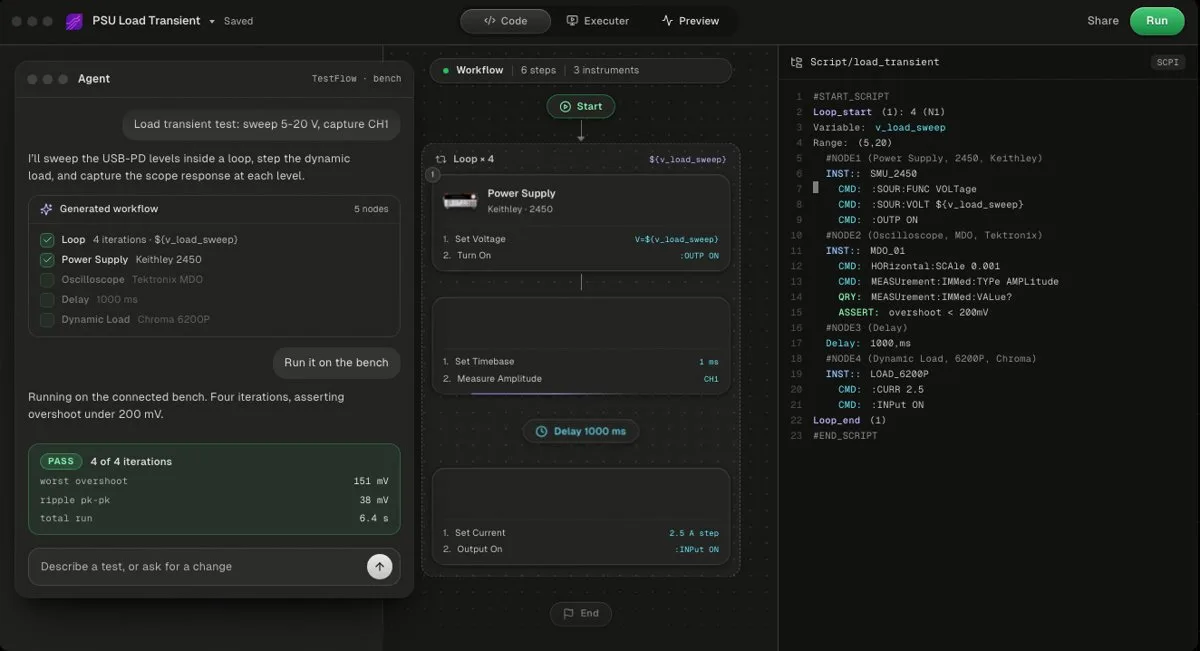
TestFlow (testflowinc.com) is an AI agent for electronics testing: you describe the test, the agent builds the workflow and Python, runs it on your bench, and writes the report from measured results. Free to start, then $39 or $149 a month per seat as of October 2026. Bench runs need the Windows desktop app. No DAQ cards, no non-SCPI instruments.
The efficiency sweep above, described in one sentence:
> "Power the buck converter from E36313A channel 2 at 12 V with a 1.5 A limit, sweep the EL34143A from 0.1 A to 2 A in 11 steps, read input voltage and current on the two 34465As and output voltage and current from the load, compute efficiency, and fail any point from 0.5 A upward below 85%."
The agent turns that into a reviewable workflow of steps (configure the meters, configure the supply and load, loop over the load points, measure, compute, compare, shut down) plus the generated Python with the SCPI for those exact models. The Windows desktop app runs it on the real instruments, values stream against their limits, and the report shows the efficiency chart with PASS or FAIL per reading. The agent writes limits, never measurements, and it will not widen a limit to make a point pass, as the trust guide explains. The generated code exports as a standalone Python package you own (generated code guide).
TestFlow is not a full test executive: there is no operator or user management and no database connectivity today. Instruments that are SCPI but not in the instrument catalog, such as many loads, can be added by the agent from the vendor's programming manual. See pricing for the plan limits.
- Best for
- Teams that want automation without writing VIs or drivers
- Cost
- Free to start. Engineer $39 a month, Lab $149 a month
- Tradeoff
- Runs on your bench through the Windows desktop app
3. The instruments' built-in sequencers (no PC)
The EL34143A has a LIST mode that steps the input through a sequence of levels with set dwell times, plus a data logger that records input voltage and current. For a fixed load profile with no limits and no report, the front panel is enough. You give up the input-side measurements, the efficiency calculation, and any verdict.
4. LabVIEW or TestStand (the incumbents)
A lab that already runs NI LabVIEW or TestStand builds these tests as VIs or TestStand steps on the same VISA layer. The cost and lock-in are covered in the LabVIEW alternatives comparison and the TestStand alternatives guide.
| Method | Who writes the SCPI | Report | Runs bench tests on | Cost as of Oct 2026 |
|---|---|---|---|---|
| Python + PyVISA | You | You build it | Windows, macOS, Linux | Free |
| TestFlow | The agent | Built from the run's results | Windows desktop app | Free version, then $39 or $149 a month |
| Built-in sequencer | Nobody, front panel | None | The instrument | Included |
| LabVIEW / TestStand | You, graphically | You build it | Depends on edition, see LabVIEW on Mac and Linux | NI licence, see LabVIEW pricing |
Common mistakes that corrupt power supply test data
Most bad power supply data comes from a short list of setup errors, not from the converter.
- •Measuring at the instrument terminals. 40 mV of lead drop at 2 A is larger than most load regulation limits.
- •Trusting readback current at light load. A 3 mA offset on a 70 mA reading is a 4% efficiency error.
- •Reading before the supply settles. The E36313A's 25 V outputs take up to 50 ms to settle at full load.
- •Running a high-current load below its minimum voltage. The EL34143A needs about 1.5 V at full-scale current on its high range, versus 0.15 V on its medium range, so a 1 V rail at 10 A will not load correctly on the high range.
- •Changing load range with the input on. The EL30000 briefly drops the input on a range change, which looks exactly like a converter dropout.
- •Ignoring thermal drift. Efficiency moves as the converter heats. Hold the hottest point for minutes, not seconds, before the reading you report.
For turning the CSV into a deliverable, the automated test report generation guide covers charts, limits, and provenance.
Related reading
- •Automate a Keysight power supply with Python, the supply side in depth
- •TestFlow vs Python and PyVISA, one regulator test written both ways
- •Automate Keysight instruments without coding
- •Automate oscilloscope measurements, for transient and ripple capture
- •Battery test automation, the same supply and load used on a cell
- •No-code test automation for electronics
- •AI test automation for lab instruments
- •Instrument control with VISA and SCPI
- •GPIB vs USB vs LAN, choosing the transport for four instruments
- •Test sequencer comparison, where a sweep becomes a sequence
- •How TestFlow works and limits in TestFlow
- •Video tutorials, including a Keysight, Tektronix, and Chroma bench run
Where TestFlow fits
A power supply test is never one instrument. It is a supply, a load, and two meters moving in step, and the wiring between them in software is where the day goes.
- 1
Connect your instruments. Pick the manufacturer and model, paste the VISA address (USB, LAN, GPIB, or serial), and the agent knows what is on your bench. No bench yet? Use a placeholder address, build the full automation, and swap in the real address when you are in the lab.
- 2
Tell the agent what to test. For example, "run a VI sweep from 1 to 10 V in 1 V steps at 0.5 A load current," or "suggest the tests for a power-management device."
- 3
The agent builds the complete workflow in seconds. Instrument-aware automation appears on the canvas, with the generated scripts visible in a code panel you can inspect and edit.
- 4
Run it in your lab. Click Run in the TestFlow desktop app for Windows and the status panel streams results step by step, with measured values inline (VOUT = 3.301 V, asserted 3.2 to 3.4 V, PASS). One click exports a structured PDF report, or the raw results as CSV.

- Vendor-neutral by design. One workflow drives Keysight, Tektronix, Rohde & Schwarz, Rigol, Keithley, Anritsu, and any other SCPI instrument over standard VISA.
- Built in the browser, run on the bench. Workflows live in your workspace, so a sequence built in one lab runs the same way in another. Bench runs use the Windows desktop app.
- Free version to start. Sign in at app.testflowinc.com and build your first workflow today; plans and quotes are on the pricing page.

The step-by-step walkthrough, VISA address formats, and Test Planner prompts are all in the TestFlow product guide.
Frequently asked questions
What instruments do I need to automate power supply testing?
A programmable DC supply for the input, a programmable electronic load for the output, at least one 6.5-digit DMM for voltages measured at the converter pins, and an oscilloscope for load transient and ripple. A Keysight E36313A, EL34143A, two 34465As, and any InfiniiVision, Tektronix, or Rigol scope cover a converter up to about 2 A input on the 25 V outputs.
How do you calculate DC-DC converter efficiency?
Efficiency is output power divided by input power: (Vout x Iout) / (Vin x Iin). Measure Vin and Vout with Kelvin leads at the converter pins, not at the instrument terminals, because a 20 milliohm lead at 2 A drops 40 mV, which is 1.2 percent of a 3.3 V output.
Why does my efficiency curve look wrong at light load?
Readback offset dominates at low current. The E36313A's 25 V outputs specify current readback as 0.04 percent plus 3 mA, so at a 70 mA input current the offset alone is about 4 percent of the reading. Put a DMM in series with the input for light-load points.
Can TestFlow automate power supply testing without writing code?
Yes. Describe the test in a sentence, naming the supply, load, meters, set points, and limits, and the TestFlow agent builds a reviewable workflow and the Python with the SCPI for your models. Bench runs need the Windows desktop app. The free version needs no card, and Engineer is $39 a month as of October 2026.
Which SCPI commands put a Keysight EL34143A in constant current mode?
FUNC CURR, (@1) selects constant current, CURR:RANG 2.2, (@1) picks the range that covers 2.2 A, CURR 1.0, (@1) sets the level, and INP ON, (@1) turns the input on. MEAS:VOLT? (@1) and MEAS:CURR? (@1) read it back.
Automate every instrument in the lab,
Create test workflows in minutes
- 01Describe the testIn a sentence, the way you would tell a colleague.
- 02The agent builds itWorkflow and script for your instruments, any vendor.
- 03Run it, get the reportOn your bench, with the measured values.
Tags
Your next test, automated today
Describe the test. TestFlow builds the workflow, runs it on your instruments, and writes the report. Free to start, no card needed.