 Ali Kamaly
Automate Oscilloscope Measurements in 2026 (Keysight, Tek, Rigol)
The SCPI that differs between Keysight InfiniiVision, Tektronix 4/5/6 Series MSO, and Rigol DS1000Z and DHO scopes, checked against each programming manual, with working PyVISA code for measurements, single acquisitions, screenshots, waveform scaling, and a pass/fail sweep.
Automating oscilloscope measurements means sending SCPI over VISA to set the channel, timebase, and trigger, take a single acquisition, wait for it to finish, and then read the scope's built-in measurements such as Vpp, frequency, and rise time, or transfer the waveform and compute your own. The sequence is identical on every scope and the command strings are not: Keysight InfiniiVision reads Vpp with :MEASure:VPP? CHANnel1, the Tektronix 4/5/6 Series MSO uses numbered measurement objects such as MEASUrement:MEAS1:TYPe PK2Pk, and Rigol DS1000Z uses :MEASure:ITEM? VPP,CHANnel1. You can write that in Python with PyVISA, or describe the measurement in a sentence to an AI agent such as TestFlow (testflowinc.com), which generates the commands for the scope on your bench.
This guide is for engineers who need numbers out of a scope without someone at the front panel. You get a vendor-by-vendor SCPI table checked against each programming manual, working PyVISA code for measurements, single acquisitions, screenshots, and waveform scaling on all three families, a pass/fail sweep, and the one-sentence TestFlow version.
The five steps of every automated scope measurement
An automated oscilloscope measurement is five steps in a fixed order, whichever vendor is on the bench.
- 1
Reset to a known state with
*RST. Never autoscale in a test: autoscale picks settings from whatever signal happens to be present, and on Keysight InfiniiVision:AUToscalealso turns off active measurements. - 2
Configure the channel: vertical scale, offset, coupling, probe ratio, and bandwidth limit.
- 3
Configure the timebase so the feature you measure fills the screen. Frequency needs at least two full cycles; rise time needs the edge to span several divisions.
- 4
Configure the trigger: edge source, level, and slope.
- 5
Take a single acquisition, wait for it, then measure. Reading a measurement while the scope is still running returns a value from an unknown acquisition.
Step 5 is where scripts fail, and each vendor handles it differently, so it has its own section below.
Bandwidth decides whether a rise-time number means anything. A scope's own rise time is roughly 0.35 divided by its bandwidth, so a 100 MHz scope contributes about 3.5 ns, and the displayed rise time is the root-sum-square of the signal's edge and the scope's. A true 5 ns edge reads as about 6.1 ns on that scope, a 22% error. For edges under about five times the scope's own rise time, report the scope bandwidth next to the number. The Keysight vs Tektronix oscilloscope comparison and the Tektronix vs Rigol comparison cover the hardware side.
Oscilloscope SCPI differences: Keysight vs Tektronix vs Rigol
The command table below was checked against each vendor's current programming manual: the Keysight InfiniiVision 3000T X-Series programmer's guide (the 4000 X-Series guide uses the same syntax), the Tektronix 4/5/6 Series MSO programmer manual, the Rigol MSO1000Z/DS1000Z programming guide, and the Rigol DHO800/DHO900 programming guide.
| Function | Keysight InfiniiVision 3000T / 4000 X | Tektronix 4/5/6 Series MSO | Rigol DS1000Z |
|---|---|---|---|
| Autoscale (avoid in tests) | :AUToscale | AUTOSet EXECute | :AUToscale (DHO800/900: :AUToset) |
| Vertical scale | :CHANnel1:SCALe 0.5 | CH1:SCAle 0.5 | :CHANnel1:SCALe 0.5 |
| Probe ratio | :CHANnel1:PROBe 10 | query only: CH1:PRObe:GAIN? (10X returns 0.1) | :CHANnel1:PROBe 10, default 10 (DHO default 1) |
| Coupling | :CHANnel1:COUPling AC | CH1:COUPling AC | :CHANnel1:COUPling AC |
| Bandwidth limit | :CHANnel1:BWLimit ON (about 25 MHz) | CH1:BANdwidth 20E6 | :CHANnel1:BWLimit 20M |
| Timebase | :TIMebase:SCALe 1E-3 | HORizontal:SCAle 1E-3 | :TIMebase:MAIN:SCALe 1E-3 |
| Edge source | :TRIGger:EDGE:SOURce CHANnel1 | TRIGger:A:EDGE:SOUrce CH1 | :TRIGger:EDGe:SOURce CHANnel1 |
| Edge level | :TRIGger:EDGE:LEVel 1.65 | TRIGger:A:LEVel:CH1 1.65 | :TRIGger:EDGe:LEVel 1.65 |
| Rising slope | :TRIGger:EDGE:SLOPe POSitive | TRIGger:A:EDGE:SLOpe RISe | :TRIGger:EDGe:SLOPe POSitive |
| Single acquisition | :DIGitize CHANnel1 or :SINGle | ACQuire:STOPAfter SEQuence then ACQuire:STATE ON | :SINGle |
| Wait for it | *OPC? after :DIGitize | *OPC? after ACQuire:STATE ON | poll :TRIGger:STATus? until STOP |
| Vpp | :MEASure:VPP? CHANnel1 | MEASUrement:MEAS1:TYPe PK2Pk | :MEASure:ITEM? VPP,CHANnel1 |
| Frequency | :MEASure:FREQuency? CHANnel1 | MEASUrement:MEAS2:TYPe FREQUENCY | :MEASure:ITEM? FREQuency,CHANnel1 |
| Rise time | :MEASure:RISetime? CHANnel1 | MEASUrement:MEAS3:TYPe RISETIME | :MEASure:ITEM? RTIMe,CHANnel1 |
| Read a Tek result | MEASUrement:MEAS1:RESUlts:CURRentacq:MEAN? | ||
| Screenshot | :DISPlay:DATA? PNG,COLor | SAVe:IMAGe "C:/x.png" then FILESystem:READFile | :DISPlay:DATA? ON,OFF,PNG (DHO: :DISPlay:DATA? PNG) |
| Waveform data | :WAVeform:DATA? | CURVe? | :WAVeform:DATA? |
| No-result value | +9.9E+37 | 9.91E+37 | not documented |
| Response headers | none | HEADer OFF to remove | none |
Three rows in that table cause most porting bugs. Tektronix has no plain probe-ratio command, because its probes report themselves. Tektronix 4/5/6 Series has no MEASUrement:IMMed entry in the current manual, so code written for older Tek scopes must move to numbered MEAS<x> objects. And Rigol's DS1000Z defaults the probe ratio to 10X while the DHO800/900 defaults to 1X, so the same script reads a factor of ten apart on two Rigol scopes. The SCPI command cheat sheet has the same kind of table for supplies, DMMs, and generators.
Triggering and waiting for a single acquisition
Waiting for a single acquisition is the step each vendor implements differently, and getting it wrong produces measurements from the previous trigger.
Keysight InfiniiVision offers a blocking path and a polling path. :DIGitize CHANnel1 followed by *OPC? blocks until the acquisition is complete, so the VISA timeout must be longer than the time to trigger. When the trigger may never arrive, the programmer's guide recommends :SINGle and polling :OPERegister:CONDition? until bit 3 (the Run bit, value 8) clears, because :DIGitize holds the scope until it completes.
Tektronix 4/5/6 Series MSO uses ACQuire:STOPAfter SEQuence, then ACQuire:STATE ON, then *OPC?, which the manual calls the simplest approach. ACQuire:STATE only generates the operation-complete event in single-sequence mode, so set STOPAfter first.
Rigol DS1000Z and DHO800/900 document *OPC? as returning 1 if the current operation is finished and 0 otherwise, which means it does not block. After :SINGle, poll :TRIGger:STATus?, which returns TD, WAIT, RUN, AUTO, or STOP, and treat STOP as complete. Rigol does not state how quickly the status changes after :SINGle, so the code below waits to see the scope armed before it accepts STOP, with a one-second fallback.
Measuring Vpp, frequency, and rise time in Python
One PyVISA script can measure Vpp, frequency, and rise time on any of the three families by reading *IDN? and choosing the command set. Run it with a 1 kHz, 3.3 V square wave on channel 1 and a 10X probe.
import time

import pyvisa

RESOURCE = "TCPIP0::192.168.1.20::inst0::INSTR"
NO_RESULT = 9e37          # Keysight +9.9E+37, Tek 9.91E+37


def keysight(scope):
    scope.write("*RST")
    scope.write(":CHANnel1:PROBe 10")
    scope.write(":CHANnel1:SCALe 1")
    scope.write(":TIMebase:SCALe 200E-6")
    scope.write(":TRIGger:MODE EDGE")
    scope.write(":TRIGger:EDGE:SOURce CHANnel1")
    scope.write(":TRIGger:EDGE:LEVel 1.65")
    scope.write(":TRIGger:EDGE:SLOPe POSitive")
    scope.query(":DIGitize CHANnel1;*OPC?")       # blocks until acquired
    return {
        "vpp": scope.query(":MEASure:VPP? CHANnel1"),
        "freq": scope.query(":MEASure:FREQuency? CHANnel1"),
        "rise": scope.query(":MEASure:RISetime? CHANnel1"),
    }


def tektronix(scope):
    scope.write("*RST")
    scope.query("*OPC?")
    scope.write("HEADer OFF")                       # bare values in replies
    scope.write("CH1:SCAle 1")
    scope.write("HORizontal:SCAle 200E-6")
    scope.write("TRIGger:A:TYPe EDGE")
    scope.write("TRIGger:A:EDGE:SOUrce CH1")
    scope.write("TRIGger:A:LEVel:CH1 1.65")
    scope.write("TRIGger:A:EDGE:SLOpe RISe")
    kinds = {"vpp": "PK2Pk", "freq": "FREQUENCY", "rise": "RISETIME"}
    for n, kind in enumerate(kinds.values(), start=1):
        scope.write(f"MEASUrement:MEAS{n}:TYPe {kind}")   # creates MEAS<n>
        scope.write(f"MEASUrement:MEAS{n}:SOUrce1 CH1")
    scope.write("ACQuire:STOPAfter SEQuence")
    scope.write("ACQuire:STATE ON")
    scope.query("*OPC?")                            # blocks until acquired
    return {
        name: scope.query(f"MEASUrement:MEAS{n}:RESUlts:CURRentacq:MEAN?")
        for n, name in enumerate(kinds, start=1)
    }


def rigol_wait_single(scope, timeout_s=10.0):
    """Rigol *OPC? does not block, so poll the trigger status instead."""
    start = time.monotonic()
    seen_armed = False
    while time.monotonic() - start < timeout_s:
        status = scope.query(":TRIGger:STATus?").strip()
        if status != "STOP":
            seen_armed = True
        elif seen_armed or time.monotonic() - start > 1.0:
            return
        time.sleep(0.05)
    raise TimeoutError("Rigol: no trigger before the timeout")


def rigol(scope):
    scope.write("*RST")
    time.sleep(2)                                   # *OPC? cannot be trusted here
    scope.write(":CHANnel1:PROBe 10")
    scope.write(":CHANnel1:SCALe 1")
    scope.write(":TIMebase:MAIN:SCALe 0.0002")
    scope.write(":TRIGger:MODE EDGE")
    scope.write(":TRIGger:EDGe:SOURce CHANnel1")
    scope.write(":TRIGger:EDGe:LEVel 1.65")
    scope.write(":TRIGger:EDGe:SLOPe POSitive")
    scope.write(":SINGle")
    rigol_wait_single(scope)
    return {
        "vpp": scope.query(":MEASure:ITEM? VPP,CHANnel1"),
        "freq": scope.query(":MEASure:ITEM? FREQuency,CHANnel1"),
        "rise": scope.query(":MEASure:ITEM? RTIMe,CHANnel1"),
    }


rm = pyvisa.ResourceManager()
scope = rm.open_resource(RESOURCE)
scope.timeout = 15000
idn = scope.query("*IDN?").upper()
if "KEYSIGHT" in idn or "AGILENT" in idn:
    raw = keysight(scope)
elif "TEKTRONIX" in idn:
    raw = tektronix(scope)
elif "RIGOL" in idn:
    raw = rigol(scope)
else:
    raise SystemExit(f"unsupported scope: {idn}")

for name, text in raw.items():
    value = float(text)
    print(f"{name}: {'no result' if abs(value) > NO_RESULT else value}")
Rise time is measured between a lower and an upper threshold that is configurable on all three families, so check the threshold settings before you compare rise times between scopes. The vendor-specific deep dives are the Tektronix oscilloscope Python guide and the Rigol oscilloscope Python guide.
Screenshots over SCPI on all three scopes
A screenshot is the cheapest piece of evidence a test report can carry, and each family returns it differently.
def screenshot(scope, vendor, path="scope.png"):
    if vendor == "keysight":
        scope.write(":HARDcopy:INKSaver OFF")      # otherwise colours invert
        png = scope.query_binary_values(":DISPlay:DATA? PNG,COLor",
                                        datatype="B", container=bytes)
    elif vendor == "tektronix":
        scope.write('SAVe:IMAGe "C:/scope.png"')
        scope.query("*OPC?")
        scope.write('FILESystem:READFile "C:/scope.png"')
        png = scope.read_raw()                      # raw file bytes, no block header
    else:  # rigol DS1000Z; use ":DISPlay:DATA? PNG" on DHO800/900
        png = scope.query_binary_values(":DISPlay:DATA? ON,OFF,PNG",
                                        datatype="B", container=bytes)
    with open(path, "wb") as f:
        f.write(png)
Keysight and Rigol return an IEEE 488.2 definite-length block, which query_binary_values strips. Tektronix writes the image to the scope's own drive first, then streams the file; Tektronix's own example reads it with read_raw().
Waveform transfer and scaling to volts
Waveform transfer returns raw ADC codes, and each vendor publishes a different scaling recipe. The preamble gives the constants; the formula turns codes into volts and seconds.
import numpy as np


def keysight_waveform(scope):
    scope.write(":WAVeform:SOURce CHANnel1")
    scope.write(":WAVeform:POINts:MODE RAW")       # scope must be stopped
    scope.write(":WAVeform:POINts 10000")
    scope.write(":WAVeform:FORMat BYTE")
    scope.write(":WAVeform:UNSigned 1")
    p = [float(x) for x in scope.query(":WAVeform:PREamble?").split(",")]
    xinc, xorg, xref, yinc, yorg, yref = p[4], p[5], p[6], p[7], p[8], p[9]
    raw = np.array(scope.query_binary_values(":WAVeform:DATA?", datatype="B"))
    t = (np.arange(raw.size) - xref) * xinc + xorg
    return t, (raw - yref) * yinc + yorg


def tektronix_waveform(scope):
    scope.write("HEADer OFF")
    scope.write("DATa:SOUrce CH1")
    scope.write("DATa:ENCdg RIBinary")              # signed, MSB first
    scope.write("WFMOutpre:BYT_Nr 2")
    scope.write("DATa:STARt 1")
    scope.write(f"DATa:STOP {int(scope.query('HORizontal:RECOrdlength?'))}")
    ymult = float(scope.query("WFMOutpre:YMUlt?"))
    yoff = float(scope.query("WFMOutpre:YOFf?"))
    yzero = float(scope.query("WFMOutpre:YZEro?"))
    xincr = float(scope.query("WFMOutpre:XINcr?"))
    xzero = float(scope.query("WFMOutpre:XZEro?"))
    raw = np.array(scope.query_binary_values("CURVe?", datatype="h",
                                             is_big_endian=True))
    t = xzero + np.arange(raw.size) * xincr
    return t, (raw - yoff) * ymult + yzero


def rigol_waveform(scope):
    scope.write(":WAVeform:SOURce CHANnel1")
    scope.write(":WAVeform:MODE NORMal")            # screen data, 1200 points
    scope.write(":WAVeform:FORMat BYTE")
    p = [float(x) for x in scope.query(":WAVeform:PREamble?").split(",")]
    xinc, xorg, yinc, yorg, yref = p[4], p[5], p[7], p[8], p[9]
    raw = np.array(scope.query_binary_values(":WAVeform:DATA?", datatype="B"))
    t = xorg + np.arange(raw.size) * xinc
    return t, (raw - yorg - yref) * yinc
Keysight's preamble order is format, type, points, count, x increment, x origin, x reference, y increment, y origin, y reference, and the guide's voltage formula is (code − yreference) × yincrement + yorigin. Rigol's preamble has the same order but a different formula, (code − YORigin − YREFerence) × YINCrement, and NORMal mode returns 1,200 points on the DS1000Z and 1,000 on the DHO800/900. Do not parse Tektronix's WFMOutpre? by position, because the manual prints two different field orders; query YMUlt, YOFf, YZEro, XINcr, and XZEro individually. The Tek time and voltage formula above follows Tektronix's own plotting example.
Recovery time after a load step, settling time, and overshoot all come from these arrays, which is why waveform transfer matters even when built-in measurements exist.
Pass/fail across a sweep: ripple versus input voltage
A sweep turns single measurements into a characterisation, and the pattern is the same for any scope. This script steps a Keysight E36313A through three input voltages to a 3.3 V buck converter, captures the output ripple on a Keysight InfiniiVision at each point, and grades it against a limit. The converter's load is held at a fixed current separately, as in the power supply testing guide.
import time

import pyvisa

LIMIT_VPP = 0.033                  # V, example spec limit, not a measured value
VIN_POINTS = [9.0, 12.0, 16.0]     # V

rm = pyvisa.ResourceManager()
psu = rm.open_resource("TCPIP0::192.168.1.10::inst0::INSTR")
scope = rm.open_resource("TCPIP0::192.168.1.20::inst0::INSTR")
scope.timeout = 15000

scope.write("*RST")
scope.write(":CHANnel1:COUPling AC")
scope.write(":CHANnel1:BWLimit ON")
scope.write(":CHANnel1:SCALe 0.01")               # 10 mV/div
scope.write(":TIMebase:SCALe 2E-6")
scope.write(":TRIGger:MODE EDGE")
scope.write(":TRIGger:EDGE:SOURce CHANnel1")
scope.write(":TRIGger:EDGE:LEVel 0")

psu.write("*RST")
psu.write("VOLT:PROT 17, (@2)")
psu.write("CURR 1.5, (@2)")
psu.write(f"VOLT {VIN_POINTS[0]}, (@2)")
psu.write("OUTP ON, (@2)")
results = []
try:
    for vin in VIN_POINTS:
        psu.write(f"VOLT {vin}, (@2)")
        time.sleep(0.2)                            # supply settling
        scope.query(":DIGitize CHANnel1;*OPC?")
        vpp = float(scope.query(":MEASure:VPP? CHANnel1"))
        if vpp > 9e37:
            verdict = "NO RESULT"
        else:
            verdict = "PASS" if vpp <= LIMIT_VPP else "FAIL"
        results.append((vin, vpp, verdict))
        print(f"Vin {vin:5.1f} V  ripple {vpp * 1000:6.1f} mVpp  {verdict}")
finally:
    psu.write("OUTP OFF, (@2)")

print("OVERALL:", "PASS" if all(r[2] == "PASS" for r in results) else "FAIL")
A NO RESULT counts as a failure in the overall verdict. A measurement the scope could not make is not a pass.
Four ways to automate oscilloscope measurements in 2026
The options differ in who carries the vendor differences in the table above.
1. Python and PyVISA (free, you write it)
PyVISA is MIT licensed, and version 1.16.2 shipped on February 27, 2026. Every snippet on this page runs on it. You carry the vendor differences, the waiting logic, the scaling, and the report yourself, and the code runs anywhere Python and a VISA backend do. The PyVISA tutorial covers setup.
2. TestFlow
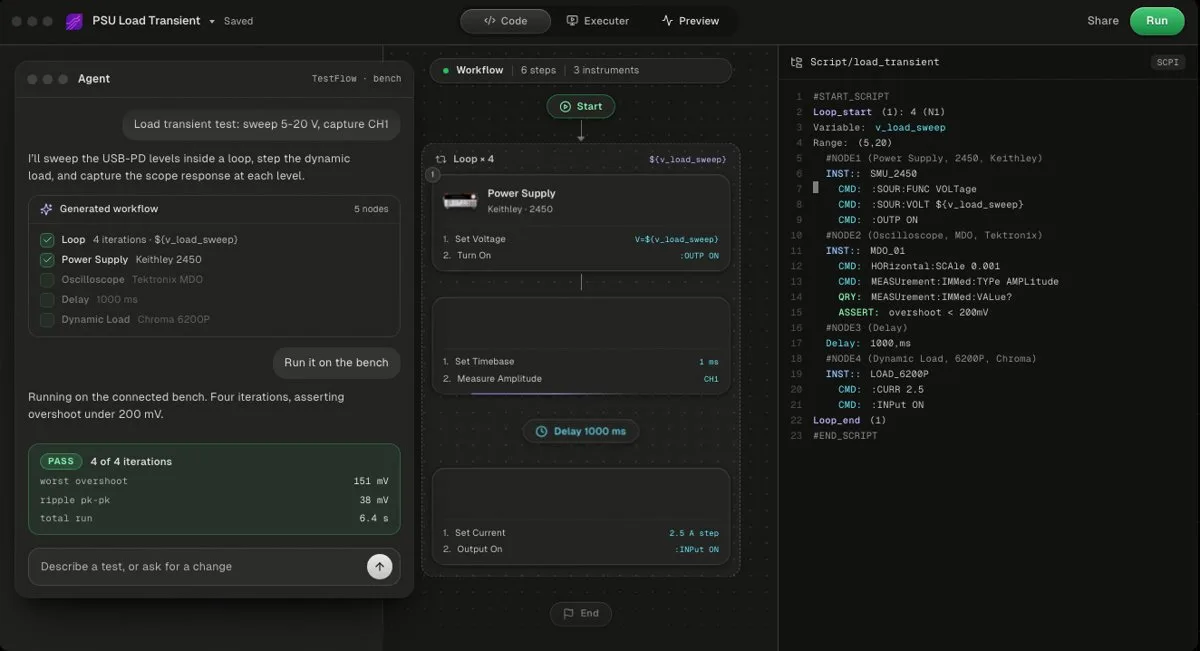
TestFlow (testflowinc.com) is an AI agent for electronics testing: you describe the test, the agent builds the workflow and Python, runs it on your bench, and writes the report from measured results. Free to start, then $39 or $149 a month per seat as of October 2026. Bench runs need the Windows desktop app. No DAQ cards, no non-SCPI instruments.
The ripple sweep above, as one sentence:
> "Step E36313A channel 2 through 9, 12, and 16 V, capture the converter output on the scope's channel 1 with AC coupling and the bandwidth limit on, measure Vpp at each point, and fail any point above 33 mV."
The agent builds a reviewable workflow of steps plus the generated Python with the SCPI for your exact scope, so the same sentence produces :MEASure:VPP? on a Keysight and numbered measurement objects on a Tektronix. Keysight and Tektronix are catalog vendors. Rigol is not in the catalog, so for a DS1000Z or DHO the agent adds the scope by finding its programming manual and drafting the command set, as it does for most SCPI instruments outside the instrument catalog. The Windows desktop app runs the workflow, values stream against their limits, and the report carries a PASS or FAIL per reading, built only from the run's results (trust guide). TestFlow is not yet a full test executive: no operator or user management and no database connectivity. Plans are on the pricing page.
- Best for
- Teams that want automation without writing VIs or drivers
- Cost
- Free to start. Engineer $39 a month, Lab $149 a month
- Tradeoff
- Runs on your bench through the Windows desktop app
3. Tektronix tm_devices (free, Tektronix-first)
tm_devices is Tektronix's own Python package for connecting to and controlling its instruments, Apache 2.0 licensed, with version 3.7.0 released on August 18, 2026. It covers Tektronix 2 through 7 Series oscilloscopes, AWGs, AFGs, and Keithley SMUs, and it runs on PyVISA. On an all-Tektronix bench it removes most of the command lookup. It does not help with the Keysight or Rigol scope on the next bench.
4. LabVIEW or TestStand (the incumbents)
Labs that already run NI LabVIEW or TestStand drive the same scopes through VISA. The trade-offs are in the LabVIEW alternatives comparison and TestFlow vs TestStand.
| Method | Vendor differences handled by | Waveform scaling | Report | Runs on | Cost as of Oct 2026 |
|---|---|---|---|---|---|
| Python + PyVISA | You | You write it | You build it | Windows, macOS, Linux | Free |
| TestFlow | The agent | Generated | Built from the run's results | Windows desktop app | Free version, then $39 or $149 a month |
| tm_devices | Tektronix, for Tektronix | Driver helpers | You build it | Anywhere Python runs | Free |
| LabVIEW / TestStand | You, with drivers | You wire it | You build it | See LabVIEW on Mac and Linux | NI licence |
Common mistakes in oscilloscope automation
Most broken scope scripts fail on one of these, and none of them raise an error.
- •Autoscaling inside a test. Settings change with the signal, so two runs are not comparable.
- •Measuring before the acquisition completes. Rigol's
*OPC?does not block; poll:TRIGger:STATus?. - •Leaving Tektronix headers on. Replies arrive as
:CURVE #5...and parsing fails. - •Probe ratio mismatch. A 10X probe set as 1X reads ten times low, and Rigol's two families default differently.
- •Inverted Keysight screenshots.
:DISPlay:DATA?returns an inverted image unless:HARDcopy:INKSaver OFFis sent first. - •Treating 9.9E+37 as a number. It means no result, and a limit check will grade it as a huge failure or, worse, a pass on a minimum limit.
- •Using port 5024 on a Keysight scope. That is the telnet port, and the programmer's guide notes it returns zeros in waveform data. Use VISA or port 5025.
For packaging the results, see automated test report generation.
Related reading
- •Automate Tektronix instruments without coding
- •Automate Keysight instruments without coding
- •Automate Rigol and Siglent instruments without coding
- •Tektronix TekScope alternatives
- •TestFlow vs Python and PyVISA
- •Python instrument control libraries compared
- •Battery test automation, where the scope watches a load step
- •AI test automation for lab instruments
- •Instrument control with VISA and SCPI
- •Supported instruments and how TestFlow works
- •Video tutorials, including a Keysight, Tektronix, and Chroma bench run
Where TestFlow fits
Scope automation is a long list of small vendor differences: how to wait for a trigger, how to scale a waveform, how to get the picture off the screen. None of them are hard, and all of them cost an afternoon the first time.
- 1
Connect your instruments. Pick the manufacturer and model, paste the VISA address (USB, LAN, GPIB, or serial), and the agent knows what is on your bench. No bench yet? Use a placeholder address, build the full automation, and swap in the real address when you are in the lab.
- 2
Tell the agent what to test. For example, "run a VI sweep from 1 to 10 V in 1 V steps at 0.5 A load current," or "suggest the tests for a power-management device."
- 3
The agent builds the complete workflow in seconds. Instrument-aware automation appears on the canvas, with the generated scripts visible in a code panel you can inspect and edit.
- 4
Run it in your lab. Click Run in the TestFlow desktop app for Windows and the status panel streams results step by step, with measured values inline (VOUT = 3.301 V, asserted 3.2 to 3.4 V, PASS). One click exports a structured PDF report, or the raw results as CSV.

- Vendor-neutral by design. One workflow drives Keysight, Tektronix, Rohde & Schwarz, Rigol, Keithley, Anritsu, and any other SCPI instrument over standard VISA.
- Built in the browser, run on the bench. Workflows live in your workspace, so a sequence built in one lab runs the same way in another. Bench runs use the Windows desktop app.
- Free version to start. Sign in at app.testflowinc.com and build your first workflow today; plans and quotes are on the pricing page.

The step-by-step walkthrough, VISA address formats, and Test Planner prompts are all in the TestFlow product guide.
Frequently asked questions
How do I read Vpp from an oscilloscope with Python?
Take a single acquisition, wait for it to finish, then query the built-in measurement. On a Keysight InfiniiVision send :MEASure:VPP? CHANnel1. On a Tektronix 4/5/6 Series MSO set MEASUrement:MEAS1:TYPe PK2Pk and MEASUrement:MEAS1:SOUrce1 CH1, then query MEASUrement:MEAS1:RESUlts:CURRentacq:MEAN?. On a Rigol DS1000Z send :MEASure:ITEM? VPP,CHANnel1.
Why does *OPC? return immediately on my Rigol scope?
Because Rigol documents *OPC? as returning 1 if the current operation is finished and 0 otherwise, so it does not block. After :SINGle, poll :TRIGger:STATus? until it returns STOP, with a timeout in case the trigger never arrives.
What does 9.9E+37 mean in an oscilloscope measurement result?
It means the scope could not make the measurement, usually because the edge or the full cycle is not on screen. Keysight InfiniiVision returns +9.9E+37 and Tektronix 4/5/6 Series returns 9.91E+37. Treat any value above 9E+37 as no result, never as a reading.
Can TestFlow automate Keysight, Tektronix, and Rigol oscilloscopes without code?
Yes. Describe the measurement in a sentence and the TestFlow agent builds a reviewable workflow and the Python with the SCPI for your scope model. Keysight and Tektronix are catalog vendors. Rigol is not in the catalog, so the agent adds a Rigol scope from its programming manual. Bench runs need the Windows desktop app, and the free version needs no card.
How do I take a screenshot from a Tektronix 4/5/6 Series MSO over SCPI?
Send SAVe:IMAGe "C:/scope.png", wait with *OPC?, then send FILESystem:READFile "C:/scope.png" and read the raw bytes from the instrument, which is how Tektronix's own example code does it.
Automate every instrument in the lab,
Create test workflows in minutes
- 01Describe the testIn a sentence, the way you would tell a colleague.
- 02The agent builds itWorkflow and script for your instruments, any vendor.
- 03Run it, get the reportOn your bench, with the measured values.
Tags
Your next test, automated today
Describe the test. TestFlow builds the workflow, runs it on your instruments, and writes the report. Free to start, no card needed.