 Ali Kamaly
Control Lab Instruments with ChatGPT or Claude in 2026 (3 Ways)
Three ways to put ChatGPT or Claude in front of a power supply or an oscilloscope, a correct script for each, the five ways LLM-written instrument code goes wrong, and the SCPI that keeps the bench safe.
You can control lab instruments with ChatGPT or Claude in three ways: have the model write a PyVISA script that you run, connect the model to the instruments through an MCP server, or use an AI agent built for the bench such as TestFlow (testflowinc.com). Neither ChatGPT nor Claude can reach a USB, LAN, or GPIB instrument from a browser tab, so every route puts some software on the bench PC between the model and the hardware.
This guide is for engineers who have already tried pasting a programming guide into a chat. It shows correct scripts for a Keysight E36313A power supply and a Keysight InfiniiVision oscilloscope, the five ways LLM-written instrument code goes wrong, the MCP servers that exist as of October 2026, and a SCPI safety checklist that applies to all three routes.
Disclosure: this guide is written by the team behind TestFlow, which appears as one of the options. We list its tradeoffs the same way as everyone else's.
The 3 ways at a glance
The three ways differ in who sends each command to the instrument: your script, the model through an MCP server, or a workflow an agent built.
| Way | On the bench PC | Who sends the commands | Price (Oct 2026) | Guard against a bad command |
|---|---|---|---|---|
| 1. LLM writes a PyVISA script | Python, PyVISA, a VISA library | Your script | ChatGPT Plus or Claude Pro $20 a month, or free plans | You reading the script |
| 2. MCP server | An MCP server and an AI client | The model, through the server's tools | Vendor servers free, open source free | Depends on the server |
| 3. Agent built for the bench | TestFlow Windows desktop app | A workflow the agent built | Free to start, $39 or $149 a month | Reviewable workflow, no limit widening |
Claude Pro includes Claude Code, which matters for way 2, because Claude Code and Claude Desktop are MCP clients. The full product comparison is in AI test automation for lab instruments.
Way 1: ChatGPT or Claude writes a PyVISA script you run
Way 1 is the simplest route: the model drafts Python, you read it, and you run it on a PC with PyVISA and a VISA library such as Keysight IO Libraries. The quality of the script depends almost entirely on what you put in the prompt.
Give the model the exact model number, the interface, the set points, the limits, and the relevant pages of the programming guide. A prompt that works:
Write a PyVISA script for a Keysight E36313A triple-output supply on LAN at
192.168.1.50. Output 1 only: 3.3 V, current limit 200 mA, over-voltage trip
3.6 V, over-current protection on. Enable the output, wait 0.5 s, read
voltage and current, then turn the output off in a finally block. Use the
(@1) channel-list form from the E36300 Series programming guide and check
SYST:ERR? after configuration.
A correct result for that prompt, checked against the Keysight E36300 Series programming guide:
import time
import pyvisa

PSU = "TCPIP0::192.168.1.50::inst0::INSTR"  # Keysight E36313A, confirm with rm.list_resources()


def drain_errors(inst):
    """Read SYST:ERR? until the queue reports no error. SCPI never raises."""
    errors = []
    while True:
        reply = inst.query("SYST:ERR?").strip()
        if reply.startswith(("+0,", "0,")):
            return errors
        errors.append(reply)
        if len(errors) > 20:
            return errors


rm = pyvisa.ResourceManager()
psu = rm.open_resource(PSU)
psu.timeout = 5000
psu.read_termination = "\n"

print(psu.query("*IDN?").strip())
psu.write("*RST")   # outputs off, voltage at minimum, current limit at default (10 A on output 1)
psu.write("*CLS")   # *RST does not clear the error queue on this supply
psu.query("*OPC?")

try:
    psu.write("CURR 0.2,(@1)")           # compliance limit first
    psu.write("VOLT:PROT 3.6,(@1)")      # over-voltage trip level
    psu.write("CURR:PROT:STAT ON,(@1)")  # over-current protection
    psu.write("VOLT 3.3,(@1)")
    errors = drain_errors(psu)
    if errors:
        raise RuntimeError(f"setup rejected: {errors}")

    psu.write("OUTP ON,(@1)")
    time.sleep(0.5)
    volts = float(psu.query("MEAS:VOLT? (@1)"))
    amps = float(psu.query("MEAS:CURR? (@1)"))
    print(f"Output 1: {volts:.4f} V, {amps * 1000:.2f} mA")
finally:
    psu.write("OUTP OFF,(@1)")
    psu.close()
Every command above is in the E36300 Series guide. The (@1) channel list matters, because on this supply VOLT without one programs whichever output INSTrument:SELect last chose. The Keysight E36313A programming guide covers the rest of the command set, and the PyVISA tutorial covers sessions, timeouts, and backends.
Controlling an oscilloscope with ChatGPT
Controlling an oscilloscope with ChatGPT works the same way, with one extra trap: a scope returns a number even when it could not make the measurement. The script below is for a Keysight InfiniiVision DSOX2004A and uses commands from the InfiniiVision 2000 X-Series programmer's guide.
import pyvisa

rm = pyvisa.ResourceManager()
scope = rm.open_resource("TCPIP0::192.168.1.60::inst0::INSTR")  # InfiniiVision DSOX2004A
scope.timeout = 10000

scope.write("*RST")
scope.write("*CLS")
scope.write(":CHANnel1:PROBe 10")
scope.write(":CHANnel1:SCALe 0.5")            # volts per division
scope.write(":TIMebase:SCALe 200E-6")         # seconds per division
scope.write(":TRIGger:EDGE:SOURce CHANnel1")
scope.write(":TRIGger:EDGE:LEVel 1.0")
scope.write(":DIGitize CHANnel1")             # one acquisition, then the scope stops
scope.query("*OPC?")

vpp = float(scope.query(":MEASure:VPP? CHANnel1"))
freq = float(scope.query(":MEASure:FREQuency? CHANnel1"))
if vpp > 9e37 or freq > 9e37:
    raise RuntimeError("measurement could not be made, scope returned 9.9E+37")

print(f"Vpp {vpp:.3f} V, frequency {freq:.1f} Hz")
print(scope.query(":SYSTem:ERRor?").strip())
scope.close()
The 9.9E+37 check is the line a model most often leaves out. Keysight's guide says that value is returned when a measurement cannot be made, typically because the right part of the waveform is not on screen. A script without the check logs 99 undecillion volts as a reading. For Tektronix and Rigol scopes, see automating oscilloscope measurements.
Five ways an LLM-written instrument script goes wrong
LLM-written instrument scripts fail in five recurring ways, and all five pass a syntax check and run without a Python exception.
- 1
Hallucinated SCPI. The model borrows a command from another vendor or a sibling model. A Tektronix-style
MEASUrement:IMMed:TYPe PK2PKsent to an InfiniiVision scope is not in its tree, so the scope queues-113,"Undefined header"and the script carries on. Sibling models differ too: the E36300 guide marks the MMEMory data-log export as supported only on the E36312A and E36313A. - 2
Wrong subsystem or channel. On a triple-output supply,
VOLT 3.3without a channel list goes to the output currently selected, which may be the 25 V output, not the 6 V one you meant. - 3
Output left enabled.
OUTP ONfollowed by an exception, with nofinally, leaves the device under test powered until someone walks over. - 4
No compliance limit. After
*RST, output 1 of an E36313A has a 10 A default current limit and its over-voltage trip at the 6.6 V maximum. A script that sets only a voltage protects nothing. - 5
A sentinel read as a measurement. The 9.9E+37 value above, or a reading taken before the output settled, goes straight into the log.
Each failure maps to a line in the checklist further down. The habit that catches the first two is draining SYST:ERR? after every configuration block, covered in the SCPI command cheat sheet.
Way 2: an MCP server exposes the instruments to the model
Way 2 uses the Model Context Protocol (MCP), an open standard that lets an AI client call tools: an MCP server on the bench PC exposes instrument tools such as discover, query, and write, and the model calls them during the conversation. The servers below exist as of October 2026, and their guards differ more than their features.
| MCP server | Maker | Instruments | Licence and price | Guard |
|---|---|---|---|---|
| Keysight MCP Server for Instrument Control | Keysight | Keysight families | Free, beta build 1.0.13 | Engineer approves every sequence, stops on first error |
| MXO AI Connect | Rohde & Schwarz | MXO 3, 4, 5, 5C | Free, no licence key | The AI client's approval setting |
| RsInstrument MCP | Rohde & Schwarz | R&S SCPI instruments | MIT | SCPI write policy, confirmation rules |
| LabMCP | K-Dense | 32 connectors, including Keithley 2400 SMUs and Rigol supplies | Apache 2.0 | Read-only mode, limits, allow and deny lists |
| LabLink MCP | techmanual-ai | VISA, SSH, REST, serial | MIT | Constraints are advisory only |
| SCPI_MCP | Community | Generator, DMM, scope, supply | MIT | Read the code |
| siglent-scpi-mcp | Community | Siglent oscilloscopes | Apache 2.0 | Read the code |
A Keysight session shows what the model actually does through a server. Per Keysight's tool reference, the client calls discover_instruments to scan the VISA buses, resolve_commands to map each intent to SCPI with a high, medium, or low confidence, preview_commands to explain the sequence, and execute_commands only after the engineer approves the preview. get_all_errors reads and clears the error queue with explanations. A low-confidence mapping is flagged before anything is sent, which is exactly the check a pasted chat script never gets.
Keysight's getting-started page says it was tested primarily with Claude Code, Claude Desktop, and GitHub Copilot, on Windows 10 or 11. LabMCP's README marks all 32 connectors as simulated, built from the manuals and not yet confirmed on real hardware by a user, so start in practice mode. In Claude Desktop, under Settings, Developer, Edit Config:
{
  "mcpServers": {
    "scpi": { "command": "uvx", "args": ["labmcp-scpi", "--simulate"] }
  }
}
Or in Claude Code, from a terminal:
claude mcp add scpi -- uvx labmcp-scpi --simulateWhat MCP does not give you is a test. The model chooses each command in the conversation, so the same request can produce a different sequence on a different day, and none of their documentation describes a test report with limits and a verdict. Keysight's release notes list reusable saved command sequences, which helps with repeatability on Keysight hardware.
Way 3: an AI agent built for the bench
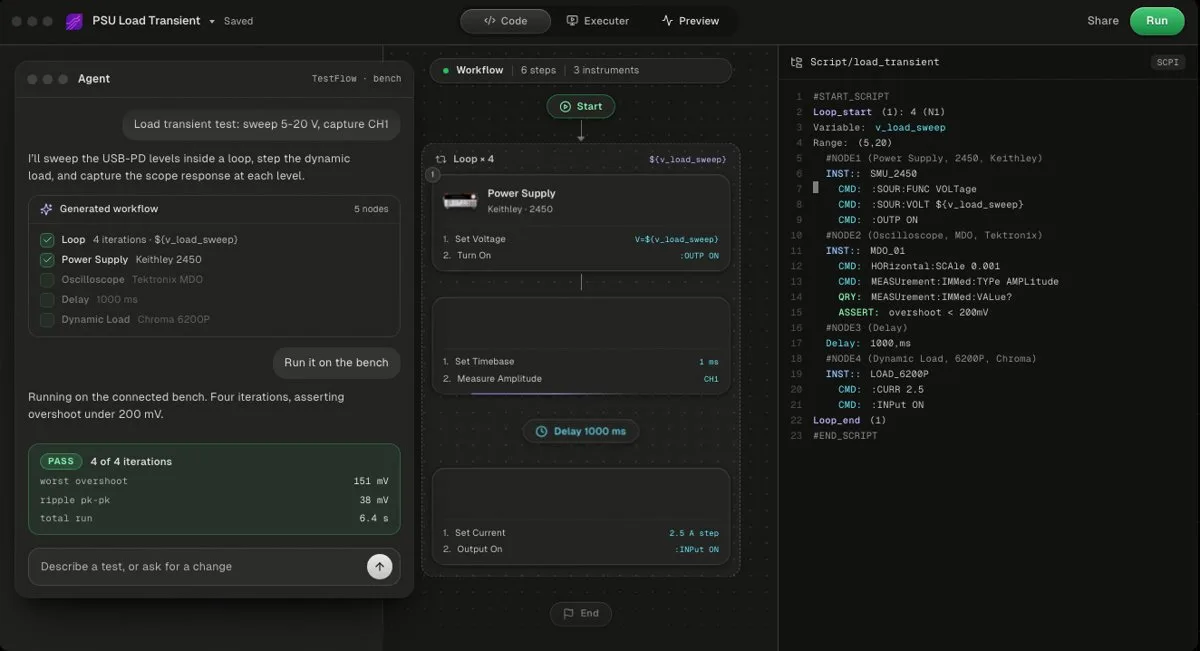
Way 3 is an AI agent built for the bench: the agent turns a described test into a saved workflow with limits, a desktop app runs that workflow on the instruments, and the report comes from the results of the run. The difference from way 2 is that the output is a test you can rerun, review, and hand to someone else, not a transcript.
TestFlow is the example used here. The agent writes limits, never measurements, and it will not widen a limit to make a test pass, as set out on the trust page. The generated code is a standalone Python package you own, visible in the code view, so you can read every SCPI string before a run. The agent works in four stages, connect, describe, build, and run and report, and the build stage produces a workflow with limits rather than a chat transcript, as shown in how TestFlow works. Instruments from different vendors can share one workflow. How that compares with writing the PyVISA yourself is covered in TestFlow vs Python and PyVISA.
Which tool to use, ranked
The ranking below favours guards on a powered bench first, then instrument reach, then whether the tool produces a rerunnable test.
1. Keysight MCP Server for Instrument Control
Free, beta, Windows only, and Keysight only. Commands come only from instrument definition files, every sequence needs engineer approval, and the tool reference requires preview_commands before execute_commands. The best choice for an all-Keysight bench driven from Claude Code or GitHub Copilot.

2. TestFlow
TestFlow is an AI agent for electronics testing: you describe the test, the agent builds a reviewable workflow with Python and SCPI for your instrument models, and the Windows desktop app runs it and reports from measured results. Free to start, then $39 or $149 a month. No DAQ cards, no macOS or Linux bench runs.
It covers instruments from Keysight, Tektronix, Keithley, Rohde & Schwarz, Siglent, Chroma, and other catalog vendors, and the agent adds most SCPI instruments outside the catalog, Rigol included, by drafting the command set from the vendor's programming manual. Engineer is $39 a month with 50 runs on real instruments, per the pricing page as of October 2026. The desktop app runs the workflow on the bench PC.
- Best for
- Teams that want automation without writing VIs or drivers
- Cost
- Free to start. Engineer $39 a month, Lab $149 a month
- Tradeoff
- Runs on your bench through the Windows desktop app
3. Rohde & Schwarz MXO AI Connect
Free, for MXO 3, 4, 5, and 5C oscilloscopes, on Windows or macOS, with no internet connection needed. The direct answer to "control an oscilloscope with Claude" if the scope is an MXO. Approval before an action is left to your AI client.
4. LabMCP by K-Dense
Open source under Apache 2.0, with 32 connectors and a generic SCPI server that supports command allow and deny lists, read-only mode, and limits checked before anything reaches the instrument. Every connector is still marked simulated, so treat a first hardware run as a test of the connector.
5. ChatGPT or Claude with PyVISA
The cheapest and most flexible route, and the one with no guard except you. Use the prompt pattern and the checklist on this page, and keep the script in version control once it works.
SCPI safety checklist before an LLM touches a bench
A SCPI safety checklist turns the five failures above into commands you can check line by line, whichever of the three ways you use.
- 1
Confirm the model.
*IDN?must return the exact model the script or server was written for. - 2
Reset and clear.
*RSTthen*CLS. On the E36300 Series,*RSTdoes not clear the error queue,*CLSdoes. - 3
Set the compliance limit before the output.
CURR 0.2,(@1)beforeOUTP ON,(@1), never after. - 4
Arm the protection.
VOLT:PROT 3.6,(@1)andCURR:PROT:STAT ON,(@1)on the E36313A. - 5
Drain the error queue.
SYST:ERR?until it returns+0,"No error", after every configuration block. - 6
Wait for completion.
*OPC?after slow operations such as:DIGitize. - 7
Reject sentinels. Treat 9.9E+37 from a scope as a failed measurement.
- 8
Turn it off in a finally block.
OUTP OFF,(@1)runs whether the script succeeds or fails. - 9
Simulate first. LabMCP's
--simulate, Keysight's mock mode, or TestFlow's browser simulation, before any hardware.
The same checklist as the SCPI sequence it produces on an E36313A:
*IDN?
*RST
*CLS
CURR 0.2,(@1)
VOLT:PROT 3.6,(@1)
CURR:PROT:STAT ON,(@1)
VOLT 3.3,(@1)
SYST:ERR?
OUTP ON,(@1)
MEAS:VOLT? (@1)
MEAS:CURR? (@1)
OUTP OFF,(@1)
SYST:ERR?
For a full power-rail test built this way, see automating power supply testing. For the connection layer underneath every route, see VISA and SCPI instrument control.
Related reading
- •AI test automation for lab instruments, six options compared
- •Best AI tools for test engineers
- •Automate a Keysight power supply with Python
- •Python instrument control libraries compared
- •GPIB vs USB vs LAN
- •Automate Rigol and Siglent instruments without coding
- •Keysight Command Expert alternatives, for finding the right SCPI
- •Supported instruments
- •Video tutorials
Where TestFlow fits
ChatGPT and Claude are good at drafting SCPI. Turning a draft into a test you can rerun, with limits and a report, is the part a chat window does not do.
- 1
Connect your instruments. Pick the manufacturer and model, paste the VISA address (USB, LAN, GPIB, or serial), and the agent knows what is on your bench. No bench yet? Use a placeholder address, build the full automation, and swap in the real address when you are in the lab.
- 2
Tell the agent what to test. For example, "run a VI sweep from 1 to 10 V in 1 V steps at 0.5 A load current," or "suggest the tests for a power-management device."
- 3
The agent builds the complete workflow in seconds. Instrument-aware automation appears on the canvas, with the generated scripts visible in a code panel you can inspect and edit.
- 4
Run it in your lab. Click Run in the TestFlow desktop app for Windows and the status panel streams results step by step, with measured values inline (VOUT = 3.301 V, asserted 3.2 to 3.4 V, PASS). One click exports a structured PDF report, or the raw results as CSV.

- Vendor-neutral by design. One workflow drives Keysight, Tektronix, Rohde & Schwarz, Rigol, Keithley, Anritsu, and any other SCPI instrument over standard VISA.
- Built in the browser, run on the bench. Workflows live in your workspace, so a sequence built in one lab runs the same way in another. Bench runs use the Windows desktop app.
- Free version to start. Sign in at app.testflowinc.com and build your first workflow today; plans and quotes are on the pricing page.

The step-by-step walkthrough, VISA address formats, and Test Planner prompts are all in the TestFlow product guide.
Frequently asked questions
Can ChatGPT control lab instruments?
Yes, indirectly. ChatGPT can write a PyVISA script that you run on the bench PC, and MCP-capable AI clients can drive instruments through an MCP server. ChatGPT in a browser cannot reach the USB, LAN, or GPIB instruments on your bench by itself.
How do I control an oscilloscope with ChatGPT?
Ask it for a PyVISA script for your exact scope model, check every command against that model's programming guide, and run it on a PC connected to the scope. For an R&S MXO 3, 4, 5, or 5C, MXO AI Connect lets an MCP client drive the scope directly.
Which MCP servers exist for lab instruments?
As of October 2026: Keysight MCP Server for Instrument Control and Rohde & Schwarz MXO AI Connect from the vendors, an MCP server inside the R&S RsInstrument Python module, and open-source projects including LabMCP by K-Dense, LabLink MCP, and smaller SCPI servers on GitHub.
Can TestFlow control instruments from different vendors in one test?
Yes. TestFlow is vendor-neutral over VISA and SCPI, so one workflow can use a Keysight supply, a Tektronix scope, and a Chroma load together. Bench runs need the Windows desktop app, and DAQ cards and non-SCPI instruments are not supported.
What SCPI commands make an LLM-written script safer?
Send *RST and *CLS at the start, set the current limit and over-voltage protection before OUTP ON, read SYST:ERR? after every configuration block, and put OUTP OFF in a finally block so the output turns off even when the script fails.
Automate every instrument in the lab,
Create test workflows in minutes
- 01Describe the testIn a sentence, the way you would tell a colleague.
- 02The agent builds itWorkflow and script for your instruments, any vendor.
- 03Run it, get the reportOn your bench, with the measured values.
Tags
Your next test, automated today
Describe the test. TestFlow builds the workflow, runs it on your instruments, and writes the report. Free to start, no card needed.