LabVIEW vs TestStand in 2026: Do You Need Both? ($605 vs $2,428/yr)
LabVIEW writes the code that talks to hardware. TestStand decides which code runs, in what order, on which unit, and where the result goes. What each one does, when you need both, and what the pair costs at ni.com list prices in November 2026.
LabVIEW and TestStand are two different layers of an NI test system: LabVIEW is a graphical programming environment that writes the code which talks to hardware, and TestStand is a test executive that decides which code runs, in what order, against which unit, with which limits, and where the result goes. You can run LabVIEW without TestStand, and you can run TestStand without LabVIEW, because TestStand also calls C#, Python, and C code. At ni.com US list prices in November 2026, LabVIEW runs from $605 to $2,805 a year per seat and the TestStand Development System is $2,428 a year, plus a one-time $857 or $3,252 license on every deployed station.
This comparison is for test engineers and test managers deciding whether a station needs one NI product or both. It covers what each tool does, the overlap that causes most of the confusion, the cases where you need both, the combined cost built only from ni.com prices, and where an AI agent fits next to the pair. If you are new to either product, the LabVIEW hub and the TestStand hub collect everything on this site about each.
LabVIEW vs TestStand at a glance
| LabVIEW | TestStand | |
|---|---|---|
| What it is | Graphical programming environment (G) | Test executive and sequencer |
| You write | VIs: block diagrams and front panels | Sequences of steps that call code modules |
| Talks to instruments | Yes, through NI-VISA, DAQmx, and instrument drivers | No, only through the code modules it calls |
| Languages it runs | G, plus calls into Python, C/C++, .NET, and MATLAB | LabVIEW, .NET, Python, C/C++ DLL, LabWindows/CVI, ActiveX/COM, and sequence calls |
| Multi-unit testing | You build it | Sequential, Parallel, and Batch process models |
| Operator logins | You build it | User Manager with Operator, Technician, Developer, and Administrator groups |
| Database logging | Database Connectivity Toolkit, Professional only | Built-in, with predefined schemas |
| Development price (ni.com, US list, November 2026) | $605, $1,801, or $2,805 a year | $2,428 a year or $8,497 perpetual |
| Per-station price | Runtime license included with development | $857 Base or $3,252 Debug, one-time |
The short version: LabVIEW is where the measurement code lives. TestStand is what turns a pile of measurement code into a station that a technician can run 500 times a shift.
What LabVIEW does
LabVIEW is NI's graphical programming language. You wire a block diagram, and the front panel becomes the user interface. NI's edition page lists what each edition adds:
- •Base ($605 a year): acquire data from NI and third-party hardware, build interactive UIs, standard math and statistics, integrate code written in Python, C/C++, .NET, and MATLAB, and save to CSV, TDMS, or custom binary files.
- •Full ($1,801 a year): Base plus advanced analysis (curve fitting, differential equations, linear algebra), signal processing, and PID and fuzzy logic control.
- •Professional ($2,805 a year): Full plus the Application Builder for royalty-free stand-alone applications, code comparison and analysis tools, and the Report Generation, Database Connectivity, and Advanced Signal Processing toolkits. NI's Nigel AI is included while a subscription or software service agreement is active.
The Real-Time Module, FPGA Module, and Vision Development Module are sold separately in every edition. For the full breakdown, including perpetual prices, read LabVIEW pricing and LabVIEW subscription vs perpetual.
LabVIEW is strongest where timing and hardware are tight: NI DAQ cards through DAQmx, PXI modules, CompactRIO, FPGA targets, and real-time loops. A LabVIEW engineer can build a complete test application, from instrument drivers to a pass/fail screen, without any other NI product.
What TestStand does
TestStand does not measure anything by itself. It is a sequencer that calls code modules, collects what they return, compares it to limits, and records the result. The teststand pricing guide covers the licenses; this section covers the job.
Module adapters: the reason TestStand is language-neutral
NI's module adapters documentation lists eight adapters: LabVIEW, LabWindows/CVI, C/C++ DLL, .NET, ActiveX/COM, HTBasic, Python, and Sequence. The LabVIEW Adapter calls VIs, including VIs in LLBs, packed project libraries, and class member VIs. The .NET Adapter calls assemblies written in C# or Visual Basic .NET. The Python Adapter calls a function in a module or a class. NI notes that the HTBasic Adapter is not supported in 64-bit TestStand, and that DLLs and the Python interpreter must match TestStand's bitness.
Process models: one unit or many
TestStand ships three process models. Sequential is the default and tests one UUT at a time. Parallel and Batch run the same sequence on several UUTs at once, and Batch adds synchronization and batch-level reporting. The process model also owns the serial-number prompt, report generation, and database logging, which is why a sequence file stays small.
Users, results, and deployment
TestStand's User Manager ships four groups, Operator, Technician, Developer, and Administrator. The Operator group can execute, terminate, and abort sequences but cannot create or debug them. NI is explicit that the User Manager is not a security system and does not control the operating system, so station hardening is still an IT job.
For results, NI's database logging documentation lists five supported DBMSs by default: SQL Server, Oracle, Microsoft Access, Sybase, and MySQL, with at least one predefined schema for each. Sequences are stored as .seq files, explained in the TestStand sequence file format.
Where the overlap confuses people
Both products can produce a working test, which is why "LabVIEW vs TestStand" gets searched as if they were rivals. The overlap is real in three places.
- 1
Sequencing. A LabVIEW state machine or a queued message handler can sequence steps. It works for one product and one engineer. It becomes a maintenance problem when the fifth product variant needs the same logic with different limits, because limits live inside VIs instead of in a sequence file.
- 2
Operator UI. LabVIEW builds excellent front panels. The TestStand Development System ships example operator interfaces, and teams commonly customize one rather than writing a station UI from scratch in LabVIEW.
- 3
Reports. LabVIEW Professional includes the Report Generation Toolkit, and TestStand's process model writes reports without extra code. Paying for both means paying twice for the same output.
The rule that resolves most of it: if a sequence will run on more than one station or by more than one operator, put the flow, limits, and logging in TestStand and keep LabVIEW for the steps.
When you need both, and when one is enough
| Situation | LabVIEW only | TestStand only | Both |
|---|---|---|---|
| One engineer, one validation bench, one unit at a time | Yes | ||
| Characterization with DAQ, FPGA, or real-time loops | Yes | ||
| Production line, Python or C# code modules | Yes | ||
| Production line, existing library of LabVIEW VIs | Yes | ||
| Several UUTs tested in parallel on one station | Yes, or TestStand with non-LabVIEW modules | ||
| Operators log in, results go to SQL Server or Oracle | Yes | Yes | |
| Hardware startup, no NI hardware, Python team | Neither, see below |
Two signals say you need TestStand on top of LabVIEW. First, a technician rather than an engineer starts the test. Second, the same steps are reused across product variants with different limits. One signal says you do not: the person who writes the test is the person who runs it.
If your code is already Python, the decision changes. TestStand runs Python modules directly, and a Python team may not need LabVIEW at all. The trade-offs are in LabVIEW vs Python and LabVIEW to Python migration, and the reverse direction, calling VIs from Python, is in call LabVIEW from Python.
What LabVIEW and TestStand cost together
All figures below are US list prices on ni.com as of November 2026. NI's product pages state that subscriptions renew at then-current prices, so treat years two to five as an estimate.
| License | Price | Term |
|---|---|---|
| LabVIEW Base | $605 a year | Subscription |
| LabVIEW Full | $1,801 a year | Subscription |
| LabVIEW Professional | $2,805 a year | Subscription |
| TestStand Development System | $2,428 a year or $8,497 | Subscription or perpetual |
| LabVIEW+ Suite (LabVIEW Professional, TestStand, InstrumentStudio, FlexLogger, DIAdem) | $4,239 a year | Subscription |
| TestStand Base Deployment Engine | $857 per station | One-time, perpetual |
| TestStand Debug Deployment Environment | $3,252 per station | One-time, perpetual |
Worked example: two engineers, five stations, three years
Two engineers write LabVIEW code modules and TestStand sequences. Four stations run the Base Deployment Engine and one rework station runs the Debug Deployment Environment.
| Option | Seats per year | Stations, once | Three-year total |
|---|---|---|---|
| LabVIEW Professional + TestStand, bought separately | $10,466 | $6,680 | $38,078 |
| LabVIEW+ Suite | $8,478 | $6,680 | $32,114 |
| LabVIEW Base + TestStand (TestStand handles reports and logging) | $6,066 | $6,680 | $24,878 |
| TestStand only, Python or C# code modules | $4,856 | $6,680 | $21,248 |
The stations are $3,428 for four Base engines plus $3,252 for one Debug license, so $6,680 once. The seats drive everything else. The Suite saves $994 a year per engineer against buying LabVIEW Professional and TestStand separately ($5,233 against $4,239), and dropping to LabVIEW Base saves more if TestStand already owns reporting and database logging. NI's licensing guide says the LabVIEW Run-Time Engine license is included with the development license, which the LabVIEW Runtime Engine guide explains. The rest of the NI stack is priced in NI software licensing costs.
Alternatives when the pair is more than the job needs
Each of these replaces one half of the pair, not both.
- •OpenTAP replaces the TestStand half with a free, open-source sequencer whose plugins are C#. The trade-offs are in OpenTAP vs TestStand.
- •Python with pytest or OpenHTF replaces the LabVIEW half for SCPI instruments, and the sequencing half for engineer-run benches. See the test sequencer comparison.
- •LabWindows/CVI teams moving off C have their own options in LabWindows/CVI alternatives.
- •The full list for each product is in LabVIEW alternatives and NI TestStand alternatives, and the NI software alternatives hub covers the rest of the NI catalog.
Where TestFlow fits next to LabVIEW and TestStand
TestFlow is an AI agent for electronics testing. You describe the test, the agent builds the automation, drives the instruments over VISA and SCPI from any vendor, and writes the report from the measured results. It works on the authoring side of this comparison: the part where someone has to write the steps before TestStand can sequence them.
What it does that matters for an NI shop:
- •Imports TestStand sequences. TestFlow imports NI TestStand sequence files and keeps the sequences and the calls between them, so an existing sequence library is a starting point rather than a rewrite.
- •Builds SCPI steps without VIs. Supplies, meters, scopes, and loads from Keysight, Tektronix, Rohde & Schwarz, Rigol, and others are driven over SCPI. The catalog is on the supported instruments page.
- •Reports from measured values. Every number in the report comes from the run's results, which matters when a customer audits it.
What it does not do, stated plainly:
- •It is not a test executive. There is no operator and user management and no database connectivity. A production line that needs TestStand's User Manager and database logging keeps TestStand.
- •It does not run LabVIEW VIs. LabVIEW code modules stay in LabVIEW.
- •DAQ coverage is narrow. TestFlow drives the NI USB-6001, USB-6501, and PCI-6515 through NI-DAQmx. Anything beyond those, plus FPGA and real-time work, stays in LabVIEW.
The practical split is phase by phase: TestFlow on the validation bench, where tests change weekly, and TestStand plus LabVIEW on the line once a test is stable. The boundary is drawn in more detail in TestFlow vs TestStand and TestFlow vs LabVIEW. There is a free version to start, see TestFlow pricing, and bench runs use the Windows desktop app.
Related reading
- •LabVIEW pricing, every edition and term
- •TestStand pricing, development and deployment licenses
- •NI TestStand alternatives, when TestStand is too much
- •LabVIEW alternatives, free and paid options
- •OpenTAP vs TestStand, the open-source sequencer compared
- •Test sequencer comparison, TestStand, OpenTAP, pytest, and Robot Framework
- •Compare test automation tools, every head-to-head on this site
Where TestFlow fits
TestFlow sits on the authoring side of this comparison. It builds and runs bench tests on SCPI instruments from a description, and it imports TestStand sequences, but it is not a test executive and does not run LabVIEW VIs.
- 1
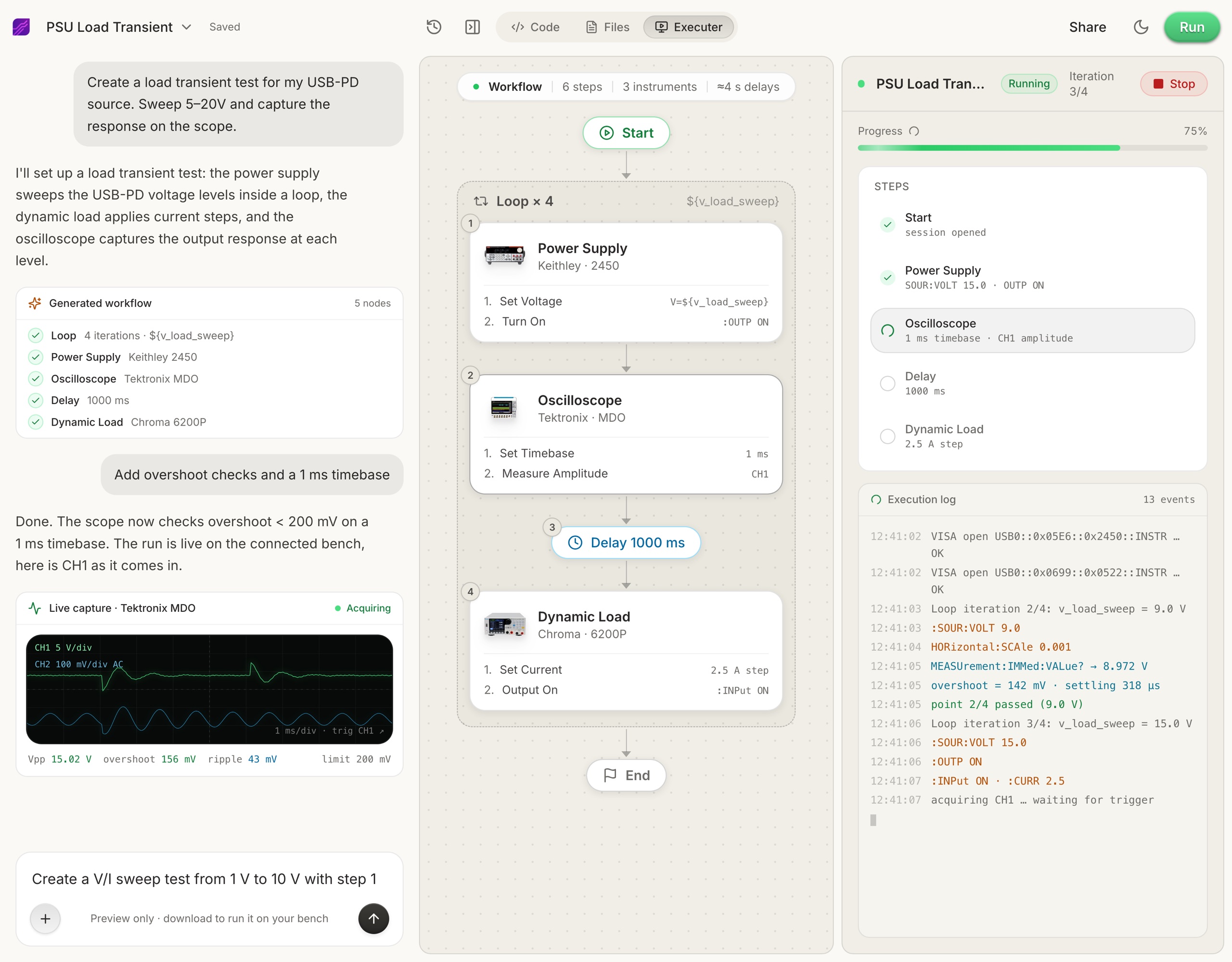
Connect your instruments. Pick the manufacturer and model, paste the VISA address (USB, LAN, GPIB, or serial), and the agent knows what is on your bench. No bench yet? Use a placeholder address, build the full automation, and swap in the real address when you are in the lab.
- 2
Tell the agent what to test. For example, "run a VI sweep from 1 to 10 V in 1 V steps at 0.5 A load current," or "suggest the tests for a power-management device."
- 3
The agent builds the complete workflow in seconds. Instrument-aware automation appears on the canvas, with the generated scripts visible in a code panel you can inspect and edit.
- 4
Run it in your lab. Click Run in the TestFlow desktop app for Windows and the status panel streams results step by step, with measured values inline (VOUT = 3.301 V, asserted 3.2 to 3.4 V, PASS). One click exports a structured PDF report, or the raw results as CSV.
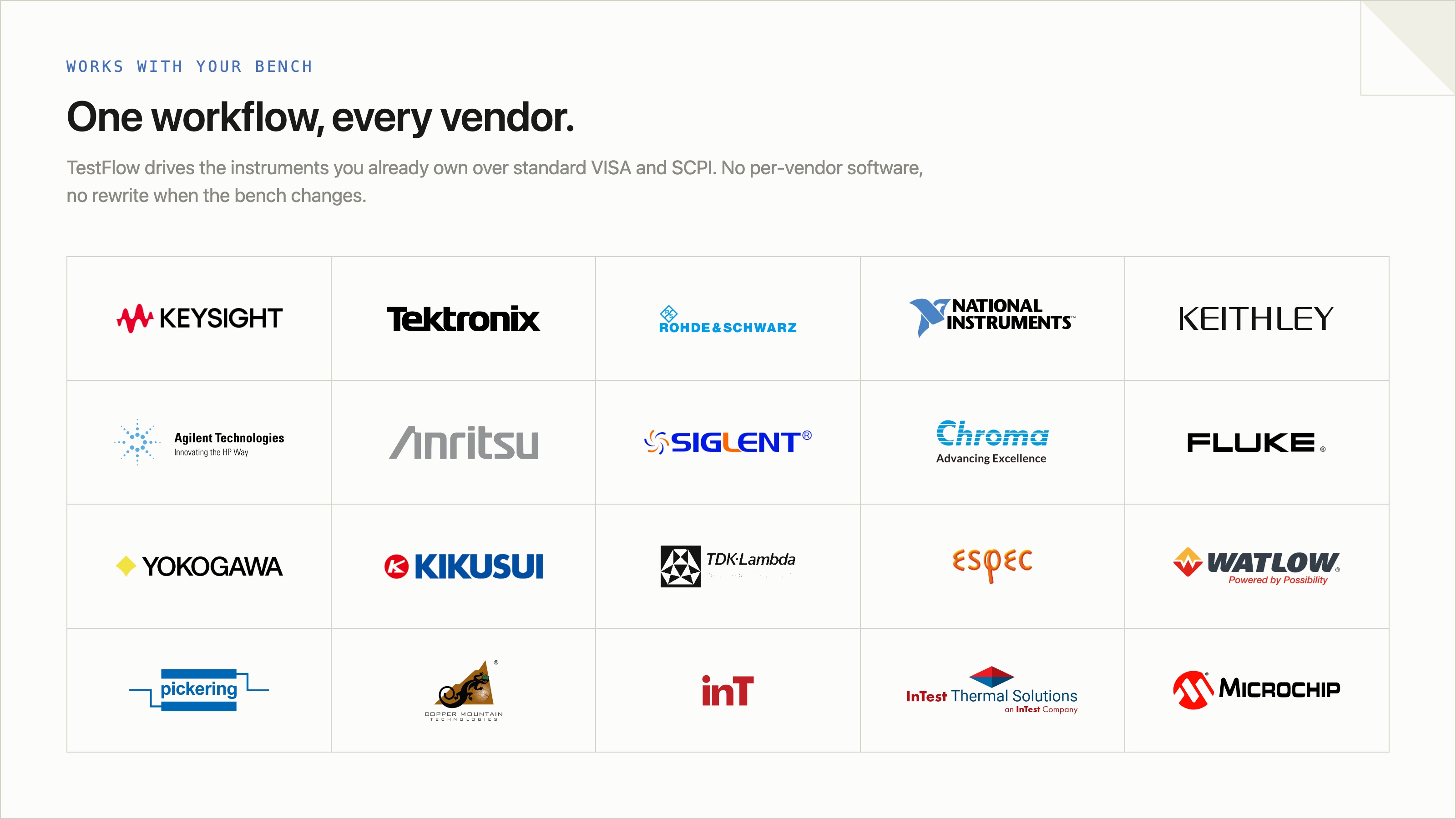
- Vendor-neutral by design. One workflow drives Keysight, Tektronix, Rohde & Schwarz, Rigol, Keithley, Anritsu, and any other SCPI instrument over standard VISA.
- Built in the browser, run on the bench. Workflows live in your workspace, so a sequence built in one lab runs the same way in another. Bench runs use the Windows desktop app.
- Free version to start. Sign in at app.testflowinc.com and build your first workflow today; teams can book a demo to scope a Bench Pilot.
The step-by-step walkthrough, VISA address formats, and Test Planner prompts are all in the TestFlow product guide.
Frequently asked questions
What is the difference between LabVIEW and TestStand?
LabVIEW is NI's graphical programming environment for writing code that acquires data, controls instruments, and builds user interfaces. TestStand is NI's test executive: it sequences code modules written in LabVIEW, C#, Python, C, or C++, runs them on one or several units, applies limits, and handles reports, database logging, and operator logins. LabVIEW writes the steps, TestStand runs them.
Do I need TestStand if I already have LabVIEW?
Not for a single engineer running one unit at a time on a validation bench. TestStand earns its price when operators run the station, several units are tested at once with the Parallel or Batch process models, results must go to a database, or sequences call code written in more than one language.
How much do LabVIEW and TestStand cost together?
At ni.com US list prices as of November 2026, LabVIEW Professional is $2,805 a year and the TestStand Development System is $2,428 a year, so $5,233 per engineer bought separately. The LabVIEW+ Suite bundles both, plus InstrumentStudio, FlexLogger, and DIAdem, for $4,239 a year. Each deployed station adds a one-time TestStand license: $857 Base or $3,252 Debug.
Can TestStand run without LabVIEW?
Yes. TestStand calls code modules through module adapters, and NI documents adapters for .NET assemblies, Python functions, C and C++ DLLs, LabWindows/CVI, ActiveX/COM, and other sequences, alongside the LabVIEW Adapter. A TestStand station with only Python or C# code modules needs no LabVIEW license.
Which LabVIEW edition do I need with TestStand?
Any edition can write code modules, but NI lists the Application Builder, the Report Generation Toolkit, and the Database Connectivity Toolkit only in LabVIEW Professional. If TestStand handles reports and database logging, a Base or Full seat can be enough for the engineers who write VIs.
Does TestFlow replace LabVIEW or TestStand?
Neither, fully. TestFlow builds and runs bench tests on SCPI instruments from a description and imports TestStand sequences with their sequences and calls preserved. It has no operator and user management, no database connectivity, does not run LabVIEW VIs, and covers only three NI DAQ devices, so production lines that need those keep TestStand and LabVIEW.
Automate every instrument in the lab,
Create test workflows in minutes
- 01Describe the testIn a sentence, the way you would tell a colleague.
- 02The agent builds itWorkflow and script for your instruments, any vendor.
- 03Run it, get the reportOn your bench, with the measured values.
Tags

Article by
Ali Kamaly
Ali Kamaly is the Co-Founder and CEO of TestFlow, an AI-native platform for electronics test automation. He writes about test automation, lab validation, and the infrastructure behind modern hardware engineering.
- NI TestStand Pricing 2026: License Cost per Seat ($2,428/yr)Every NI TestStand license type with its US list price on ni.com as of November 2026, the subscription versus perpetual break-even, and a worked five-year cost for a six-station test fleet.
- LabWindows/CVI 2026: Maintenance Mode, Cost, 5 AlternativesLabWindows/CVI is in maintenance mode with a four-figure seat price. Here are the realistic replacements for ANSI C test applications, and how to migrate without rewriting a decade of code at once.
- OpenTAP vs NI TestStand in 2026 (Free Open Source vs the Incumbent)A direct comparison of the free open-source sequencer and the production incumbent, on cost, capability, and the migration effort in each direction.
- Test Sequencer Software 2026: TestStand vs OpenTAP vs pytestWhat a test sequencer actually does, the five real options in 2026, and the four questions that decide which one fits, including the results question most teams ask too late.
- AI Test Automation for Lab Instruments in 2026 (6 Options Compared)Six ways to put a language model in charge of a bench in 2026, checked against each vendor's own documentation: what each one automates, what it costs, and what stops it from sending a bad command or inventing a number.
Your next test, automated today
Describe the test. TestFlow builds the workflow, runs it on your instruments, and writes the report. See it on a bench like yours.