TestStand Sequence File (.seq) in 2026 (Read One Without a License)
The anatomy of an NI TestStand sequence file, how to tell binary from XML, a tested Python script that lists every sequence and step in an XML .seq, NI's free diff route for binary files, and how to carry sequences into another tool.
A TestStand sequence file (.seq) is the file NI TestStand saves sequences in: one or more sequences, each with Setup, Main, and Cleanup step groups, parameters, and locals, plus sequence file globals and the type definitions its steps use. TestStand saves it in one of three formats. NI describes XML as the most readable and largest, binary as the fastest and smallest, and INI as the legacy TestStand 3.x format it can still read. An XML .seq can be read by any XML parser without TestStand. A binary .seq needs TestStand software, and NI states that its File Diff and Merge Utility can compare sequence files without a license, though it cannot save them.
This guide is for test engineers and integrators who have inherited .seq files: on a production line, in a customer handover, or in a repository nobody has opened since the last TestStand seat lapsed. It covers what is inside the file, how to read both formats, how to convert and diff them, and how to move the sequences somewhere else. For the wider context, see the TestStand hub.
What is inside a TestStand sequence file
Every .seq holds the same logical pieces, whatever the format. The element names below come from an XML sequence file saved by TestStand 2021 SP1, published in NI's measurement-plugin-python repository.
| Piece | What it holds | Where it sits in an XML .seq |
|---|---|---|
| File header | File type, TestStand version that saved it, oldest compatible version | <teststandfileheader productversion=... compatibleversion=...> |
| Type definitions | Step types and data types the file uses | <typelist> containing <typedef> entries |
| Sequences | MainSequence plus any subsequences | <Sequence name='MainSequence'> under <Seq> |
| Parameters and locals | Inputs a caller passes, working variables, the ResultList | <Parameters>, <Locals> |
| Step groups | Setup, Main, and Cleanup, in that order | <Setup>, <Main>, <Cleanup> |
| Steps | Each step's type, name, settings, and limits | <Step typename=... name=...> |
| Code module calls | The module a step calls, such as a VI, DLL, or Python file | <ModulePath> inside the step |
NI's step groups page defines the order. Setup typically initializes instruments, fixtures, and the UUT. Main holds the bulk of the test. Cleanup powers off or restores them. If a step in Setup or Main hits a run-time error, or the operator terminates, execution jumps to Cleanup.
Two things a .seq does not contain matter for migration. The code modules themselves live outside the file, so a step only points to rail_check.vi or teststand_nidmm.py. The process model, which adds serial number entry, reporting, and database logging around MainSequence, is usually a separate sequence file.
The three .seq formats: binary, XML, and INI
NI's File Format Options dialog box lists the choices:
| Format | NI's description | Readable without TestStand | Notes |
|---|---|---|---|
| XML | Most readable, largest | Yes, any XML parser | NI reserves the right to change the XML format in future releases |
| Binary | Fastest and smallest | No | Set the file type to binary in your source control, or it may be corrupted |
| INI | TestStand 3.x or earlier | Not documented | Reading is still supported, saving will be deprecated |
The format is set per file. New files take the station default from Configure » Station Options » File » File Format Options, and an existing file's format can be changed in its Sequence File Properties dialog box.
How to tell which format you have
Look at the first bytes. An XML sequence file starts with an XML declaration and a teststandfileheader element. A binary file does not. NI's Calling the TestStand API in Python example ships a binary .seq that opens with a short readable header naming TestStand 2017 and then switches to compressed data.
def seq_format(path: str) -> str:
    head = open(path, "rb").read(64).lstrip(b"\xef\xbb\xbf")  # skip a UTF-8 BOM
    return "xml" if head.startswith(b"<?xml") else "binary or ini"
Read an XML .seq with Python, no TestStand required
Because XML files are plain elements, the standard library is enough. This script lists every sequence, step group, step type, step name, and called module. The default XML namespace includes the TestStand version, so it matches tags with the {*} wildcard that xml.etree.ElementTree supports for find operations.
"""List the sequences, step groups, and steps in an XML-format TestStand .seq file."""
import sys
import xml.etree.ElementTree as ET

STEP_GROUPS = ("Setup", "Main", "Cleanup")


def inspect(path: str) -> None:
    root = ET.parse(path).getroot()  # <teststandfileheader>
    print(f"{path}: saved by TestStand {root.get('productversion')}")
    for seq in root.iterfind(".//{*}Sequence"):
        print(f"\nSequence: {seq.get('name')}")
        subprops = seq.find("{*}subprops")
        for group in STEP_GROUPS:
            node = subprops.find(f"{{*}}{group}") if subprops is not None else None
            if node is None:
                continue
            for step in node.iterfind(".//{*}Step"):
                module = step.find(".//{*}ModulePath/{*}value")
                where = f"  [{module.text}]" if module is not None and module.text else ""
                print(f"  {group:<8} {step.get('typename'):<28} {step.get('name')}{where}")


if __name__ == "__main__":
    for p in sys.argv[1:]:
        inspect(p)
Run against NI's published NIDmmMeasurement_example.seq, it prints:
NIDmmMeasurement_example.seq: saved by TestStand 2021 SP1 (21.1.0.49154)

Sequence: MainSequence
  Setup    NI_UpdatePinMap              Update pin map
  Setup    Action                       Create and register NI-DMM Sessions  [teststand_nidmm.py]
  Main     NI_Measurement               Perform a measurement using an NI DMM
  Cleanup  Action                       Destroy and unregister NI-DMM sessions  [teststand_nidmm.py]
That file is roughly 179 KB and holds four steps. Most of its size is the typelist, which is normal: XML sequence files carry the definitions of every type they use. Point the same script at a folder of .seq files and you have a step inventory for a migration estimate in seconds.
Open a binary .seq without a TestStand license
A binary .seq needs TestStand software to decode, but not necessarily a paid seat. Three routes, from cheapest to most capable:
1. The File Diff and Merge Utility (no license needed for analysis)
NI's File Diff and Merge Utility page states that the utility does not require a license for build or analysis purposes, as defined by the License Agreement, and that without a license you can diff but not save sequence files. It runs from <TestStand>\Bin\FileDiffer.exe, and the /GenerateReport <reportPath.xml> argument writes the diff report and exits.
The main window groups differences by sequences, file global variables, file properties, and types. The same tool is the right answer for code review: NI ships FileDifferLauncher.exe so Git clients can call it for two-way and three-way merges.
2. Convert it to XML with the Sequence File Converter
NI's Sequence File Converter resaves files with the current TestStand version and can change their format. It runs from Tools » Update Sequence Files or from the command line:
SequenceFileConverter.exe -Recursive -Format:XML "C:\Tests\Sequences"The -Unlock:<PasswordList> option unlocks password-protected files during conversion, and -UpdateVersion resaves files even when nothing else changed. Run the conversion once on a machine with a licensed TestStand installation and keep the XML copies under source control.
3. Walk the file through the TestStand API
On a machine with TestStand installed and licensed, the API reads any format. SequenceFile.NumSequences, GetSequence, Sequence.GetNumSteps, and GetStep are enough to dump the structure. The StepGroups enumeration numbers Setup 0, Main 1, and Cleanup 2.
import win32com.client

engine = win32com.client.Dispatch("TestStand.Engine")
sf = engine.GetSequenceFileEx(r"C:\Tests\PowerOnTest.seq")
try:
    for i in range(sf.NumSequences):
        seq = sf.GetSequence(i)
        print(seq.Name)
        for group, label in ((0, "Setup"), (1, "Main"), (2, "Cleanup")):
            for j in range(seq.GetNumSteps(group)):
                print(f"  {label:<8} {seq.GetStep(j, group).Name}")
finally:
    engine.ReleaseSequenceFileEx(sf)
    engine.ShutDown(True)
NI's community example notes that Python is not an officially supported language for the TestStand API, so treat this as a utility script. Calling LabVIEW and TestStand from Python covers the API from Python in more depth.
Version compatibility: opening a newer file in an older TestStand
NI's File menu reference describes the supported downgrade path. Select File » Save As and pick the target version in Files of Type. You can save sequence files as TestStand 4.0 or later, and the older copy is written to a different location from the current one.
NI's warning is worth quoting in substance: if the file uses step types or features the older version lacks, the saved file will not function correctly, and TestStand does not warn you. The XML header's compatibleversion attribute tells you which version a file expects before you try.
For documentation rather than editing, Tools » Sequence File Documentation generates an HTML or text document with every sequence and step in a file, according to NI's Sequence File Documentation dialog reference.
Migrating sequences out of TestStand
A .seq file is a sequence plus pointers. Migrating it means moving three layers, and they move at different speeds:
| Layer | What it is | Moves easily? |
|---|---|---|
| Structure | Sequences, step groups, subsequence calls, order | Yes, it is in the file |
| Limits and settings | Numeric limits, comparison types, preconditions | Mostly, they are step properties |
| Code modules | VIs, DLLs, .NET assemblies, Python files | Only if the target can run them |
The code modules decide the effort. Python modules move as they are. C and .NET modules need a host. LabVIEW VIs need LabVIEW or a rebuild, which is why LabVIEW to Python migration is usually part of the same project. The NI TestStand alternatives list and OpenTAP vs TestStand cover where the structure can land, and TestStand pricing shows what you stop paying for.
Start with an inventory. The XML script above, run over a converted folder, tells you how many steps call VIs, how many call Python, and how many are built-in step types. That count is the migration estimate.
Where TestFlow fits
TestFlow is an AI agent for electronics testing. You describe the test, the agent builds the automation, drives the instruments over VISA and SCPI from any vendor through the Windows desktop app, and writes the report from the measured results.
For teams sitting on .seq files, the relevant part is import: TestFlow imports TestStand sequences and preserves the sequences and the calls between them, so the structure of an existing test survives the move. It does not run LabVIEW VIs, so a step that calls a VI arrives as structure that needs a new implementation, which the agent can build from a description when the step talks to a SCPI instrument. The TestFlow vs TestStand comparison sets out what transfers and what does not.
TestFlow is not a full test executive. It has no operator and user management and no database connectivity yet, and its DAQ coverage is limited to the NI USB-6001, USB-6501, and PCI-6515 through NI-DAQmx. Production lines that depend on those keep TestStand there. It has a free version to start, and the supported instruments list shows what it drives today.
Related reading
- •NI TestStand alternatives, every realistic replacement
- •TestStand pricing, development and deployment licenses
- •Call LabVIEW and TestStand from Python, automation around NI
- •Test sequencer comparison, TestStand, OpenTAP, pytest, Robot Framework
- •Python hardware test frameworks, where Python sequences land
- •LabVIEW hub, for the VIs your steps call
- •Python instrument control, the layer under rewritten code modules
- •PyVISA tutorial, the first library a rewritten step needs
Where TestFlow fits
Sequence files hold years of test structure. TestFlow keeps that structure on import and takes over the authoring of new bench steps on the instruments you already own.
- 1
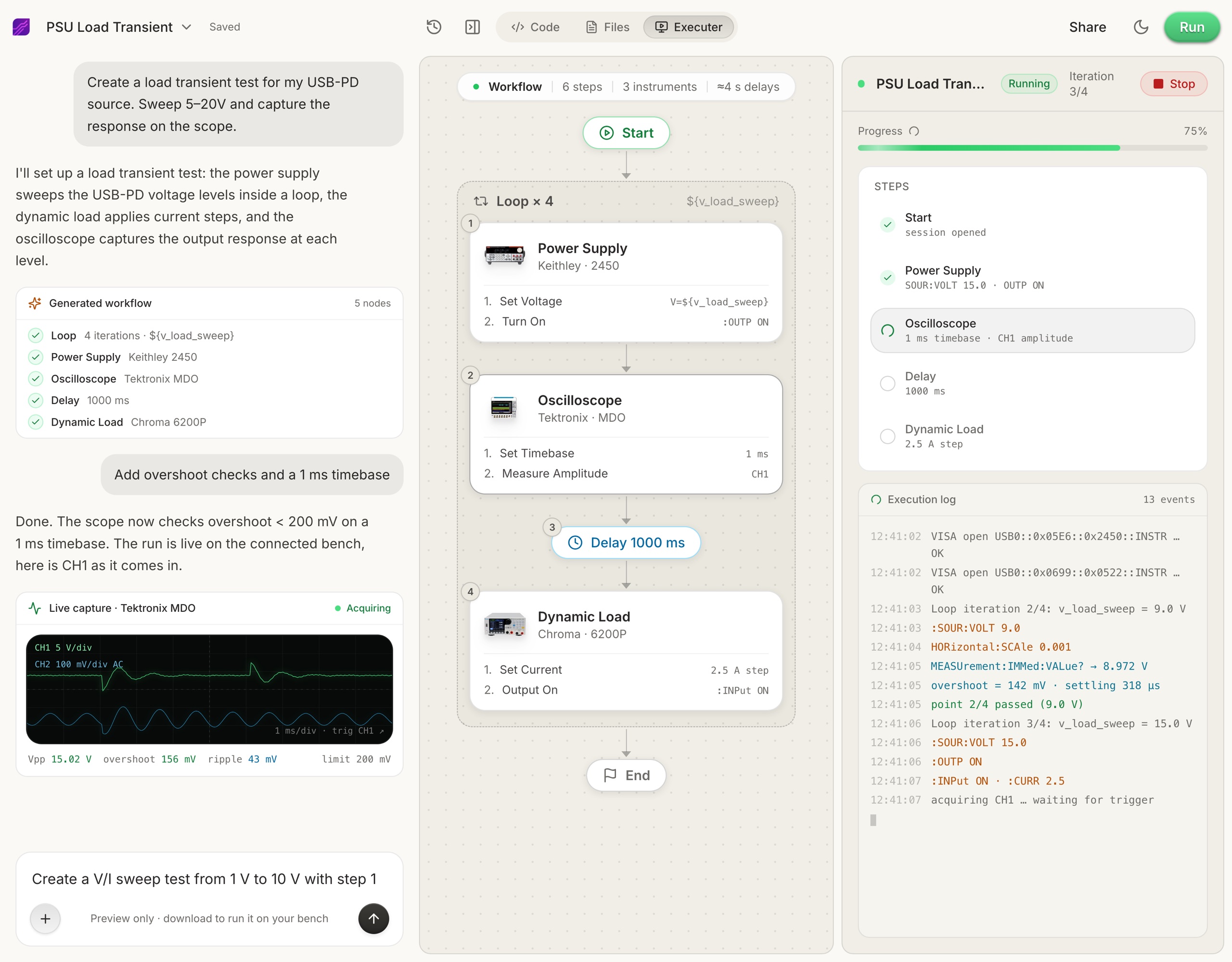
Connect your instruments. Pick the manufacturer and model, paste the VISA address (USB, LAN, GPIB, or serial), and the agent knows what is on your bench. No bench yet? Use a placeholder address, build the full automation, and swap in the real address when you are in the lab.
- 2
Tell the agent what to test. For example, "run a VI sweep from 1 to 10 V in 1 V steps at 0.5 A load current," or "suggest the tests for a power-management device."
- 3
The agent builds the complete workflow in seconds. Instrument-aware automation appears on the canvas, with the generated scripts visible in a code panel you can inspect and edit.
- 4
Run it in your lab. Click Run in the TestFlow desktop app for Windows and the status panel streams results step by step, with measured values inline (VOUT = 3.301 V, asserted 3.2 to 3.4 V, PASS). One click exports a structured PDF report, or the raw results as CSV.
- Vendor-neutral by design. One workflow drives Keysight, Tektronix, Rohde & Schwarz, Rigol, Keithley, Anritsu, and any other SCPI instrument over standard VISA.
- Built in the browser, run on the bench. Workflows live in your workspace, so a sequence built in one lab runs the same way in another. Bench runs use the Windows desktop app.
- Free version to start. Sign in at app.testflowinc.com and build your first workflow today; teams can book a demo to scope a Bench Pilot.
The step-by-step walkthrough, VISA address formats, and Test Planner prompts are all in the TestFlow product guide.
Frequently asked questions
What is a TestStand .seq file?
It is the file NI TestStand saves sequences in. It holds one or more sequences, each with Setup, Main, and Cleanup step groups, parameters, and locals, plus sequence file globals and the type definitions its steps use. TestStand saves it in binary, XML, or, for older files, INI format.
How do I open a .seq file without TestStand?
If the file is saved in XML format, any XML parser or text editor can read it, and the sequences, steps, and code module paths are plain elements. A binary .seq needs TestStand software to read. NI states that its File Diff and Merge Utility does not need a license for build or analysis purposes, and without a license you can diff but not save sequence files.
How can I tell if a .seq file is binary or XML?
Open the first bytes. An XML sequence file starts with an XML declaration followed by a teststandfileheader element that names the TestStand version that saved it. A binary file does not start with an XML declaration and is mostly compressed data after a short header.
How do I convert a TestStand sequence file to XML?
Use NI's Sequence File Converter, either from Tools, Update Sequence Files in the Sequence Editor or from the command line with SequenceFileConverter.exe and the -Format:XML option. You can also change one file's format in the Sequence File Properties dialog box.
Can I save a sequence file for an older TestStand version?
Yes. Select File, Save As and pick the TestStand version in the Files of Type control. NI supports saving as TestStand 4.0 or later, and warns that TestStand does not check whether the older version can load or run the result.
Can TestFlow import TestStand sequence files?
Yes. TestFlow imports TestStand sequences and preserves the sequences and the calls between them. It does not run LabVIEW VIs, so code modules written in LabVIEW are not executed after import.
Automate every instrument in the lab,
Create test workflows in minutes
- 01Describe the testIn a sentence, the way you would tell a colleague.
- 02The agent builds itWorkflow and script for your instruments, any vendor.
- 03Run it, get the reportOn your bench, with the measured values.
Tags

Article by
Ali Kamaly
Ali Kamaly is the Co-Founder and CEO of TestFlow, an AI-native platform for electronics test automation. He writes about test automation, lab validation, and the infrastructure behind modern hardware engineering.
- What Is LabWindows/CVI? The C Environment for Test and MeasurementLabWindows/CVI explained: NI's ANSI C environment for test and measurement, how it differs from LabVIEW, what it costs, and modern alternatives.
- NI TestStand Alternatives 2026: Free, Open-Source & AI OptionsThe best NI TestStand alternatives in 2026: OpenTAP, pytest, Robot Framework, and AI-native TestFlow. Plus what TestStand does, how it works with LabVIEW, and what it costs.
- NI TestStand Pricing 2026: License Cost per Seat ($2,428/yr)Every NI TestStand license type with its US list price on ni.com as of November 2026, the subscription versus perpetual break-even, and a worked five-year cost for a six-station test fleet.
- LabWindows/CVI Alternatives in 2026 (Free & Modern C Options)LabWindows/CVI is in maintenance mode with a four-figure seat price. Here are the realistic replacements for ANSI C test applications, and how to migrate without rewriting a decade of code at once.
- Best Electronic Test Automation Software 2026 (8 Tools Compared)Eight tools for automating an electronics lab, what each is genuinely good at, what it costs, and a decision path that starts from your bench rather than from a feature list.
Your next test, automated today
Describe the test. TestFlow builds the workflow, runs it on your instruments, and writes the report. See it on a bench like yours.