LabVIEW vs C# for Test Automation in 2026 (VISA.NET, IVI.NET, WPF)
LabVIEW gets a test station running fastest on NI hardware. C# and .NET give you text code, standard tooling, and operator UIs any .NET developer can maintain. Instrument access, UI, deployment, hiring, and cost compared, with sources checked in November 2026.
LabVIEW and C# are both proven languages for test automation, and the split is clear: LabVIEW is faster to a working station on NI hardware and for engineers who are not software developers, while C# on .NET gives you text code that diffs and reviews like any other software, a vendor-neutral instrument API through VISA.NET and IVI.NET, and WPF operator interfaces any .NET developer can maintain. On cost, the .NET SDK and WPF are free and open source, and Visual Studio Community is free for non-enterprise teams of up to five, while LabVIEW lists at $605 to $2,805 a year per seat on ni.com, with the Application Builder that produces a stand-alone station executable only in the $2,805 Professional edition.
This comparison is for test engineering leads choosing a language for new test stations, and for teams with a LabVIEW codebase deciding whether new work should start in C#. It covers instrument access, operator UIs, sequencing, deployment, hiring, and five-year cost, using only figures from ni.com, Microsoft, and the IVI Foundation checked in November 2026. The LabVIEW side of this site is collected on the LabVIEW hub.
LabVIEW vs C# at a glance
| LabVIEW | C# on .NET | |
|---|---|---|
| Programming model | Graphical dataflow (G) | Text, object-oriented |
| Instrument I/O | NI-VISA functions, instrument driver VIs | VISA.NET (Ivi.Visa), IVI.NET drivers |
| NI DAQ, FPGA, real-time | Native, through DAQmx and add-on modules | DAQ through NI's .NET support; FPGA and real-time targets stay in LabVIEW |
| Operator UI | Front panels, built in | WPF, open source, Windows only |
| Stand-alone executable | Application Builder, Professional only | Standard dotnet build output |
| Version control | Binary VIs; NI ships compare tools | Plain text, any diff and review tool |
| Unit testing | NI and community tools | xUnit, NUnit, MSTest, and CI runners |
| Sequencing | Build your own, or TestStand | Build your own, TestStand's .NET Adapter, or OpenTAP |
| Development cost | $605, $1,801, or $2,805 a year per seat (ni.com, US list, Nov 2026) | $0 with Community where eligible; Visual Studio Professional $45 per user per month |
| Talent pool | Test engineers trained on LabVIEW | Any .NET developer |
Instrument control: VISA functions vs VISA.NET
Both languages sit on the same VISA layer, so the instrument does not care which one you choose.
LabVIEW ships VISA Open, Write, Read, and Close functions, plus instrument driver VIs that vendors publish for their models. A LabVIEW engineer drops the driver VI and wires the measurement.
C# uses VISA.NET, the IVI Foundation's .NET specification, VPP-4.3.6. Its GlobalResourceManager consults every installed VISA.NET implementation, and Keysight's VISA.NET help notes that opening sessions through it lets a program reference only the Ivi.Visa namespace and stay portable across vendors. NI's NI-VISA .NET library implements the same Ivi.Visa interfaces in the NationalInstruments.Visa namespace, supersedes the older VisaNS API, and NI says VisaNS support will be removed in a future release.
The same 3.3 V rail check used across this site, in C# against Ivi.Visa:
using System;
using Ivi.Visa;

class RailCheck
{
    static void Main()
    {
        using (var dmm = (IMessageBasedSession)GlobalResourceManager.Open(
                   "TCPIP0::192.168.1.50::inst0::INSTR", AccessModes.None, 2000))
        {
            dmm.TimeoutMilliseconds = 10000;
            dmm.FormattedIO.WriteLine("MEAS:VOLT:DC? 10");
            double volts = dmm.FormattedIO.ReadLineDouble();
            bool pass = volts >= 3.20 && volts <= 3.40;
            Console.WriteLine($"{(pass ? "PASS" : "FAIL")} {volts:F4} V");
        }
    }
}
IMessageBasedSession exposes FormattedIO, RawIO, TimeoutMilliseconds, and Dispose, per Keysight's member listing, so the using block closes the session. The VISA.NET shared components that provide Ivi.Visa are not a separate download from the IVI Foundation; its shared components page says they are distributed inside vendor installers, so installing NI-VISA or the Keysight IO Libraries Suite puts them on the PC. The commands themselves are in the SCPI command cheat sheet, and the VISA layer underneath is explained in VISA and SCPI instrument control.
IVI.NET drivers
For instruments where raw SCPI is not enough, IVI.NET drivers give C# a typed API per instrument class. The IVI Foundation lists the IVI.NET Shared Components at version 3.1.1, requiring .NET Framework 2.0 or later, and states that IVI Generation 2026 drivers support .NET 6 and later, through the IVI.NET DriverCore Shared Component 1.1.0, available on NuGet, for Windows 10 64-bit and Windows 11. Check that your instrument's vendor ships a Generation 2026 driver before planning a .NET 8 or later station around it.
Operator interfaces: front panels vs WPF
LabVIEW wins on time to first screen. A front panel is the UI, so a working operator screen exists the moment the VI runs. The cost appears later: complex station UIs in LabVIEW become large VIs that are hard to review.
C# uses WPF, which Microsoft maintains as open source under MIT at dotnet/wpf, described there as a .NET Core UI framework for building Windows desktop applications; its latest release was v10.0.15 on November 10, 2026. WPF separates layout (XAML) from logic, so a station UI can be reviewed, unit tested at the view-model level, and maintained by any .NET developer. It runs on Windows only, which matches most test stations.
NI's middle path is Measurement Studio, which NI describes as an extension of Visual Studio with .NET tools for test and measurement: engineering UI controls, hardware libraries, and more than 500 analysis routines. NI's page lists support for Visual Studio 2015, 2017, and 2019, so confirm compatibility with your Visual Studio version and get a quote before you depend on it. NI's online price display was inconsistent when checked, so no price is given here.
Sequencing, data, and the test executive question
Neither language is a test executive. In both you either write one or buy one.
- •TestStand is language-neutral. Its module adapters include a LabVIEW Adapter for VIs and a .NET Adapter for assemblies written in C# or Visual Basic .NET, so a station can mix both. Prices are in TestStand pricing, and the product is covered on the TestStand hub.
- •OpenTAP is a free, open-source C# sequencer, which makes it a natural fit for a C# team. The trade-offs against the incumbent are in OpenTAP vs TestStand.
- •Your own executive. Some C# teams write a lean sequencer with a results database behind it. It is the most flexible option and the one that quietly becomes a product you maintain.
For results, LabVIEW Professional includes the Database Connectivity and Report Generation toolkits, per NI's edition page. C# has ADO.NET and the full .NET data ecosystem, at no license cost.
Deployment and version control
LabVIEW. Building an executable needs the Application Builder, which NI lists only in Professional. The deployed application needs the LabVIEW Run-Time Engine, whose license NI includes with the development license; the details are in LabVIEW Runtime Engine. VIs are binary files. NI ships code comparison tools in Professional, but a pull request on GitHub cannot show a reviewer what changed inside a VI.
C#. dotnet publish produces the station build with no per-station license from Microsoft. Source is plain text, so every change goes through the same review, CI, and static analysis as the rest of your software. For a regulated product, that review trail is often the deciding factor.
Moving a LabVIEW station to C# one layer at a time
A rewrite is rarely the right first move. NI's edition page lists integration with .NET code in every LabVIEW edition, Base included, so the two languages can share a station while the balance shifts.
- 1
Start with the instrument layer. Write new SCPI instrument classes in C# against
Ivi.Visaand call them from existing VIs. The LabVIEW code keeps running, and every new instrument is text code from day one. - 2
Move the operator UI next. A WPF front end over the same instrument classes lets the software team own the screen technicians see, which is usually the part of a LabVIEW station that changes most often.
- 3
Put a sequencer in the middle. If the station already runs TestStand, the .NET Adapter calls the C# classes next to the remaining VIs. If it does not, OpenTAP is the C# option with no per-station license.
- 4
Leave DAQ, FPGA, and real-time where they are. Those are LabVIEW's strongest ground. NI publishes .NET support for its hardware on its .NET resources page, but FPGA and real-time targets are programmed from LabVIEW.
Each step ships on its own, and the station never stops testing. The wider cluster of station-building guides is on the hardware test automation hub.
Cost: five years, three engineers
All LabVIEW figures are ni.com US list prices as of November 2026. Microsoft figures are from Microsoft's Visual Studio pages as of November 2026. Microsoft's Community license terms allow up to five users in a non-enterprise organization and define an enterprise as more than 250 PCs or more than $1 million in annual revenue.
| Option | Per seat | Three seats, five years |
|---|---|---|
| LabVIEW Base (cannot build executables) | $605 a year | $9,075 |
| LabVIEW Full (cannot build executables) | $1,801 a year | $27,015 |
| LabVIEW Professional | $2,805 a year | $42,075 |
| C# with Visual Studio Community (non-enterprise, up to 5 users) | $0 | $0 |
| C# with Visual Studio Professional, monthly | $45 a month | $8,100 |
Three caveats. NI renews subscriptions at then-current prices, so the LabVIEW rows are a floor. Add-ons such as the FPGA, Real-Time, and Vision modules are separate in every LabVIEW edition. And the C# rows count tools, not people: if your team has to learn C#, the training cost is real. LabVIEW pricing and LabVIEW subscription vs perpetual cover the NI side in full.
When to choose LabVIEW and when to choose C#
| Situation | Choose |
|---|---|
| NI DAQ, CompactRIO, FPGA, or real-time loops | LabVIEW |
| Test engineers who are not software developers | LabVIEW |
| Existing LabVIEW library that is qualified and working | LabVIEW, and add C# at the edges |
| SCPI instruments from several vendors, no NI hardware | C# |
| Operator UI that must be maintained by an IT or software team | C# with WPF |
| Code review, CI, and static analysis required by your quality system | C# |
| Mixed team on one station | Both, under TestStand's LabVIEW and .NET adapters |
If neither fits, Python is the third option, covered in LabVIEW vs Python, and MATLAB the fourth, in MATLAB vs LabVIEW. Teams leaving LabWindows/CVI face the same choice from the C side, covered in LabWindows/CVI alternatives, and the full field is in LabVIEW alternatives.
Where TestFlow fits for LabVIEW and C# teams
Both languages leave the same job to an engineer: writing every instrument call, limit, and report line by hand. TestFlow is an AI agent for electronics testing: you describe the test, the agent builds the automation, drives the instruments over VISA and SCPI from any vendor, and writes the report from the measured results.
- •It uses the same VISA layer. The Windows desktop app talks to instruments through the VISA library already on the station, the same one your C# or LabVIEW code uses. The catalog is on the supported instruments page.
- •It imports TestStand sequences with the sequences and calls preserved, so an existing TestStand station built on LabVIEW or .NET modules is a starting point.
- •It exports Python, as a standalone package, for teams that want the generated code in their own repository.
The limits, plainly: TestFlow is not a full test executive, with no operator and user management and no database connectivity. It does not run LabVIEW VIs or C# assemblies. DAQ coverage is narrow: the NI USB-6001, USB-6501, and PCI-6515 through NI-DAQmx, so DAQ-heavy and FPGA work stays in LabVIEW. The LabVIEW boundary is drawn in TestFlow vs LabVIEW, and there is a free version to start on the pricing page.
Related reading
- •NI-VISA alternatives, the VISA libraries under both languages
- •Keysight IO Libraries, the most common VISA.NET provider besides NI
- •Learn LabVIEW, if you are staying on LabVIEW
- •Compare test automation tools, every head-to-head on this site
Where TestFlow fits
TestFlow sits above the language choice in this article. It builds and runs the bench test on SCPI instruments, so the LabVIEW or C# team spends its time on the station code that only it can write.
- 1
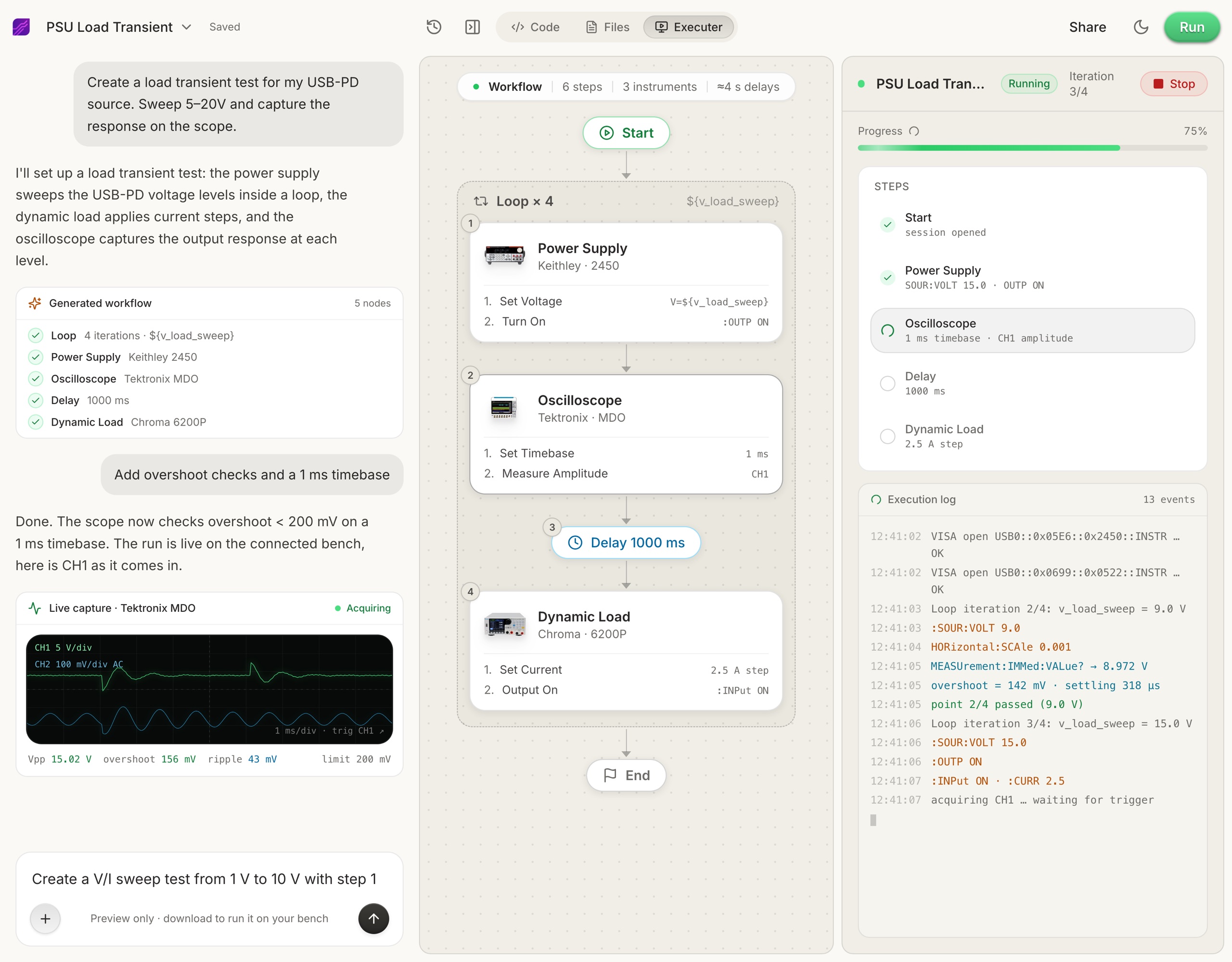
Connect your instruments. Pick the manufacturer and model, paste the VISA address (USB, LAN, GPIB, or serial), and the agent knows what is on your bench. No bench yet? Use a placeholder address, build the full automation, and swap in the real address when you are in the lab.
- 2
Tell the agent what to test. For example, "run a VI sweep from 1 to 10 V in 1 V steps at 0.5 A load current," or "suggest the tests for a power-management device."
- 3
The agent builds the complete workflow in seconds. Instrument-aware automation appears on the canvas, with the generated scripts visible in a code panel you can inspect and edit.
- 4
Run it in your lab. Click Run in the TestFlow desktop app for Windows and the status panel streams results step by step, with measured values inline (VOUT = 3.301 V, asserted 3.2 to 3.4 V, PASS). One click exports a structured PDF report, or the raw results as CSV.
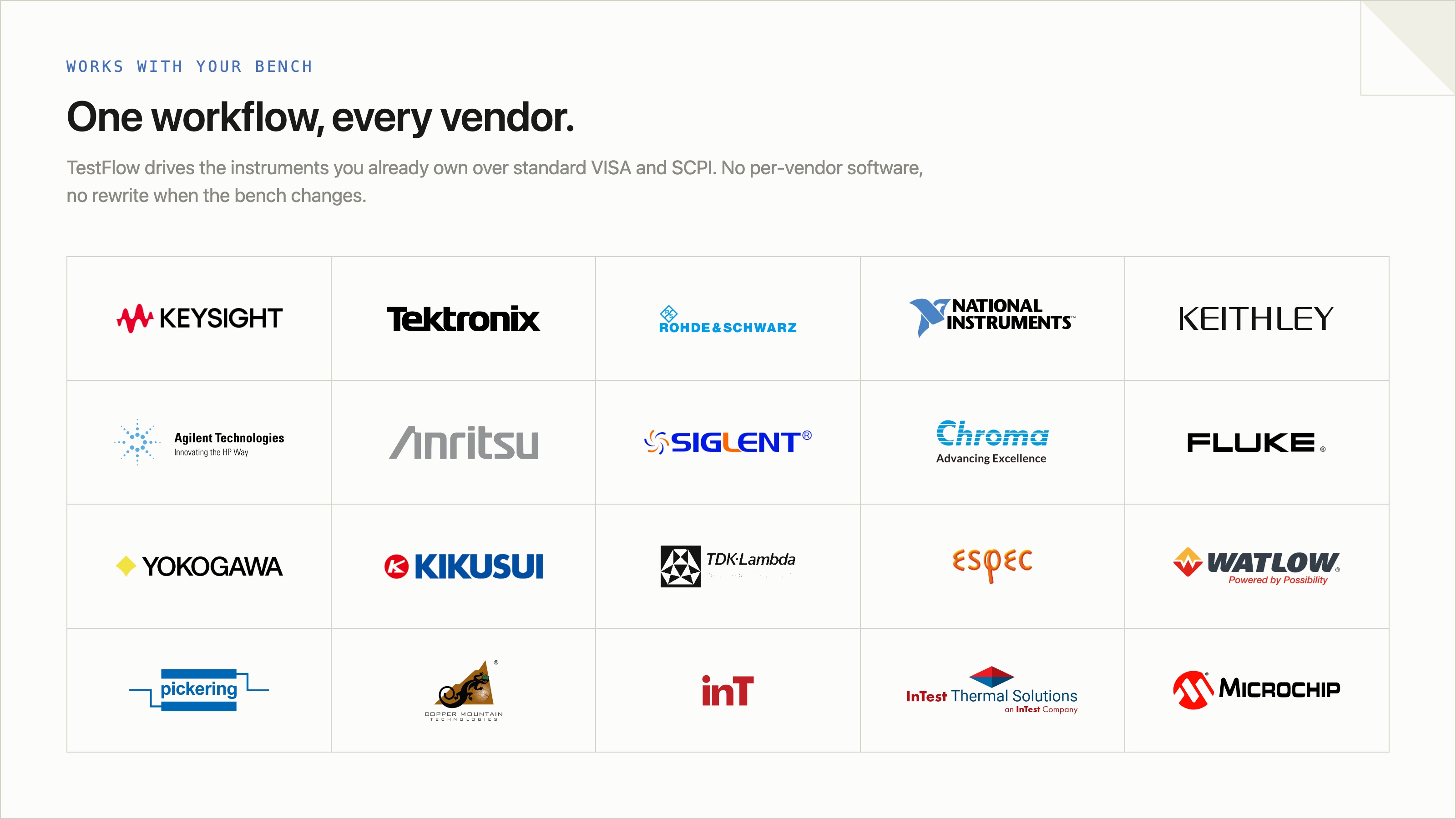
- Vendor-neutral by design. One workflow drives Keysight, Tektronix, Rohde & Schwarz, Rigol, Keithley, Anritsu, and any other SCPI instrument over standard VISA.
- Built in the browser, run on the bench. Workflows live in your workspace, so a sequence built in one lab runs the same way in another. Bench runs use the Windows desktop app.
- Free version to start. Sign in at app.testflowinc.com and build your first workflow today; teams can book a demo to scope a Bench Pilot.
The step-by-step walkthrough, VISA address formats, and Test Planner prompts are all in the TestFlow product guide.
Frequently asked questions
Is C# a good replacement for LabVIEW in test automation?
For SCPI instrument control, sequencing, and operator UIs, yes. VISA.NET gives C# a vendor-neutral instrument API, IVI.NET drivers cover many instruments, and WPF builds Windows operator interfaces. LabVIEW stays stronger for NI DAQ, FPGA, and real-time targets, and for teams whose engineers are not software developers.
What is VISA.NET?
VISA.NET is the IVI Foundation's VISA implementation specification for .NET, VPP-4.3.6. It defines the Ivi.Visa interfaces, such as IMessageBasedSession, and a GlobalResourceManager that consults every installed VISA.NET implementation, so code that references only Ivi.Visa can run on NI, Keysight, or another vendor's VISA. NI's NationalInstruments.Visa library implements those interfaces.
How much does C# test automation cost compared with LabVIEW?
The .NET SDK and WPF are free and open source. Visual Studio Community is free for individuals and for non-enterprise organizations with up to five users; enterprises, defined by Microsoft as over 250 PCs or over $1 million in annual revenue, need a paid edition such as Visual Studio Professional at $45 per user per month. LabVIEW lists at $605 to $2,805 a year per seat on ni.com, US list, November 2026.
Which LabVIEW edition do I need to build a stand-alone test application?
LabVIEW Professional. NI's edition page lists the Application Builder for royalty-free stand-alone applications only in Professional, at $2,805 a year US list as of November 2026. Base and Full can develop and run VIs but cannot build the executable an operator station runs.
Can LabVIEW and C# work together?
Yes. NI lists integration with .NET code in every LabVIEW edition, so a VI can call a C# assembly. TestStand's .NET Adapter calls C# assemblies as code modules next to LabVIEW VIs, which is the most common way mixed teams share one station.
Where does TestFlow fit for a LabVIEW or C# team?
TestFlow builds and runs bench tests on SCPI instruments from a description, writes reports from measured results, imports TestStand sequences, and exports Python. It is not a full test executive, with no operator and user management or database connectivity, and it covers only three NI DAQ devices, so it complements the station code rather than replacing it.
Automate every instrument in the lab,
Create test workflows in minutes
- 01Describe the testIn a sentence, the way you would tell a colleague.
- 02The agent builds itWorkflow and script for your instruments, any vendor.
- 03Run it, get the reportOn your bench, with the measured values.
Tags

Article by
Ali Kamaly
Ali Kamaly is the Co-Founder and CEO of TestFlow, an AI-native platform for electronics test automation. He writes about test automation, lab validation, and the infrastructure behind modern hardware engineering.
Keep reading
All 19 articles in the LabVIEW guide- LabVIEW vs Python for Test Automation in 2026 (When to Use Each)LabVIEW vs Python for test automation and DAQ: cost, instrument control, maintainability, and when to use each. Plus an AI-native third option.
- Call LabVIEW from Python in 2026 (VIs, DLLs, and the TestStand API)Five documented ways to drive LabVIEW VIs and TestStand sequences from a Python script, what each needs installed and licensed, working code for the common ones, and the reverse direction through the Python Node and the
- LabVIEW Runtime Engine in 2026 (Version Rules, Royalty-Free Deploy)What the LabVIEW Runtime is, the exact version and bitness rules from NI's documentation, a symptom-by-symptom fix list for built applications that will not start, and what you need to deploy LabVIEW code to a station wi
- LabVIEW Subscription vs Perpetual License 2026 (3.5-Year Break-Even)The licence decision, not the price list. Break-even by edition from ni.com prices, what stops working and what keeps working when a subscription or software service lapses, how to tell which licence you are on, and the
- 8 Best LabVIEW Alternatives in 2026 (Free, Open Source, and AI-Native)Compare the 8 best LabVIEW alternatives in 2026: Python, MATLAB, OpenTAP, TestStand, BenchVue, and AI-native TestFlow. Costs, lock-in, learning curve, and a migration checklist.
Your next test, automated today
Describe the test. TestFlow builds the workflow, runs it on your instruments, and writes the report. See it on a bench like yours.