NI MAX Alternatives in 2026 (Find, Test & Alias Any Instrument)
How to find, test, and alias bench instruments without NI Measurement & Automation Explorer, which tool replaces each MAX job, where NI MAX actually comes from in 2026, and the NI hardware tasks that still need it.
The practical NI MAX alternatives for VISA instruments are Keysight Connection Expert (in the free Keysight IO Libraries Suite), PyVISA's `list_resources()` and `pyvisa-shell`, the R&S VISA Tester, and NI-VISA's own VISA Interactive Control, which runs without opening MAX. Each one finds instruments on the bus, sends *IDN?, and confirms a connection. Connection Expert also manages VISA aliases. What none of them replace is NI MAX's NI hardware work: NI-DAQmx tasks, simulated devices, and self-tests stay in MAX.
This guide is for engineers who searched for an NI MAX download, or who are trying to get a bench of Keysight, Tektronix, or Rohde & Schwarz instruments talking without installing the NI driver stack. It maps each MAX job to a replacement, explains where NI MAX comes from in 2026, and shows how to keep aliases working. Every fact was checked on the vendor's own documentation in November 2026. The layer underneath all of this is explained in VISA and SCPI instrument control.
How to get NI MAX in 2026 (and why there is no standalone download)
NI's own answer to "ni max download" is that there isn't one. Its What Is NI MAX page says MAX cannot be downloaded by itself but is included, and installed automatically, with all NI drivers, naming NI-VISA, NI-DAQmx, and NI System Configuration.
The lightest route is NI System Configuration. As of November 2026 its download page lists version 2026 Q4, and the bundle includes Measurement & Automation Explorer, the Hardware Configuration Utility, I/O Trace, and Device Monitor. If you only need VISA instruments, installing NI-VISA 2026 Q4 also gets you MAX.
Two cautions before you install:
- •Security. NI's driver pages carry a notice that customers on NI driver software 2026 Q2 or earlier should follow ni.com/ni-pal-update, which covers a local privilege escalation in NI-PAL 26.3.1 and earlier on Windows. That page names NI MAX and NI Hardware Manager as the tools to confirm a device still works after the update.
- •Licensing. NI lists NI-VISA under products whose deployment license is the same as development, included with NI software or hardware (deployment and debug licenses). On a PC with neither, the NI-VISA alternatives guide covers the options.
What NI MAX does, and the alternative for each job
NI's page lists what MAX is for: configure NI hardware and software, create and edit channels, tasks, interfaces, scales, and virtual instruments, create simulated NI-DAQmx devices, run diagnostics and test panels, export and import the system configuration, and view connected devices and installed software. For VISA instruments, the jobs and their replacements look like this.
| NI MAX job | Keysight IO Libraries Suite | PyVISA | R&S VISA | NI without MAX |
|---|---|---|---|---|
| List instruments on the bus | Connection Expert | list_resources() | Find Resource in RsVisaTester | VISA Interactive Control |
Send *IDN? and other commands | Interactive IO | pyvisa-shell or query() | RsVisaTester | VISAIC test panel |
| Create and edit VISA aliases | Alias Manager | Read only, via resource_info() | Not covered | VISA Options in MAX |
| Trace I/O calls | IO Monitor | pyvisa-info for setup only | RsVisaTraceTool | NI I/O Trace |
| NI-DAQmx tasks, simulated devices | No | No | No | MAX |
| Cost | No extra charge | Open source | Royalty-free terms | Comes with NI drivers |
Alternative 1: Keysight Connection Expert
Connection Expert is the closest like-for-like replacement for MAX's Devices and Interfaces view. Keysight's IO Libraries Suite overview says it displays the status of your instruments, chassis, and interfaces, lets you change properties such as addresses, timeouts, and baud rates, and tests and troubleshoots connections. The suite is available at no extra charge, and the download page lists 2026 Update 1 (build 21.4.204, September 14, 2026).
Three details matter in practice:
- 1
Discovery has limits. Keysight's overview says the Instrument Discovery Service finds instruments and lists them in Connection Expert, while serial and LAN instruments must be added manually.
- 2
Aliases live in Connection Expert. Keysight's programming guide calls VISA aliases symbolic names that hide addressing from your program, created in the Connection Settings area of Instrument View in Connection Expert Classic and managed on Windows under Settings, Tools, Alias Manager.
- 3
Interactive IO is the test panel. It sends single commands and shows the responses, but the same guide notes it does not work with PXI modular instruments.
New-generation Connection Expert, Interactive IO, and IO Monitor are now the defaults, with Classic versions still shipped, so menu paths depend on which one you open.
Alternative 2: PyVISA from the command line or a script
If the bench is driven from Python anyway, PyVISA replaces MAX's instrument list in three lines. The PyVISA communication guide shows the pattern: create a ResourceManager, call list_resources(), open a resource, query *IDN?.
The ResourceManager reference adds two details. The default query for list_resources() is ?*::INSTR, written in VISA's resource expression syntax, not Python regex, and on some platforms an instrument that is already open is not returned. list_resources_info() returns a ResourceInfo per resource, including an alias field.
This script is a working stand-in for MAX's "Scan for Instruments" plus a test panel. It lists every resource, asks each one for its identity, and prints the alias if the VISA library has one:
# scan_bench.py: list every VISA instrument, its alias, and its *IDN? reply
import pyvisa

rm = pyvisa.ResourceManager()            # IVI VISA if installed, else pyvisa-py
for name, info in rm.list_resources_info("?*::INSTR").items():
    alias = info.alias or "-"
    try:
        inst = rm.open_resource(name)
        inst.timeout = 2000
        idn = inst.query("*IDN?").strip()
        inst.close()
    except Exception as exc:              # timeouts, busy ports, serial lines
        idn = f"no reply ({type(exc).__name__})"
    print(f"{name:45} {alias:15} {idn}")
For interactive work, run pyvisa-shell. The PyVISA shell guide lists its commands: list, open, query, write, read, attr, termchar, timeout, close, and exit. Start it with pyvisa-shell -b py to use pyvisa-py when no VISA library is installed, and run pyvisa-info to see which backends PyVISA found. The PyVISA tutorial builds from here to a full measurement.
Alternative 3: R&S VISA Tester and Trace Tool
R&S VISA installs two utilities that cover MAX's test panel and NI I/O Trace. Rohde & Schwarz's VISA and VISA tools guide describes RsVisaTester as a ready-to-use tool to connect, send SCPI commands, and read responses: enter a resource string, click Connect, then send *IDN? with Query. If you do not know the resource string, its Find Resource menu searches for it, and R&S VISA can find network instruments through mDNS and VXI-11.
RsVisaTraceTool logs every command sent and every response received, with timestamps and errors, and the log can go straight to Rohde & Schwarz support. The installer is about 35 MB, and the R&S VISA page lists builds for Windows (7.2.6), macOS, and Linux.
Alternative 4: NI's own tools without opening MAX
Two NI utilities do part of MAX's job on their own.
- •VISA Interactive Control (VISAIC). NI's NI-VISA Utilities page says VISAIC ships with NI-VISA on Windows and Linux (as NIvisaic), finds every available resource at launch, and opens a session with Configuration and Input/Output tabs when you double-click one. On Windows it is under Start, National Instruments, VISA.
- •Hardware Configuration Utility. It ships in the System Configuration bundle alongside MAX, and NI's NI-PAL update page names NI Hardware Manager next to MAX as a place to confirm a device after a driver update. Check NI's documentation for which hardware it covers before you plan around it.
Keeping VISA aliases working without MAX
Aliases are the MAX feature teams miss most, because test code written against "PSU_MAIN" breaks when the alias disappears. Where they live depends on the VISA library:
- •NI-VISA: NI's knowledge base article Where Are NI-VISA Aliases Stored? gives
C:\ProgramData\National Instruments\NIvisa\visaconf.inion Windows Vista and later, a hidden folder by default, edited in MAX under Tools, NI-VISA, VISA Options, Aliases. - •Keysight VISA: Alias Manager in Connection Expert, as above.
- •pyvisa-py: its documentation describes no alias store, so keep the mapping in your own configuration.
The approach that survives any library change is to own the mapping in source control and resolve it in code:
# bench.py: aliases in version control, not in one PC's VISA config
BENCH = {
    "PSU_MAIN": "USB0::0x2A8D::0x1102::MY12345678::INSTR",
    "DMM":      "TCPIP0::192.168.1.50::inst0::INSTR",
}

def resource(alias: str) -> str:
    return BENCH[alias]
Resource strings are per machine. A USB serial number or a DHCP lease changes between benches, so keep one file per station. The GPIB vs USB vs LAN guide covers which address formats are stable.
When you still need NI MAX
Keep MAX on any PC with NI hardware. NI documents MAX as the tool for NI-DAQmx tasks, channels, and scales, simulated NI-DAQmx devices, self-tests and test panels, and configuration export and import. LabVIEW and TestStand stations on PXI or CompactDAQ fall in this group, see the LabVIEW hub and TestStand hub. A bench of SCPI supplies, meters, and scopes over USB and LAN does not.
A checklist for moving a bench off NI MAX
Work through these in order and the switch takes an afternoon, not a week.
- 1
Export what MAX knows. Copy
visaconf.iniand note every alias and its resource string before you uninstall anything. - 2
Pick one VISA library per station. Keysight VISA, R&S VISA, or pyvisa-py, see the NI-VISA alternatives comparison. Two is fine on 64-bit, but one is simpler to support.
- 3
Move aliases into source control. One mapping file per station, reviewed like code.
- 4
Run the scan script on every station. Save the output. It is the record of what each bench had on the day you switched.
- 5
Pin PyVISA's backend. Pass the library explicitly, or set
PYVISA_LIBRARY, so the next installer cannot change which VISA your tests use. - 6
Keep MAX where NI hardware lives. NI-DAQmx and PXI stations are not part of this migration.
Where TestFlow fits
TestFlow covers the VISA half of MAX and then keeps going. In the Windows desktop app, Scan on an instrument's address field enumerates the VISA resources present and, where an instrument answers an identification query, shows what it is. Auto-detect matches that reply against the catalog so the manufacturer and model arrive filled in. The VISA addressing guide documents this, and it uses whichever vendor VISA is installed.
From there you describe the test, the agent builds the workflow with the right SCPI for each instrument, runs it, and writes the report from the measured results only. It is vendor-neutral across Keysight, Tektronix, Rohde & Schwarz, and others, listed on supported instruments. It does not replace MAX for NI hardware: DAQ coverage is limited to a few NI devices through NI-DAQmx. Teams on TestStand can import TestStand sequences, see TestFlow vs TestStand. There is a free version, and the desktop app runs on Windows.
Related reading
- •NI-VISA alternatives, Keysight VISA, R&S VISA, TekVISA, and pyvisa-py
- •PyVISA tutorial, from
list_resources()to a logged measurement - •Python instrument control libraries compared, PyVISA and its wrappers
- •Keysight Command Expert alternatives, SCPI tools on the Keysight side
- •SCPI command cheat sheet, the commands you send once the instrument answers
- •Free instrument control software, the zero-license bench
- •LabVIEW alternatives, when MAX is a symptom of a bigger NI question
- •NI TestStand alternatives, the sequencer layer above the instruments
- •TestFlow vs Python and PyVISA, the same test written both ways
Where TestFlow fits
NI MAX and its alternatives stop at "the instrument answered". TestFlow picks up from there, with the same VISA resources, and turns a description of the test into a run you can review.
- 1
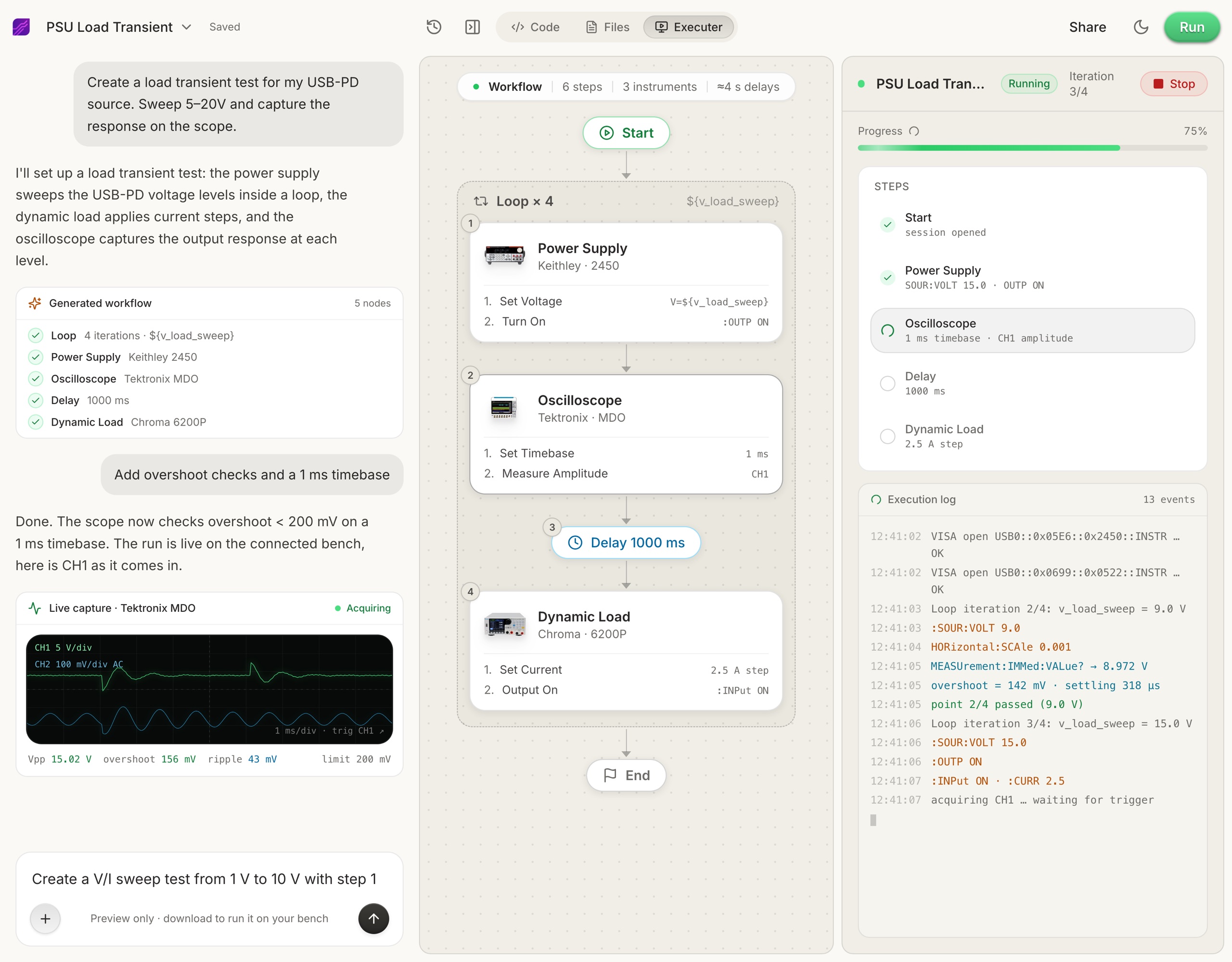
Connect your instruments. Pick the manufacturer and model, paste the VISA address (USB, LAN, GPIB, or serial), and the agent knows what is on your bench. No bench yet? Use a placeholder address, build the full automation, and swap in the real address when you are in the lab.
- 2
Tell the agent what to test. For example, "run a VI sweep from 1 to 10 V in 1 V steps at 0.5 A load current," or "suggest the tests for a power-management device."
- 3
The agent builds the complete workflow in seconds. Instrument-aware automation appears on the canvas, with the generated scripts visible in a code panel you can inspect and edit.
- 4
Run it in your lab. Click Run in the TestFlow desktop app for Windows and the status panel streams results step by step, with measured values inline (VOUT = 3.301 V, asserted 3.2 to 3.4 V, PASS). One click exports a structured PDF report, or the raw results as CSV.
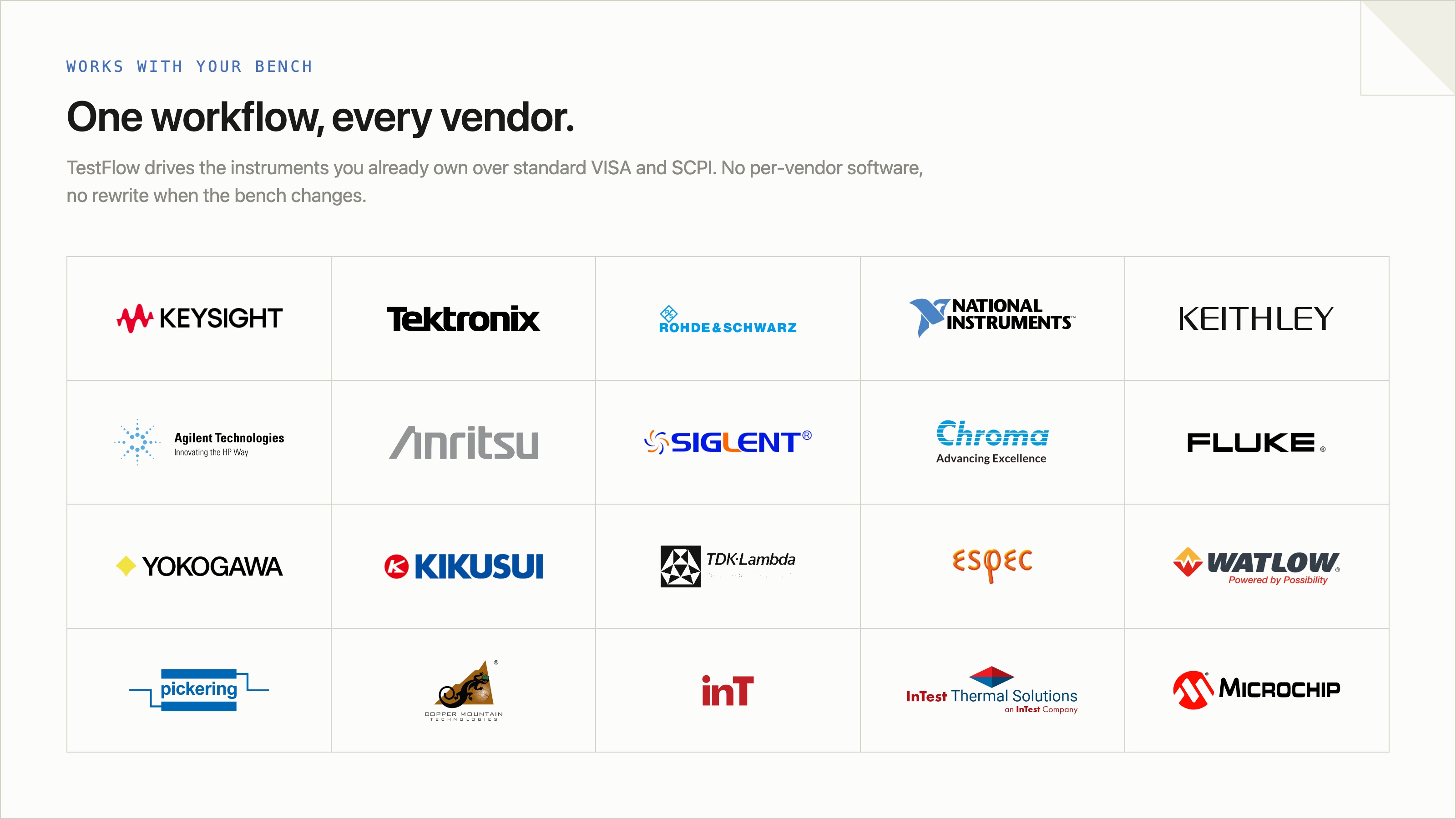
- Vendor-neutral by design. One workflow drives Keysight, Tektronix, Rohde & Schwarz, Rigol, Keithley, Anritsu, and any other SCPI instrument over standard VISA.
- Built in the browser, run on the bench. Workflows live in your workspace, so a sequence built in one lab runs the same way in another. Bench runs use the Windows desktop app.
- Free version to start. Sign in at app.testflowinc.com and build your first workflow today; teams can book a demo to scope a Bench Pilot.
The step-by-step walkthrough, VISA address formats, and Test Planner prompts are all in the TestFlow product guide.
Frequently asked questions
How do I download NI MAX?
NI states that MAX cannot be downloaded by itself. It is included and installed automatically with NI drivers such as NI-VISA and NI-DAQmx, and with NI System Configuration, whose 2026 Q4 release on ni.com also includes the Hardware Configuration Utility, I/O Trace, and Device Monitor.
What can I use instead of NI MAX for VISA instruments?
Keysight Connection Expert, in the free Keysight IO Libraries Suite, lists instruments, tests connections, and manages VISA aliases. PyVISA's list_resources() and pyvisa-shell do the same from Python. R&S VISA ships RsVisaTester and a trace tool, and NI-VISA's own VISA Interactive Control runs without opening MAX.
Where are NI MAX VISA aliases stored?
In visaconf.ini. NI's knowledge base gives the path as C:\ProgramData\National Instruments\NIvisa\visaconf.ini on Windows Vista and later, a hidden folder by default. In MAX you edit them under Tools, NI-VISA, VISA Options, Aliases.
Can PyVISA read NI MAX aliases?
Yes, through the VISA library underneath. PyVISA's list_resources_info() and resource_info() return a ResourceInfo with an alias field, described as the user-defined alias for the resource string. The aliases themselves come from the VISA library underneath, such as NI-VISA's visaconf.ini or Keysight's Alias Manager.
When do I still need NI MAX?
For NI hardware. NI documents MAX as the place to configure NI hardware and software, create NI-DAQmx tasks, channels, and scales, create simulated NI-DAQmx devices, run self-tests and test panels, and export or import a system configuration. None of the VISA tools above do those jobs.
Does TestFlow replace NI MAX?
Only for the VISA part. The TestFlow desktop app scans the VISA bus, shows what answers an identification query, and can match it against its instrument catalog. It does not configure NI-DAQmx tasks or NI hardware, and its DAQ coverage is limited to a few NI devices through NI-DAQmx.
Automate every instrument in the lab,
Create test workflows in minutes
- 01Describe the testIn a sentence, the way you would tell a colleague.
- 02The agent builds itWorkflow and script for your instruments, any vendor.
- 03Run it, get the reportOn your bench, with the measured values.
Tags

Article by
Ali Kamaly
Ali Kamaly is the Co-Founder and CEO of TestFlow, an AI-native platform for electronics test automation. He writes about test automation, lab validation, and the infrastructure behind modern hardware engineering.
- What Is NI DIAdem? And the Modern Alternatives for Test DataNI DIAdem explained: how it manages, analyzes, and reports on measurement data, what it costs, and AI-native alternatives for test data analysis.
- NI VeriStand: What It Does, What It Costs, and When You Need ItNI VeriStand explained: the real-time test and HIL configuration software, how it works, what it costs, and the alternatives for test automation.
- What Is NI SignalExpress? And What to Use InsteadNI SignalExpress explained: the no-code interactive measurement tool, its legacy status, and the modern alternatives for quick benchtop measurements.
- What Is NI Vision? Machine Vision in the NI EcosystemNI Vision explained: the Vision Development Module and Vision Builder, how machine vision works with LabVIEW, what it costs, and alternatives.
- 8 Best LabVIEW Alternatives in 2026 (Free, Open Source, and AI-Native)Compare the 8 best LabVIEW alternatives in 2026: Python, MATLAB, OpenTAP, TestStand, BenchVue, and AI-native TestFlow. Costs, lock-in, learning curve, and a migration checklist.
Your next test, automated today
Describe the test. TestFlow builds the workflow, runs it on your instruments, and writes the report. See it on a bench like yours.