NI FlexLogger: What It Does, What It Costs, and Alternatives
NI FlexLogger explained: the no-code data logging software, what it does, what it costs, and the best alternatives for sensor data acquisition.
FlexLogger is National Instruments' configuration-based data logging software for NI-DAQmx hardware. The pitch is simple: acquire and record mixed sensor measurements without writing any code. If you searched "ni flexlogger," you are probably weighing it for benchtop or test-cell data logging.
What FlexLogger does
FlexLogger software lets you set up a data acquisition and logging system through configuration instead of programming:
- •Connect NI DAQ hardware and configure channels (voltage, temperature, strain, IEPE, and more).
- •Set scaling, sample rates, and alarms in a UI, no G code required.
- •Log synchronized data to file with metadata.
- •View live dashboards while recording.
It targets engineers who want sensor data fast without building a LabVIEW application. According to NI's FlexLogger page, it also:
- •Logs to CSV or TDMS binary files, with file splitting by size or time.
- •Calculates channels on the fly: RMS, filters, integrals, and custom math expressions.
- •Triggers on alarms and events to start logging or change what is logged.
- •Drives outputs through the Output Sequencer, a step-based controller for analog and digital outputs with conditional branching.
- •Integrates with TestStand, LabVIEW, and Python through APIs that start, stop, and manage a test.
Supported hardware
FlexLogger works with NI-DAQmx hardware: CompactDAQ chassis, USB DAQ devices, PXI DAQ modules, and FieldDAQ devices. Third-party devices need a custom plug-in. The Plug-In Development Kit is free, but building a plug-in requires a LabVIEW license, and deploying plug-ins needs the Professional edition.
FlexLogger editions: Lite vs Professional
| Edition | How you get it | What it covers |
|---|---|---|
| FlexLogger Lite | Free, included with NI DAQ hardware, no time limit | Channel configuration, live screens, logging |
| FlexLogger Professional | Paid NI subscription, also part of the LabVIEW+ Suite | Adds custom plug-ins, math and analysis channels, event triggers for logging and outputs, and a locked operator mode |
If you only need to log sensors on NI hardware, Lite may be enough. Calculated channels, event-driven logging, plug-ins, or operator lockdown mean Professional.
What it costs and its limits
FlexLogger Professional is a paid NI subscription (Lite is free with NI DAQ hardware), and both are designed around NI hardware. It is convenient inside that ecosystem, but it ties your logging setup to NI devices and licensing, and it is focused on acquisition and logging rather than full test automation or analysis.
FlexLogger alternatives
| Option | Approach | Notes |
|---|---|---|
| Python (`nidaqmx`) | Code | Free, flexible; you build the UI and logging. See DAQ with Python |
| DIAdem | Analysis | NI's data analysis and reporting tool, often paired with logging |
| FlexLogger | No-code | Easy inside NI hardware, paid and locked in |
| TestFlow | AI-native | Plans and scripts generated from specs, vendor-agnostic |
For a deeper comparison with pricing and migration notes, see the FlexLogger alternatives guide, or NI software alternatives for the rest of the NI stack.
Where TestFlow fits
FlexLogger removes coding from data logging; TestFlow removes it from the harder part, validation and test planning. Instead of configuring channels for a one-off log, you describe what you need to validate and TestFlow generates the plan and the instrument scripts, then runs them with live step-by-step results and a one-click PDF report. No lock to one hardware vendor: the same workflow drives NI, Keysight, Tektronix, Rigol, and the rest over VISA and SCPI.
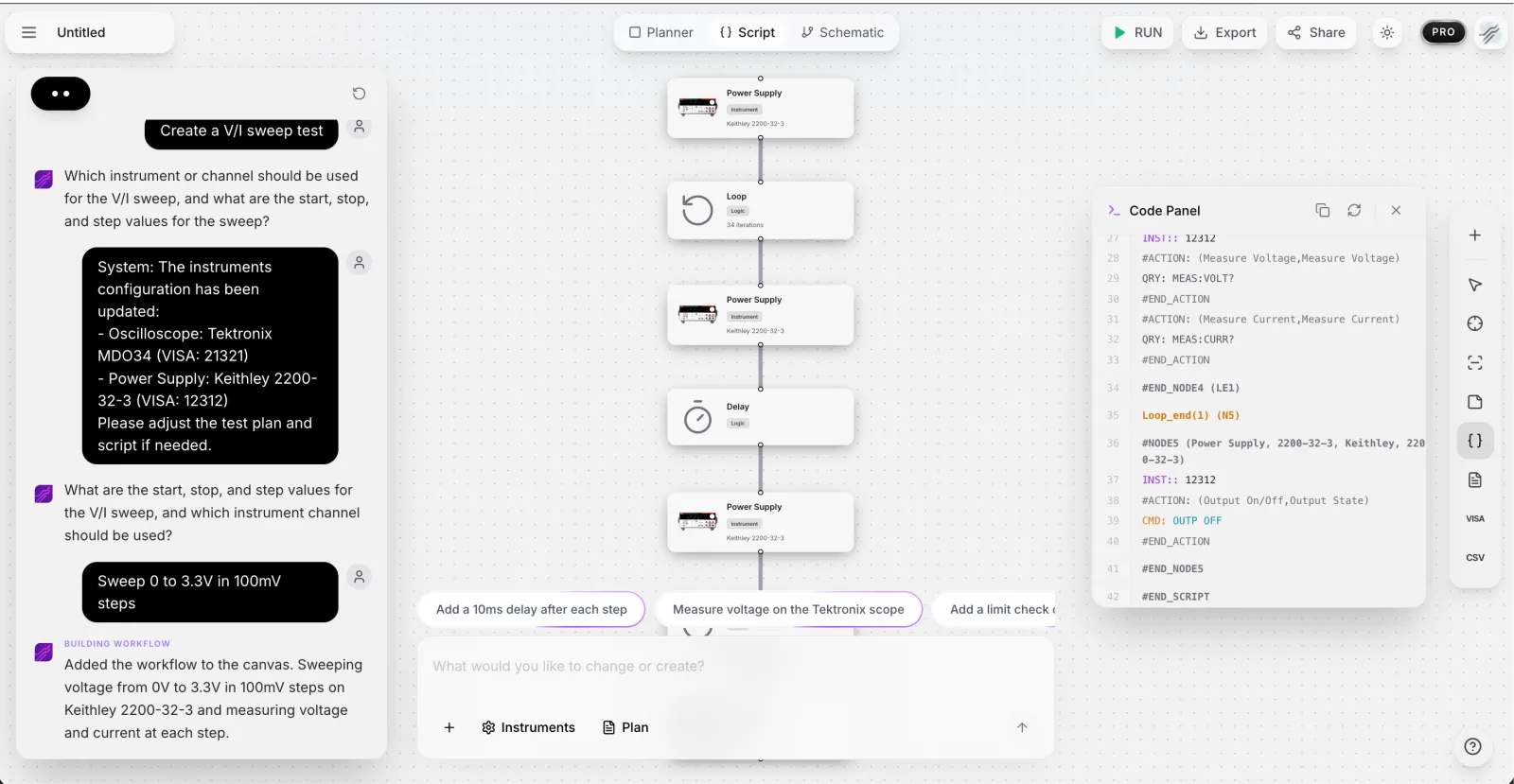
TestFlow is built around bench instruments (supplies, loads, meters, scopes, and switching) rather than plug-in DAQ cards, so its DAQ coverage is narrow: if your job is high-channel-count sensor logging on NI DAQ hardware, FlexLogger or Python with nidaqmx is the better fit. For teams who like FlexLogger's no-code idea but want it across the whole validation workflow, the free version is worth a look. For the broader landscape, see the data logger without LabVIEW guide and the best data acquisition system guide.
Frequently asked questions
What is NI FlexLogger used for? No-code data acquisition and logging of mixed sensor measurements, mainly with NI hardware.
Is FlexLogger free? Partly. FlexLogger Lite is free with NI DAQ hardware, with no time limit. FlexLogger Professional is a paid NI subscription. Free alternatives include Python with nidaqmx.
What is the difference between FlexLogger and LabVIEW? FlexLogger is configuration-based logging with no programming. LabVIEW is a full programming environment for building custom applications.
Does FlexLogger work with non-NI hardware? FlexLogger is designed around NI DAQ hardware. For mixed-vendor benches you need a vendor-neutral layer such as Python with pyVISA or an AI-native platform like TestFlow.
What is the difference between FlexLogger Lite and Professional? Lite covers configuration, live display, and logging on NI-DAQmx hardware. Professional adds custom plug-ins, math and analysis channels, event triggers that control logging and outputs, and a locked operator mode.
What file format does FlexLogger log to? CSV or NI's binary TDMS format, with optional file splitting by size or time. TDMS files open directly in NI DIAdem.
Can FlexLogger be automated from Python or TestStand? Yes. NI lists APIs to start, stop, and manage FlexLogger test execution from TestStand, LabVIEW, and Python.
What hardware does FlexLogger support? NI-DAQmx hardware: CompactDAQ chassis, USB DAQ devices, PXI DAQ modules, and FieldDAQ devices. Third-party devices need a custom plug-in, and building plug-ins requires a LabVIEW license.
Automate every instrument in the lab,
Create test workflows in minutes
- 01Describe the testIn a sentence, the way you would tell a colleague.
- 02The agent builds itWorkflow and script for your instruments, any vendor.
- 03Run it, get the reportOn your bench, with the measured values.
Tags

Article by
Ali Kamaly
Ali Kamaly is the Co-Founder and CEO of TestFlow, an AI-native platform for electronics test automation. He writes about test automation, lab validation, and the infrastructure behind modern hardware engineering.
- NI SignalExpress Alternatives in 2026 (It Is Discontinued)SignalExpress was the no-code way to log data without writing LabVIEW. NI stopped developing it. Here is what fills the gap, what each option costs, and how to move your existing steps.
- NI Software Licensing Costs 2026 (LabVIEW, TestStand, VeriStand)A per-product breakdown of NI software licensing, the deployment licences that multiply quietly, and a worked example of what a four-station test lab actually pays per year.
- NI VeriStand Alternatives in 2026 (Open Source & AI-Native Options)What VeriStand actually does, where its licence cost stops making sense, and the realistic alternatives for real-time test and HIL work in 2026, including what each one gives up.
- NI Vision Alternatives in 2026 (OpenCV & Free Machine Vision Options)NI Vision is a four-figure add-on on top of LabVIEW. Here is what it does, where OpenCV genuinely replaces it, where it does not, and how to move an inspection application safely.
- 8 Best LabVIEW Alternatives in 2026 (Free, Open Source, and AI-Native)Compare the 8 best LabVIEW alternatives in 2026: Python, MATLAB, OpenTAP, TestStand, BenchVue, and AI-native TestFlow. Costs, lock-in, learning curve, and a migration checklist.
Your next test, automated today
Describe the test. TestFlow builds the workflow, runs it on your instruments, and writes the report. See it on a bench like yours.