 Ali Kamaly
Download LabVIEW Free in 2026 (Community, Student & Trial Editions)
How to download LabVIEW in 2026: the free Community Edition, student licenses, the eval trial, and what each can legally be used for.
Yes, you can download LabVIEW free: the Community Edition is free for non-commercial use, students get academic licenses, and commercial teams get a time-limited trial. Which one is right depends on whether your use is personal, academic, or commercial. This guide covers each path and what it is actually licensed for.
All downloads come from NI (now part of Emerson) through the NI website and NI Package Manager. Avoid third-party "free LabVIEW download" sites; they are a security and licensing risk.
Option 1: LabVIEW Community Edition (free)
The LabVIEW Community Edition is the real answer for most people searching for a free version. It is full-featured LabVIEW, free for non-commercial and home use.
- •Cost: Free
- •Use: Personal projects, learning, makers, hobbyists
- •Not allowed: Commercial, production, or business use
- •How to get it: Create a free NI account, search "LabVIEW Community Edition," and install through NI Package Manager.
If you only want to learn LabVIEW or build a home project, this is the labview community edition download you want. It is full-featured for non-commercial use; the restriction is the license, not the features. Before installing, check the LabVIEW system requirements so the install does not stall on an under-spec machine.
Option 2: Student / academic license
If you are a student or your university has a site license, you can get LabVIEW free or heavily discounted.
- •Cost: Free or low cost through your institution
- •Use: Coursework and academic projects
- •How to get it: Check your university's software portal, or NI's academic page for a labview student license.
Option 3: Free trial (evaluation)
For commercial evaluation, NI offers a time-limited free trial of the full software.
- •Cost: Free for the trial period
- •Use: Evaluation before buying a subscription
- •How to get it: Download the labview software download from NI and select the evaluation option.
Option 4: Paid subscription (commercial use)
If your use is commercial, you need a paid Base, Full, or Professional subscription. See LabVIEW pricing for what each tier costs.
Which LabVIEW download is right for you?
| Your situation | Right option |
|---|---|
| Hobby / learning at home | Community Edition (free) |
| Student | Academic license (free/cheap) |
| Evaluating for work | Free trial |
| Commercial use | Paid subscription |
Before you commit: is LabVIEW the right tool?
If you are downloading LabVIEW to start a new commercial project, it is worth comparing it first. Python handles much of the same instrument control for free, and AI-native alternatives generate test plans and scripts without NI hardware lock-in. New to LabVIEW entirely? Start with what LabVIEW is.
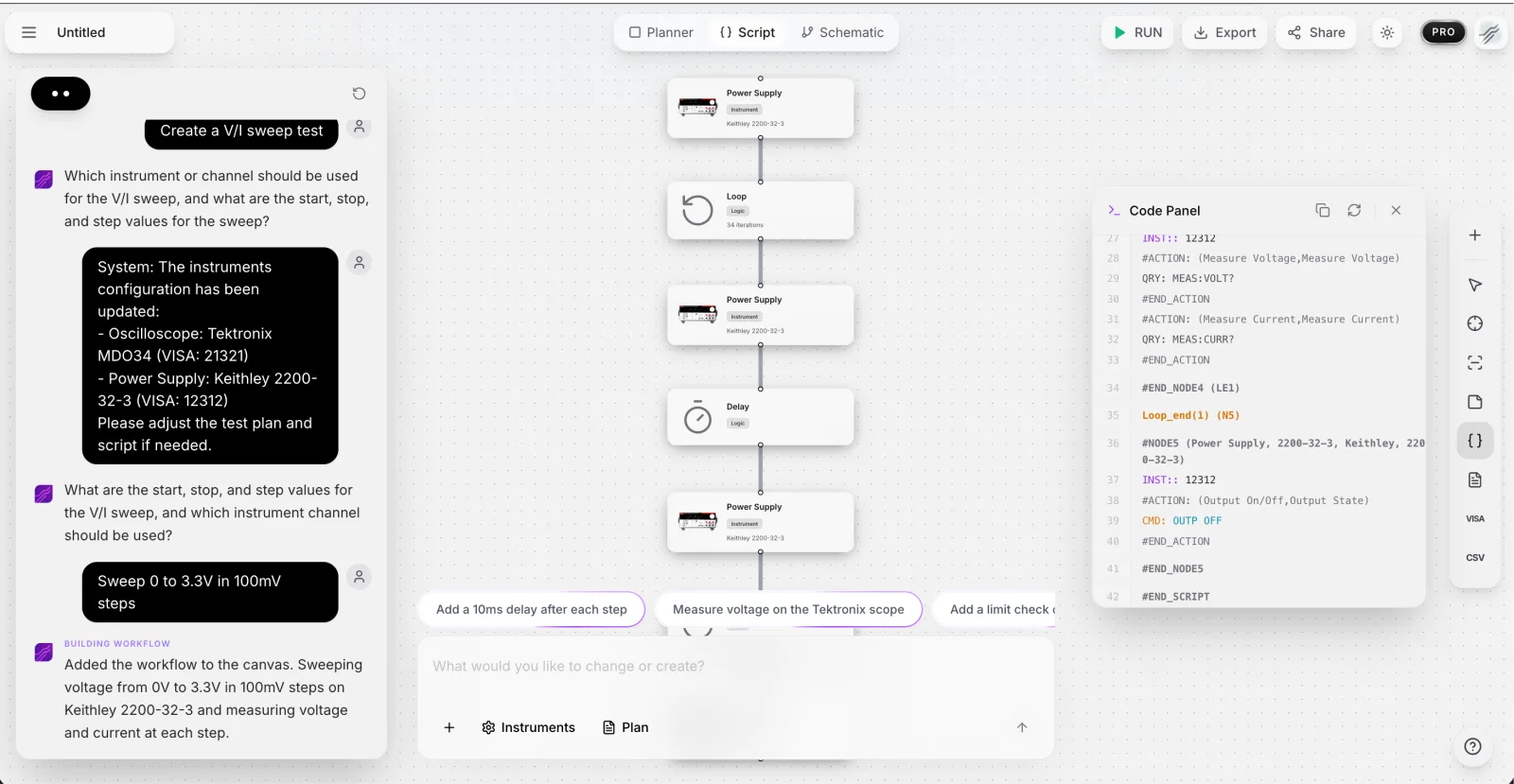
If your goal is automated validation rather than learning G specifically, TestFlow has a free version you can use in the browser today, with no download. You connect your instruments by VISA address, describe the test in plain English, and the agent builds and runs the workflow:
Frequently asked questions
Is there a free version of LabVIEW? Yes, the Community Edition is free for non-commercial use, and students can get academic licenses.
Can I use LabVIEW Community Edition for commercial work? No. It is licensed for non-commercial and home use only. Commercial use requires a paid subscription.
Where do I download LabVIEW safely? Only from NI's official site through NI Package Manager. Avoid third-party download sites.
Is the LabVIEW Community Edition full-featured? Yes, for non-commercial use it is full-featured LabVIEW comparable to the paid editions. The restriction is the license, not the features.
Can I download LabVIEW for Mac or Linux? Official platform support has narrowed over the years and is Windows-first. Cross-platform teams usually use Python or a browser-based tool instead.
Ready to automate your lab?
Connect your instruments, describe a test in plain English, and TestFlow builds and runs it in minutes.
Tags
Put it on your bench this week
A new way for testing, from specs to automated sequences, capture clean data, and accelerate your validation cycle.